How to Release a Manufactured Batch
Finished goods ship before quality has signed the lot
Batch plants often receive finished goods into the same warehouse that sales can pick from. A lot can be allocated to a delivery before the inspection is approved, and the only control is a verbal hold that the picker never sees.
Spreadsheets that list held batches fall out of date as soon as a second completion uses the same batch number or a Toast sale consumes stock without a named lot. The warehouse then argues with quality about which quantity is still blocked.
A separate signature product for the batch sheet duplicates the documents the company already signs for other records. Operators either skip the sheet or maintain two histories that do not match the production entry.
Why this happens
- Completion puts finished goods on hand with no quality status on the lot.
- Sales, delivery notes, and Toast can consume quantity that quality meant to hold.
- Reusing a released batch number mixes a new held receipt into stock that is already saleable.
- The batch sheet is a file outside the work order, so lots, steps, and inspections are not on one page.
Biznsbook addresses this through hold until release, quality inspection, batch record when Manufacturing and Inventory are enabled; Accounting adds WIP and cost postings when your chart and system accounts are configured. Company Settings pre-fill default warehouses on Create forms.
Finance teams lose days each month reconciling versions that should never have diverged. Naming Biznsbook screens as the system of record — and closing periods when agreed — prevents silent edits that auditors flag immediately.
Step-by-step: Release a Manufactured Batch
Built for production planners, shop-floor supervisors, and operations managers running BOM-driven work orders with inventory and optional accounting integration.
- Turn on hold until release. Open Manufacturing Settings, then Company Settings, and enable Hold finished goods until release. Leave it off when the plant does not need a quality gate. The flag is company-wide and off by default.
- Optional: choose a batch-record template. If Document Management is licensed, select an active document template on the same settings screen. The batch record can then request a signature through Documents. Without the module or the template, the signature button stays hidden.
- Set Process/Batch when you run formulas. Process/Batch mode shows quantity or percent of batch on the BOM and links the batch record from the work order. The hold flag alone also shows that link. Job shop mode is stored and does not change this flow.
- Complete the entry with a batch number. Enter the finished batch number before you complete the production entry. Completion without a batch number is refused and no stock moves. The finished lot is created On hold. The finished-goods journal still posts. A subcontracting work order is not stocked from the production entry.
- Do not reuse a released batch number. If that batch number is already released and still has quantity in the target warehouse, completion stops. Use a new batch number. If the same number is already On hold, the new quantity is added to that held lot.
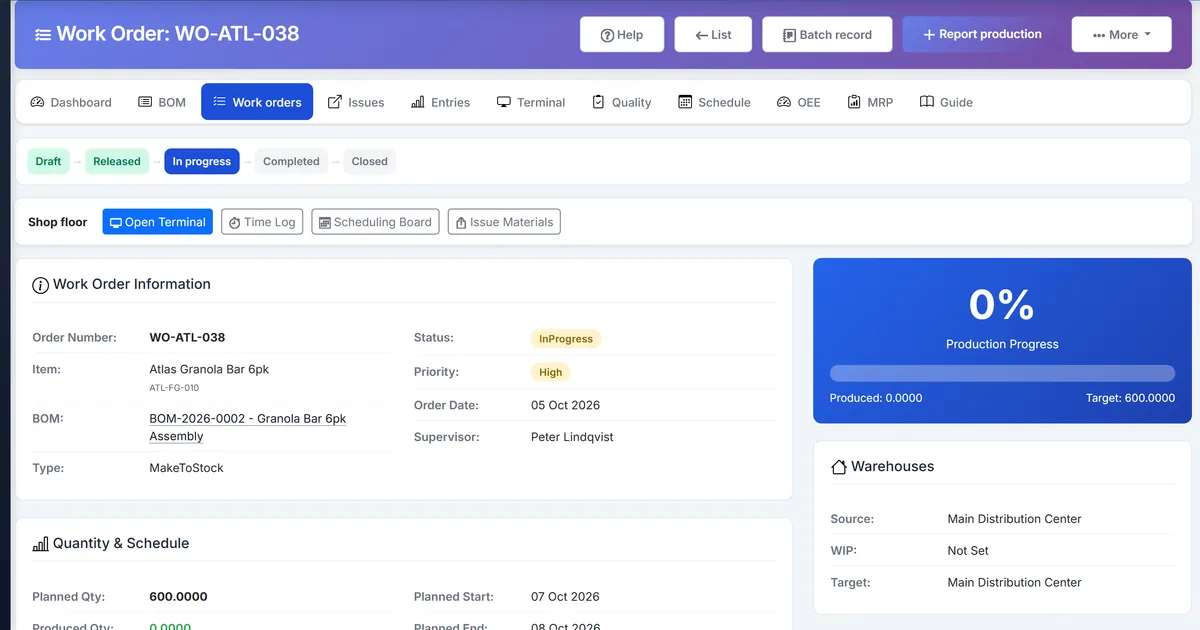
- Open the batch record from the work order. Work Order Details links to the batch record when mode is Process/Batch or hold is on. The page lists operations, issued lots, where-from genealogy, inspections, finished lots, and acknowledgements. It is not a sidebar item.
- Acknowledge the step you performed. Acknowledge records who confirmed a step. It needs the Production entry permission. That checkpoint is not a legal signature.
- Inspect, then release. Create an inspection for the latest production entry, or open Quality when the order has no entry yet. Approve as Passed or Conditional pass to release the finished lot. Failed, On hold, and Rework required leave the lot held. You can also Release from the batch record. That action needs Quality inspect, and releasing again is safe.
- Confirm the lot can ship. Until release, a sale, delivery note, or Toast sale cannot pick the held lot, including when the item is not otherwise batch-tracked. Other released lots of the same item can still ship. Yield percent on the entry stays a report of good quantity divided by theoretical quantity.
Review results after the first full weekly cycle. Adjust roles, mappings, or approvals where the same exception repeats.
Screen-level flows live in the Help Center. This guide focuses on the business process; help articles cover click-by-click navigation.
Common mistakes to avoid
- Mistake 1: Completion puts finished goods on hand with no quality status on the lot. Repeating this each month usually shows up first in production statistics or stock card variance reports.
- Mistake 2: Sales, delivery notes, and Toast can consume quantity that quality meant to hold. Repeating this each month usually shows up first in production statistics or stock card variance reports.
- Mistake 3: Reusing a released batch number mixes a new held receipt into stock that is already saleable. Repeating this each month usually shows up first in production statistics or stock card variance reports.
- Mistake 4: The batch sheet is a file outside the work order, so lots, steps, and inspections are not on one page. Repeating this each month usually shows up first in production statistics or stock card variance reports.
Track recurring exceptions in month-end notes; each should map to a control above.
Best practices that hold up as you scale
- Turn on hold until release — Open Manufacturing Settings, then Company Settings, and enable Hold finished goods until release.
- Optional: choose a batch-record template — If Document Management is licensed, select an active document template on the same settings screen.
- Set Process/Batch when you run formulas — Process/Batch mode shows quantity or percent of batch on the BOM and links the batch record from the work order.
- Complete the entry with a batch number — Enter the finished batch number before you complete the production entry.
- Do not reuse a released batch number — If that batch number is already released and still has quantity in the target warehouse, completion stops.
Teams that set Company Settings warehouses, release work orders only against active BOMs, and post material issues before production entry avoid the rework cycle that distorts WIP and finished-goods stock.
How Biznsbook supports this workflow
hold until release is documented in Biznsbook Manufacturing capabilities. Use it as part of a controlled finance process — posting, review, and period close — not as an isolated export. When Sales, Purchase, Inventory, Taxation, Expense, or Finance Management modules are enabled, related documents can post through the central accounting posting service with double-entry validation.
quality inspection is documented in Biznsbook Manufacturing capabilities. Use it as part of a controlled finance process — posting, review, and period close — not as an isolated export. When Sales, Purchase, Inventory, Taxation, Expense, or Finance Management modules are enabled, related documents can post through the central accounting posting service with double-entry validation.
batch record is documented in Biznsbook Manufacturing capabilities. Use it as part of a controlled finance process — posting, review, and period close — not as an isolated export. When Sales, Purchase, Inventory, Taxation, Expense, or Finance Management modules are enabled, related documents can post through the central accounting posting service with double-entry validation.
Manufacturing permissions separate BOM maintenance, work order release, production entry, and quality inspection. Company Settings and Workstations stay under company-management. Inventory is required for items, warehouses, and stock mutations.
Suggested implementation timeline
- Week 1: Document current process gaps and configure hold until release with finance owner sign-off.
- Weeks 2–3: Pilot on one month or one entity; post all test transactions through Biznsbook; freeze parallel spreadsheet journals.
- Week 4: Run first trial balance or report tie-out; fix mapping and permission issues.
- Month 2–3: Roll out to full team; add approvals and period close cadence from this guide.
- Ongoing: Monthly review using release checklist and leadership dashboard.
Metrics to track monthly
- Work orders by status (released, in progress, on hold, completed)
- Material issue vs BOM explosion variance
- Production yield and scrap/reject rates
- QC pass/fail and defect counts
- WIP and finished-goods stock movement per work order
Start with three metrics; trend direction matters more than a single point-in-time snapshot.
Spreadsheet / manual books vs integrated ERP
Compare typical manual finance work with Biznsbook hold until release and related capabilities.
| Capability | Manual / Spreadsheet | Biznsbook |
|---|---|---|
| Finished lot status | ❌ On hand and saleable at once | ✅ On hold until release |
| Missing batch number | ❌ Stock still posts | ✅ Completion is refused and stock does not move |
| Released batch number reused | ❌ Quantities merge | ✅ Completion asks for a new batch number |
| Release path | ❌ Verbal clearance | ✅ Passed or conditional inspection, or batch-record release |
| Failed inspection | ❌ Stock may still ship | ✅ Lot stays on hold |
| Signature | ❌ A second signing tool | ✅ Documents request only when licensed and a template is set |
| Journal | ❌ Wait for release to post | ✅ Finished-goods journal posts at completion |
Release checklist
Before you ship, confirm the production entry has a batch number, yield percent is filled when you entered a theoretical quantity, the inspection is Passed or Conditional pass, and the finished lot is no longer On hold. Acknowledgements stay on the batch record as checkpoints.
Document this in your finance SOP and revisit each quarter as transaction volume or entity structure changes.
Frequently asked questions
Does hold until release stop the finished-goods journal?
No. Completing the entry still posts finished goods. The lot stays On hold so sales, delivery notes, and Toast cannot pick it until release.
What releases the lot?
Approve the inspection as Passed or Conditional pass, or use Release on the work order batch record. Both need Quality inspect. Failed, On hold, and Rework required leave the lot held.
What if I complete without a batch number?
When hold is on, completion is refused and no stock moves. Enter a batch number and complete again.
Can I add quantity to a lot that is already released?
Not while hold is on and that lot still has quantity in the target warehouse. Use a new batch number. A lot that is already On hold can receive more quantity.
Is Acknowledge a legal signature?
No. Acknowledge is a checkpoint on the batch record. Request signature appears only when Document Management is licensed and Company Settings has a batch-record template.
Where do I open the batch record?
From Work Order Details when mode is Process/Batch or hold until release is on. The page is not in the Manufacturing sidebar.
How this differs by industry
Retail
Private-label kitters can hold a finished retail lot until the inspection passes, then release it into the same warehouse sales already uses.
Wholesale & distribution
Repack and light-assembly wholesalers can block a Toast or delivery pick of a held lot without stopping other released lots of that item.
Manufacturing
Batch plants record formula output, yield percent, and the hold on one production entry, then release from the inspection or the work order batch record.