How to Create Work Orders from Sales Orders
Customer orders stay in sales while the shop floor has nothing to release
A confirmed sales order promises a manufactured item, but the planner still types a separate work order. The finished item, the open quantity, or the customer can be copied wrong, and two people can create two open orders for the same line.
A shortage of a component is often treated as a reason to refuse the order. The customer commitment and the material gap are different facts. The shop still needs a draft work order so purchasing and the schedule can see the job.
Some teams use the sales invoice field on the work order as if it were the sales order. That field is a separate reference. The make-to-order link belongs on the sales order line, with the customer and the sales order number.
Why this happens
- Create work orders from sales orders is off, so the sales order has no production action.
- The order is still a draft or is already fulfilled, so there is no open quantity to plan.
- The finished item has no active manufacturing BOM, so the line cannot become a work order.
- A shortage list is mistaken for a stock reservation or a block on saving.
Biznsbook addresses this through sales order work orders, make to order, shortage check when Manufacturing and Inventory are enabled; Accounting adds WIP and cost postings when your chart and system accounts are configured. Company Settings pre-fill default warehouses on Create forms.
Finance teams lose days each month reconciling versions that should never have diverged. Naming Biznsbook screens as the system of record — and closing periods when agreed — prevents silent edits that auditors flag immediately.
Step-by-step: Create Work Orders from Sales Orders
Built for production planners, shop-floor supervisors, and operations managers running BOM-driven work orders with inventory and optional accounting integration.
- Turn on create work orders from sales orders. Open Manufacturing Settings, then Company Settings, and enable Create work orders from sales orders. The flag is off by default. Leave it off when the plant does not build to a specific customer order. Turning it on does not create work orders by itself and does not change stock.
- Use a confirmed or partially fulfilled sales order. Open the sales order. Create work orders is for a confirmed or partially fulfilled order. A draft order, a cancelled order, and a fully fulfilled line are not open demand. The open quantity is what still has to be made or shipped.
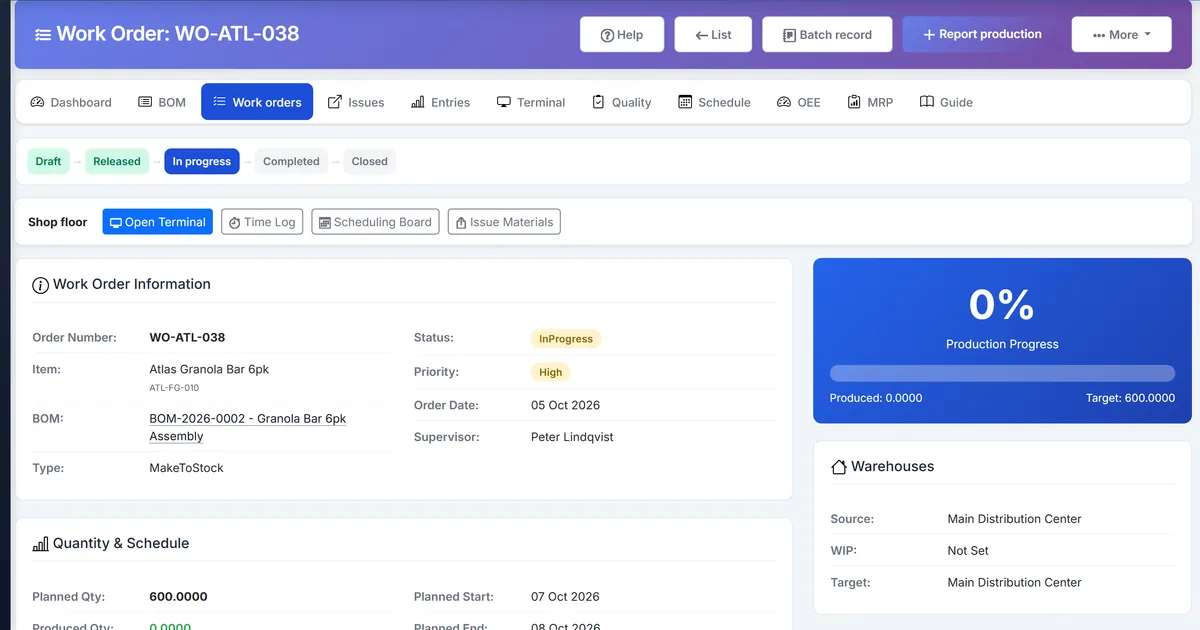
- Click Create work orders. On the sales order, click Create work orders. You need permission to create a work order. Biznsbook creates one draft make-to-order work order for each manufactured line that still has open quantity and an active BOM.
- Check the finished item, quantity, and customer. Each new work order uses the finished item on that line, the open quantity, and the customer. The customer reference comes from the sales order number, and from the customer PO when the order has one. The sale-invoice dropdown on the work order stays a separate reference and is not this link.
- Read the shortage list. Creation compares the exploded BOM with on-hand stock and lists components that are short. The list does not reserve stock, does not issue materials, and does not post a journal. The draft work order is still created. Issue materials later, after you release the order, on the normal material-issue path.
- See which lines were skipped. A line without an active manufacturing BOM is skipped. A line that already has an open work order is skipped. A second click on Create work orders does not add another open work order for a line that already has one. Cancelled or fulfilled lines are not planned again.
- Or pick the line on Work Order Create. When the setting is on, Work Order, then Create, can also pick a confirmed sales-order line. That path sets the same finished item, quantity, customer, and reference. Use it when you are already on the work order form. Do not use the sale-invoice field as a substitute for the sales order line.
- Release on the existing work order path. The new order is Draft. Release, start, issue materials, and complete production the same way as any other work order. Creating the order from the sales order does not issue stock and does not receive finished goods.
- Net the order in Material Requirements. When the setting is on, uncovered quantity on a confirmed or partially fulfilled sales order is firm demand in MRP, dated by the promised date or the order date. Stocked finished goods are not exploded into components. Firm a remaining component shortage from the MRP run. That firm is separate from the sales-order button, and a second firm returns the same document.
Review results after the first full weekly cycle. Adjust roles, mappings, or approvals where the same exception repeats.
Screen-level flows live in the Help Center. This guide focuses on the business process; help articles cover click-by-click navigation.
Common mistakes to avoid
- Mistake 1: Create work orders from sales orders is off, so the sales order has no production action. Repeating this each month usually shows up first in production statistics or stock card variance reports.
- Mistake 2: The order is still a draft or is already fulfilled, so there is no open quantity to plan. Repeating this each month usually shows up first in production statistics or stock card variance reports.
- Mistake 3: The finished item has no active manufacturing BOM, so the line cannot become a work order. Repeating this each month usually shows up first in production statistics or stock card variance reports.
- Mistake 4: A shortage list is mistaken for a stock reservation or a block on saving. Repeating this each month usually shows up first in production statistics or stock card variance reports.
Track recurring exceptions in month-end notes; each should map to a control above.
Best practices that hold up as you scale
- Turn on create work orders from sales orders — Open Manufacturing Settings, then Company Settings, and enable Create work orders from sales orders.
- Use a confirmed or partially fulfilled sales order — Open the sales order.
- Click Create work orders — On the sales order, click Create work orders.
- Check the finished item, quantity, and customer — Each new work order uses the finished item on that line, the open quantity, and the customer.
- Read the shortage list — Creation compares the exploded BOM with on-hand stock and lists components that are short.
Teams that set Company Settings warehouses, release work orders only against active BOMs, and post material issues before production entry avoid the rework cycle that distorts WIP and finished-goods stock.
How Biznsbook supports this workflow
sales order work orders is documented in Biznsbook Manufacturing capabilities. Use it as part of a controlled finance process — posting, review, and period close — not as an isolated export. When Sales, Purchase, Inventory, Taxation, Expense, or Finance Management modules are enabled, related documents can post through the central accounting posting service with double-entry validation.
make to order is documented in Biznsbook Manufacturing capabilities. Use it as part of a controlled finance process — posting, review, and period close — not as an isolated export. When Sales, Purchase, Inventory, Taxation, Expense, or Finance Management modules are enabled, related documents can post through the central accounting posting service with double-entry validation.
shortage check is documented in Biznsbook Manufacturing capabilities. Use it as part of a controlled finance process — posting, review, and period close — not as an isolated export. When Sales, Purchase, Inventory, Taxation, Expense, or Finance Management modules are enabled, related documents can post through the central accounting posting service with double-entry validation.
Manufacturing permissions separate BOM maintenance, work order release, production entry, and quality inspection. Company Settings and Workstations stay under company-management. Inventory is required for items, warehouses, and stock mutations.
Suggested implementation timeline
- Week 1: Document current process gaps and configure sales order work orders with finance owner sign-off.
- Weeks 2–3: Pilot on one month or one entity; post all test transactions through Biznsbook; freeze parallel spreadsheet journals.
- Week 4: Run first trial balance or report tie-out; fix mapping and permission issues.
- Month 2–3: Roll out to full team; add approvals and period close cadence from this guide.
- Ongoing: Monthly review using before you release and leadership dashboard.
Metrics to track monthly
- Work orders by status (released, in progress, on hold, completed)
- Material issue vs BOM explosion variance
- Production yield and scrap/reject rates
- QC pass/fail and defect counts
- WIP and finished-goods stock movement per work order
Start with three metrics; trend direction matters more than a single point-in-time snapshot.
Spreadsheet / manual books vs integrated ERP
Compare typical manual finance work with Biznsbook sales order work orders and related capabilities.
| Capability | Manual / Spreadsheet | Biznsbook |
|---|---|---|
| Source of the job | ❌ Retyped from the sales order | ✅ One draft work order per open manufactured line |
| Customer link | ❌ A note or the invoice field | ✅ Customer and sales order reference on the work order |
| Already planned line | ❌ A second open work order | ✅ The line is skipped |
| No active BOM | ❌ A work order with no formula | ✅ The line is skipped |
| Component shortage | ❌ Creation refused | ✅ A report only; the draft order is still saved |
| Stock effect | ❌ Issue or reserve on create | ✅ No stock move and no journal until the normal path |
| Repeat click | ❌ Duplicate orders | ✅ An open work order is not created again |
Before you release
Confirm the work order shows the finished item, the open quantity, and the customer reference. Treat the shortage list as a buying and issuing checklist. Release the draft only when you are ready to issue materials. Creating the order does not reserve those components.
Document this in your finance SOP and revisit each quarter as transaction volume or entity structure changes.
Frequently asked questions
Is create work orders from sales orders on by default?
No. Turn it on under Manufacturing Settings, then Company Settings. Until then the sales order does not offer the action.
Which sales orders can create work orders?
Confirmed or partially fulfilled orders. Each manufactured line needs open quantity and an active BOM. Lines without an active BOM are skipped.
What is copied onto the work order?
The finished item, the open quantity, the customer, and a customer reference from the sales order number. When the sales order has a customer PO, that PO is included in the reference.
Does the shortage check stop the work order?
No. The check compares the exploded BOM with on-hand stock and still creates the draft work order. It does not reserve stock and does not issue materials.
What happens if I click Create work orders again?
A line that already has an open work order is skipped. The second run does not add another open work order for that line.
Is the sale-invoice field the sales order link?
No. The sale-invoice dropdown remains a separate reference. Use Create work orders on the sales order, or pick the confirmed sales-order line on Work Order Create.
How this differs by industry
Retail
Made-to-order retailers can turn a confirmed customer line for a manufactured kit into one draft work order without retyping the item or the quantity.
Wholesale & distribution
Distributors that assemble to a customer order can keep the sales order number on the work order and still ship other stocked items that were not manufactured.
Manufacturing
Plants create one draft make-to-order work order per open manufactured line, read the shortage list, and release that order on the existing path.