Run several warehouses without losing track of stock

2:06 walkthroughStart free trial
A second warehouse means transfers, stock on the road and the question of who has what where. Biznsbook tracks every location down to the bin, moves stock with approved transfers and shows what is in transit.
Free 30-day workspace · no card neededTry the demo account
How do you manage stock across several warehouses?
Give every warehouse its own stock, organise it by aisle, shelf and bin, and move stock only through transfers. In Biznsbook a transfer is approved, shipped (stock leaves the source and shows as in transit) and received at the destination, so the total never jumps or disappears on the way.
Signs it is time
If two or more of these sound familiar, it is time for one system.
- Stock vanishes between sitesGoods left one warehouse but never arrived in the other's numbers.
- Nobody knows which binPickers walk the aisles looking for an item the system says you have.
- Transfers happen by phoneNo approval, no paper trail and no in-transit view.
- You cannot see capacityOne site is full while another has empty racks.
How it works in Biznsbook
Four steps, all in the same system.
Set up warehouses and bins
Add each warehouse and its storage locations: aisle, shelf and bin.
Receive at each site
Goods received and Fast Receive record stock into the right warehouse as it arrives.
Transfer with approval
Request, approve and ship; stock is in transit until the destination receives it.
Count by warehouse
Run physical or cycle counts per warehouse, with blind counts if you want them, and post the differences.
What you get
Bin locations
Aisle, shelf and bin for every item, with a warehouse map.
Approved transfers
Transfers need approval before they ship, and in-transit stock is tracked.
Capacity dashboard
See how full each warehouse and location is.
Phone pick lists
Pick lists on a phone, grouped by zone and bin so pickers walk the aisles once, with FEFO or FIFO lots suggested.
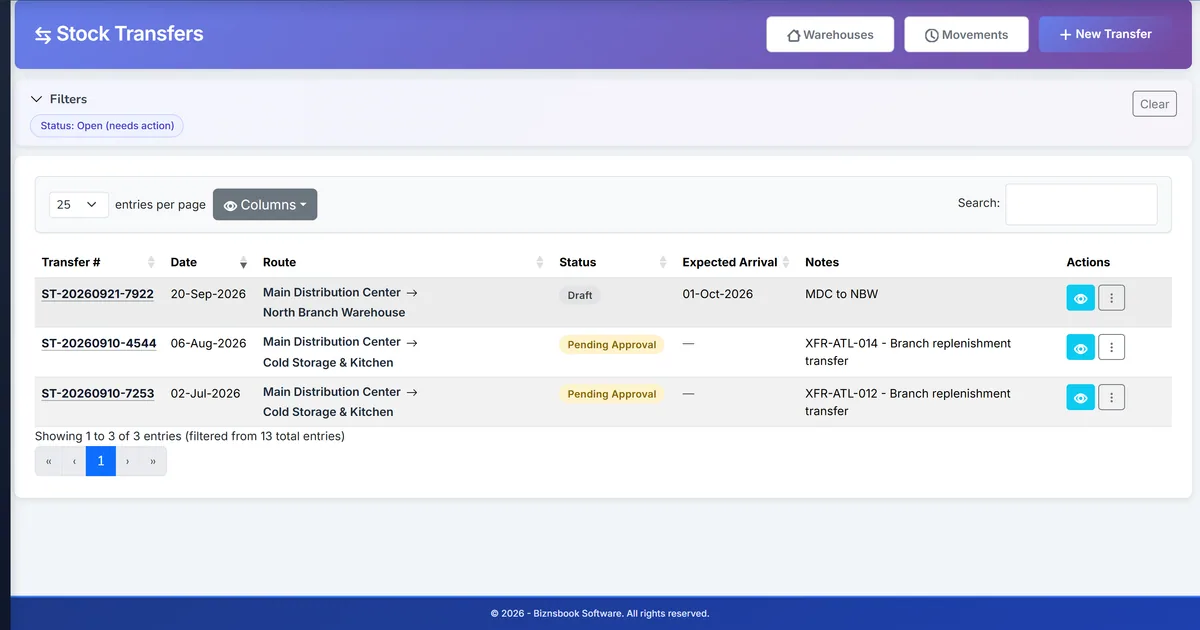
Stock transfers
Transfers between warehouses with their status, from a demo company.
What it costs
Multi-warehouse comes with Growth, at $69 a month for 10 users, with Inventory and Accounting & Tax in its Products core. Every plan is a flat monthly price, not per user. See plans and pricing.
Frequently Asked Questions
Is there a limit on warehouses?
No. Add as many warehouses and storage locations as you run.
What happens to stock during a transfer?
It leaves the source warehouse when the transfer ships and shows as in transit until the destination receives it, so the company total stays right.
Can transfers need approval?
Yes. Transfers can require approval before they ship.
Can pickers work from a phone?
Yes. Pick lists for delivery notes and open sales orders open in the phone browser, grouped by zone then bin, with the suggested lot on each line. Scanning or tapping ticks a line off; stock moves when the delivery note is posted. There is no separate app to install.
Is there a free trial?
Yes. Start a 30-day free trial with no card from the demo request page, or pick a plan at checkout: nothing is charged for 30 days and your first charge has a 14-day refund.
Try Biznsbook free for 30 days
Start a 30-day free trial, or see plans and pricing first.