How to Track Inventory Across Multiple Warehouses
The cost of not knowing which warehouse holds your stock
When a business opens a second location, inventory complexity doubles overnight. Sales promises stock from the wrong branch, transfers sit on trucks without system records, and finance values inventory using a single blended number that matches neither building.
Spreadsheets labeled "Warehouse A" and "Warehouse B" break when the same SKU is renamed, merged, or counted on different days. Buyers reorder for the main site while a regional warehouse sits on excess dead stock.
Without per-location visibility, customer service wastes hours calling stores to locate one line item. That friction scales poorly as SKU count and site count grow.
Why this happens
- One global quantity per item hides where physical stock actually sits.
- Transfers are recorded on paper or chat but not in the system until days later.
- Capacity constraints are ignored, leading to overflow and mis-picks in the wrong building.
- Purchasing defaults to a single default warehouse on every PO.
These patterns show up across SMB inventory teams regardless of industry. The fix is usually process plus tooling — not hiring one more buyer. Biznsbook addresses this topic through ItemWarehouse balances, stock transfers, warehouse capacity when the Inventory module (and related Warehouse, Purchase, or Integration modules where noted) is enabled for your tenant.
Leaders often underestimate how much informal workarounds cost: extra emails, duplicate counts, and end-of-month fire drills. Documenting who owns each step — and which screen in Biznsbook is the system of record — removes ambiguity that spreadsheets never solve.
Step-by-step: Track Inventory Across Multiple Warehouses
The following workflow is designed for owners, warehouse leads, and finance reviewers who need a repeatable process. Adapt roles to your team size — separation of duties matters more than headcount.
- Define warehouses and default receiving rules. Create each warehouse in Warehouse Management. Assign default warehouses on suppliers or product groups so GRNs post to the correct location.
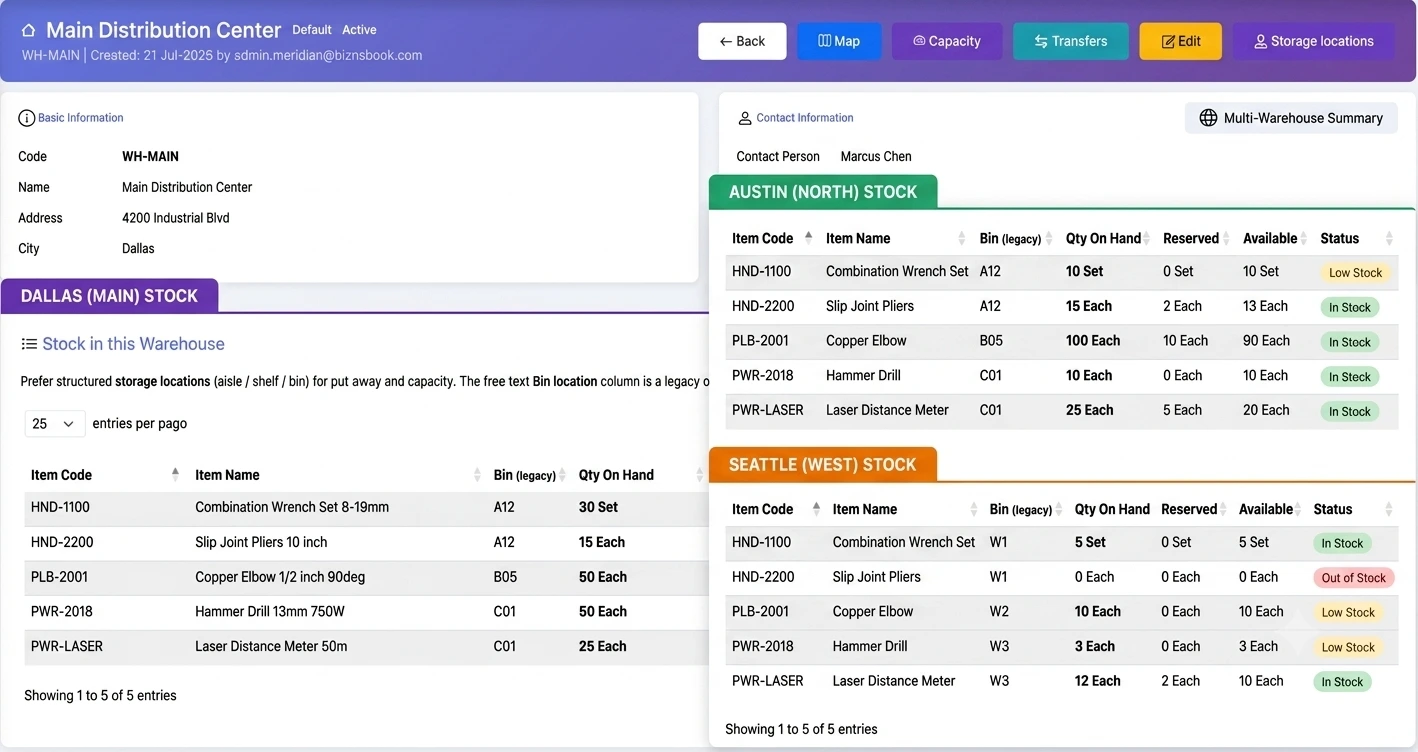
- Maintain per-warehouse balances on every SKU. Biznsbook tracks ItemWarehouse quantities so on-hand is visible by site on the product and health views.
- Use stock transfers for every physical move. Create stock transfers between warehouses including in-transit handling so quantity is neither double-counted nor lost while goods move.
- Monitor warehouse capacity. Review warehouse capacity utilization to avoid overfilling sites that cannot accept inbound pallets without relocation chaos.
- Reconcile inter-branch drift monthly. Run stock reconciliation per warehouse. Investigate variances before they become year-end write-offs.
- Report valuation by warehouse. Filter the inventory valuation report by warehouse for local P&L accountability and tax reporting where required.
- Train teams on a single source of truth. Block informal transfers. If it moved physically, it needs a transfer document in the system the same day.
After implementing these steps, review results in the first full cycle (usually one month). Adjust thresholds, permissions, or training where the same exception repeats. Inventory improvement compounds when feedback loops are short.
For related screen-level flows, see the Biznsbook Help Center (for example GRN, transfers, batch tracking, or Shopify setup). This guide stays focused on the business problem; help articles cover click-by-click navigation.
Common mistakes to avoid
- Mistake 1: Ignoring that one global quantity per item hides where physical stock actually sits. Teams that skip corrective process here usually see the same emergency twice in one quarter.
- Mistake 2: Ignoring that transfers are recorded on paper or chat but not in the system until days later. Teams that skip corrective process here usually see the same emergency twice in one quarter.
- Mistake 3: Ignoring that capacity constraints are ignored, leading to overflow and mis-picks in the wrong building. Teams that skip corrective process here usually see the same emergency twice in one quarter.
- Mistake 4: Ignoring that purchasing defaults to a single default warehouse on every PO. Teams that skip corrective process here usually see the same emergency twice in one quarter.
Most failures are repeat offenses, not one-off disasters. Track exceptions in your ops meeting notes and tie each back to a control in the step-by-step section.
Best practices that hold up as you scale
- Define warehouses and default receiving rules — Create each warehouse in Warehouse Management.
- Maintain per-warehouse balances on every SKU — Biznsbook tracks ItemWarehouse quantities so on-hand is visible by site on the product and health views.
- Use stock transfers for every physical move — Create stock transfers between warehouses including in-transit handling so quantity is neither double-counted nor lost while goods move.
- Monitor warehouse capacity — Review warehouse capacity utilization to avoid overfilling sites that cannot accept inbound pallets without relocation chaos.
- Reconcile inter-branch drift monthly — Run stock reconciliation per warehouse.
Consistency beats intensity. A medium-sized distributor that posts every GRN the same day will outperform a larger competitor that counts annually but posts sporadically.
How Biznsbook supports this workflow
ItemWarehouse balances in Biznsbook is part of the verified Inventory module capability set (see product documentation). Use it in the workflow above rather than as a standalone report: connect itemwarehouse balances to daily receiving, shipping, and count routines so data stays current. When Warehouse, Purchase, Sales, POS, or Integration modules are licensed, the same stock ledger feeds itemwarehouse balances without duplicate entry — that integration is where SMB teams recover the hours lost to spreadsheet reconciliation.
stock transfers in Biznsbook is part of the verified Inventory module capability set (see product documentation). Use it in the workflow above rather than as a standalone report: connect stock transfers to daily receiving, shipping, and count routines so data stays current. When Warehouse, Purchase, Sales, POS, or Integration modules are licensed, the same stock ledger feeds stock transfers without duplicate entry — that integration is where SMB teams recover the hours lost to spreadsheet reconciliation.
warehouse capacity in Biznsbook is part of the verified Inventory module capability set (see product documentation). Use it in the workflow above rather than as a standalone report: connect warehouse capacity to daily receiving, shipping, and count routines so data stays current. When Warehouse, Purchase, Sales, POS, or Integration modules are licensed, the same stock ledger feeds warehouse capacity without duplicate entry — that integration is where SMB teams recover the hours lost to spreadsheet reconciliation.
Module licensing is flexible: Inventory is the foundation; enable Warehouse Management, Purchase, Sales, POS, Manufacturing, or Integration Hub connectors when your operating model requires them. Permissions are role-based per tenant — separate who can view, receive, adjust, and approve so controls scale with headcount.
Suggested implementation timeline
- Week 1: Baseline current performance, assign process owner, configure master data fields tied to ItemWarehouse balances.
- Weeks 2–3: Pilot on one product group or warehouse; post every transaction through Biznsbook documents; no parallel spreadsheet edits.
- Week 4: First review against metrics; tune thresholds, permissions, and training gaps.
- Month 2–3: Expand to all warehouses and categories; add cycle count or replenishment cadence from this guide.
- Ongoing: Monthly ops review using health dashboard and warehouse governance checklist checklist.
Metrics to track monthly
- Weeks on hand for top twenty SKUs by revenue
- Count accuracy percentage on A-class items
- Open document aging (GRNs, transfers, adjustments in draft)
- Value at risk from low-stock and overstock KPIs on replenishment views
- Exception rate: lines requiring manual override per hundred transactions
Pick three metrics to start — not all five. Review trend direction, not single points. Improving these metrics usually precedes revenue protection and working-capital releases finance can measure.
Manual / spreadsheet vs integrated ERP
Spreadsheets work for snapshots; they fail as a transaction system. Compare typical manual approaches with how Biznsbook supports ItemWarehouse balances and related capabilities.
| Capability | Manual / Spreadsheet | Biznsbook |
|---|---|---|
| Per-site on-hand | ❌ Tabs in Excel | ✅ ItemWarehouse balances |
| Transfers | ❌ Email requests | ✅ Formal stock transfer docs |
| In-transit | ❌ Unknown | ✅ In-transit accounting on transfers |
| Capacity planning | ❌ Guesswork | ✅ Warehouse capacity views |
| Valuation by site | ❌ Manual split | ✅ Valuation report filters |
| Bins/locations | ❌ Paper map | ✅ Storage locations when Warehouse enabled |
Warehouse governance checklist
Name warehouses clearly, disable inactive sites, restrict who can post transfers, and audit negative quantities weekly. Negative on-hand at any warehouse is almost always a process failure, not a system bug.
Teams that document this section in their internal inventory SOP onboard new hires faster and pass audits with fewer emergency counts. Revisit quarterly as assortment and warehouse footprint change.
Pair this with the inventory valuation report and stock card when investigating exceptions — numbers in isolation rarely tell the full story without movement history behind them.
Frequently asked questions
How many warehouses can a small ERP handle?
Biznsbook supports multiple warehouses per company. Practical limits are operational — how well you reconcile each site — not a low arbitrary cap.
Should each store be a warehouse?
Often yes for retail chains. Each branch becomes a warehouse with transfers from a central DC replenishing stores.
What is in-transit stock?
Quantity that has left the sending warehouse but not yet received at the destination. Proper transfers track in-transit so it is not counted twice.
Can I see total stock and by warehouse?
Yes. Product and reporting views show company totals and warehouse-specific quantities when Warehouse Management is enabled.
How this differs by industry
Retail
Each store is a stocking point. POS sales deplete that warehouse; central DC transfers push replenishment on a schedule.
Wholesale & distribution
Regional DCs hold bulk; smaller forward warehouses serve key accounts. Capacity views prevent accepting inbound that cannot be stored.
Manufacturing
Raw stores, WIP areas, and finished goods warehouses should be separate so material issues do not confuse sellable stock.