Real-Time Inventory Tracking
Never run out of stock - see live quantities across every warehouse the moment transactions happen.
- ✓ Instant stock level updates
- ✓ Know exactly what you have
- ✓ Automatic reorder alerts
- ✓ No manual counting needed
Biznsbook is the inventory software for small business and enterprise alike. Get real-time stock tracking, multi-warehouse management, GRN processing, intelligent reporting, and per-product profit analysis. Manage thousands of SKUs across multiple warehouses - connected to your POS, Accounting, and CRM - all from one cloud inventory ERP.
Manual tracking with spreadsheets and paper logs leads to counting mistakes, data entry errors, and lost inventory visibility across warehouse locations.
Without a stock management system, you have no idea what's in stock right now. Teams waste hours reconciling numbers while stockouts and overstocking happen silently.
Inventory data is scattered across spreadsheets, emails, and disconnected systems. No single source of truth for your stock position.
Every purchase, sale, transfer, and adjustment is recorded automatically. Warehouse inventory software eliminates manual counting mistakes and data entry errors.
Inventory software for small business and enterprise gives you instant visibility into current stock position. Know exactly what you have, where it is, and when to reorder.
Whether you're managing hundreds of SKUs or thousands of products across multiple locations, all your inventory data lives in one accessible place - integrated with your POS system and accounting software.
Everything you need for real-time stock tracking - from multi-warehouse management to automated inventory reports.
Never run out of stock - see live quantities across every warehouse the moment transactions happen.
Trace every product's journey from purchase to sale - full accountability at your fingertips.
Eliminate guesswork - see exactly where inventory went, who moved it, and when. GRN (Goods Received Note) processing ensures every delivery is verified against purchase orders.
Make smarter purchasing decisions with one-click reports on valuation, aging, and trends.
Plan replenishment with weeks-on-hand projections and highlight slow-moving inventory before it ties up cash.
Allocate freight, duty, and handling charges across GRN lines to keep average cost accurate.
Discover which products make money and which don't - optimize your mix for maximum margin.
Track stock separately at each location. Manage inter-warehouse transfers and view consolidated or site-specific reports - connected to POS, Accounting, and CRM.
Built-in quality control workflow for receiving goods. Verify quantities and condition before stock is fully accepted.
Streamlined receiving dock workflows for busy warehouses. Speed up goods receipt without sacrificing accuracy or audit trail.
Complete control over perishable inventory. Track batch numbers, expiry dates, shelf life, and automatically alert on items nearing expiration.
Correct inventory discrepancies with full audit trail and optional approval workflow for segregation of duties.
Identify and resolve inventory discrepancies. Compare system records with physical counts to ensure data accuracy.
Document outbound goods and manage returns efficiently. Integrated with sales and purchase modules for complete traceability.
Streamline warehouse operations with barcode support. Print labels, scan products during receiving, and reduce manual entry errors.
Get instant visibility into inventory status with key performance indicators and actionable alerts.
Proactive expiry management with analytics dashboard and configurable alerts to minimize waste.
Central product management with comprehensive master data. Support for multiple item types and product grouping.
Flexible unit management with base, purchase, and sale units per item. Convert between different measurement scales seamlessly.
Accurate inventory valuation using weighted average cost method. Automatically calculated with every stock movement.
Seamlessly connected Point of Sale reduces stock automatically on checkout. Real-time sync across retail terminals.
Seamless integration with Manufacturing module for BOMs, work orders, and production materials.
Organize inventory by storage locations (bins). Visual warehouse map for efficient picking and stock placement.
Replenishment dashboard KPIs, purchase requisitions, ABC/XYZ classification, and forecast accuracy — plan buys before stockouts hit.
Size/color variant matrix, fabric rolls, and stitching workflows for fashion retailers — extend Inventory with the Clothing module.
Monitor warehouse space usage and prevent overstocking. Track capacity per warehouse and location.
Join 200+ user already tracking stock in real time with Biznsbook.
Transform your inventory operations and gain the competitive edge your business needs.
40% fewer stock errors. 60% less time on manual counts. Results from day one.
Inventory guides (25) · Batch & expiry for Shopify & Toast · Help Center
Take a closer look at how Biznsbook helps you track stock in real time, manage multi-warehouse movements, and generate reports - all from one intuitive dashboard.
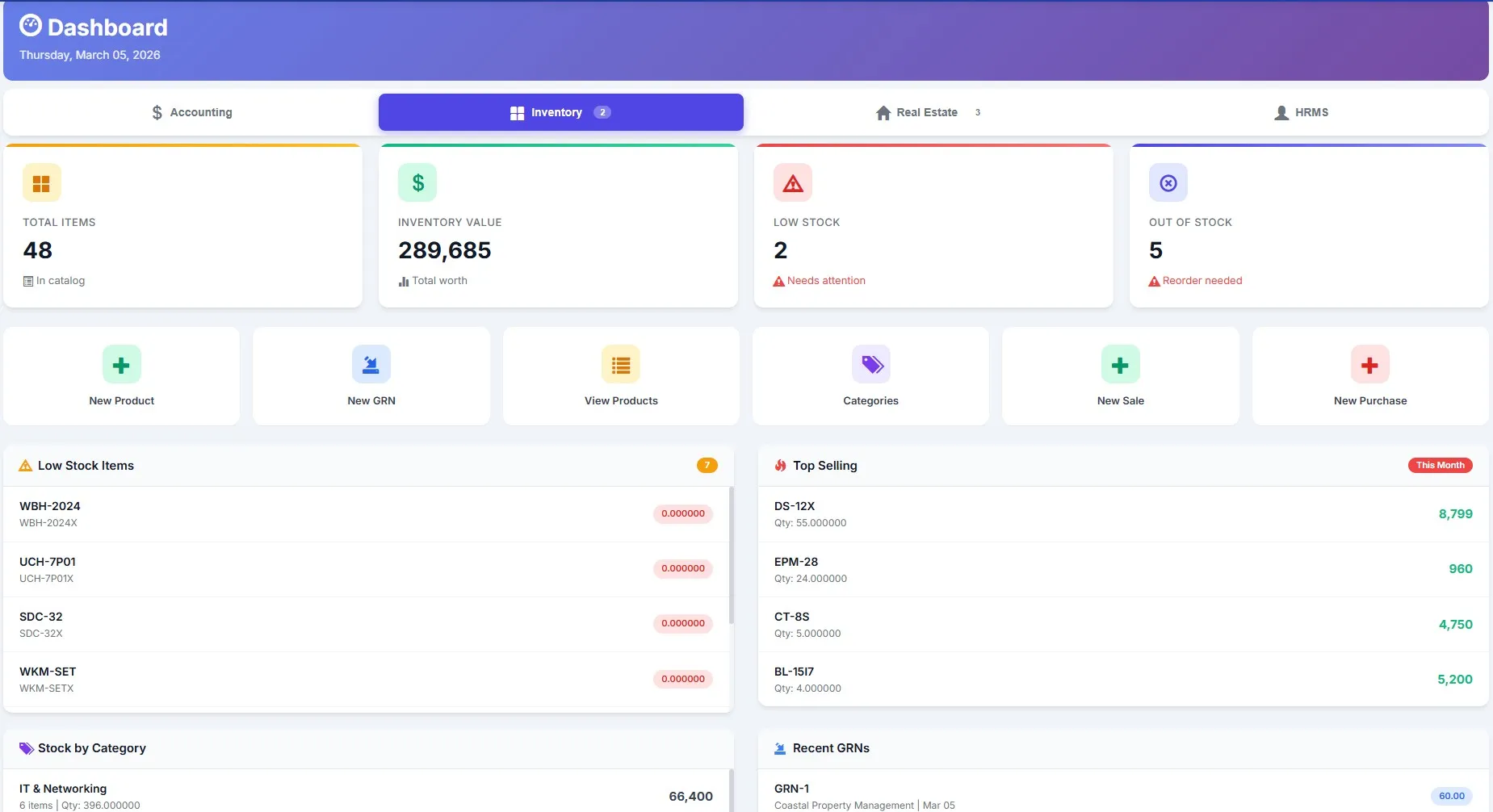
Monitor stock levels across all warehouses at a glance. Instant alerts for low stock and reorder points help you avoid stockouts before they happen.
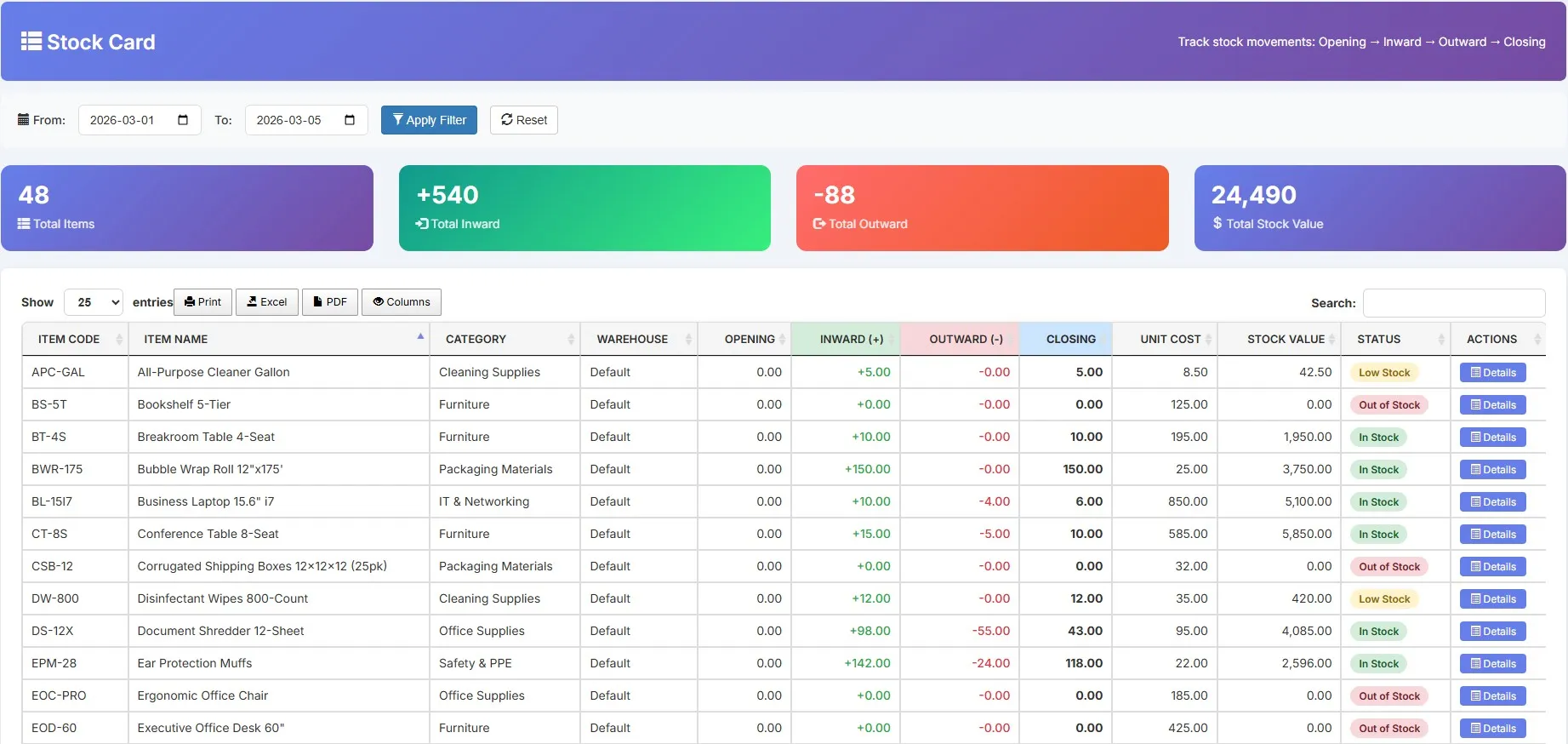
Organize thousands of products with categories, pricing, and SKU tracking. Find any item instantly with powerful search and filters.
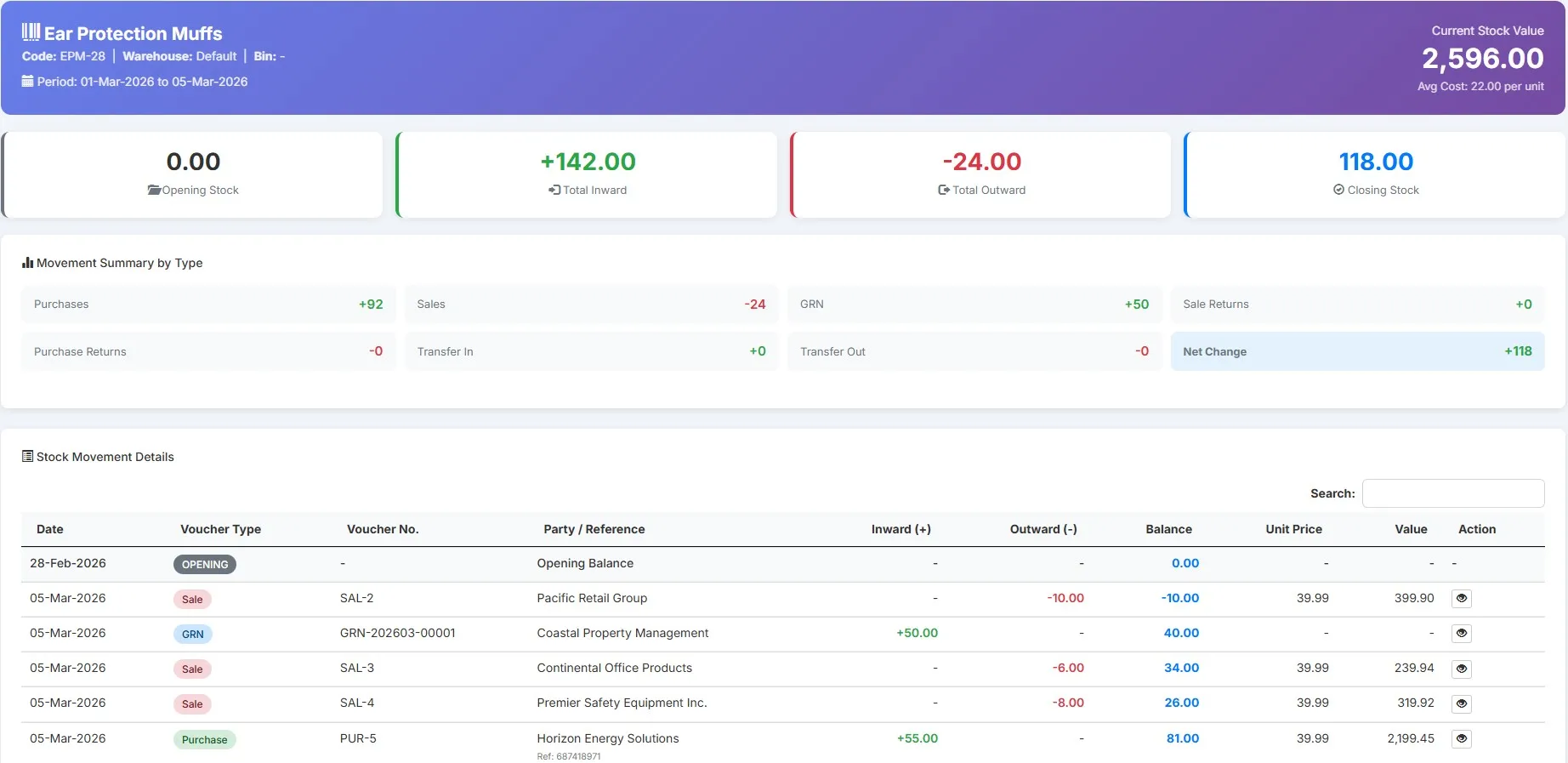
Every purchase, sale, transfer, and adjustment is recorded automatically. Get a complete audit trail of how inventory flows through your business.
Get started in minutes. Our cloud inventory ERP follows a straightforward four-step process.
Enter your product details including name, SKU, category, pricing, and initial stock quantities.
Record purchases, sales, and adjustments. Stock levels update automatically in real time.
Track all inventory movements with complete audit trails and transaction history.
Create detailed reports on stock levels, valuation, movement history, and profitability.
No complex configuration. Add products, start selling, and track everything automatically.
Whether you need inventory software for small business or enterprise-grade multi-warehouse stock control, our scalable solution grows with you.
The ideal inventory software for small business - perfect for retailers, small shops, and startups looking for affordable yet powerful stock tracking.
Ideal for growing businesses needing multi-department tracking and advanced features.
Enterprise-grade warehouse inventory software for large-scale stock control across multiple facilities and locations.
Transform raw inventory data into actionable business intelligence.
Analyze profit margins at the product, category, and overall inventory level.
Generate stock valuation, aging, movement, and reorder reports on demand.
Use historical data and trends to make smarter purchasing and pricing decisions. Combine with accounting reports for complete financial visibility.
Biznsbook Inventory is built into your ERP - not bolted on. Every module shares the same data.
Sell from the counter ? stock deducts instantly. Barcode scanning, receipt printing, and real-time inventory sync across all POS terminals.
Use sales history for statistical forecasts, optimize service levels under budget, and turn recommendations into purchase requisitions.
Purchase orders auto-create journal entries. Stock valuation feeds directly into your balance sheet. COGS calculates on every sale - automatically.
Add products from stock to deals. Check availability before closing. Sales teams see real-time stock levels without leaving the CRM pipeline.
Your inventory data is protected with enterprise-grade security measures.
Industry-standard encryption protects your data in transit and at rest. Role-based access controls ensure only authorised users see sensitive inventory data.
Your inventory data is backed up daily across multiple geographically isolated Azure data centers, ensuring zero data loss even if a localized server fails.
Audit trails and validation ensure accurate, tamper-proof records. Every change is logged with user, timestamp, and action for full accountability.
No separate license. No per-user fee. Just activate the inventory module. Manage warehouse inventory alongside your POS, Accounting, Automation, and CRM - all in one plan.
An inventory management system is software that helps businesses track stock levels, monitor product movement, and manage warehouse inventory in real time. It replaces manual spreadsheets with automated stock counting, reorder alerts, and data-driven insights - giving you full control over your inventory operations.
An inventory management system works by recording every product entry, sale, transfer, and adjustment in a centralized database. When you purchase stock, quantities increase automatically. When you sell, stock deducts in real time. The system continuously tracks current quantities, locations, and values - so you never need to count manually.
See how this module fits vertical-specific workflows — not just generic features.
Variant matrix, fabric rolls, and tailoring workflows.
See industry solution →Batch traceability, expiry alerts, and FEFO picking.
See industry solution →High-SKU batch tracking and multi-warehouse retail.
See industry solution →Multi-site transfers, FEFO/FIFO, and fulfillment ops.
See industry solution →Quick answers to common questions about inventory management, GRN processing, multi-warehouse tracking, and pricing.
Inventory management software is a digital solution that helps businesses track stock levels, monitor product movement, and manage inventory operations in real time. It automates stock counting, provides reorder alerts, and delivers data-driven insights for better inventory decisions. Unlike manual methods, it eliminates errors and saves significant time.
Inventory tracking works by recording every product entry, movement, and exit in a centralized database. When you purchase inventory, it's added to stock. When you sell, stock is deducted. Transfers, adjustments, and returns are all tracked automatically, providing real-time visibility into current quantities, locations, and values.
Yes, you can track profit per product with our system. The software automatically calculates profit margins by comparing purchase costs against selling prices for each item. You can view profitability at the individual product level, by category, or across your entire inventory to make informed pricing and purchasing decisions.
Yes, our inventory management software is highly suitable for large businesses and enterprises. The system handles thousands of SKUs, supports multiple warehouses and locations, manages complex inventory operations, and integrates with other ERP modules. Enterprise features include role-based access, audit trails, and advanced reporting.
Key benefits include reduced stock errors, better decision-making with real-time data, increased operational efficiency, cost reduction through optimized stock levels, and complete visibility into inventory across all locations. Businesses typically see a 40% reduction in stock errors and 60% time savings after implementation.
Real-time inventory tracking provides instant visibility into stock levels, preventing stockouts and overstocking. It enables faster order fulfillment, allows quick response to demand changes, reduces carrying costs, and helps you make timely purchasing decisions. You'll always know exactly what's in stock without manual counting.
Yes, comprehensive inventory reports are available on demand. Generate stock valuation reports showing current inventory worth, movement history tracking all transactions, aging analysis identifying slow-moving items, reorder reports for purchasing, and profitability reports for financial analysis. Reports can be exported for further use.
Yes, your inventory data is secured with enterprise-grade security measures. We use encrypted data storage, implement regular automated backups, provide role-based access controls, and maintain complete audit trails. These measures ensure data integrity and protection against unauthorized access or data loss.
Stock movement tracking records every inventory transaction in your business. This includes purchases (stock in), sales (stock out), warehouse transfers, stock adjustments, and returns. It provides a complete audit trail showing how inventory flows through your business, who made changes, and when.
Yes, small businesses benefit greatly from inventory management software. It helps track stock accurately without complex spreadsheets, prevents losses from theft or spoilage, reduces manual counting errors, and provides insights needed to grow efficiently. Our user-friendly interface makes it easy to get started.
Adding products is simple and straightforward. Enter basic product details like name, SKU, category, and pricing. Then record initial stock quantities. From that point, the system tracks all subsequent movements automatically through purchases, sales, transfers, and adjustments. You can also import products in bulk.
Yes, the system fully supports multiple warehouses and storage locations. Track inventory separately at each location, manage inter-warehouse transfers, and view consolidated reports across all facilities or location-specific reports. This is essential for businesses operating from multiple sites.
The best inventory software for small business combines ease of use with powerful features. Look for real-time stock tracking, automated reorder alerts, built-in reporting, and affordable pricing without per-user fees. Biznsbook delivers all of this as part of a complete ERP platform - so you get inventory, POS, accounting, and CRM in one plan.
To track inventory in real time, use software that automatically updates stock levels with every transaction. In Biznsbook, every purchase, sale, transfer, and adjustment records instantly. You see accurate quantities across all locations without manual counting - and receive automatic alerts when stock reaches reorder levels.
Yes, modern inventory software supports multiple warehouses and storage locations. Biznsbook lets you track stock separately at each facility, manage inter-warehouse transfers with full traceability, and view consolidated or location-specific reports - all from a single dashboard. This gives growing businesses complete visibility across every site.
Yes, Biznsbook inventory is natively integrated with POS and accounting. Sales at the counter automatically deduct stock. Purchase orders create journal entries. Stock valuation feeds directly into your balance sheet, and COGS calculates on every sale - no manual data entry or syncing required.
GRN variance alerts highlight quantity and price deviations when received goods are matched against purchase invoices. Finance and warehouse teams see mismatches early — before stock valuation or payables drift from reality.
Yes. The replenishment dashboard shows at-risk and overstock KPIs, purchase requisitions, ABC/XYZ classification, and forecast accuracy views. Apparel retailers can extend Inventory with the Clothing module for variant matrix and fabric roll stock.
Biznsbook includes inventory management in every ERP subscription at no extra cost. There are no separate inventory licenses, no per-user fees, and no hidden charges. Just activate the module alongside POS, Accounting, and CRM - all included in one plan. View pricing ?
A GRN (Goods Received Note) confirms goods have been physically received from a supplier and verified against the purchase order. In Biznsbook, GRN processing automatically updates stock quantities, flags discrepancies between ordered and received items, and creates the corresponding accounting journal entry - eliminating manual data entry and ensuring accuracy.
Use aging analysis to identify slow-moving items before they expire or become obsolete. Biznsbook provides aging reports, automated reorder alerts at optimal levels, and per-product profitability data - so you buy only what sells and free up cash tied in dead inventory. Combined with movement trends, you can set smarter reorder points.
Yes, Biznsbook supports unlimited warehouse locations in a single dashboard. Track stock separately at each site, manage inter-warehouse transfers with full traceability, and view consolidated or location-specific reports. All warehouse data syncs in real time with POS, Accounting, and CRM modules.
Set reorder point alerts so you're notified the moment stock drops below your threshold. Combined with movement history and demand trends, Biznsbook helps you order the right quantity at the right time - preventing both costly stockouts and excess inventory that ties up your cash flow.
Biznsbook generates stock valuation reports, product movement history, aging analysis, per-product profitability reports, reorder reports, and category-level insights. All reports can be exported to Excel or PDF for deeper analysis, team sharing, or audit documentation.
Yes, Biznsbook includes barcode and scanner integration. Generate and print barcode labels directly from the system, configure scanner settings for warehouse workflows, and speed up receiving and stock movements. Mobile device support lets you scan on any smartphone or tablet.
Biznsbook tracks batch numbers and expiry dates for perishable items. Set FEFO (First Expiry First Out) or FIFO (First In First Out) picking rules, track shelf life, and receive automatic alerts as items approach expiration. The expiry dashboard gives you complete visibility into aging inventory to minimize waste.
GRN (Goods Received Note) is a formal receiving process with quality check and approval workflow - ideal for compliance and audits. Fast Receive is a streamlined, quick receipt entry for busy docks that still maintains full audit trails. Use Fast Receive for speed and GRN for controlled, verified receiving. Both integrate seamlessly with purchase orders.
Yes, stock adjustments support an approval workflow. Create adjustments as drafts, route them for approval to designated team members, and only apply them once approved. This provides separation of duties and prevents unauthorized inventory changes - essential for compliance and control.
Stock reconciliation compares system quantities with physical count results. The system highlights variances, shows drift analysis, and guides you through a structured reconciliation workflow. This proactive approach catches shrinkage, counting errors, and theft before they compound.
Yes, Biznsbook supports storage locations (bins) within warehouses and includes a visual warehouse map. Organize inventory by location, track capacity utilization per bin, and use the map editor to optimize your physical layout. This speeds up picking and prevents overstocking specific areas.
Biznsbook uses weighted average costing to value inventory. Every purchase or receipt updates the average cost per unit. When items are sold or adjusted, cost of goods sold (COGS) is calculated using the weighted average cost - automatically and consistently with every transaction.
Yes, when the Manufacturing module is enabled, inventory tracks bill of materials (BOMs), material issues for production, and receipt of finished goods. Raw materials are consumed automatically when work orders are completed, and finished goods are added to inventory. This keeps manufacturing and inventory perfectly synchronized.
The Inventory Health Dashboard displays key metrics including low stock items, out-of-stock alerts, overstock warnings, and total inventory value. Drill down from KPIs to detailed product lists, and see trends and alerts that need immediate attention. This gives management quick visibility into inventory status.
Yes, each product can have base, purchase, and sale units that are different. For example, buy in boxes (12 units each) and sell individually. Biznsbook handles the unit conversion automatically so invoices and reports always show the correct units and quantities without manual calculation.
Return to Vendor processes allow you to send goods back to suppliers. The system automatically reduces stock, tracks return reasons, and links to the original purchase. Delivery notes let you document all outbound shipments. Both maintain a complete audit trail for compliance.