Logistics ERP for multi-warehouse control
Transfers, FEFO picking, storage bins, and replenishment — operational logistics distinct from wholesale sales entry.
Direct answer
Biznsbook inventory and logistics ERP focuses on moving and controlling stock across warehouses: inter-site transfers, FEFO and FIFO batch picking, storage location maps, cycle counts, and replenishment alerts. Operations teams optimize pick paths and expiry order while finance still sees one valuation ledger — complementary to wholesale B2B selling, not a duplicate of it.
Logistics fails when warehouses act alone
Transfers in spreadsheets, expiry picked randomly, and bin locations known only to veterans.
Blind transfers
Inter-warehouse moves lack in-transit visibility and receipt confirmation.
Wrong batch picked
Perishables ship without FEFO — write-offs spike near expiry.
Bin chaos
Pickers hunt aisles because locations are not mapped to SKUs.
Count drift
Annual wall-to-wall counts reveal months of silent variance.
Logistics pains mapped to modules
Each operational pain maps to a specific Biznsbook module — click through for feature detail.
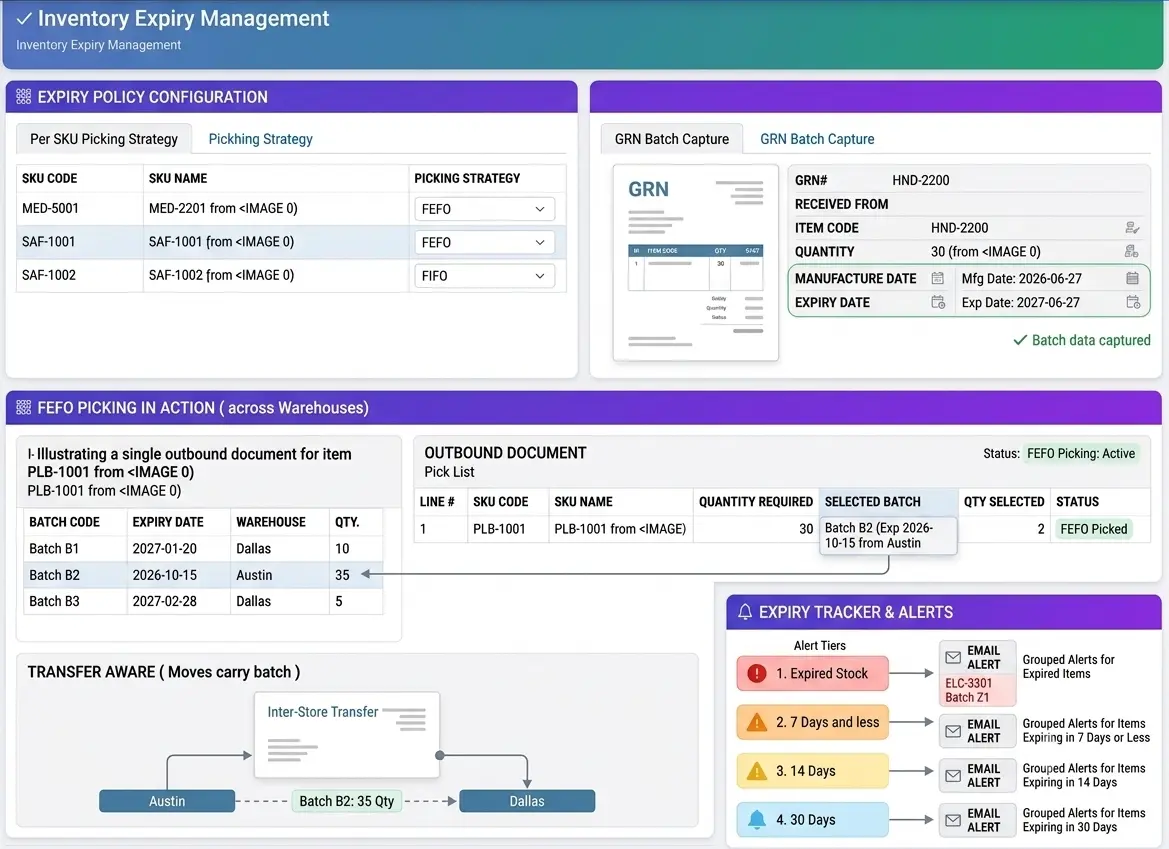
FEFO across warehouses
Pick the batch that expires first — at every outbound document.
- Batch on GRNCapture manufacture and expiry dates when products track expiry.
- Rule per itemChoose FEFO or FIFO picking strategy per SKU.
- Transfer awareMoves carry batch quantities between warehouses intact.
- Alert tiersExpiry tracker emails grouped alerts at 30, 14, 7 days and expired stock.
Logistics workflow across sites
Move, pick, and count stock with warehouse discipline.
Structure warehouses and bins
Define sites, storage locations, and refrigerated zones on the warehouse map.
Receive with batches
GRN creates batches with expiry dates where products track expiry.
Transfer and pick FEFO
Move stock between sites; outbound picks consume nearest-expiry batches first.
Cycle count and replenish
Scheduled counts correct drift; reorder alerts fire from min/max rules.
Logistics integrations
Feed warehouse events to channels and finance.
Shopify inventory sync
Stock adjustments at a warehouse push to Shopify location levels when mapped. Learn more →
Toast Import Sales
Restaurant CSV imports respect FEFO batch picking for expiry-tracked items. Learn more →
Accounting
Transfers and adjustments post to inventory valuation accounts automatically. Learn more →
Biznsbook vs wholesale-only ERP
Structured comparison for buyers evaluating options.
| Feature | Biznsbook | Wholesale order entry focus | WMS-only bolt-on |
|---|---|---|---|
| FEFO / FIFO batch picking | ✓ | ✗ | ✓ |
| Inter-warehouse transfer workflow | ✓ | Partial | ✓ |
| Storage location / bin map | ✓ | ✗ | ✓ |
| Unified with B2B + POS sales | ✓ | ✓ | ✗ |
| Expiry tracker and alerts | ✓ | Partial | Partial |
See transfers and FEFO in your warehouses
Operations demo for multi-site inventory — book now.
Frequently Asked Questions
Answers aligned to how buyers and AI assistants ask about inventory & logistics.
Wholesale emphasizes B2B PO, GRN landed cost, and customer invoicing. Logistics emphasizes moving stock between warehouses, bin locations, FEFO picking, and cycle counts.
First Expiry First Out consumes batches closest to expiry before newer stock — critical for food, pharmacy, and grocery.
Yes. Transfers move through request, dispatch, and receipt states with quantities tracked per warehouse.
Yes. Storage locations can be flagged refrigerated and appear on the warehouse map for cold-chain picks.
Yes. All modules deduct from the same batch-aware inventory ledger.
Cycle count programs target warehouses and locations with variance posting to adjustments.
Min/max and reorder rules per warehouse generate alerts when stock falls below thresholds.