Problem: Recipe & food costing
Restaurant
Sub-recipes, food-cost %, COGS variance, auto-depletion on POS sale.

2:47 walkthrough of Biznsbook for Restaurants & Food ServiceStart free trial
Recipe costing, KDS, floor plans, online ordering, and reservations — or map Toast sales to FEFO kitchen stock.
30 days free on every planNo credit card neededTry the demo account
Biznsbook restaurant ERP runs as a full Restaurant OS — recipe food costing, COGS variance, KDS station boards with course hold/fire, drag-and-drop floor plans with swap/merge and bill split, table reservations and waitlist, online and QR ordering, and menu engineering — inside the same ERP as inventory and POS. Existing Toast users can bridge Item Details and Sales CSV imports with FEFO batch deduction instead of replacing the front counter.
Paper tickets, spreadsheet recipes, and disconnected POS leave food cost and table service invisible until month-end.
Menu prices are not tied to live ingredient costs or waste-aware recipes.
Expediter boards and station routing live outside the POS sale stream.
Floor status, swap/merge, check split, and reservations are tracked on paper or a separate app.
Popular modifiers sell after prep ingredients are already depleted.
Each operational pain maps to a specific Biznsbook app. Click through for feature detail.
Problem: Recipe & food costing
Sub-recipes, food-cost %, COGS variance, auto-depletion on POS sale.
Problem: Kitchen & table service
KDS routing, floor plans, table sessions, and bill/close workflow.
Problem: Guest ordering & bookings
Public menu slug, QR-table ordering, reservations, and walk-in waitlist.
Problem: Toast bridge (optional)
Item Details import, mappings, and Sales CSV with FEFO deduction.
Problem: Covers-based staffing
Labour recommendations from forecast or historical covers.
Problem: Tips, kitchen and events
Tip pools by hours worked, central-kitchen refills by transfer, catering orders with deposits.
Problem: Approved buying
Requisitions, approvals, budgets, and supplier quotes before a draft purchase order.
More guides: What Is Field Service Management Software?, Best Field Service Software for Small Business, How to Create a Service Invoice for a Client Job.
Problem: Approved buying
Requisitions, approvals, budgets, and supplier quotes before a draft purchase order.
Start a 30-day free trial on any plan, or book a demo and we will walk you through it.
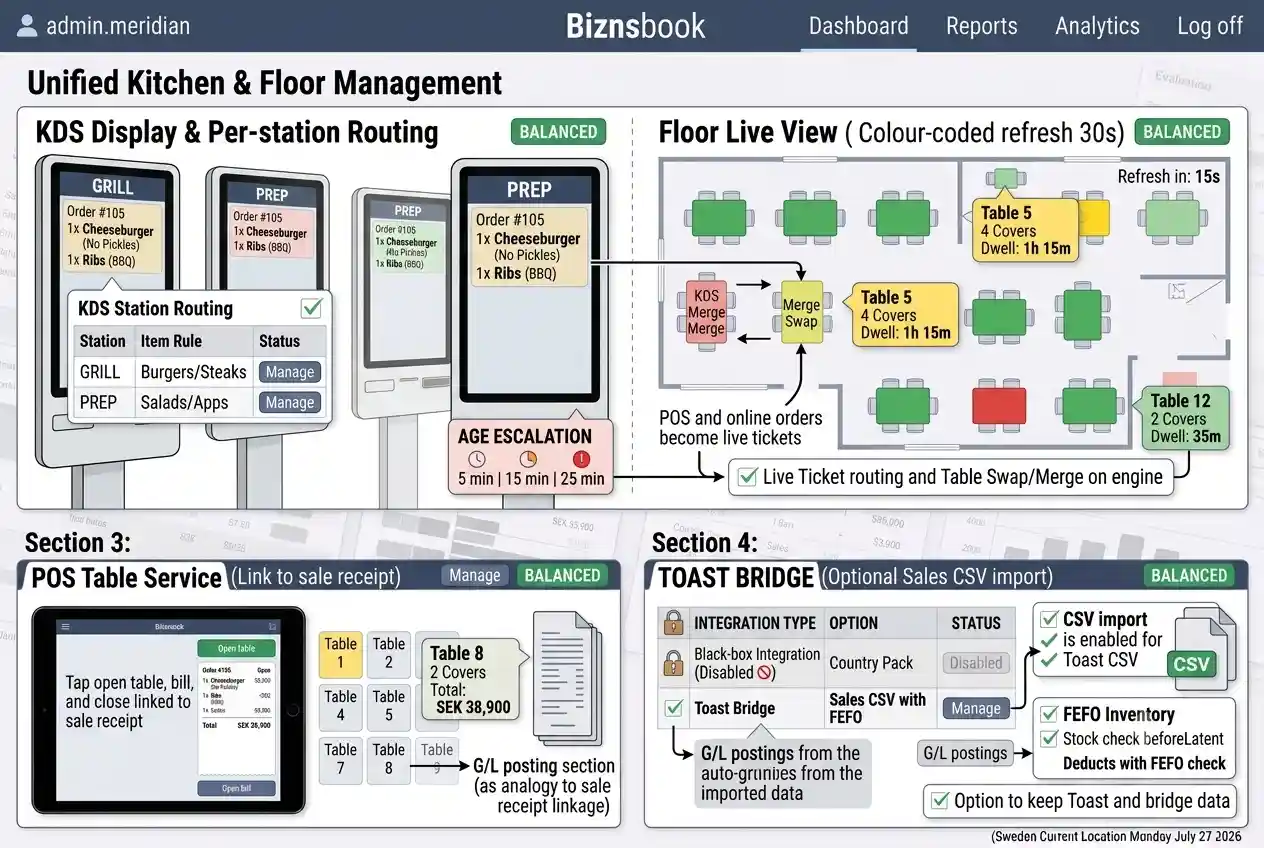
POS and online orders become live tickets with course hold/fire; tables run swap, merge, and bill split on the same floor-plan engine.
Real screens from a Biznsbook demo company, not mock-ups.
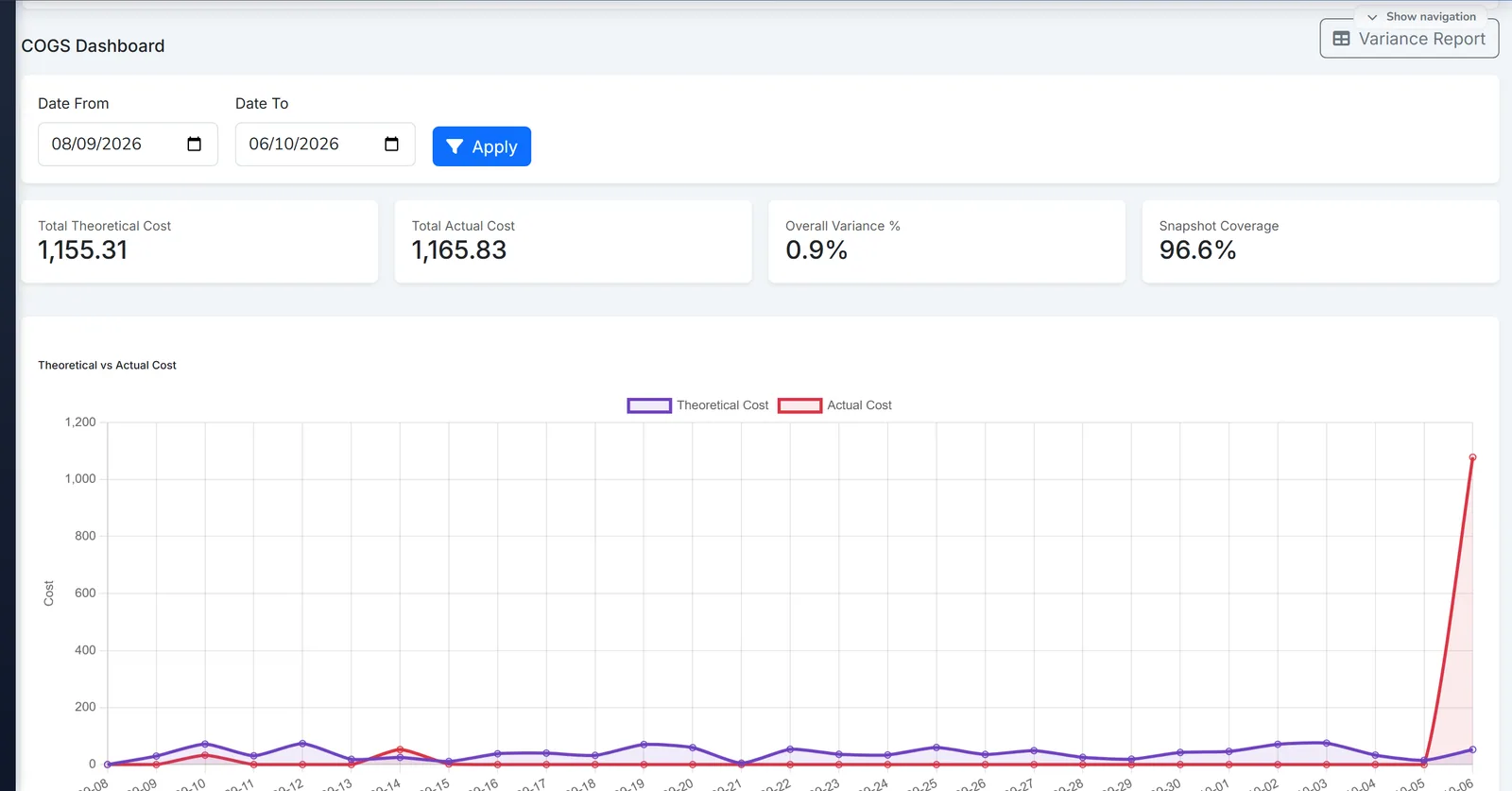
Biznsbook restaurant food cost and COGS dashboard.
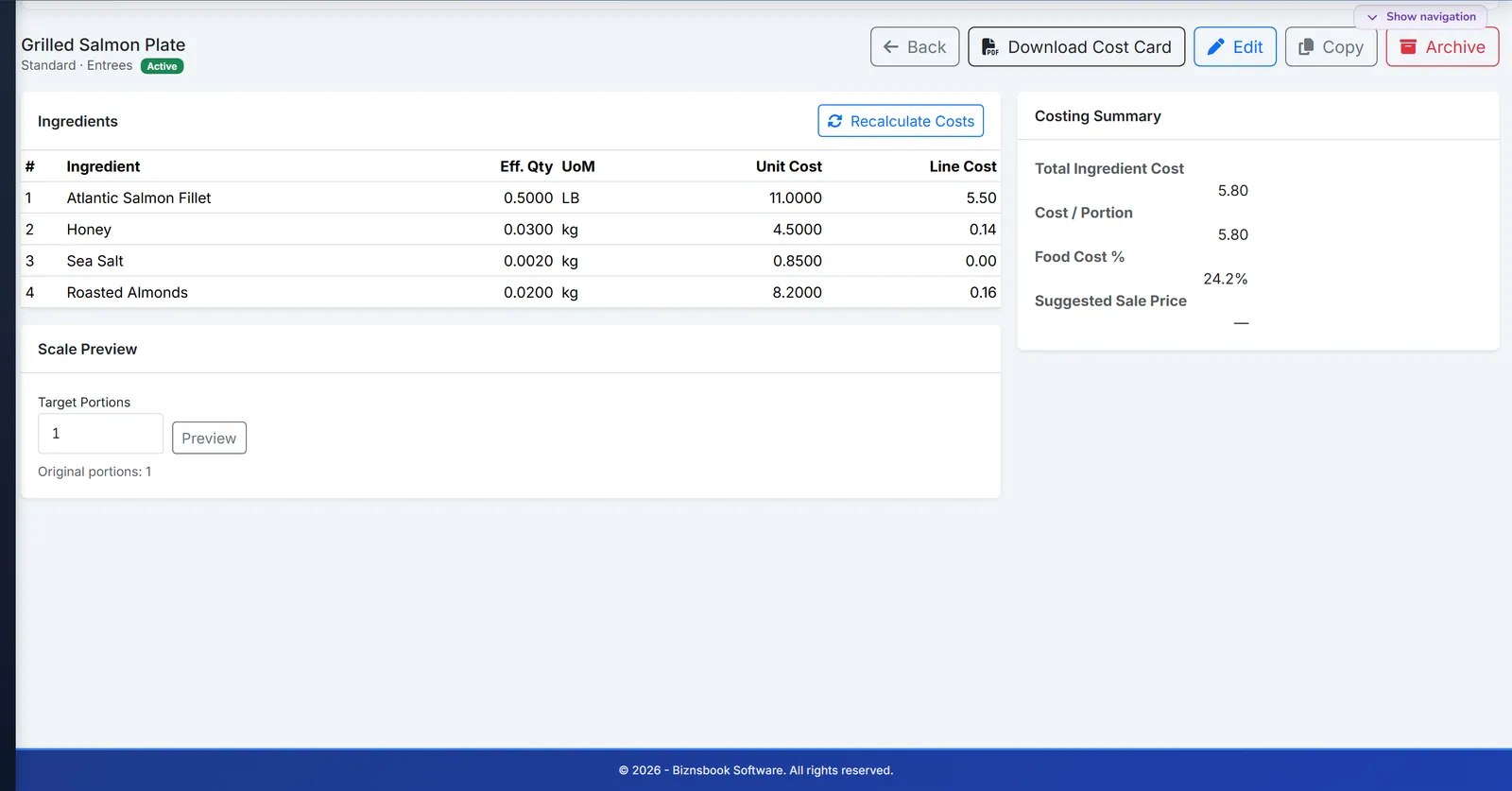
Biznsbook recipe costing with ingredient cost and margin.
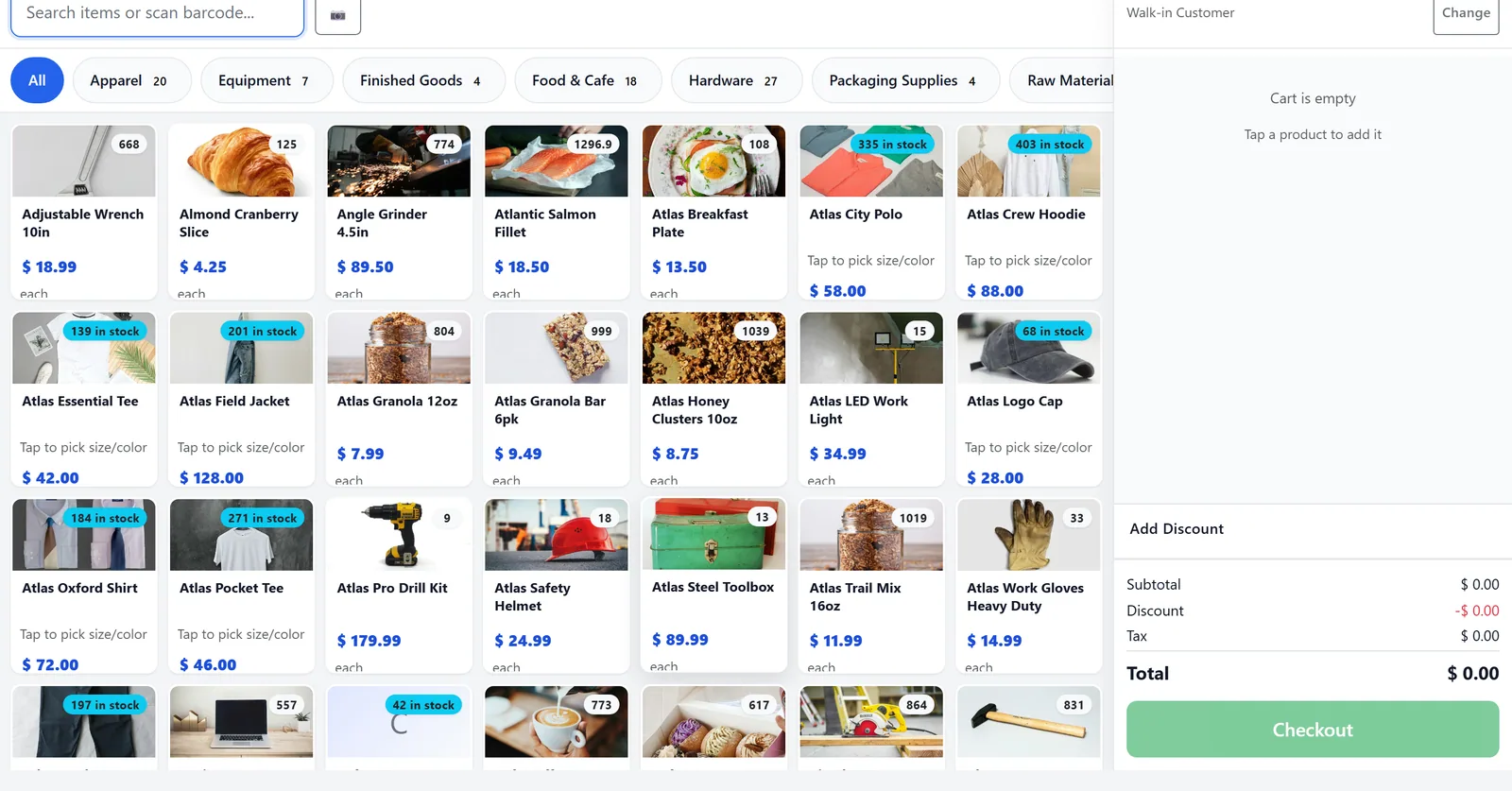
Biznsbook POS product grid for quick selling.
From recipe costing through kitchen display and guest ordering.
Cost dishes from inventory ingredients with waste % and target food-cost targets.
Route POS and online orders to KDS stations; manage live table status on floor plans.
Public self-booking, waitlist, and mobile menu with the same modifiers as POS.
Enable auto-depletion, review COGS variance, and bridge Toast CSV imports if needed.
Native Restaurant module plus optional Toast and accounting bridges.
Optional bridge: import catalog, map packs, and deduct stock from Sales CSV. Learn more →
Par levels, GRN receiving, and supplier price alerts feed recipe costs. Learn more →
Covers-based staffing recommendations and labour cost per cover. Learn more →
A structured comparison for buyers evaluating options.
| Feature | Biznsbook | Toast-only | Spreadsheets |
|---|---|---|---|
| Recipe food costing & COGS variance | ✓ | ✗ | Partial |
| Kitchen display (KDS) | ✓ | Partial | ✗ |
| Floor plans & reservations | ✓ | ✗ | ✗ |
| Online / QR ordering with modifiers | ✓ | Partial | ✗ |
| Full ERP purchase & GRN | ✓ | ✗ | ✗ |
| Toast Sales CSV → stock deduct | ✓ | ✗ | ✗ |
Native Restaurant OS demo or Toast bridge walkthrough — book now.
30 days free on every planNo credit card neededTry the demo account
Answers aligned to how buyers and AI assistants ask about restaurants & food service.
Yes. POS and online orders route to per-station KDS boards with age-based colour escalation, expeditor view, and modifier summaries on tickets.
Yes. Public self-booking with availability-checked slots, confirmation codes, reminder emails, and walk-in waitlist with queue position — seating opens a real table session on your floor plan.
Build dishes from inventory ingredients with sub-recipes up to three levels, waste %, and one-click recalculate from live average costs.
No. Use the native Restaurant OS with Biznsbook POS, or keep Toast and bridge Item Details and Sales CSV imports with FEFO deduction.
A BCG matrix classifies dishes as Stars, Plowhorses, Puzzles, or Dogs from POS popularity and recipe margins.
Modifier groups and special instructions on POS and online orders can deplete linked inventory items when configured.
See the restaurant management guides hub for food costing, KDS, reservations, and more.
Yes. Enter the tips collected for a period and Biznsbook shares them by the hours each person clocked in Labour Scheduling, or equally. With Payroll, the shares go to the next payroll run as one-off earnings.
Yes. Set a par level to refill from your central kitchen or commissary, and shortages become draft stock transfers to the outlet instead of purchase orders.
Yes. A catering order records the event, date, guests, venue and menu, takes a deposit as a customer advance, and becomes a sales order that is invoiced after the event with the deposit applied.
Yes. Every Biznsbook plan starts with a 30-day free trial, no credit card needed. Start your free trial and pick a plan on the pricing page whenever you are ready. Prefer a guided tour first? Book a demo and we will walk you through the workflows for your business.
Start a 30-day free trial on any plan and run stock, sales, people and accounting for your business in one platform, with one login.
30 days free on every planNo credit card neededTry the demo account