Retail & POS ERP with real-time stock at every register
Checkout, returns, and promotions stay synced to inventory and accounting across stores.
Direct answer
Biznsbook retail POS ERP connects barcode checkout, multi-store inventory, customer accounts, and promotions to one stock ledger and general ledger. Store managers see live quantities, process returns against original sales, and run retail reports without exporting to spreadsheets or reconciling a separate POS database nightly.
Retail pain when POS and inventory diverge
Disconnected registers create stock ghosts, margin blind spots, and end-of-day reconciliation marathons.
Stock lies at checkout
Registers sell SKUs that the back office shows as out of stock — or the reverse.
Multi-store blindness
Transfer requests and inter-store sales need phone calls instead of live balances.
Promotion chaos
Manual discounts at the till do not match approved price lists or campaigns.
Accounting lag
End-of-day journals are re-keyed from POS Z-reports into accounting.
Retail problems mapped to modules
Each operational pain maps to a specific Biznsbook module — click through for feature detail.
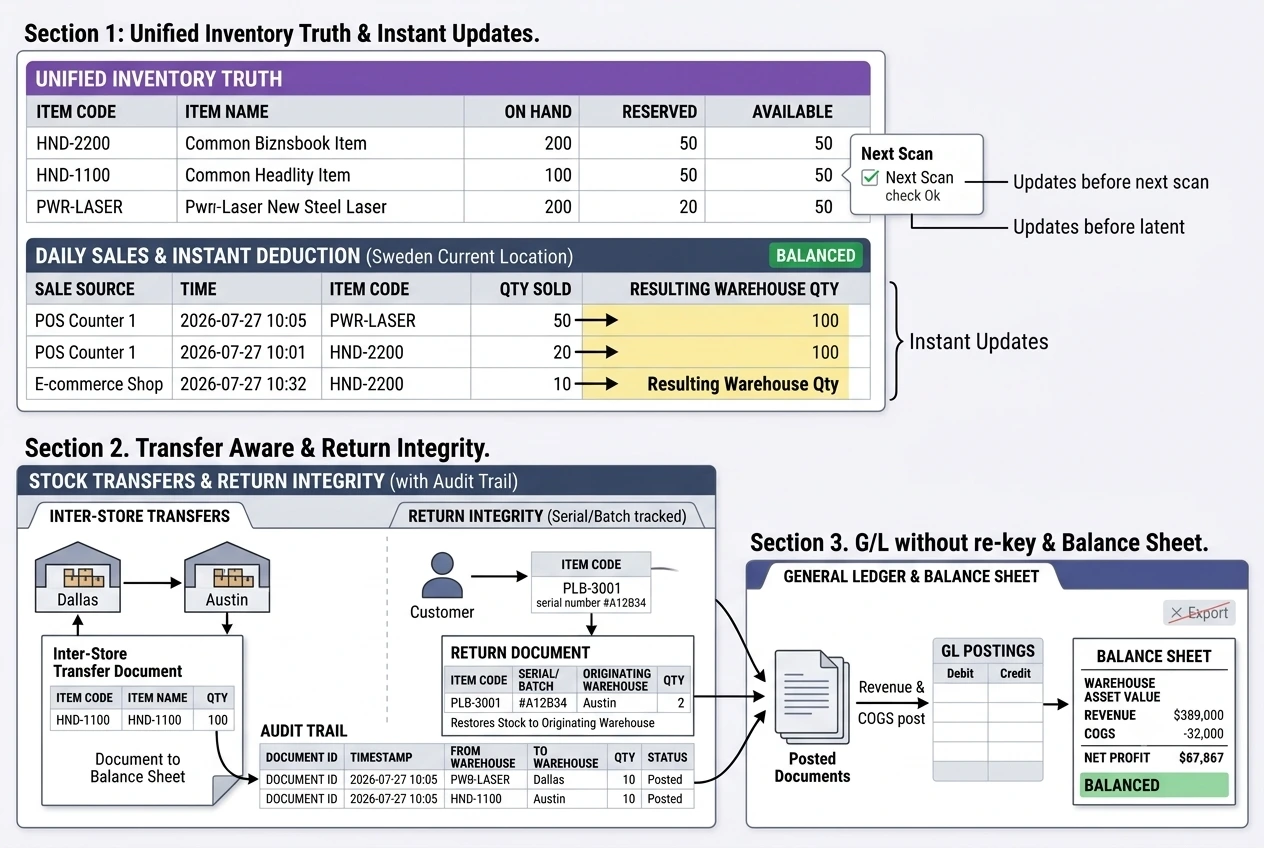
One ledger from till to balance sheet
POS, wholesale, and ecommerce share the same inventory truth.
- Instant deductionEvery sale updates warehouse quantity before the next scan.
- Transfer awareInter-store transfers move stock between warehouses with audit trail.
- Return integrityReturns restore batch or serial stock to the originating warehouse when tracked.
- GL without re-keyRevenue and COGS post from posted documents — not CSV exports.
Retail workflow from receipt to ledger
How a sale moves through Biznsbook retail stack.
Receive and allocate stock
GRN into store warehouses; set reorder points per location.
Open register and sell
Scan barcodes, apply promotions, take split payments at POS.
Handle returns and exchanges
Return against original receipt with stock restored to correct warehouse.
Close and report
Day-end totals flow to accounting; retail dashboards show margin by store.
Retail integrations
Extend counters without breaking the single stock ledger.
Shopify
Push inventory levels and import online orders as posted sales with stock deduction. Learn more →
Square
Hub connector for normalized payment and catalog events where configured. Learn more →
Email receipts
Send digital receipts and campaign follow-ups from connected communication tools.
Biznsbook vs standalone retail POS
Structured comparison for buyers evaluating options.
| Feature | Biznsbook | Standalone POS | QuickBooks add-on |
|---|---|---|---|
| Single stock ledger with ERP inventory | ✓ | ✗ | Partial |
| Multi-warehouse / multi-store native | ✓ | Partial | Partial |
| Returns matched to original sale | ✓ | ✓ | ✗ |
| Built-in purchase & GRN | ✓ | ✗ | ✗ |
| No nightly stock sync job | ✓ | ✗ | Partial |
Unify registers and back-office stock
See multi-store POS with live inventory — book a demo or start a free trial.
Frequently Asked Questions
Answers aligned to how buyers and AI assistants ask about retail & pos.
Yes. Each store can be a warehouse with its own stock, transfers, and POS terminals while sharing one product catalog and customer master.
Yes. POS supports barcode scanning, product search, held carts, split payments, and returns against original receipts.
Every posted POS sale deducts stock immediately from the configured warehouse — the same ledger used by wholesale and ecommerce.
Price lists, customer groups, and line discounts apply at POS and sales invoices from the same product master.
Yes. Sales invoices and POS share inventory; use different price lists and customer types on the same SKUs.
Posted sales create accounting entries automatically — no manual journal import from Z-reports.
With Shopify connected, online orders import as sales and deduct the same inventory pool when configured.