Fast Billing & Checkout
Search products by name, code, or barcode. Add to cart, apply discounts, and complete checkout in seconds.
- ✓ Barcode scanning
- ✓ Product quick search
- ✓ Line-level discounts
- ✓ One-click checkout
Biznsbook POS gives you lightning-fast billing, Bring Your Own Payments (SumUp, bank, QR — 0% of sales), real-time stock deduction, invoice printing, and automatic journal entries — all from one screen connected to your Inventory, Accounting, and CRM.
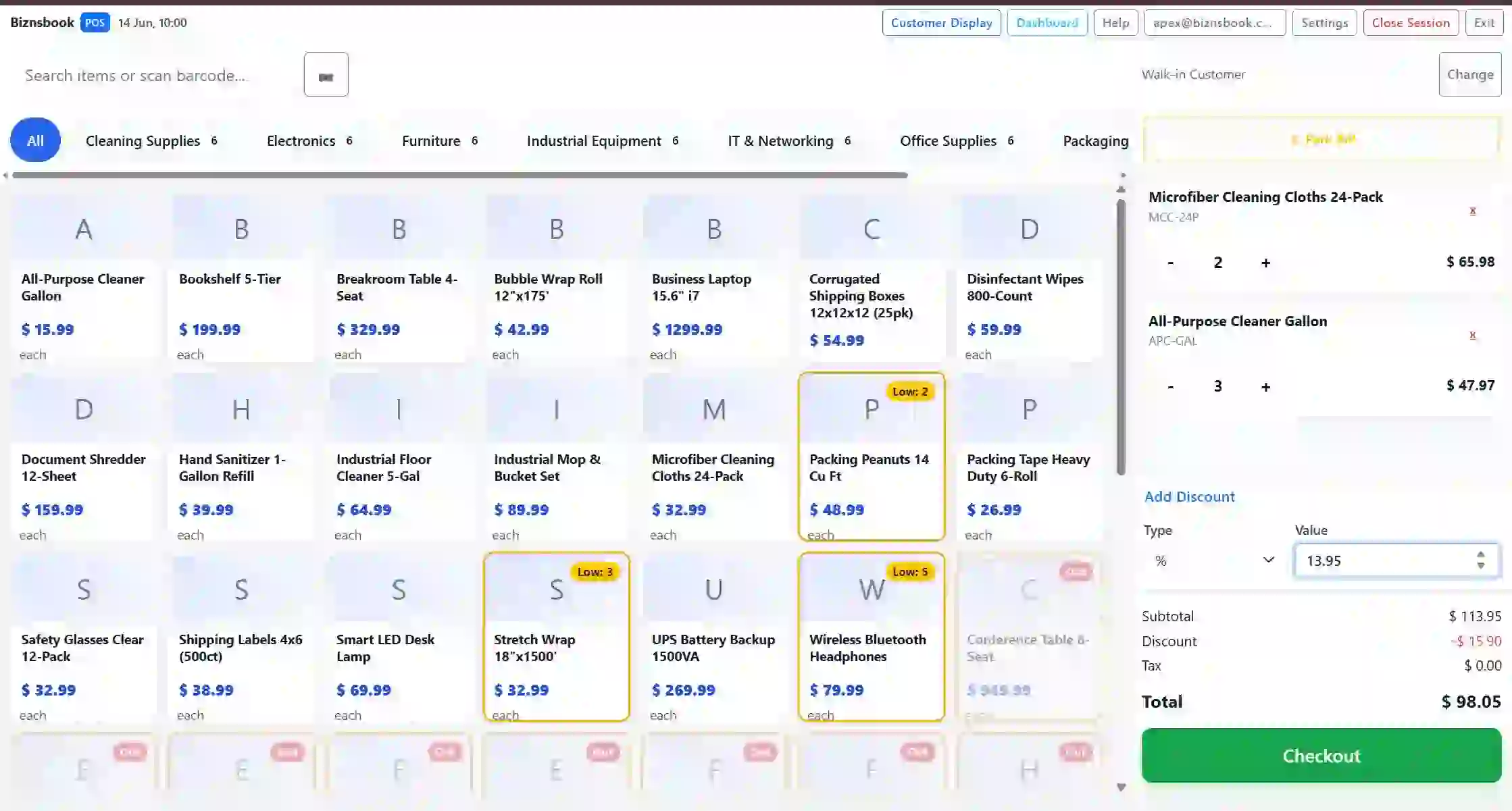
From product search to Bring Your Own Payments — Biznsbook POS covers the full checkout workflow.
Search products by name, code, or barcode. Add to cart, apply discounts, and complete checkout in seconds.
Every sale instantly deducts stock. Low-stock alerts and multi-warehouse tracking keep your shelves stocked.
Use SumUp, bank transfer, wallet QR, or any method you already have. Biznsbook records and reconciles it — and takes 0% of your sales.
Classic cash and card with change due, F11 split, and optional Stripe Terminal for card-present. Every method maps to the ledger.
Generate professional invoices with itemized details, tax breakdowns, and payment info. Print or email instantly.
Open a float per shift, track expected vs counted cash, declare non-cash tenders at close, and generate Z-reports by terminal and date.
Configure POS terminals per branch with tax groups and receipt modes. Multiple cashiers run simultaneous sessions with per-register reporting.
Posted POS refunds restore stock when the original sale was a POS sale bill. Accounting reversals keep finance in sync.
Link sales to customer profiles. Track purchase history, balances, and receivables per customer.
A modern retail terminal built into your ERP — browse products, build a cart, take payment, and post inventory and accounting in one flow.
The Biznsbook POS terminal at /pos is designed for speed at the counter. Cashiers browse categories, search or scan barcodes, apply discounts, and complete sales while stock, journals, and customer balances update automatically.
POS (Point of Sale) software is a digital checkout system used by retail and wholesale businesses to process sales transactions. It handles billing, inventory deduction, payment processing, and generates sales reports — all in real time. When integrated with your ERP, every sale automatically updates inventory, posts accounting entries, and tracks customer balances.
Start by searching for products — by name, SKU, or barcode scan. Add items to the cart, select a customer (or walk-in), apply discounts, and choose a payment method. The system calculates totals, taxes, and change. One click prints the invoice, deducts inventory, and posts accounting entries.
You sell an item but stock levels don't update. You discover shortages only during manual stock counts. Overselling becomes a daily problem.
Every sale needs a separate journal entry. Revenue, COGS, tax, and receivables are posted by hand. Errors compound. Month-end is chaos.
Searching for products takes too long. Payment processing is clunky. Customers wait. Lines grow. Sales are lost.
Every sale deducts stock in real time. Low-stock alerts trigger automatically. Multi-warehouse tracking keeps every location accurate.
Revenue, COGS, tax liabilities, and customer receivables — all posted to the general ledger automatically with every transaction. Zero manual entries.
Barcode scan, quick search, one-click payment. Complete a sale in seconds. No waiting. No friction. Happy customers.
Replace disconnected checkout systems with POS that talks to your entire ERP.
Real-time inventory. Automatic accounting. Lightning-fast checkout. All in one system.
Biznsbook POS is designed for speed. Here's how every transaction flows.
Find products by name, SKU, or barcode scan. Add quantities and apply line-level discounts.
Choose an existing customer or walk-in. Tax rules apply automatically based on your configuration.
Cash, card, split, or your own tenders (SumUp, bank, QR). Change calculates and the ledger updates instantly.
Invoice prints, stock deducts, and accounting entries post — all automatically in one click.
Fast billing, real-time inventory, and automatic accounting — all inside your ERP.
From retail counters to wholesale distribution — fast checkout for every business type.
Fast checkout with barcode scanning, receipt printing, and real-time stock tracking. Perfect for shops with high transaction volume.
Bulk billing with customer credit tracking, split payments, and multi-warehouse inventory management for distributors.
Sell finished goods directly from production. POS connects to manufacturing output for accurate stock of manufactured items.
Every POS transaction ripples through inventory, accounting, and customer management without any manual work.
Every sale deducts stock instantly. Returns restore stock. Low-stock alerts trigger automatically. Multi-warehouse tracking across locations.
Revenue, COGS, tax liabilities, and payment receipts post to the general ledger automatically with every transaction. Zero manual entries.
Link sales to customer profiles. Track purchase history, credit balances, and receivables. Build customer relationships from transaction data.
Track revenue, margins, top products, and customer trends with built-in sales intelligence.
Revenue, transaction count, average order value, and payment method breakdown. Filter by date, location, or cashier.
Top-selling products, slow movers, profit margins, and category-wise revenue analysis. Know what sells and what doesn't.
Top customers by revenue, purchase frequency, and average transaction value. Aging reports and receivables tracking.
No separate POS license. No per-transaction fee. Just activate the module. Process sales alongside Inventory, Accounting, and CRM — all in one plan.
See how this module fits vertical-specific workflows — not just generic features.
Quick answers to common questions about POS billing, inventory sync, payments, and pricing.
POS (Point of Sale) software is a digital checkout system for processing sales transactions. It handles billing, inventory deduction, payment processing, and generates sales reports — all in real time. Biznsbook POS is integrated with your entire ERP.
Yes. Every sale instantly deducts stock from the connected inventory module. You can track real-time stock levels, receive low-stock alerts, and manage multi-warehouse inventory from one dashboard.
Yes. Biznsbook POS supports full and partial sales returns. Returned items are automatically added back to inventory, and the accounting entries are reversed to maintain financial accuracy.
Cash, card, split, and Bring Your Own Payments tender types (SumUp, bank transfer, wallet QR, and more you define). Each tender posts to its own clearing account. Optional Stripe Terminal for card-present. Biznsbook takes 0% of your sales on BYOP tenders.
Bring Your Own Payments (BYOP) lets you use the card machines and wallets you already have. Configure tender types in Payments, take multi-tender sales at the till, show a payment QR on the customer display, then record or import CSV settlements and reconcile clearing balances. Biznsbook never holds the funds and takes no cut of those sales.
Yes. Biznsbook POS supports multi-location and multi-warehouse operations. Each location can have its own inventory, and you can view consolidated sales analytics across all branches.
Yes. Use any USB or Bluetooth barcode scanner. Products are instantly found and added to the cart when scanned. No special hardware configuration needed.
Every POS transaction automatically generates journal entries in the general ledger. Sales revenue, cost of goods sold, tax liabilities, and payment receipts are all posted without manual intervention.
Cashiers open a session with an opening float linked to a POS terminal register. Sales post through the shift with expected vs counted cash on close. Z-reports by terminal and date summarize totals and tax breakdown — including back-office checkout for the same register.
Yes. Configure multiple POS terminals per branch with tax groups and receipt settings. Each terminal has its own cashier sessions and Z-reports while sharing inventory and accounting.
Yes. Multiple cashiers can operate POS on separate devices simultaneously. Each session is tracked individually for accountability and reporting.
Yes. Sales can be recorded on credit, creating a receivable entry. Track customer balances and collect payments later through the payment module.
Biznsbook includes POS in every ERP subscription at no extra cost. No per-transaction fees. No separate POS license. Just activate the module. View pricing ?
POS (Point of Sale) software is a digital checkout system used by retail and wholesale businesses to process sales transactions. It handles billing, inventory deduction, payment processing, and generates sales reports — all in real time. When integrated with your ERP, every sale automatically updates inventory, posts accounting entries, and tracks customer balances.
Start by searching for products — by name, SKU, or barcode scan. Add items to the cart, select a customer (or walk-in), apply discounts, and choose a payment method. The system calculates totals, taxes, and change. One click prints the invoice, deducts inventory, and posts accounting entries.