Close More Deals. Build Stronger Relationships.

2:45 walkthrough of Biznsbook CRMStart free trial
Biznsbook CRM gives your sales team everything they need — lead management, visual pipelines, smart automation, and deep ERP integration. All in one place.
30 days free on every planNo credit card neededTry the demo account
Biznsbook CRM at a glance
- Best for
- Sales teams that want leads, pipelines and quotations connected to orders, stock and invoices
- Works with
- Sales, Email, Automation, AI Content and the rest of Biznsbook
- Free trial
- 30 days free on every plan, no credit card. See plans and pricing
- Access
- Cloud software in any modern browser, on desktop, tablet or phone
Everything Your Sales Team Needs
Capture, Score & Convert
Capture leads by hand, from web forms or from a spreadsheet. Rule-based lead scores from 0 to 100 (source, industry, engagement) are refreshed nightly. Convert a qualified lead to contact, account and deal in one step.
Drag-and-Drop Deal Board
See every deal at a glance with weighted value per stage. Move deals between stages with drag-and-drop, and let health dots flag deals going cold.
Complete Customer Profiles
A single record for every contact and company. Full activity history, communication log, and deal history in one view.
Log Every Touchpoint
Calls, emails, meetings, notes — log in seconds. A complete timeline of every customer interaction, automatically organised.
Automate the Boring Stuff
Set rules: when a lead scores above 70, assign to senior rep and send email. Build workflows without writing code.
Know Your Numbers
Win rate, pipeline velocity, revenue forecast, team performance. Nine report types with Excel and PDF export.
Web Form Builder
Capture leads from your website with embed codes, branding, thank-you pages, and a secure public submission API.
Email Sequences & Drip Nurture
Step-based automated follow-ups. Enroll prospects via Business Automation when leads are created or deals move stage.
Customer Onboarding
Start an onboarding plan from a won deal with tasks copied from a template, block a task with a reason, and track a customer health score. Weekly task reminders keep new clients on track.
Deal Health & At-Risk Deals
Every open deal gets a health score from 0 to 100 based on recent activity, time in stage, a passed close date, a missing contact or next task. The Deal health page lists at-risk deals with the reasons, and managers tune the weights.
Close Won to Draft Sales Order
Win a deal and CRM creates a draft sales order in Sales with the deal’s inventory products, finding or creating the customer. Sales confirms, delivers and invoices it, and the deal shows the order’s live status.
Quotations Customers Accept Online
Price lines from inventory, email the PDF or send the link by WhatsApp, and the customer accepts or declines on a public page without signing in. Revise into new versions; an accepted quotation becomes a draft sales order.
Territories & Lead Routing
New leads without an owner go to the owner of the matching sales territory, then to routing rules by source, country and industry, either round robin or a fixed owner. People who have left are skipped.
Lost Reasons & Competitors
Close lost deals with a standard lost reason, record competitors on each deal, and see win rate, lost reasons and competitors lost to in the Win/loss report.
Import, Duplicate Check & Merge
Import leads, contacts and accounts from Excel with column mapping, a validation preview and a trial run. Duplicate warnings appear as you type an email or phone, and merging moves activities, deals and quotations to the record you keep. Lists export with your filters.
Sales Commissions
Commission rules (flat or percentage, optionally per employee or role and deal size) calculate commission when a deal is won. Split it, approve or reject it, then mark it paid or send it to the next payroll run.
Auto-Logged Emails, WhatsApp & E-Signed Quotes
Emails and WhatsApp messages land on the contact's timeline by themselves, quotations go out for e-signature, and idle deals remind their owner. Signing a quotation accepts it. One customer timeline in Party 360. Marketing consent respected on every send.
Lead Radar & Prospect Inbox
Lead Radar reads public posts on Reddit, Hacker News, Stack Exchange, Bluesky and RSS feeds (including Google Alerts), scores likely buyers out of 10 and suggests a reply you copy and post yourself. It never posts or sends messages. Prospects wait in a Prospect Inbox, apart from your leads, to convert, snooze or dismiss, with alerts to Discord, Slack, Teams, Google Chat, Telegram, email or the CRM bell and a daily digest. Forwarded email, WhatsApp messages from new numbers, a web address for Zapier or Make, and consent-based website visitor tracking feed the same inbox.
Landing Pages & Free Downloads
Hosted landing pages and link-in-bio pages with a headline, picture, blocks and a sign-up form, so you need no website builder. Unlock a free download such as a guide or price list after sign-up (link valid 24 hours), download a QR code per campaign label, and see views, sign-ups, conversion and downloads. Sign-ups become leads or go to the Prospect Inbox first.
Referrals & Review Requests
A personal referral link for every customer and a refer-a-friend page with your offer. Referred friends become leads (source Customer referral) or Prospect Inbox entries, are followed to won deals, and the reward becomes due; rewards are tracked, never posted to your accounts. Thank-you emails after won deals ask for a review and a referral, with a per-contact limit and opt-outs respected.
Your Sales Team Is Working Too Hard — For Too Little
Leads slipping through the cracks
Important prospects are lost in spreadsheets, forgotten inboxes, and sticky notes. By the time someone follows up, the lead has gone cold.
No visibility into the pipeline
You have no idea what is closing this month. Managers spend hours piecing together deal updates from reps instead of coaching them to close.
Disconnected from your ERP
Sales data lives in one system, finance in another, inventory in a third. Manual re-entry wastes time and creates costly errors.
Never lose a lead again
Capture from web forms, spreadsheet imports and business card scans. Rule-based lead scoring prioritises hot leads, and task reminders make sure nothing falls through.
Pipeline you can actually see
A drag-and-drop Kanban board shows every deal at every stage. Revenue forecasting and deal health scores that flag at-risk deals keep your team on track.
Natively built into your ERP
Sales, inventory, payroll and expenses are all connected. When a deal closes, a draft sales order is created in Sales and commission is calculated from your rules.
See Biznsbook CRM in action
Real screens from a Biznsbook demo company, not mock-ups.
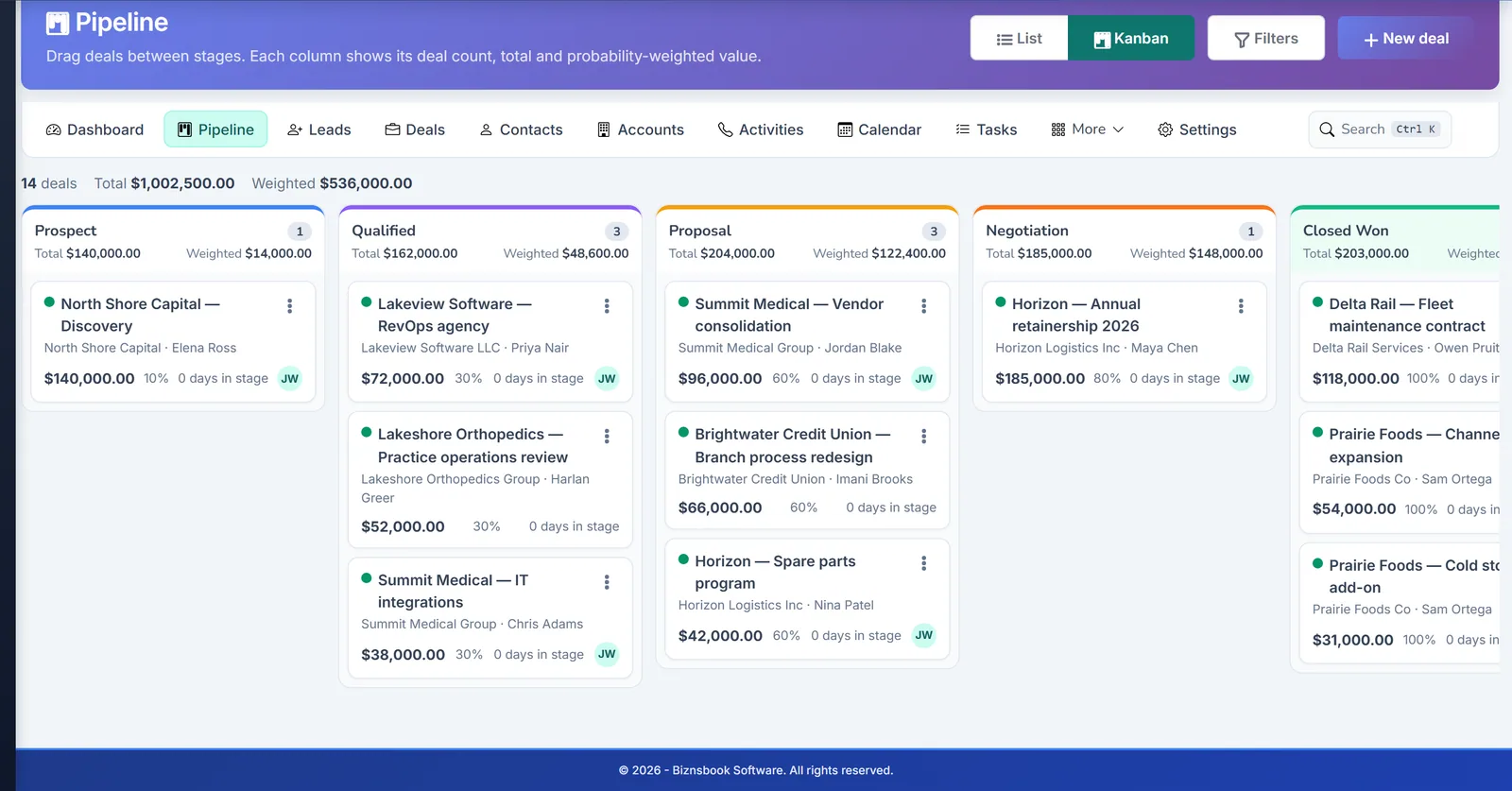
Deal Pipeline
Biznsbook CRM deal pipeline by stage.
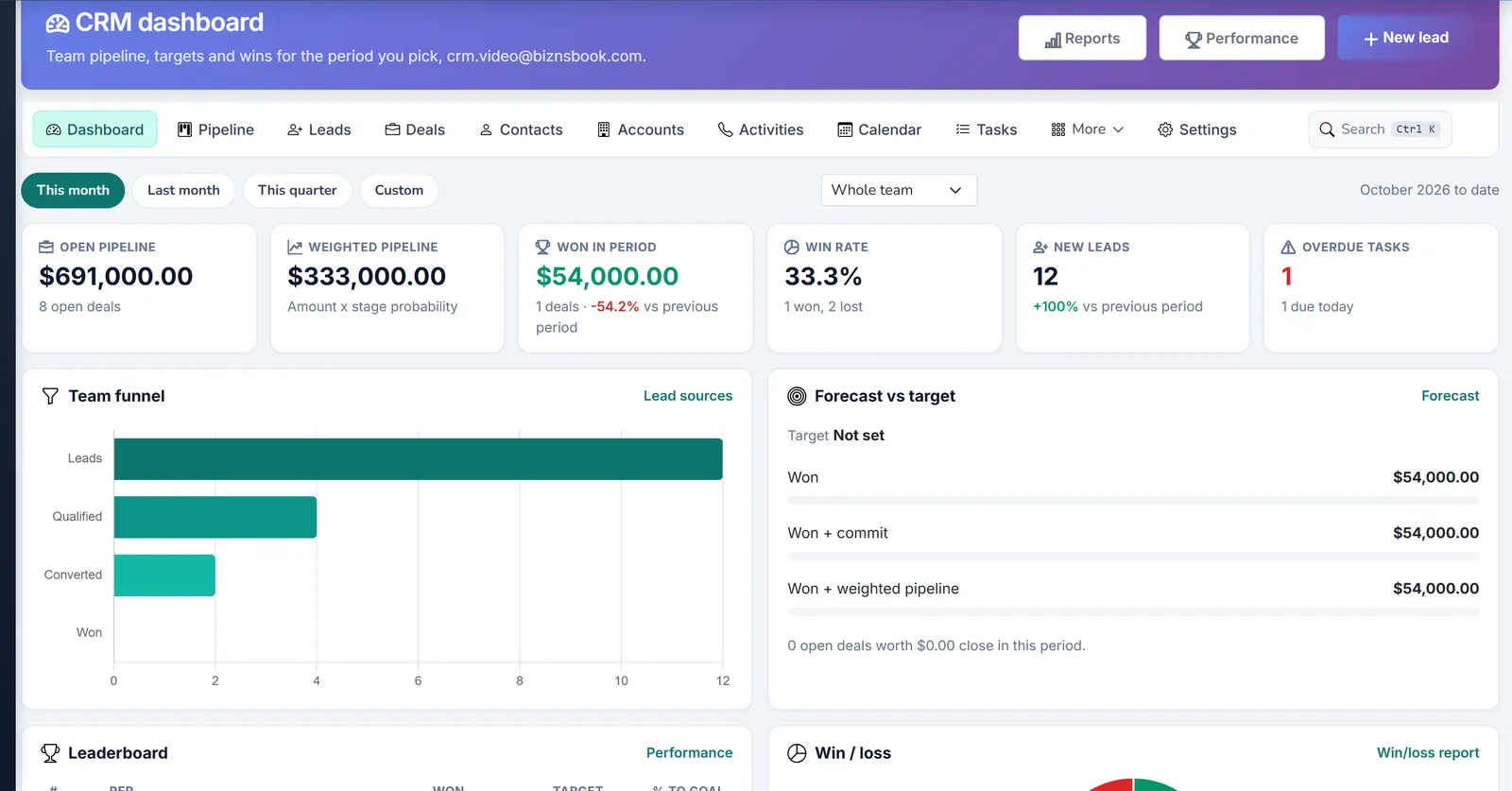
CRM Dashboard
Biznsbook CRM dashboard with pipeline value and activity.
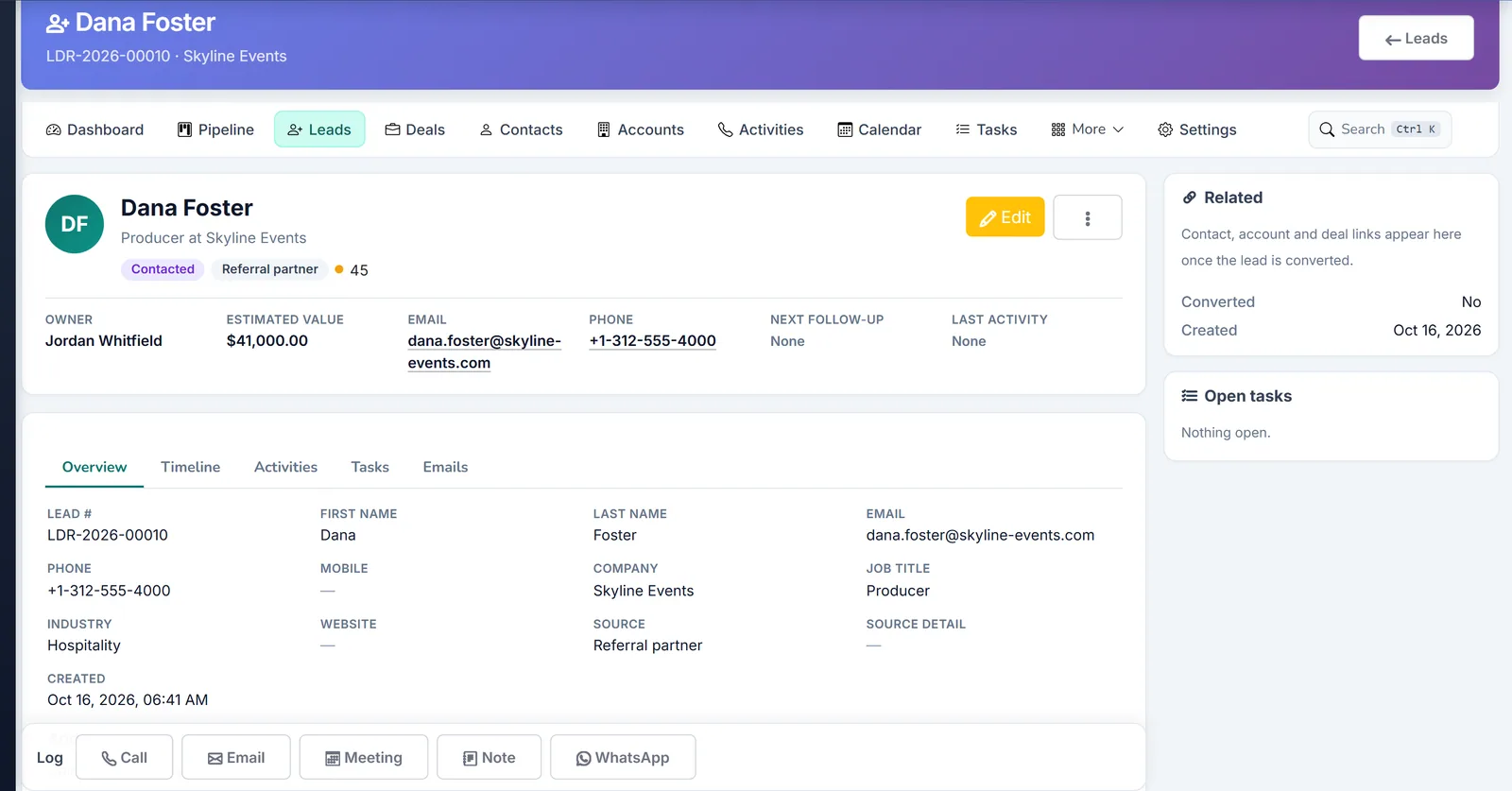
Lead Detail
Biznsbook CRM lead record with timeline and next actions.
Visual Sales Pipeline
See your entire revenue engine at a glance. Drag, drop, and forecast with confidence.
- ✓ Multiple pipelines per company
- ✓ Configurable stages with probability %
- ✓ Deal health scores for at-risk deals
- ✓ Weighted revenue forecast
- ✓ Mobile-friendly Kanban
- ✓ Filter by owner, amount or close date
Not Just a CRM. Your Entire Business, Connected.
Biznsbook CRM is built into your ERP — not bolted on.
Accounting
Close a deal → draft sales order in Sales, which confirms, delivers and invoices it. Link an account to a customer to see their invoices and balance on its Financials tab.
Inventory
Add inventory items to deals and quotations. They become sales order lines when the deal is won or the quotation is accepted.
HRMS
Sales reps are your employees. Commission rules can target one employee or role, and imported leads are assigned by employee code.
Payroll
Approved commissions go to the next open payroll run with Send to payroll. Splits to people who are not employees are skipped.
Real Estate
Real Estate leads are copied into CRM when they are created or converted. Property agents keep working in the Real Estate Agent Workspace, where co-broker commissions stay.
Expenses
The deal page has an Expenses tab for costs linked to the deal. Claims are approved and reimbursed in Expense Management.
Zero-Code Sales Automation
Build powerful workflows in minutes. No developers required.
- ✓ 24 event triggers across all ERP modules
- ✓ AND / OR condition logic
- ✓ 8 action types: email, SMS, task, field update, API call and more
- ✓ Execution logs with retry
- ✓ Built on the same Automation Engine as the rest of the ERP
Workflow Builder
Trusted by Sales Teams Across Industries
“We went from spreadsheets to a full CRM in one week. The pipeline visibility alone changed how we run our weekly sales meetings.”
“The Real Estate integration is a game-changer. Property deals, agent commissions, and buyer contacts — all in one place.”
“When a deal closes, the invoice appears in accounting automatically. My finance team does not even know they are benefiting from CRM.”
Why Biznsbook CRM Over Standalone CRMs?
| Feature | Biznsbook CRM | Salesforce | HubSpot | Zoho |
|---|---|---|---|---|
| ERP-native accounting integration | ✓ | ✓ | ✓ | ✓ Partial |
| Inventory product linking in deals | ✓ | ✓ | ✓ | ✓ |
| Commissions sent to payroll | ✓ | ✓ | ✓ | ✓ |
| Included in ERP subscription | ✓ | ✓ extra cost | ✓ extra cost | ✓ extra cost |
| Business automation engine built-in | ✓ | ✓ extra | ✓ limited | ✓ limited |
| OCR business card scanning | ✓ | ✓ add-on | ✓ | ✓ add-on |
| No per-user CRM seat fee | ✓ | ✓ | ✓ | ✓ |
CRM Is Included in Your Biznsbook ERP Subscription
No separate CRM license. No per-seat fee. Just activate the module. Every plan includes the full CRM with all features.
30 days free on every planNo credit card neededTry the demo account
Frequently Asked Questions
Is CRM included in all Biznsbook plans?
CRM is a licensed Biznsbook module. Choose it as one of your plan's modules or add it to any plan for $5 a month. It gives you leads, deals, pipelines, quotations, web forms, reports and more, and works with Sales, Communication Center and Business Automation. Each salesperson needs the CRM Manager or CRM Sales Rep role.
Can I migrate data from Salesforce or HubSpot?
Yes, for leads, contacts and accounts. Export them from your old CRM to a spreadsheet and import them with Data Import: an Excel template, column mapping that is remembered, a validation preview, a trial run that saves nothing, a file of failed rows, and the option to reverse a completed import.
Does the CRM work for real estate businesses?
Yes, alongside the Real Estate module. Real Estate has its own leads, bookings and Agent Workspace. When a company has both, Real Estate leads are copied into CRM when they are created or converted, so the whole sales team sees them; edits in CRM are not copied back. Property agents work in Real Estate and the rest of the team in the CRM pipeline.
How does commission calculation work?
When a deal is won, CRM calculates commission from the commission rule that matches it. A rule is a flat amount or a percentage, optionally for one employee or role and a minimum or maximum deal amount. You can split a commission between people, approve or reject it, then mark it paid or send it to the next open payroll run.
Can I customise the sales pipeline stages?
Yes. Create as many pipelines as you need, each with its own stages in order. Every stage has a win probability that drives the weighted pipeline and forecast, and one pipeline is the default. With Business Automation you can act on stage changes, for example create a task when a deal moves stage.
What can customers see in the customer portal?
Contacts you invite can sign in to see their quotations, deals and documents. CRM Managers invite contacts by email (each sets their own password), activate or deactivate access, and see when each customer last signed in. Customers use a separate portal login, never the Biznsbook login.
How many workflows can I create?
CRM automations — welcome emails, task creation, drip enrollment, and field updates — are configured in the Business Automation module (/Automation), not in CRM Settings. There is no hard limit on workflows; each supports multiple conditions, actions, cooldowns, and execution logs.
Does it work on mobile?
Yes. Biznsbook is fully responsive and works on any modern mobile browser. The Kanban pipeline, lead forms, activity logs, and deal updates are all optimised for touch screens. Your sales team can update deals on the go, right from their phones.
How do I send a quotation to a customer?
Choose Send on the quotation. The email window fills in the contact's address and your wording, in the contact's language, with the PDF attached and a View and accept quotation button. You can add files or send the link by WhatsApp instead. The quotation becomes Sent, an email activity is logged on the deal, and the email appears in the sent history.
Is lead scoring AI-based?
No. Lead scoring is rule-based. You set lead score rules (for example for source, industry or engagement), each with points, a condition and a priority. Every lead gets a score from 0 to 100, open leads are re-scored nightly, and optional score decay lowers the score of leads nobody has touched.
What happens when a deal is won?
CRM can create a draft sales order in Sales. It finds or creates the customer, adds the deal's inventory products, and shows the order number and its live status on the deal. Sales confirms, delivers and invoices the order; CRM never creates an invoice. A matching commission rule calculates the rep's commission.
Can customers accept a quotation online?
Yes. Every sent quotation has a link to a public page that needs no sign-in. The customer can download the PDF, accept by typing their name, or decline with a reason. Opening the link marks the quote Viewed, quotes past their valid-until date expire, and an accepted quotation can become a draft sales order.
How are new leads assigned?
A lead without an owner goes to the owner of the sales territory it matches. If no territory matches, lead routing rules are checked in priority order on lead source, country and industry, and assign by round robin or a fixed owner. Otherwise the lead stays unassigned until someone picks it up.
How does deal health work?
Every open deal starts at 100 and rules add or remove points. Rules cover no activity for 7, 14 or 30 days, too long in a stage, a passed close date, no contact, no open next task, probability against the stage default, and a viewed quotation. Scores refresh every two hours, and the Deal health page lists critical and watch deals with the reasons.
Can I find and merge duplicate leads, contacts or accounts?
Yes. As you type an email or phone on a new lead, CRM warns about existing matches. To merge, open the record you keep and merge the duplicate into it: activities, tasks, emails, deals, quotations and campaign memberships move across and blank fields are filled. A merge cannot be undone.
Can Biznsbook CRM find prospects on Reddit and other communities?
Yes, with Lead Radar, included in CRM. Describe what you sell and it reads public posts on Reddit, Hacker News, Stack Exchange, Bluesky and RSS feeds, including Google Alerts. Likely buyers are scored out of 10 and land in a Prospect Inbox with a suggested reply. It does not read LinkedIn, Facebook groups, X or Quora.
Does Lead Radar post replies or send messages for me?
No. It finds posts and suggests a reply. You copy it, edit it and post it yourself, following the community's self-promotion rules. Prospects stay out of your leads, reports and forecast until someone converts them into a lead.
Can I build a landing page with a free download?
Yes. Landing pages are hosted for you: add a headline, blocks and a sign-up form, and upload a guide or price list of up to 25 MB. People get a download link after signing up, valid for 24 hours. Each sign-up becomes a lead with source Landing page, and QR codes carry a campaign label.
Does the CRM run a referral program and ask for reviews?
Yes. Every contact can get a personal referral link. Referred friends are followed to a won deal, when the reward is due; you pay it your usual way and mark it paid, and nothing is posted to your accounts. Thank-you emails after won deals ask for a review and a referral, at most as often as you allow.
Is there a free trial of Biznsbook CRM?
Yes. Every Biznsbook plan starts with a 30-day free trial, no credit card needed. Start your free trial and pick a plan on the pricing page whenever you are ready. Prefer a guided tour first? Book a demo and we will walk you through CRM.
Try Biznsbook CRM free for 30 days
Start a 30-day free trial on any plan and run CRM together with the rest of your business: one platform, one login.
30 days free on every planNo credit card neededTry the demo account