Real Estate ERP with REMS lifecycle built in
Projects, units, bookings, installments, and lead CRM — payment schedules post to accounting automatically.
Direct answer
Biznsbook real estate ERP (REMS) manages developer sales and leasing lifecycles: projects with phases, unit inventory, customer bookings, flexible installment payment schedules, a public listings portal at /listings with online rental applications, lead CRM with site visits, commission tracking, and automatic accounting entries on receipts.
Property sales and leasing fracture without REMS
Unit availability in spreadsheets, vacant rentals invisible online, and leads lost between agents.
Unit double-booking
Sales teams sell the same unit because availability is not live.
Vacant units invisible online
Prospective tenants cannot browse or apply without staff intervention.
Installment drift
EMI due dates and late fees live outside the booking record.
Lead leakage
Inquiries from portals are not tied to site visits and conversions.
REMS pains mapped to modules
Each operational pain maps to a specific Biznsbook module — click through for feature detail.
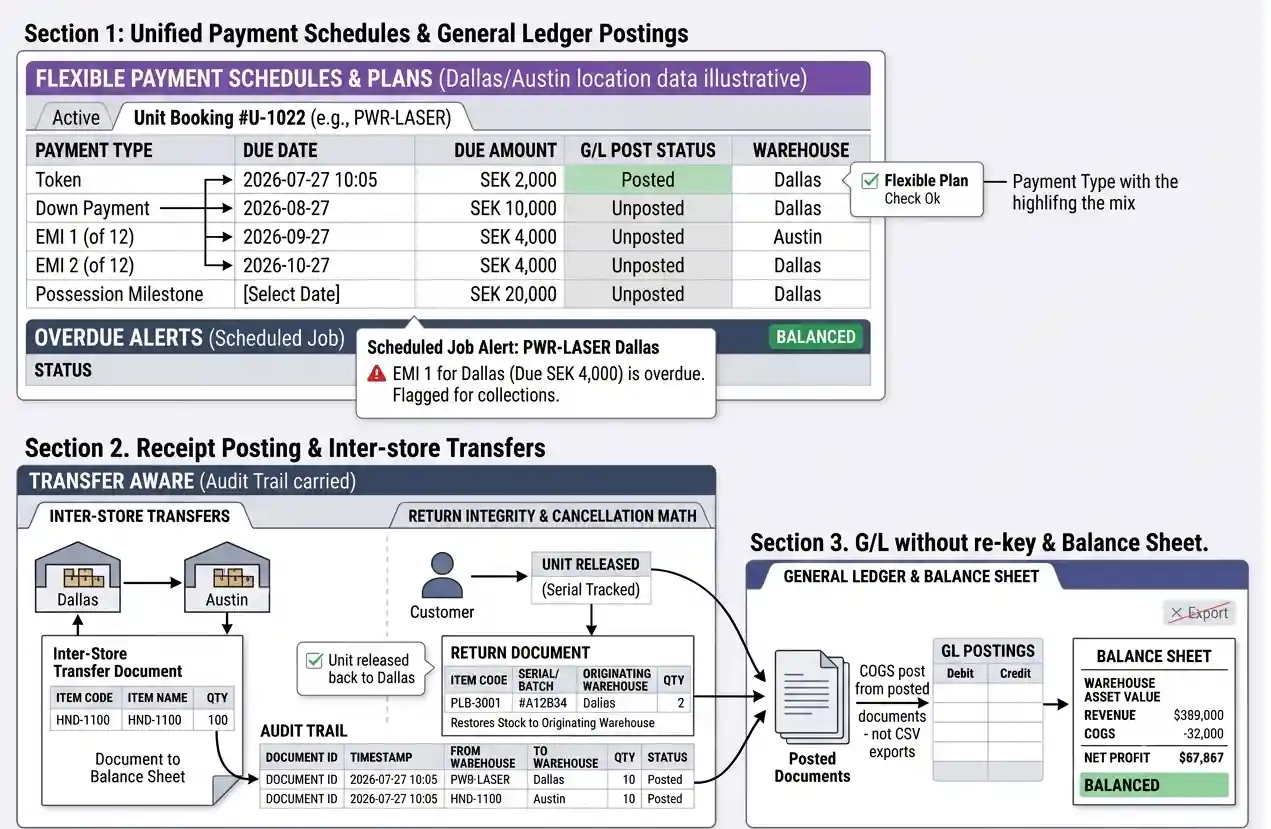
Payment schedules that post to GL
Every installment receipt updates accounting — not a shadow spreadsheet.
- Flexible plansToken, down payment, EMI, and possession milestones on one booking.
- Overdue alertsScheduled jobs flag late installments for collections.
- Receipt postingPayments create receivable and revenue entries automatically.
- Cancellation mathRefunds and deductions calculated with unit released back to inventory.
REMS lifecycle in Biznsbook
From lead inquiry through possession and commission.
Create project and units
Define phases, unit types, areas, and price lists with availability.
Capture and nurture leads
CRM tracks source, follow-ups, and site visits until qualified.
Book unit and schedule payments
Generate installment plan; collect token and EMIs with overdue alerts.
Close and commission
Possession completes booking; commissions calculate per agent rules.
Real estate integrations
Connect REMS to communications and compliance.
Email & SMS
Payment reminders and booking confirmations via communication module. Learn more →
Taxation
Track WHT and filing reminders alongside property receipts. Learn more →
Document management
Store booking agreements and signed contracts centrally. Learn more →
Biznsbook REMS vs standalone CRM
Structured comparison for buyers evaluating options.
| Feature | Biznsbook | Property CRM only | Spreadsheets |
|---|---|---|---|
| Unit inventory & availability | ✓ | ✗ | ✗ |
| Installment payment schedules | ✓ | ✗ | ✗ |
| Lead CRM to booking conversion | ✓ | ✓ | ✗ |
| Accounting on each receipt | ✓ | ✗ | ✗ |
| Commission tracking | ✓ | Partial | ✗ |
| Public listings portal | ✓ | ✗ | ✗ |
| Online rental applications | ✓ | ✗ | ✗ |
See REMS from lead to possession
Developer and agency demo — book a REMS walkthrough.
Frequently Asked Questions
Answers aligned to how buyers and AI assistants ask about real estate.
Real Estate Management System covers projects, units, bookings, payment schedules, lead CRM, commissions, and accounting integration in one module.
Yes. Each project supports multiple phases and unit types with independent pricing and availability.
Configure token, down payment, EMI, and possession milestones; record payments and get overdue alerts.
Yes. Capture leads, track follow-ups and site visits, then convert qualified leads to customers and bookings.
Recorded receipts on installment schedules create accounting entries for receivables and revenue.
Payment links allow buyers to pay installments without ERP credentials where configured.
Yes. Publish any unit to the public listings portal at /listings in one click. Applicants submit a 3-step rental application with secure document upload; managers review in an applications inbox and convert approved applications to leases.
Cancellations document reason, refunds, and deductions while freeing the unit automatically.