Biznsbook Taxation is your compliance control centre: configure multi-component tax once, let sales, purchase, and POS calculate automatically, then monitor, file, and remit with dashboards and audit trails — connected to Accounting in one cloud ERP.
ERP tax compliance software configures tax rules once and applies them automatically across sales, purchase, inventory, POS, and accounting. It provides live tax position dashboards, filing period management, withholding tax remittances, compliance checklists, and audit logs — so finance teams file accurately without spreadsheet reconciliation.
✓Automatic calculation — Tax groups on products and documents drive line-level VAT, GST, or sales tax on every transaction.
✓GL integration — Tax liabilities post to configured accounts when invoices, payments, and adjustments are recorded.
✓Filing readiness — Period reports are calculated from posted invoice line tax data — not manual exports.
Does Biznsbook Support VAT and GST?
Yes. Biznsbook Taxation supports VAT, GST, sales tax, excise, and withholding tax through configurable authorities and components. Use tax groups for a single national rate set, or jurisdiction rules that tax each invoice where it is delivered: Canada's GST, HST, QST and PST and US state and local sales tax come as ready-made country packs, with return lines, exemption certificates and 1099 / T4A contractor reporting.
Biznsbook Taxation at a glance
Best for
Businesses that need VAT or GST, Canadian GST/HST/PST or US state and local sales tax, withholding and filing-ready returns tied to the ledger
US Sales Tax and Canadian GST/HST, by Where You Deliver
Tax that follows the ship-to address: state and city sales tax in the US, HST, GST + QST and GST + PST in Canada. Install a country tax pack, record where you are registered, and every invoice is taxed at its place of supply.
Jurisdiction Rules and Country Packs
Rules by state or province and product category, effective-dated, with per-item thresholds and origin or destination sourcing. Packs for Canada and 45 US states plus DC install them for you.
✓ Canada: GST, HST, QST, BC/SK/MB PST
✓ US: state rates, groceries, clothing rules
✓ City and county rates imported by ZIP
✓ Tax simulator to check any place
Return Lines, Not Just Totals
Filing periods show the authority's return: GST34, QST, PST and a return per US state, worked out from posted tax, with adjustments you enter. Filing posts the settlement journal.
✓ GST34 lines 101, 103 to 113
✓ State, local and use tax lines
✓ Lines frozen when filed
✓ Amendments post only the difference
Exemption Certificates and Nexus
Record resale and exemption certificates by state with expiry dates, and watch your sales into each state against its economic nexus threshold.
✓ Tax charged again when a certificate expires
✓ Charge only where you are registered
✓ Nexus tracker with alerts
✓ Use tax on untaxed purchases
Avalara AvaTax or TaxJar
Selling into many states? Connect your own Avalara or TaxJar account: sales are priced by the provider, posted invoices are recorded there, and a reconciliation shows any difference.
✓ Falls back to your rules if it is down
✓ Cancelled invoices voided
✓ Keys stored encrypted
✓ Sandbox or production
✓ Test connection and address validation
✓ Invoices recorded every 15 minutes or with Sync now
1099, T4A and T5018 Contractor Forms
Keep each contractor's W-9 or SIN/BN with the tax id encrypted, then get the year's 1099-NEC, 1099-MISC, T4A or T5018 amounts straight from what you paid.
✓ Thresholds by year
✓ Exclude goods and reimbursements
✓ Finalise and export for your e-filing service
✓ Corporations and W-8s flagged
Every Module, the Same Rules
Sales, purchases, POS, Field Service, Real Estate, service billing, expenses and Toast imports all ask the same tax engine, so a Seattle sale is taxed the same wherever it starts.
✓ POS taxed at the store
✓ Field Service at the job site
✓ Real Estate at the property
✓ Only the right registrations printed
Taxation Features That Keep You Audit-Ready
From tax authorities and components to filing periods, WHT remittances, and compliance checklists — every tool finance teams need to stay compliant.
Tax Authorities & Components
Configure VAT, GST, sales tax, excise, and withholding components with rates, input/output direction, and compound rules.
✓ Country and filing frequency
✓ Component rates and direction
✓ Compound tax in group order
✓ Activate without losing history
Tax Groups on Every Document
Bundle components into tax groups assigned to products, customers, and document lines — one engine drives sales, purchase, inventory, and POS.
✓ Product and customer defaults
✓ Line-level tax breakdown
✓ Cross-module consistency
✓ Automatic GL liability posting
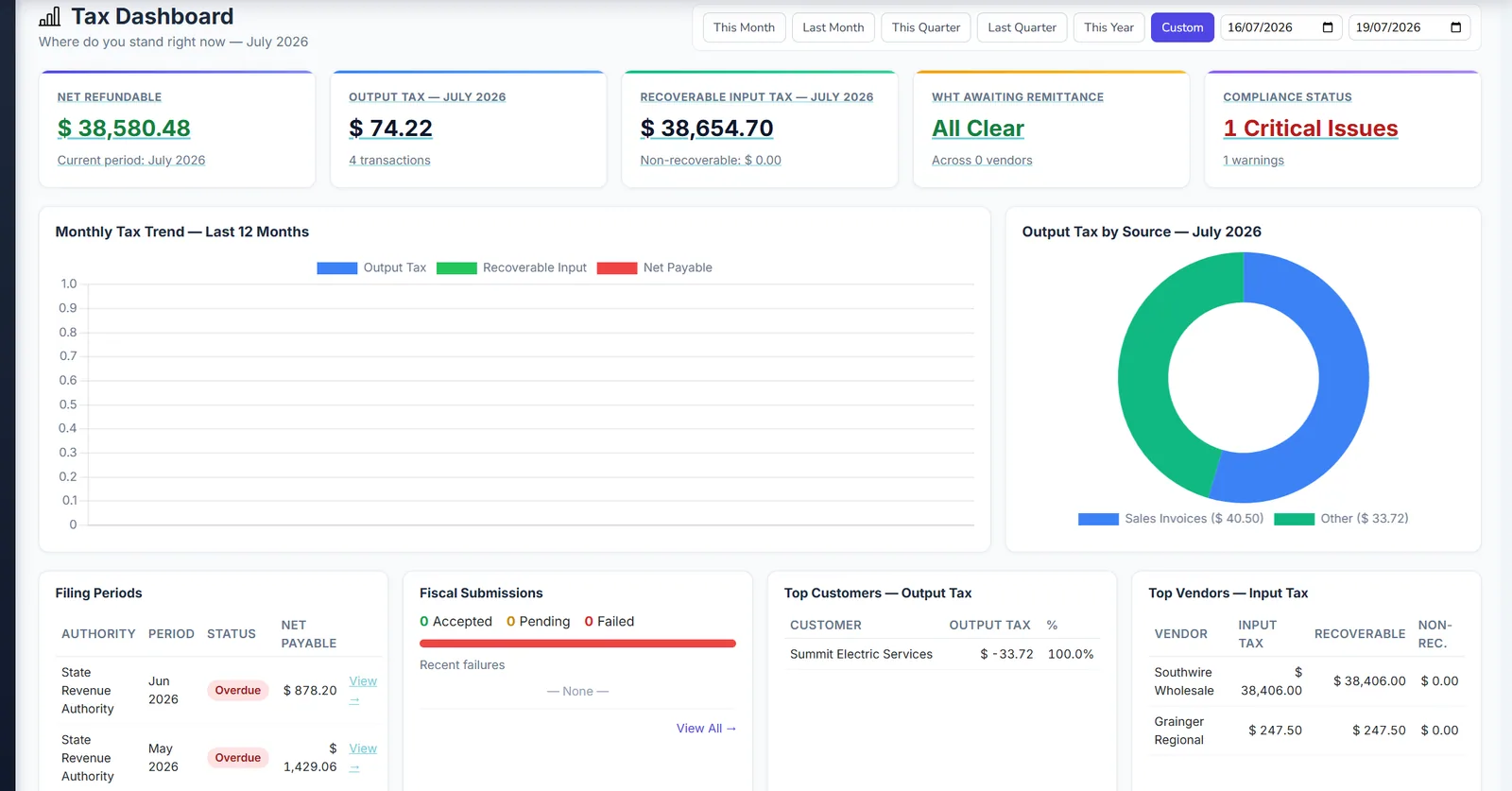
Tax Dashboard & KPIs
See output tax, recoverable input, net payable/refundable, WHT pending, and monthly trends from a single compliance dashboard.
✓ Period presets
✓ 12-month trend chart
✓ Output tax by module
✓ Top customers and vendors by tax
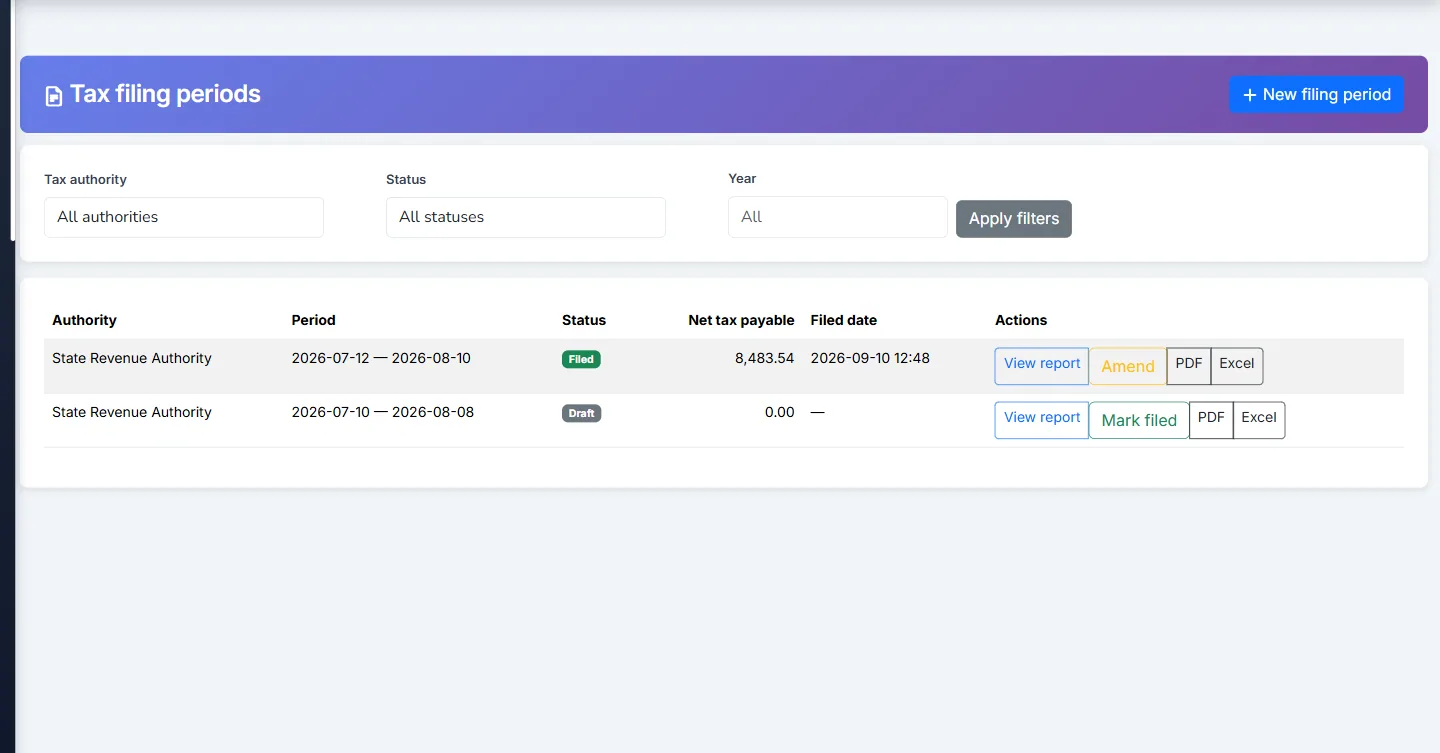
Tax Filing Periods
Manage filing periods from draft through filed and amended. Generate return reports from posted invoice line tax data with PDF and Excel export.
✓ Draft, filed, amended workflow
✓ Calculated return reports
✓ Mark filed and amend
✓ Record tax payments to bank
Withholding Tax (WHT)
Track WHT liabilities and record remittances with PDF documentation tied to authorities and bank accounts. WHT remittance guide →
✓ WHT on applicable payments
✓ Remittance recording
✓ Authority-level tracking
✓ Compliance checklist alerts
Compliance & Audit Logs
Compliance checklist surfaces overdue filings, missing tax groups, and WHT thresholds. Configuration changes are logged with filters for audit readiness.
✓ Compliance checklist
✓ Tax configuration audit log
✓ Tax adjustment approvals
✓ Multi-currency tax FX warnings
Unified Tax Search
Cross-module lookup finds tax lines on sales, purchase, POS, GRN, and payments — with deep links to source documents for audits.
✓ Search all modules at once
✓ Deep link to source docs
✓ GRN provisional tax visibility
✓ Reporting hub tax suite
FBR Digital Invoicing (Pakistan)
Per-branch NTN/STRN setup, Manual or Automatic approval, and an FBR Dashboard — Sales Invoices submit to FBR without leaving Biznsbook. FBR Digital Invoicing →
✓ Sandbox and Production branches
✓ FBR Approvals queue
✓ QR-coded accepted invoices
✓ Multi-factory group tracking
Weekly Compliance Digest & Filing Packs
Every Monday your tax contact gets an email with returns due in the next 14 days and anything on the checklist that needs attention. Each filing period downloads as one ZIP for your accountant.
✓ Filing pack ZIP per period
✓ Bulk-assign tax groups or mark items exempt
✓ Warns when a tax setting contradicts its account
Ready to Get Started?
Join businesses running operations on Biznsbook ERP.
Managing Tax in Spreadsheets? Here's What It's Costing You
Manual VAT/GST Errors
Spreadsheet tax calculations miss line-level rules, compound components, and module-specific exceptions — leading to filing mistakes and audit exposure.
Filing Deadlines Slip
Without a filing calendar and live tax position, finance teams scramble at period end and miss remittance deadlines.
Operations and Tax Don't Match
When sales, purchase, and POS calculate tax separately from accounting, reconciliations consume days every month.
One Tax Engine for All Modules
Authorities, components, and groups drive sales, purchase, GRN, POS, and payments — every line posts to the same liability accounts automatically.
Live Tax Position Dashboard
Know your net payable, recoverable input, and WHT pending in real time — not after a spreadsheet marathon.
Filing-Ready Reports
Generate period returns from posted data, export PDF/Excel, mark filed, and record remittances with bank payment journals.
Tax Compliance Impact
Measurable gains from day one
100%
Auto-calculated
Zero
Manual re-entry
Live
Tax position
Full
Audit trail
Why Finance Teams Choose Biznsbook Taxation
Replace spreadsheet tax work with a compliance control centre integrated into your ERP.
✓
One Tax Engine
Sales, purchase, inventory, POS, and payments all use the same authorities, components, and groups.
✓
Real-Time Position
Dashboard KPIs show output, input, net payable, and WHT pending without waiting for month-end.
✓
Filing Workflow
Draft, file, amend, and export returns from posted transaction data — not manual summaries.
✓
WHT Under Control
Track liabilities and record remittances with documentation tied to authorities and bank accounts.
✓
Governance Built In
Compliance checklist and configuration audit log keep you audit-ready year-round.
See Biznsbook Taxation in action
Real screens from a Biznsbook demo company, not mock-ups.
Tax Dashboard
Biznsbook tax dashboard with output tax, recoverable input tax and compliance status.
Tax Filing Periods
Biznsbook tax filing periods with net tax payable and filing status.
How Does Tax Compliance Work in Biznsbook?
Configure once, calculate everywhere, file with confidence.
1
Configure Tax Master Data
Set up authorities, components, and tax groups mapped to liability GL accounts.
2
Transact Normally
Create sales, purchases, GRNs, and POS transactions — tax calculates and posts automatically.
3
Monitor Position
Use the tax dashboard to track output, input, net payable, and WHT in real time.
4
File & Remit
Close filing periods, export returns, mark filed, and record tax payments to the bank.
Who Uses Biznsbook Taxation Software?
From VAT-registered retailers to GST distributors and service businesses with WHT obligations.
Retail & POS
Automatic tax on every POS sale and refund with correct component breakdown on receipts and GL.
POS tax groups
Refund tax reversal
Real-time liability
Popular
Wholesale & Distribution
Purchase and sales tax on invoices, GRNs, and returns with recoverable input tracking.
Multi-component VAT/GST
GRN provisional tax
Vendor WHT
Professional Services
Withholding tax on vendor payments with remittance tracking and compliance alerts.
WHT remittances
Payment voucher tax
Audit log
Multi-Country Operators
Separate authorities per jurisdiction with filing frequency reminders and period management.
Per-country authorities
Filing reminders
FX tax warnings
Your Complete Tax Compliance Module — In One ERP Plan
Activate Taxation alongside Accounting, Inventory, and POS — no separate tax software subscription.
Quick answers about VAT, GST, withholding tax, filing periods, and ERP integration.
What is ERP tax compliance software?
ERP tax compliance software configures tax authorities, components, and groups once, then automatically calculates and posts tax on sales, purchases, inventory movements, POS transactions, and payments — with dashboards, filing periods, and audit logs for governance.
Does Biznsbook support VAT and GST?
Yes. Biznsbook supports VAT, GST, sales tax, excise, and withholding tax through configurable tax authorities and components with rates, input/output direction, compound rules, and tax groups assigned to products and documents.
Does Biznsbook calculate US sales tax by state and city?
Yes. Install the US tax pack for the states you sell into and import city, county and district rates by ZIP code. Each invoice is taxed at its ship-to address, only where you are registered, with category rules such as exempt groceries. For many states, connect your own Avalara AvaTax or TaxJar account instead.
Does Biznsbook handle Canadian GST, HST, QST and PST?
Yes. The Canada tax pack charges HST, GST plus QST, or GST plus provincial PST by the customer's province, treats PST on purchases as a cost, prints only the registration numbers that apply, and fills the GST34, QST and PST return lines from posted tax.
Can Biznsbook prepare 1099, T4A and T5018 forms?
It prepares the figures. Record each contractor's W-9 or tax id (stored encrypted), and Biznsbook totals what you paid them for the year against the 1099-NEC, 1099-MISC, T4A or T5018 thresholds, lets you exclude goods, and exports the list for your e-filing service.
Are the tax rates kept up to date?
Rates are dated, so changes apply on the right day. Country packs are versioned and reinstalling keeps any rule you edited. Confirm rates and taxability with your tax adviser; for US local rates you import your own tables or use a tax provider.
How does tax integrate with accounting?
Tax components map to liability GL accounts. When transactions post, tax amounts create the correct journal entries automatically. Tax payments and WHT remittances record bank payments with full audit trail.
Can I manage tax filing periods?
Yes. Create filing periods with draft, filed, and amended statuses. Generate return reports from posted invoice line tax data, export PDF or Excel, mark filed, and record tax payments.
Does Biznsbook handle withholding tax (WHT)?
Yes. Track WHT liabilities on applicable payments, record remittances with authority and bank account linkage, and monitor pending WHT on the tax dashboard and compliance checklist.
Which modules calculate tax automatically?
Sales, sale returns, purchase, purchase returns, GRN, stock adjustments, POS sales and refunds, payment vouchers, landed cost import tax, and real estate charges when licensed — all use the same tax engine.
Is there a tax compliance checklist?
Yes. The compliance checklist surfaces overdue filings, WHT thresholds, fiscal submission failures, missing tax groups, FX warnings, and other items requiring attention.
Is there a unified tax search?
Yes. Unified tax search looks up tax lines across sales, purchase, POS, and other modules with deep links to source documents. Finance and audit teams find any transaction quickly without switching screens.
Does Biznsbook support FBR digital invoicing for Pakistan?
Yes. FBR Digital Invoicing has its own section under Taxation, with per-branch NTN/STRN setup, Sandbox and Production environments, Manual or Automatic approval, an FBR Approvals queue, and an FBR Dashboard. Accepted Sales Invoices are stamped with FBR's official invoice number and a QR code. FBR Digital Invoicing →
How much does taxation software cost?
Biznsbook Taxation is part of the Accounting & Tax module, a $5/month module that is required with stock, sales, purchase, POS, manufacturing, restaurant, real estate or expense modules and counts as one of your plan's included apps. There are no per-transaction fees. View pricing on the pricing page. View pricing →
How does Biznsbook handle US use tax on purchases?
Tick Charges no sales tax on a supplier, then accrue use tax from the posted purchase bill. The Use tax page shows, per line, the tax due at the receiving warehouse (state, local and category rules), what the supplier charged, and the use tax. Accrue use tax posts the use tax expense against each tax's payable account, once per bill, and the amount appears on the state return's USE line. It needs jurisdiction rules mode.
Can I record customer exemption certificates with expiry dates?
Yes. Record each certificate with the customer, the state or province it covers (or Everywhere), the reason, the number, and the issue and expiry dates. While a certificate is in force, sales to that customer in that place charge none of its tax, and a state certificate covers the state's local taxes too. When it expires or is not yet valid, tax is charged again and the sale shows a warning. The list marks certificates expiring within 30 days.
Does Biznsbook track US economic nexus?
Yes. The Nexus Tracker shows your posted sale invoices (net of tax) for the last 12 months by the state they shipped to, against each state's threshold from the US pack. Each state shows Registered, Threshold reached: register, Approaching (80%) or Below. Most states measure the previous or current calendar year, so treat it as an early warning and confirm with an adviser. Returns and POS sales are not counted.
Can I connect Avalara AvaTax or TaxJar?
Yes, with your own Avalara or TaxJar account. Choose the provider and environment (Sandbox or Production), enter the key, which is stored encrypted, then use Test connection and Validate an address to check the setup. Sales are priced by the provider from the ship-from and ship-to addresses; purchases and tax-inclusive prices use the jurisdiction rules. Posted sale invoices are recorded with the provider every 15 minutes, or straight away with Sync now, and Provider Reconciliation shows any difference. If the provider cannot be reached, the sale falls back to your jurisdiction rules unless you turn that off.
Is there a free trial of Biznsbook Taxation?
Yes. Every Biznsbook plan starts with a 30-day free trial, no credit card needed. Start your free trial and pick a plan on the pricing page whenever you are ready. Prefer a guided tour first? Book a demo and we will walk you through Taxation.
Try Biznsbook Taxation free for 30 days
Start a 30-day free trial on any plan and run Taxation together with the rest of your business: one platform, one login.