BIZNSBOOK ERP PLATFORM

Every Software Feature Your Business Needs — In One Integrated Platform

All modules are built natively into one ERP, so data flows automatically between inventory, accounting, HR, CRM, and operations. Stop juggling disconnected tools — run your entire business management from a single integrated platform.

16+
modules
99.9%
uptime
2,000+
businesses
All Plans
full features
inventory_2Inventory
account_balanceAccounting
groupsHRMS
handshakeCRM
paymentsPayroll
receipt_longExpense
apartmentReal Estate
precision_manufacturingManufacturing
auto_modeAutomation
⟵ All modules share one database — data flows automatically ⟶

Q: What is Biznsbook ERP?

Biznsbook ERP is an all-in-one business management software that combines inventory, accounting, HRMS, payroll, CRM, expense management, manufacturing, real estate, and communication modules into a single integrated platform. All 15+ modules share one database, eliminating manual data entry between systems. It is designed to scale from startups to enterprises.

Q: What modules are included in Biznsbook ERP?

Biznsbook includes Inventory Management, Sales & Purchase, Finance & Accounting, HRMS, Payroll, CRM, Expense Management, Real Estate, Communication Center, Data Import & OCR, Treasury & Cash, Manufacturing, Business Automation, Admin Controls, Reporting & Analytics, and Point of Sale — totalling 15+ natively integrated modules.

Q: How do ERP modules work together?

In Biznsbook, when a sale is made the inventory updates, an accounting journal entry posts automatically, and the sales report refreshes in real-time. Payroll generates journal entries in accounting. CRM deal closures create invoices. Expense approvals post to the general ledger. Every module reads and writes to a shared database, so there is zero manual re-entry between departments.

Trusted Across Industries

★★★★★
“We replaced three separate tools with Biznsbook. The inventory-to-accounting automation alone saves our warehouse team 10 hours per week on data entry.”
KA
Khalid Al-Farsi
Operations Director, Gulf Wholesale Trading
★★★★★
“The Real Estate module with CRM integration changed how we manage property sales. Lead tracking, unit booking, and payment schedules — all in one place.”
SP
Sarah Patel
Agency Manager, Greenfield Properties
★★★★★
“Our remote team uses HRMS for attendance and the expense module for reimbursements. Payroll runs automatically — no more spreadsheet chaos.”
RM
Rashid Mansoor
Founder, NexBridge Consulting

One Platform vs Multiple Disconnected Tools

Capability Multiple Standalone Apps Biznsbook ERP
Monthly cost$200–$500+ (5–8 subscriptions)One subscription for all modules
Data sync between toolsManual CSV exports / copy-paste✅ Automatic — shared database
User trainingMultiple interfaces to learn✅ One consistent interface
SupportMultiple vendors, finger-pointing✅ Single support team
Accounting accuracyManual journal entries✅ Auto-posted from all modules
Real-time visibilityDelayed — depends on sync schedule✅ Instant across all modules
Payroll accuracyManual salary calculations✅ Automated with tax deductions
CRM to invoice flowCopy-paste deal details✅ One-click invoice on deal close

Q: What does inventory management software do?

Biznsbook inventory management tracks stock levels in real-time across multiple warehouses, sends automated low-stock alerts, manages purchase orders and goods received notes (GRN), and automatically updates accounting when inventory moves. It supports stock cards with FIFO/LIFO valuation, multi-tier pricing, and per-product profit analysis. Essential for retail, wholesale, manufacturing, and distribution businesses.

inventory_2

Inventory Management

Explore Inventory Management Features →

Track every product across every warehouse in real-time with automated stock valuation and reorder alerts.
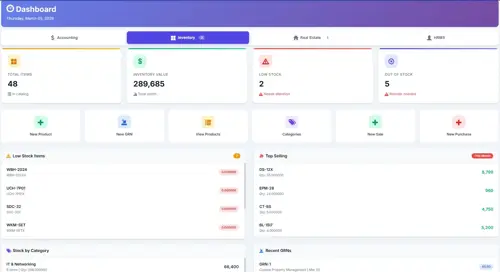
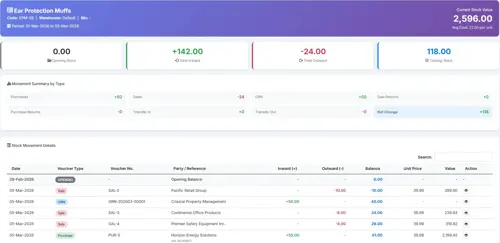
Biznsbook inventory management dashboard showing real-time stock levels and movement tracking

Real-time inventory dashboard with stock levels and movement tracking

analytics

Dynamic Stock Cards

Real-time tracking of stock movements and levels across multiple warehouses with automated FIFO/LIFO valuation. Every purchase, sale, and transfer is recorded with full audit trail.

receipt_long

Goods Received Notes (GRN)

Streamline your procurement process with automated documentation for received items and instant ledger updates. Match GRNs against purchase orders to verify quantities and prices.

sell

Multi-tier Price Lists

Manage complex pricing structures for different customer segments, bulk orders, and seasonal promotions effortlessly. Apply automatic discounts based on quantity breaks or customer tier.

warehouse

Multi-Warehouse Support

Track stock across unlimited warehouse locations with inter-warehouse transfer management. View consolidated or per-location stock reports and set location-specific reorder levels.

notifications_active

Low Stock Alerts

Set minimum stock thresholds per product and receive automated notifications when levels drop below safe limits. Prevent stockouts before they impact your customers or production line.

trending_up

Per-Product Profit Analysis

Calculate profit margins by comparing purchase costs against selling prices for each item. Identify your most and least profitable SKUs to optimise purchasing decisions.

Biznsbook stock card tracking view showing item movements, quantities, and valuations across warehouses

Stock Card Tracking

Track every item movement across all locations in real time
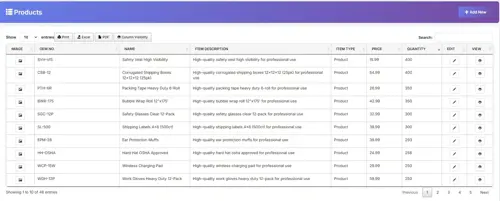
Biznsbook product detail view with pricing tiers, stock levels, and category information

Product View

See pricing, stock, and category details for any product at a glance
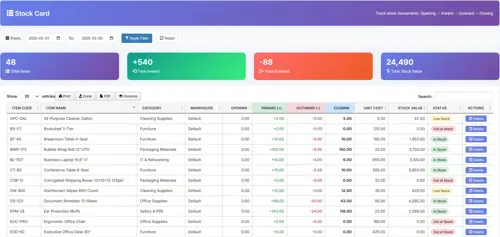
Biznsbook individual stock card with movement history, opening and closing balances

Stock Card Detail

Complete movement history and valuation for each stock item

Q: What sales and purchase features does ERP software include?

Biznsbook Sales & Purchase handles the complete procurement-to-sales cycle: create professional sale and purchase invoices, process returns with automatic stock and ledger adjustments, track import/export shipments separately, manage supplier purchase orders, generate delivery notes, and apply multi-currency pricing. Every transaction auto-posts to the general ledger and updates inventory in real-time.

shopping_cart

Sales & Purchase

Manage the complete buy-to-sell cycle with professional invoicing, returns, and import/export tracking.

description

Sale & Purchase Invoicing

Create professional invoices with automatic tax calculation, multi-currency support, and customisable templates. Every invoice posts to the general ledger and updates customer/supplier balances instantly.

assignment_return

Sale & Purchase Returns

Handle returns without accounting headaches. Credit notes generate automatically, stock reverses to the correct warehouse, and the general ledger adjusts in real-time with full audit trail.

local_shipping

Import/Export Tracking

Track international shipments separately with customs documentation, landed cost calculations, and duty tracking. Monitor shipment status from order placement to warehouse delivery.

request_quote

Purchase Orders

Generate purchase orders from reorder alerts or manual requests. Track PO status through approval, dispatch, and delivery stages with automatic GRN matching on receipt.

local_offer

Quotation Management

Create quotations with item details, pricing, and terms. Convert accepted quotations to sales invoices in one click with all line items, taxes, and discounts carried over automatically.

summarize

Delivery Notes

Generate delivery notes linked to sales invoices for warehouse dispatch. Track which items have been shipped and which are pending, with customer signature capture on delivery.

Q: What accounting features does ERP software include?

Biznsbook provides professional double-entry bookkeeping with a general ledger, automated trial balance, profit & loss statements, balance sheets, cash flow statements, accounts receivable/payable aging, and bank reconciliation. All financial reports generate automatically in real-time as transactions post from inventory, payroll, expenses, and other modules.

account_balance

Finance & Accounting

Explore Accounting Features →

Professional double-entry accounting engine built on standard financial principles for accurate, compliant books.

check_circle

Double-Entry General Ledger

A comprehensive record of every financial transaction that maintains the highest standard of accounting integrity.

check_circle

Profit & Loss Statement

Instant calculations of your revenue and expenses to reveal your true net margin at any moment.

check_circle

Trial Balance

Generate comprehensive trial balances at any moment to verify financial health and ensure debits equal credits.

check_circle

Automatic Balance Sheets

Real-time reporting that visualizes your assets, liabilities, and equity instantly as transactions post.

check_circle

Integrated Cash Book

Live tracking of all cash and bank movements to provide a clear view of your available liquidity.

check_circle

Notes to the Accounts

Detailed breakdowns and supplementary schedules that explain the context behind your financial totals.

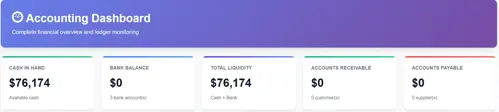
Biznsbook finance and accounting dashboard showing revenue, expenses, and real-time financial reports

Financial Reporting Interface

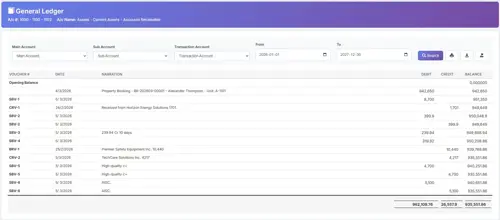
Biznsbook general ledger showing double-entry debit and credit transactions with account balances

General Ledger

Complete record of every financial transaction with drill-down detail

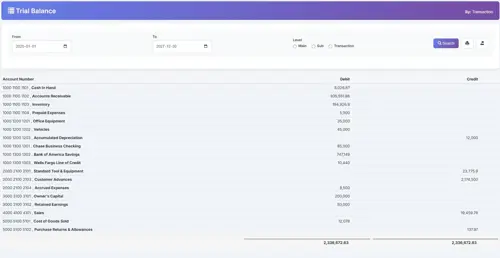
Biznsbook trial balance report with debit and credit columns ensuring balanced books

Trial Balance

Verify that debits equal credits across all accounts instantly

Biznsbook notes to accounts with supplementary financial schedules and breakdowns

Notes to Accounts

Supplementary schedules that add context to your financial statements

Q: What HR features does ERP software include?

Biznsbook HRMS provides complete employee lifecycle management: employee database with document storage, attendance tracking, leave management with configurable policies, department and designation hierarchies, onboarding workflows, and performance tracking. It integrates directly with accounting for payroll journal entries and with expense management for employee reimbursements.

groups

Human Resource Management

Explore HRMS Features →

Manage the complete employee lifecycle from onboarding to exit with integrated attendance, leave, and performance tracking.

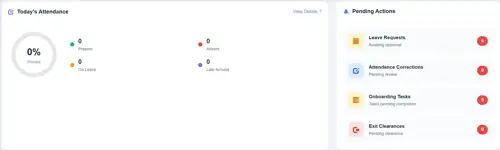
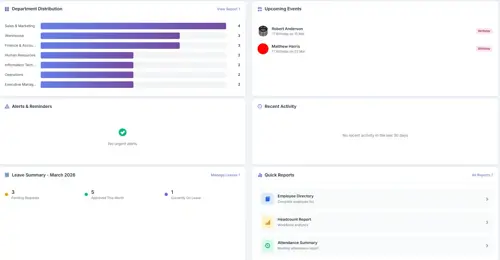
Biznsbook HRMS dashboard showing employee headcount, department breakdown, and recent activities

Comprehensive HR Management Dashboard

Biznsbook HR employee overview with headcount, department statistics, and active employee list
badge

Employee Management

Complete employee lifecycle management from onboarding to exit. Track personal details, documents, employment history, and role assignments in one centralised record.

Biznsbook HR attendance and leave management showing daily records and leave balances
schedule

Attendance & Leave

Automated attendance tracking, leave management, and holiday calendars. Real-time visibility into workforce availability with configurable leave policies per department.

payments

Payroll Integration

Seamless salary processing with tax calculations.

domain

Department Structure

Organize teams with hierarchical department setup.

trending_up

Performance Reviews

Track probation periods and employee evaluations.

folder_shared

Document Storage

Store employee documents securely with expiry alerts.

Q: What payroll features does ERP software include?

Biznsbook Payroll automates salary calculations with statutory deductions for tax and social security, generates detailed payslips, posts payroll journal entries directly to accounting, supports bank transfer file exports, handles multi-currency payroll, settles employee advances against salary, and integrates commission calculations from the CRM module for sales team compensation.

payments

Payroll Management

Explore Payroll Features →

Automated salary processing with tax compliance, payslip generation, and direct accounting integration.

calculate

Salary Processing

Run payroll for your entire workforce in minutes. Automated gross-to-net calculations handle basic salary, allowances, overtime, and deductions based on configurable salary structures.

account_balance_wallet

Tax & Deductions

Configure statutory deductions including income tax, social security, pension contributions, and loan repayments. Tax slabs update per financial year with automatic calculation for each employee band.

receipt

Payslip Generation

Generate detailed payslips showing earnings breakdown, deductions, tax, and net pay. Distribute payslips via email through the Communication Center or download as PDF for printing.

assessment

Payroll Reports

Generate summary reports by department, pay period, or cost centre. Export payroll data for bank transfers and statutory filing. Year-end tax certificates generate automatically.

Q: What expense management features does ERP software include?

Biznsbook Expense Management provides complete expense tracking with multi-level approval workflows, employee advance management with settlement tracking, budget planning with real-time utilization alerts, recurring expense automation, vendor management, receipt attachments, and automatic journal entry posting to your general ledger. Perfect for controlling operational costs across departments.

receipt_long

Expense Management

Explore Expense Management Features →

Streamline expense tracking, approvals, and reimbursements with automatic accounting integration.

check_circle

Smart Expense Recording

Quick expense entry with categories, vendors, tax handling, and receipt attachments. Auto-generated expense numbers for easy tracking.

check_circle

Multi-Level Approval Workflows

Configurable approval stages with amount-based routing, role-based approvers, and automatic escalation for delayed approvals.

check_circle

Employee Advances & Settlements

Request advances for travel or projects, track disbursements, settle against actual expenses, and manage outstanding balances.

check_circle

Budget Control & Alerts

Set budgets by category or department with threshold alerts. Real-time utilization tracking prevents overspending before it happens.

fact_check

Approval Dashboard

Review and approve expenses in one click.

account_balance_wallet

Advance Tracking

Monitor employee advances and settlements.

repeat

Recurring Expenses

Automate monthly subscriptions and fees.

sync_alt

GL Integration

Auto-post to General Ledger on approval.

category

Category Management

Custom categories with GL mapping.

store

Vendor Database

Track spending per vendor.

attach_file

Receipt Attachments

Upload receipts and invoices.

assessment

Expense Reports

Summary and analytics reports.

Q: What real estate management features does ERP include?

Biznsbook Real Estate Management includes property portfolio tracking, project and unit management with bulk creation, booking management, lead generation CRM, customer management, payment schedules with installment tracking, automated reminders for due dates and renewals, and integrated financial reporting for property income and expenses. Designed for developers, agents, and property managers.

apartment

Real Estate Management

Explore Real Estate Features →

End-to-end property and real estate management for developers, agents, and property managers.

check_circle

Project Management

Track multiple real estate projects with status, units, and financial details from land acquisition to handover.

check_circle

Unit & Booking Management

Manage property units, bookings, and customer allocations with ease. Bulk-create units for large projects.

check_circle

Payment Schedules

Automated installment tracking with due date alerts and payment receipts linked to accounting.

check_circle

Lead Generation & CRM

Capture leads, schedule site visits, and track conversion through integrated CRM pipeline.

Biznsbook real estate management dashboard with project status, unit availability, and payment tracking

Real Estate Management Dashboard

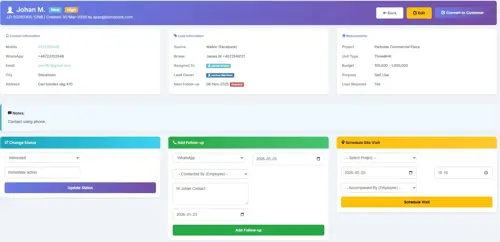
Biznsbook lead generation and CRM system for real estate with pipeline stages and contact management

Integrated Lead Generation & CRM System

Q: What email marketing and communication features does ERP include?

Biznsbook Communication Center includes a WYSIWYG email composer, reusable templates with {{placeholder}} tokens, mailing list management for customers, suppliers, and employees, email scheduling with recurring sends, delivery tracking for sent, delivered, opened, and bounced messages, file attachments, and integration with all ERP modules for automated notifications like invoice reminders and payslip delivery.

mail

Communication Center

Explore Communication Features →

Centralised email management for invoices, reminders, campaigns, and automated notifications — all with tracking.

check_circle

Rich Email Composer

WYSIWYG editor with formatting, tables, images, and code view. Create professional emails without HTML knowledge.

check_circle

Template Library

20+ built-in templates for invoices, payroll, notifications, and marketing. Create custom templates with dynamic {{placeholder}} tokens.

check_circle

Mailing Lists & Segments

Create recipient lists from customers, suppliers, or employees. Import from CSV or build dynamic segments based on criteria.

check_circle

Scheduling & Automation

Schedule emails for future delivery or set up recurring sends. Background processing ensures reliable delivery.

drafts

Draft Management

Save and resume emails anytime.

mark_email_read

Delivery Tracking

Track opens, bounces, and failures.

attach_file

File Attachments

Attach PDFs, images, documents.

analytics

Email Analytics

Charts and reports on performance.

link

Module Integration

Link emails to invoices, orders, payroll.

search

Recipient Search

Search across all contacts.

send

SendGrid & SMTP

Reliable email delivery providers.

brush

Visual Builder

Drag-and-drop template designer.

Q: How do I import data into ERP software?

Biznsbook offers two powerful data import methods: (1) CSV/Excel Import with intelligent column mapping, validation, and upsert support for customers, items, employees, chart of accounts, and payment vouchers; (2) OCR Document Scanning that reads receipts, invoices, and bills using Tesseract OCR, extracts structured data, and lets you review before importing. Perfect for migrating from legacy systems or digitizing paper records.

upload_file

Data Import & OCR

Migrate from legacy systems or digitise paper records with intelligent CSV/Excel import and OCR scanning.

table_chart

CSV & Excel Import

Bulk data migration made easy

  • check Import Customers, Suppliers & Items
  • check Import Employees & Chart of Accounts
  • check Import Payment & Journal Vouchers
  • check Intelligent Column Mapping
  • check Insert, Update, or Upsert Modes
  • check Preview & Validation Before Import
document_scanner

OCR Document Scanning

Turn paper into digital data

  • check Scan Receipts, Invoices & Bills
  • check PNG, JPG, TIFF, BMP Support
  • check Powered by Tesseract OCR Engine
  • check Extract Amounts, Dates & Vendors
  • check Review & Edit Before Approval
  • check Route to Expense, Inventory or Payroll

How Data Import Works

1

Upload File

CSV, Excel, or images

2

Map Columns

Match to system fields

3

Preview Data

Review before importing

4

Validate

Fix errors if any

5

Import

Data flows into ERP

Q: What treasury and cash management features does ERP include?

Biznsbook Treasury provides daily cash book reconciliation of all liquid assets, cheque lifecycle management from issuance to clearance, bank reconciliation matching bank statements against ledger entries, journal voucher controls with audit-ready document trails, and an immutable transaction history. Every payment and receipt is validated with granular controls for financial integrity.

savings

Treasury & Cash Management

Maintain total control over liquid assets with strict validation, journal voucher controls, and bank reconciliation.

menu_book

Cash Book

Daily reconciliation of all cash and bank movements providing a clear view of available liquidity. Every receipt and payment is recorded with counter-party details and reference numbers.

payments

Cheque Management

Full lifecycle tracking of cheques from issuance through presentation to clearance or bounce. Manage post-dated cheques with maturity alerts and automatic status updates.

compare_arrows

Bank Reconciliation

Match bank statement entries against your ledger records to identify discrepancies. Automated matching for common transactions with manual override for exceptions.

description

Journal Vouchers

Create audit-ready journal entries with supporting documentation. Multi-line debit/credit entries with narration, approvals, and a complete document trail for every transaction.

shield

Immutable History

Every transaction is permanently recorded.

history_edu

Bank Sync

Real-time bank statement matching.

verified_user

Audit Log

Track every system interaction.

lock

Period Locking

Lock financial periods to prevent changes.

Q: What CRM features are included in ERP software?

Biznsbook CRM includes lead capture and scoring, contact and account management, a visual sales pipeline with drag-and-drop Kanban board, deal tracking with probability percentages, activity logging for calls, emails, and meetings, workflow automation, quotation generation, and deep ERP integration — accounting invoices generate on deal close, inventory checks stock availability, and payroll calculates sales commissions automatically.

handshake

CRM — Customer Relationship Management

Explore CRM Features →

Close more deals and build stronger relationships with lead management, visual pipelines, and deep ERP integration.

filter_alt

Lead Management

Capture leads from web forms, email, and business cards. Auto-score by behaviour and profile. One-click conversion to contact, account, and deal with full history preserved.

view_kanban

Sales Pipeline

Visual drag-and-drop Kanban board showing every deal at every stage. Configure unlimited pipelines with custom stages, probability percentages, and rotten deal detection alerts.

event_note

Activity Tracking

Log calls, emails, meetings, and notes in seconds. A complete timeline of every customer interaction is automatically organised and visible to the entire sales team.

auto_mode

CRM Automation

Set rules: when a lead scores above 70, assign to senior rep and send email. Build workflows without code — automate follow-ups, stage transitions, and notifications.

request_quote

Quotation Generation

Create and send quotations directly from deals with product details, pricing, and terms. Convert accepted quotations to invoices in one click when the deal closes.

bar_chart

Sales Reports & Forecasting

Win rate, pipeline velocity, revenue forecast, and team performance dashboards. Downloadable Excel and PDF reports for management review and strategic planning.

Q: What manufacturing features does ERP software include?

Biznsbook Manufacturing includes bill of materials (BOM) management, work order creation and tracking, production planning with scheduling, raw material consumption tracking against inventory, finished goods receipt to stock, cost of production reports, and integration with inventory for automatic material requisition and with accounting for production cost journal entries.

precision_manufacturing

Manufacturing

Explore Manufacturing Features →

Plan production, manage bills of materials, and track costs from raw material to finished goods.

account_tree

Bill of Materials (BOM)

Define multi-level BOMs with raw materials, sub-assemblies, quantities, and unit costs. Nested BOMs support complex products with automatic cost roll-up calculations.

assignment

Work Orders

Create work orders from sales orders or production plans. Track status through stages — planned, in-progress, quality check, and completed — with estimated vs actual time tracking.

inventory

Production Tracking

Monitor raw material consumption in real-time as production progresses. Automatic inventory deduction for consumed materials and stock receipt for finished goods.

calculate

Cost Management

Track direct material costs, labour, and overhead per production batch. Compare estimated BOM costs against actual production costs to identify variances and optimise margins.

Q: What business automation features does ERP software include?

Biznsbook Business Automation provides event-triggered workflows across 24 ERP event types, a visual condition builder with AND/OR logic, action handlers including email, field update, API call, task creation, and status update. Execution logs with retry capability ensure reliability, powered by Hangfire background processing. It integrates with all ERP modules for cross-functional automation.

auto_mode

Business Automation

Explore Automation Features →

Build powerful workflows without code — automate repetitive tasks across every module in your ERP.

bolt

Workflow Builder

Visual WHEN → IF → THEN builder. Define triggers, conditions, and actions without writing code. Test workflows before activating.

sensors

Event Triggers

24 event types across all modules — lead created, invoice paid, expense approved, employee onboarded, stock below threshold, and more.

play_circle

Action Handlers

Send emails, update fields, call external APIs, create tasks, change statuses, and assign records. Chain multiple actions in sequence.

history

Execution Logs

Complete audit trail of every workflow execution with timestamps, input data, results, and automatic retry on failure for reliable processing.

bolt Workflow Builder

WHEN Lead Created ▼
IF Lead Score ▼ greater than ▼ 70
THEN Send Email ▼ to owner
AND Create Task ▼ Follow up call
check_circle Workflow active · 142 executions this month
admin_panel_settings

Admin & System Controls

Maintain organisational security and data integrity with advanced administrative features.

manage_accounts

Granular Role Assignment

Define precise access levels for every user. Control who can view, edit, or approve financial transactions down to individual field level with role-based permissions.

upload_file

Bulk Data Import

Migrate your data from legacy systems in minutes. The intelligent mapping tool handles Excel and CSV imports with automatic validation. Learn about data import →

Q: What reporting and analytics features does ERP software include?

Biznsbook provides real-time dashboards and comprehensive reports across all modules: financial reports (P&L, balance sheet, trial balance, cash flow), inventory reports (stock valuation, movement, aging), HR reports (headcount, attendance, leave balances), sales reports (pipeline, revenue, win rate), expense reports (budget utilisation, category breakdown), and a custom dashboard builder to create personalised views of your most important metrics.

analytics

Reporting & Analytics

Gain insights with real-time dashboards, financial statements, and customisable business analytics across all modules.

account_balance

Financial Reports

Profit & loss, balance sheet, trial balance, cash flow statement, and general ledger reports — all generated in real-time as transactions post across the system.

inventory_2

Inventory Reports

Stock valuation, movement history, aging analysis, reorder reports, and per-product profitability. Filter by warehouse, category, or date range for targeted insights.

groups

HR Reports

Headcount by department, attendance summaries, leave balance reports, payroll cost analysis, and employee turnover tracking for workforce planning decisions.

trending_up

Sales Reports

Pipeline velocity, revenue forecasting, win/loss analysis, team performance dashboards, and customer acquisition reports for data-driven sales strategy.

receipt_long

Expense Reports

Budget utilisation by department, expense category breakdowns, vendor spend analysis, and approval turnaround times to control operational costs effectively.

dashboard_customize

Custom Dashboard Builder

Create personalised dashboards by selecting widgets from any module. Pin your most important KPIs, charts, and metrics for a quick overview every time you log in.

Q: What AI content generation features does ERP software include?

Biznsbook AI Content Generator creates professional marketing content for 13 social platforms simultaneously — including LinkedIn, Instagram, Twitter, TikTok, Blog, and Email. It supports Google Gemini, OpenAI GPT-4o, and Anthropic Claude as AI models. Key features include Brand Voice Training (so content sounds like your company), AI image generation via DALL-E 3, social media scheduling via Buffer, SEO keyword generation, batch generation for campaigns, and performance analytics with A/B prompt testing.

auto_awesome

AI Content Generator

Explore AI Content Generator Features →

Write professional marketing content for every platform in seconds, powered by Gemini, GPT-4o, and Claude — built natively into your ERP.

auto_awesome

Multi-Platform Content Generation

Generate LinkedIn posts, Twitter threads, Instagram captions, TikTok scripts, blog intros, emails, and 7 more platform formats from a single briefing — all at once.

record_voice_over

Brand Voice Training

Teach the AI your company's tone, vocabulary preferences, and content style. Every generated post automatically matches your brand identity with a compliance score.

image

AI Image Generation

Generate platform-sized visuals using DALL-E 3 and Google Imagen 3. Photorealistic, illustrated, or minimal styles — no designer or external tool needed.

schedule_send

Buffer Scheduling Integration

Plan content on the visual calendar and schedule directly to Buffer. Posts go live automatically at the right time on LinkedIn, Instagram, Twitter, and Facebook.

layers

Batch Content Generation

Generate content for up to 20 products or campaigns at once. Configure all rows, submit, and the system generates everything in the background.

insights

Viral Score & Analytics

Track quality ratings, copy rates, brand voice compliance, and A/B prompt test results. Know which platforms, tones, and topics perform best for your brand.

Explore All Biznsbook Modules

Every module works standalone or as part of your integrated ERP

Frequently Asked Questions About Biznsbook ERP

Biznsbook ERP includes 15+ integrated modules: Inventory Management for real-time stock tracking, Sales & Purchase for invoicing and returns, Finance & Accounting with double-entry bookkeeping, HRMS for employee lifecycle management, Payroll for salary processing, CRM for sales pipeline management, Expense Management with approval workflows, Real Estate Management for property portfolios, Communication Center for email marketing, Data Import & OCR for migration, Treasury & Cash for liquidity control, Manufacturing for production planning, Business Automation for zero-code workflows, Admin Controls for security, and Reporting & Analytics for dashboards.

Yes. Biznsbook replaces standalone accounting software (like QuickBooks), HR systems, CRM platforms (like Salesforce or HubSpot), inventory tools, payroll processors, email marketing services, and expense management apps. Instead of paying for 5–8 separate subscriptions and manually syncing data between them, you get one integrated platform where all modules share a single database and work together natively.

Yes. Biznsbook uses modular activation — you can enable only the modules your business needs today and activate additional modules as you grow. For example, start with Inventory and Accounting, then add CRM and Payroll when your team expands. Each module works standalone but integrates automatically with other active modules for seamless data flow.

Biznsbook is designed to scale from startups to enterprises. Small businesses can start with core modules like Inventory and Accounting on an affordable plan, then add CRM, HRMS, Manufacturing, and more as they grow. The platform handles everything from 1 user to hundreds without requiring migration to a different system — your data and configuration grow with you.

When a sale is made, inventory stock levels update automatically, an accounting journal entry posts to the general ledger, and the sales report refreshes in real-time. When payroll runs, journal entries post to accounting. When a CRM deal closes, an invoice generates in accounting. When an expense is approved, it posts to the GL. All modules read and write to a shared database — zero manual re-entry.

Yes. When a CRM deal moves to the "Won" stage, Biznsbook can automatically generate a sales invoice in the Accounting module. Revenue recognition, tax calculation, and ledger entries happen instantly — eliminating manual invoice creation and reducing billing errors. The deal record also links to the invoice for end-to-end traceability.

Yes. Biznsbook supports CSV and Excel imports with intelligent column mapping for customers, suppliers, items, employees, chart of accounts, and payment vouchers. The import wizard validates data before committing, supports insert/update/upsert modes, and provides error reports. Additionally, OCR scanning can digitise paper receipts and invoices for import into the expense or inventory modules.

When payroll is processed, Biznsbook automatically generates journal entries in the Accounting module — debiting salary expense accounts and crediting payable accounts. Tax deductions, employer contributions, employee advances, and loan repayments are all reflected in the general ledger without manual posting. You can review the journal entry before it finalises.

Yes. Biznsbook includes OCR receipt scanning powered by the Tesseract engine. Upload a photo of a receipt or invoice in PNG, JPG, TIFF, or BMP format, and the system extracts amounts, dates, and vendor names automatically. You review and edit the extracted data before it posts to your expense records and routes through the approval workflow.

Yes. Biznsbook Inventory supports multi-warehouse management with real-time stock tracking across all locations. You can view stock cards per warehouse, transfer stock between locations, set per-warehouse reorder levels, and generate location-specific inventory reports — all from a single dashboard. There is no limit on the number of warehouses you can manage.

Biznsbook is fully responsive and works on any modern mobile browser — no native app download required. The interface automatically adapts to phones and tablets, giving you full access to inventory, CRM, accounting, expense approvals, and all other modules on the go. Your sales team can update deals, approve expenses, and check stock from their phones.

Biznsbook uses multi-tenant architecture with strict CompanyId isolation ensuring no data leaks between tenants. Role-based access control lets administrators define granular permissions per user, per module, down to field level. All data is encrypted in transit and at rest, with regular automated backups and a complete audit trail of every system action for compliance.

Ready to Run Your Entire Business from One Platform?

Every module included in every plan. No per-module fees. No per-seat charges for most modules. Just activate what you need and start growing.