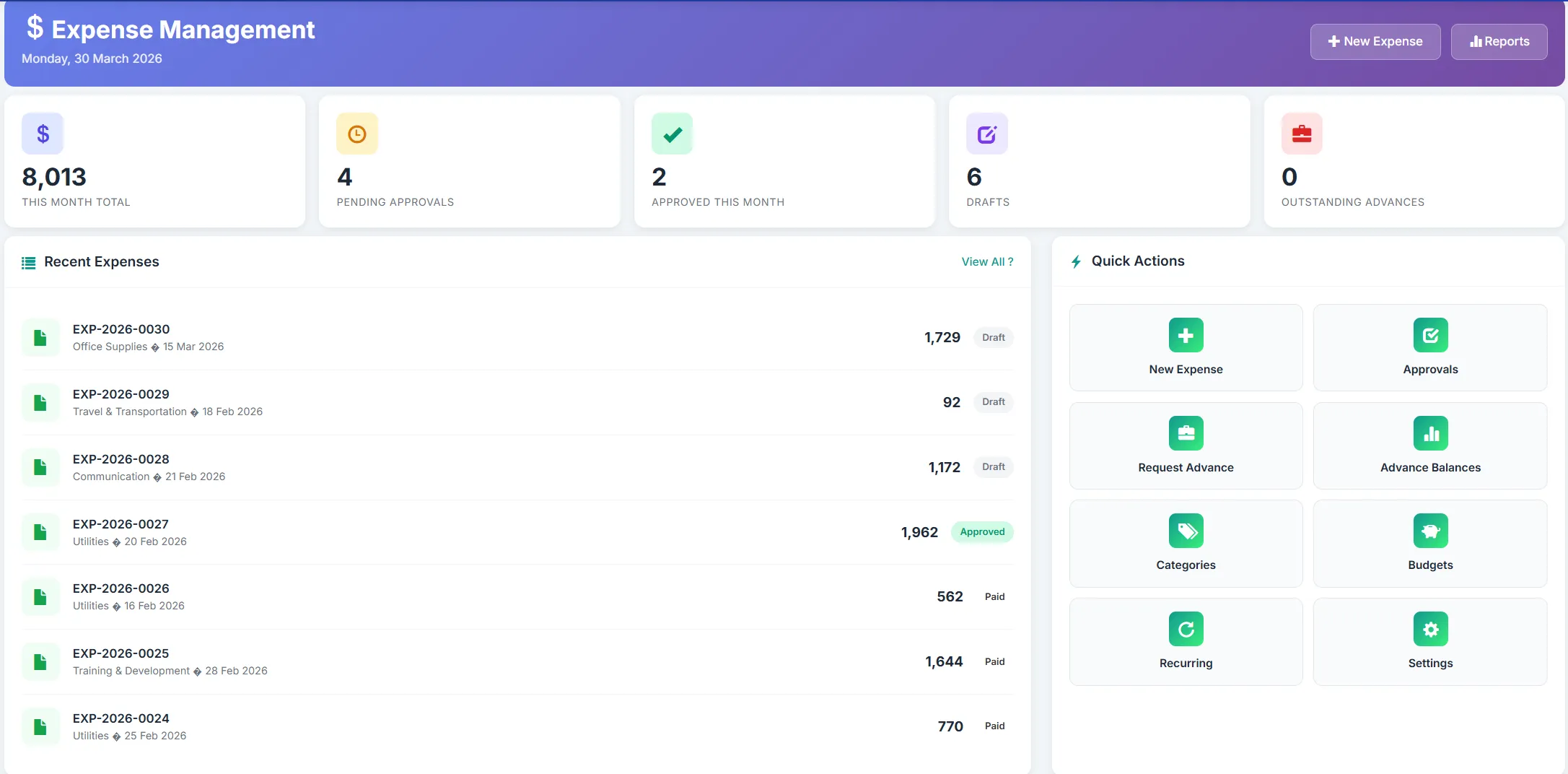
Expense Module

From Receipt Scan to Accounting Entry — Fully Automated

Biznsbook Expense Management gives you everything you need — expense claims, receipt OCR, approval workflows, policy enforcement, and deep accounting integration. Stop chasing paper receipts and spreadsheets — connected to your Accounting, Payroll, and HRMS.

No Credit Card Required Flat $19/mo Cancel Anytime Unlimited Users
Recent Expense Claims ● 12 This Week
Flight — Dubai to London
$1,240
Approved
Client Dinner — Nexus Corp
$185
Approved
Taxi — Airport Transfer
$62
Hotel — 3 Nights Conference
$890
Pending
Software License — Annual
$299
Approved

What Is Expense Management Software?

Expense management software is a platform that automates the entire expense lifecycle — from submitting claims and scanning receipts to manager approvals, policy enforcement, reimbursement processing, and accounting entry. It replaces paper receipts and manual spreadsheets with a streamlined, auditable workflow.

  • Automated receipt capture — Snap a photo, OCR extracts the data, and the claim form fills itself.
  • Approval workflows — Claims route to the right manager based on department and policy rules. One-click approve or reject.
  • Connected to your ERP — Approved expenses auto-post to accounting and reimburse through payroll. Zero manual entry.

How Does Automated Expense Management Work?

Automated expense management works by replacing paper-based processes with a digital workflow. Employees submit claims from their phone or desktop, attach receipt photos, and the system routes the claim through the approval chain. Once approved, reimbursements process through payroll and journal entries post to accounting — all without manual intervention.

  • 1. Submit claim — Employee enters expense details or snaps a receipt photo. OCR auto-fills the form.
  • 2. Approve & enforce — Manager reviews and approves. Policy rules flag out-of-limit claims automatically.
  • 3. Reimburse & record — Approved claims reimburse through payroll. Accounting entries post automatically.

Still Chasing Paper Receipts? Here's What It's Costing You

Lost Receipts, Incomplete Claims

Paper receipts fade, get lost, or sit in wallets for weeks. By the time someone submits a claim, details are missing and finance has no way to verify.

No Spending Visibility

Without a centralised system, managers have no idea what's being spent until month-end. Budget overruns happen silently across departments.

Manual Accounting Entry

Approved expenses are manually typed into the accounting system. Every re-entry is a chance for mispostings, duplicate entries, and reconciliation headaches.

Snap, Scan, Submit

Photograph any receipt. OCR extracts vendor, amount, date, and category. The claim form fills itself — no typing, no lost paper, no delays.

Real-Time Spending Visibility

See what's being claimed, by whom, and against which category — the moment it's submitted. Policy rules flag overspending before it's approved.

Auto Accounting & Payroll Entry

Approved expenses auto-post journal entries to your general ledger. Reimbursements process in the next payroll run. Zero manual data transfer.

Everything You Need for Automated Expense Management

From receipt scanning to approval workflows — all connected to your accounting and payroll.

Expense Claim Submission

Employees submit claims from desktop or mobile. Attach receipts, select categories, and add notes — all in under a minute.

  • Mobile and desktop submission
  • Receipt photo attachment
  • Category and project tagging
  • Draft and resubmit support

Receipt OCR Scanning

Snap a photo of any receipt. OCR extracts vendor name, date, amount, and category automatically — eliminating manual data entry.

  • Auto data extraction
  • Multi-language receipt support
  • PDF and image uploads
  • Accuracy verification

Approval Workflows

Claims route to the right approver based on department hierarchy and rules. Multi-level approval chains for larger organisations.

  • One-click approve / reject
  • Multi-level approval chains
  • Department-based routing
  • Mobile approval support

Policy Enforcement

Define spending limits per category, employee, or department. The system flags or blocks claims that exceed thresholds before approval.

  • Per-category spending limits
  • Auto policy violation alerts
  • Custom approval rules
  • Duplicate claim detection

Reimbursement Processing

Approved claims flow into the next payroll run for reimbursement. Employees see reimbursements on their payslips automatically.

  • Payroll integration
  • Direct bank transfer
  • Reimbursement tracking
  • Employee self-service view

Expense Reports & Analytics

Reports by employee, department, category, project, or time period. Identify spending trends and budget overruns instantly.

  • Department spending analysis
  • Category-wise breakdowns
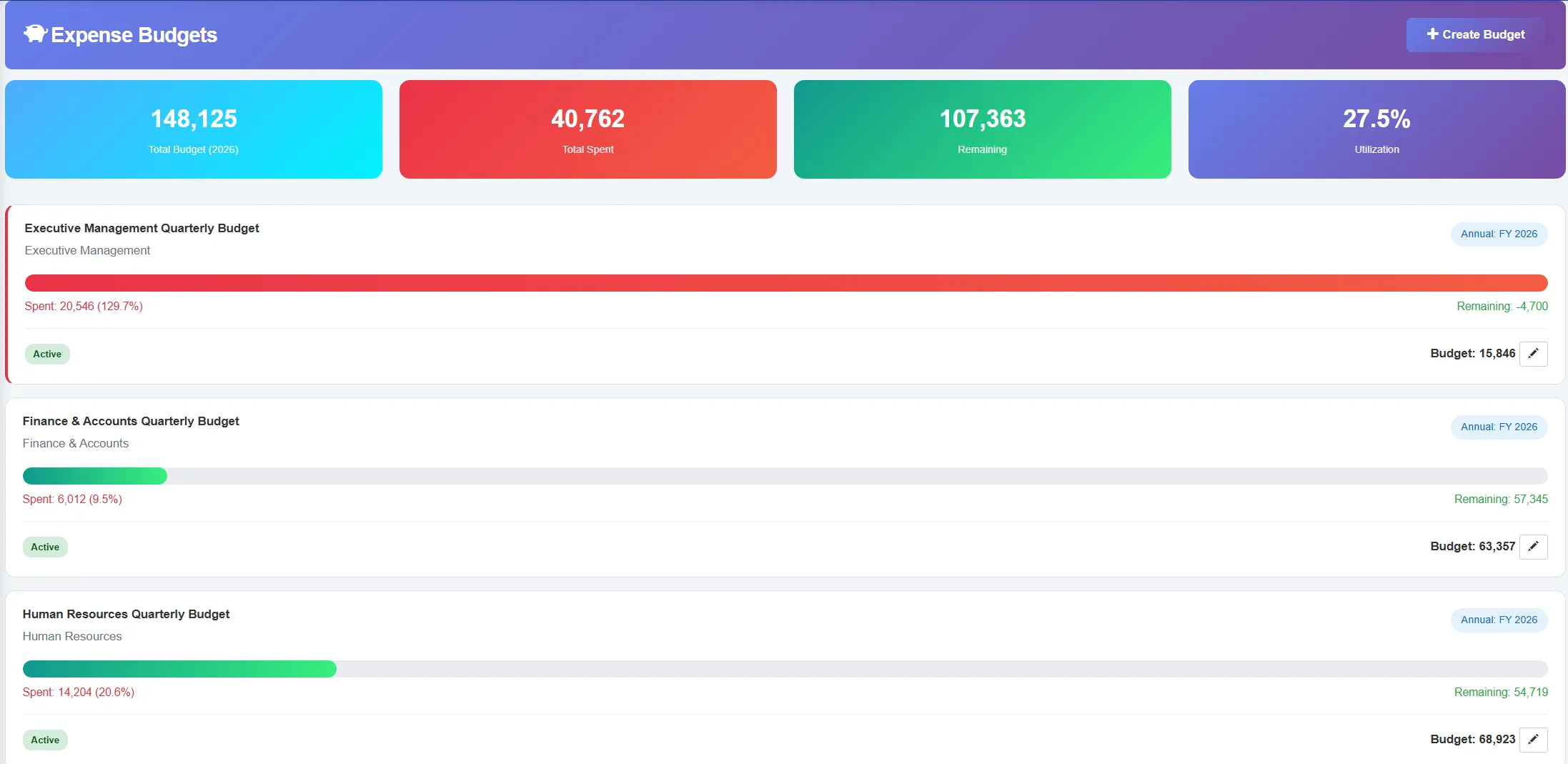
  • Budget vs. actual reports
  • Export to Excel & PDF

Ready to Automate Your Expense Process?

Join 2,000+ businesses already processing expense claims in minutes with Biznsbook.

Expense Impact
Measurable results from day one
80%
Faster Reimbursement
Zero
Lost Receipts
100%
Policy Compliance
1-Click
Approval Flow

Why Finance Teams Switch to Biznsbook Expenses

Transform expense management from a monthly headache into a seamless, automated workflow.

  • 80% Faster Reimbursements
    Digital claims and automated approvals mean employees get reimbursed in days, not weeks.
  • Zero Lost Receipts
    Every receipt is captured digitally the moment it's received. No more faded paper or missing documentation.
  • 100% Policy Compliance
    Spending limits and category rules are enforced automatically. Out-of-policy claims are flagged before approval.
  • Instant Accounting Sync
    Approved expenses auto-post journal entries. No manual data entry, no month-end reconciliation surprises.
  • Complete Spending Visibility
    Real-time dashboards show what's being spent, by whom, and against which budget — the moment it's submitted.

See the Difference Automated Expenses Make

80% faster reimbursements. Zero lost receipts. Results from day one.

How Does Biznsbook Expense Management Work?

Get started in minutes. Our expense workflow follows a straightforward four-step process.

1

Capture Receipt

Snap a photo of your receipt or upload a PDF. OCR extracts the details automatically.

2

Submit Claim

Review the auto-filled form, select category and project, add notes, and submit in seconds.

3

Get Approved

Manager receives the claim, reviews receipt and details, and approves or rejects with one click.

4

Get Reimbursed

Approved claims process through payroll. Accounting entries post automatically. Done.

Set Up in Minutes. Process Claims Automatically.

No complex configuration. Snap receipts, submit claims, and get reimbursed — all automated.

Who Uses Expense Management Software?

Whether you have a small team or a global workforce, Biznsbook Expenses scales with your business.

Small Businesses

Perfect for startups and small teams that need simple expense tracking without paper receipts or spreadsheets.

  • Simple claim submission
  • Receipt photo capture
  • Basic approval workflow
Popular

Growing Companies

Ideal for companies scaling their expense process with multi-department approvals and spending policies.

  • Multi-level approvals
  • Policy enforcement
  • Expense analytics

Enterprises

Enterprise-grade expense management for large organisations with complex policies, multi-location operations, and compliance needs.

  • Global policy management
  • Full ERP integration
  • Enterprise compliance

Not Just Expenses. Your Entire ERP, Connected.

Biznsbook Expenses is built into your ERP — not bolted on. Every module shares the same data.

Accounting

Approved expenses auto-post journal entries to your general ledger. Expense accounts, cost centres, and tax codes apply automatically.

Payroll

Approved reimbursements process in the next payroll run. Employees see reimbursements on their payslips — no separate payment needed.

HRMS

Claims link to employee profiles and department hierarchy. Approval chains follow HR reporting lines automatically.

Security & Compliance

Your expense data is protected with enterprise-grade security measures.

Data Security

Industry-standard encryption protects expense data and receipt images in transit and at rest. Role-based access ensures only authorised personnel view claim details.

Backup Systems

Automated backups ensure expense records and receipt images are never lost. Regular snapshots and disaster recovery keep your data safe.

Audit Trails

Every claim submission, approval, rejection, and amendment is logged with user, timestamp, and action. Full accountability for compliance audits.

Expense Management Is Included in Your Biznsbook ERP Subscription

No separate expense license. No per-employee fee. Just activate the module. Track expenses alongside Accounting, Payroll, and HRMS — all in one plan.

Expense Management — Frequently Asked Questions

Quick answers to common questions about expense claims, receipt scanning, approval workflows, and pricing.

Expense management software automates the entire expense lifecycle. It handles claim submission, receipt scanning, manager approvals, policy enforcement, reimbursement processing, and accounting entry — replacing paper receipts and manual spreadsheets with a streamlined digital workflow.

Receipt scanning uses OCR to extract key data from photos or PDF receipts. Snap a photo of your receipt and the system auto-fills vendor name, date, amount, and category — eliminating manual data entry and reducing claim submission time to seconds.

Yes. Claims route to the appropriate manager based on department hierarchy and approval rules. Managers review, approve, or reject with one click — from desktop or mobile. Multi-level approval chains are supported for larger organisations.

Absolutely. Small businesses benefit from expense automation by eliminating lost receipts, speeding up reimbursements, and gaining visibility into spending. Biznsbook is designed to be simple for small teams yet powerful for growing enterprises. No per-employee fees.

Yes. Biznsbook Expense Management is natively integrated with Accounting and Payroll. Approved expenses auto-post journal entries to the general ledger, and reimbursements process through the payroll run — zero manual data transfer.

Yes. Define spending limits per category, per employee, or per department. The system flags or blocks claims that exceed policy thresholds before they reach the approver — ensuring compliance without manual checking.

Yes. Expense data is secured with enterprise-grade encryption, role-based access controls, and complete audit trails. Receipt images, claim details, and approval history are protected. Every change is logged for full accountability.

Yes. Generate reports by employee, department, category, project, or time period. Budget vs. actual comparisons, category breakdowns, and spending trend reports help identify savings opportunities. Export to Excel or PDF for management review.

Biznsbook includes expense management in every ERP subscription at no extra cost. There are no separate licenses, no per-employee fees, and no hidden charges. Just activate the module alongside Accounting, Payroll, and HRMS — all in one plan. View pricing →

Yes. Biznsbook Expense Management is fully responsive and works on any modern mobile browser. Employees can snap receipts, submit claims, and track reimbursement status from their phones. Managers can approve claims on the go — no app installation needed.

Start Today View Pricing