Real Estate Module

Property Listings, Tenants, Leases, and Commissions — All Connected

Biznsbook Real Estate Management gives you everything you need — projects, units, bookings, payment schedules, lead CRM, and site visit tracking. Manage your entire portfolio from inquiry to possession — connected to your Accounting, CRM, and HRMS.

No Credit Card Required Flat $19/mo Cancel Anytime Unlimited Users
Skyline Towers — Unit Inventory ● 120 Units
Unit A-101 — 2 BHK Apartment
$185,000
Sold
Unit A-204 — 3 BHK Apartment
$265,000
Booked
Shop S-05 — Commercial
$120,000
Available
Unit B-302 — Penthouse
$520,000
Booked
Villa V-12 — 4 BHK Villa
$680,000
Available

What Is Real Estate Management Software?

Real estate management software is a platform that helps property developers, agents, and managers track projects, manage units, handle bookings, process payments, and maintain customer relationships in one centralised system. It automates property sales workflows from lead inquiry through possession handover — with full accounting integration.

  • Complete portfolio management — Projects, phases, units, and availability status tracked in real time.
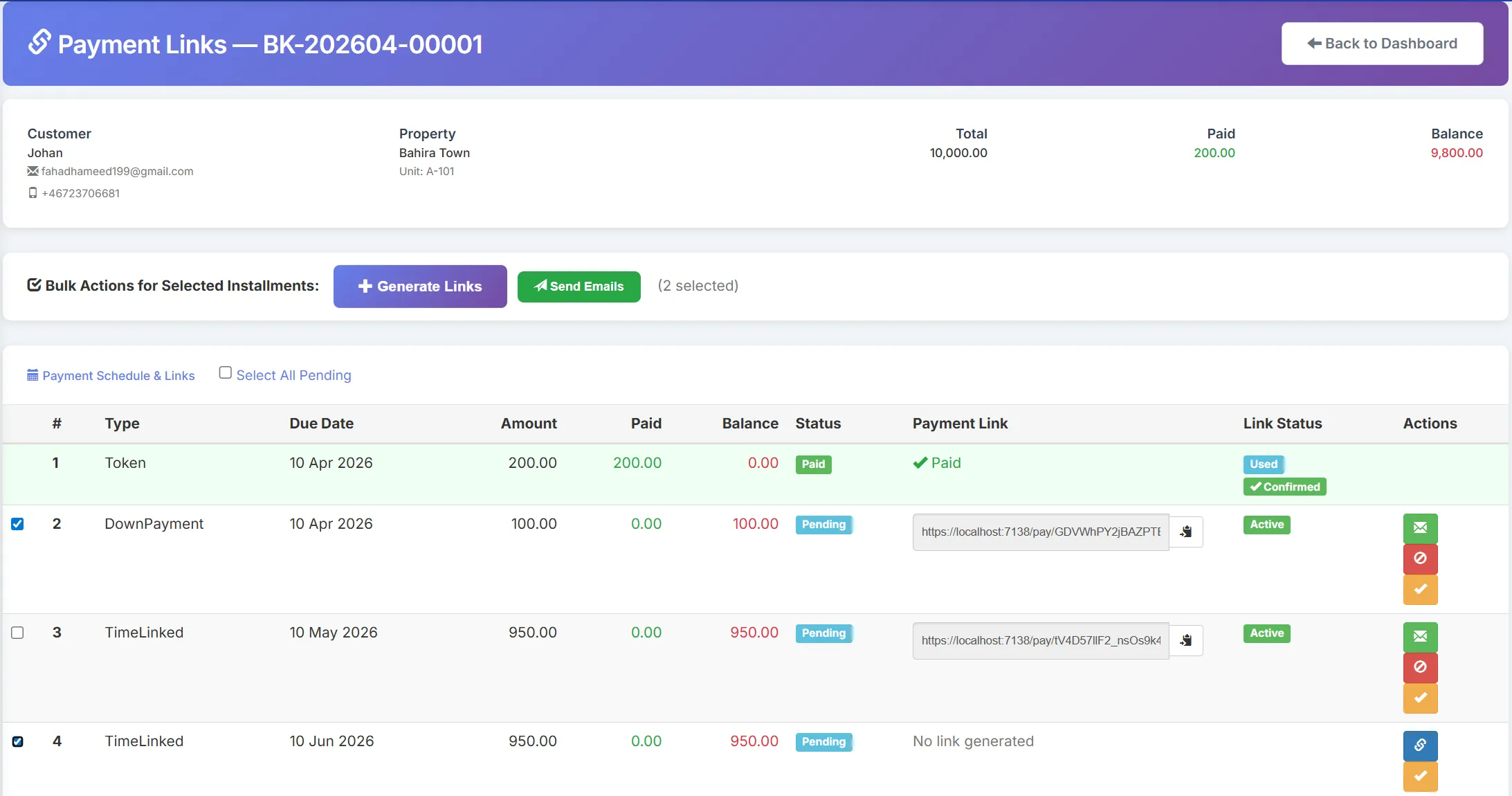
  • Booking & payment workflows — Create bookings, generate payment schedules, track installments, and send due-date reminders.
  • Connected to your ERP — Payments post to Accounting automatically. Lead data syncs with CRM. Agent commissions track in one place.

How Does Property Booking Work in Biznsbook?

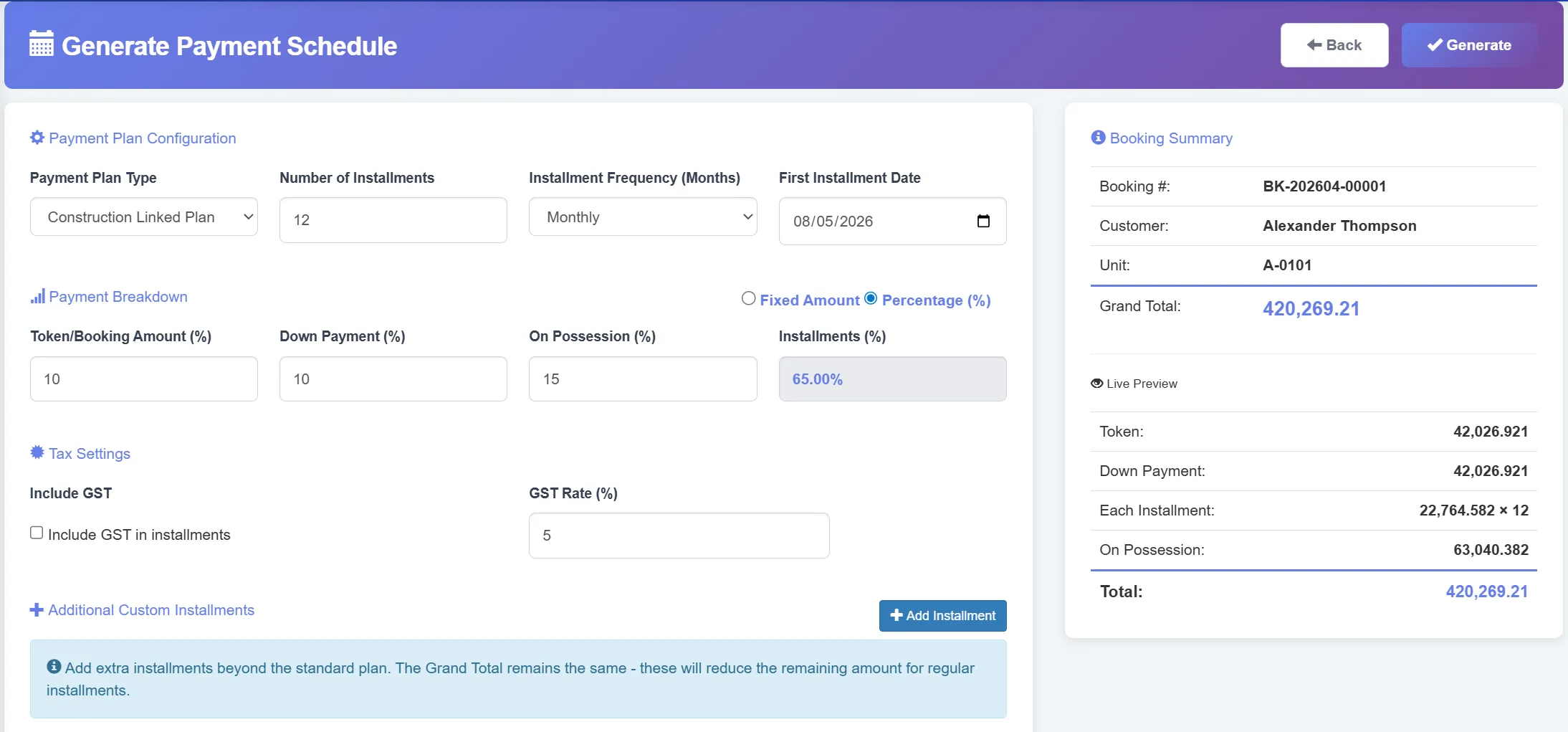
Property booking starts by selecting a project and available unit, then creating a booking for a customer with pricing details. The system generates a payment schedule based on the chosen plan — construction-linked, time-linked, or custom. All payments are tracked and synced with accounting automatically.

  • 1.Select unit — Pick a project, phase, and available unit. View pricing, area, floor, and specifications.
  • 2.Create booking — Add customer details, co-applicants, broker info, and pricing with discounts and taxes.
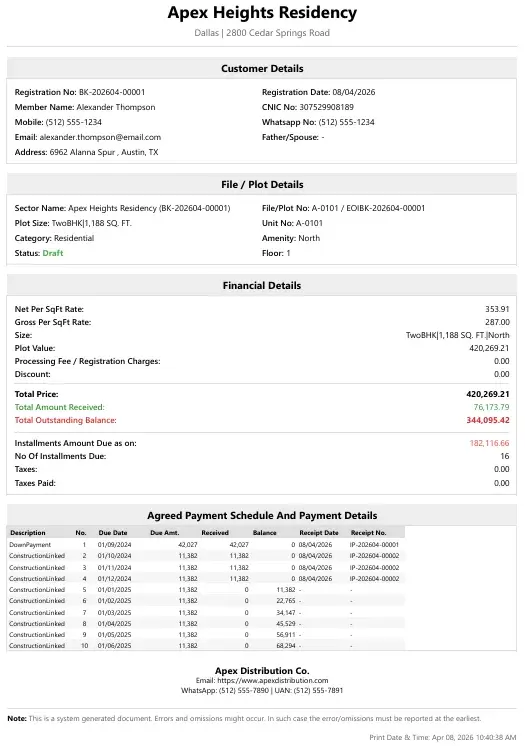
  • 3.Track payments — Generate installment schedule, record receipts, send reminders, and sync with accounting.

Still Managing Properties in Spreadsheets? Here's What It's Costing You

Missed Payments & Overdue Installments

Without automated tracking, installments slip through. Finance discovers overdue amounts weeks late — hurting cash flow and customer relationships.

No Portfolio Visibility

Which units are available? Which are booked? How much is outstanding? Spreadsheet-based tracking provides answers days late, not in real time.

Disconnected from Accounting

Every payment received needs manual journal entries. Every cancellation needs manual reversal. Month-end reconciliation takes days instead of minutes.

Automated Payment Tracking

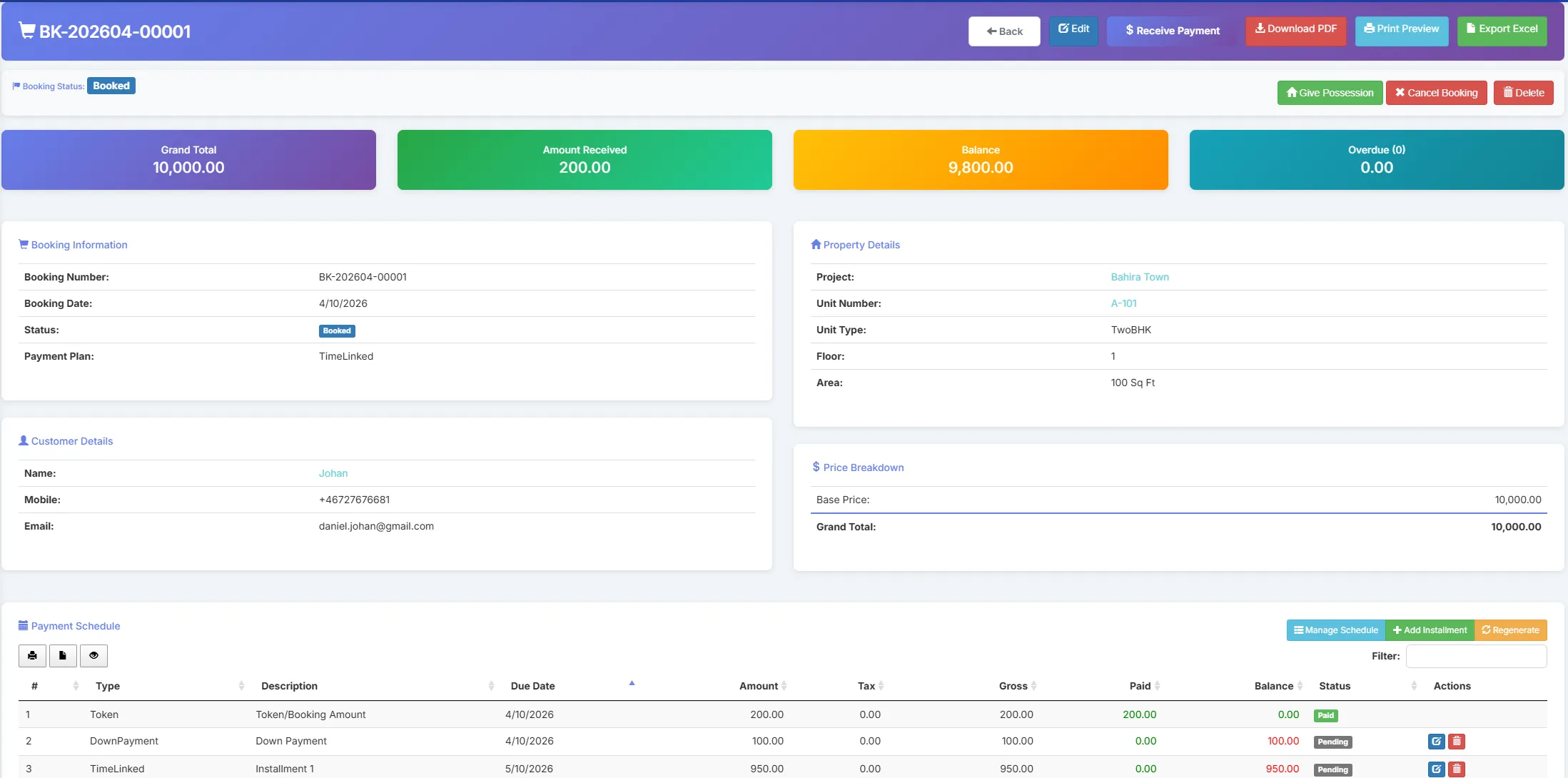
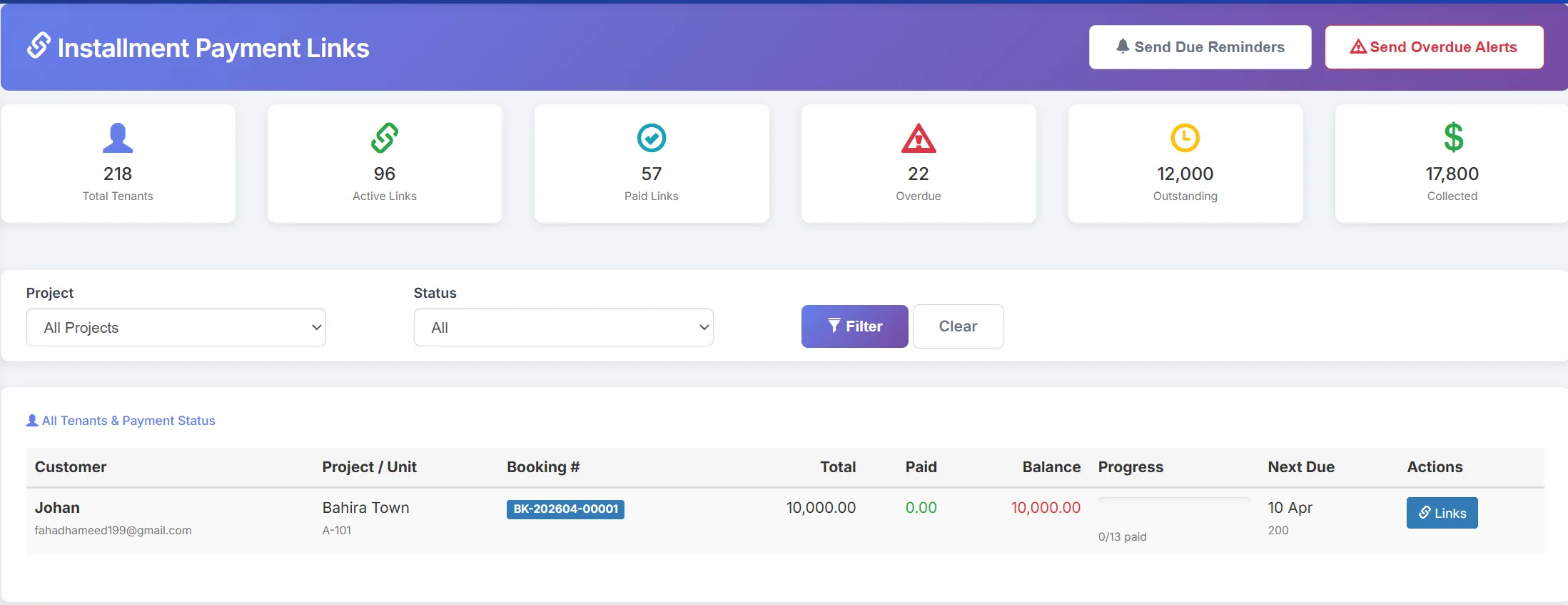
Payment schedules generate automatically per booking. Track every installment, send due-date reminders, and flag overdue amounts instantly.

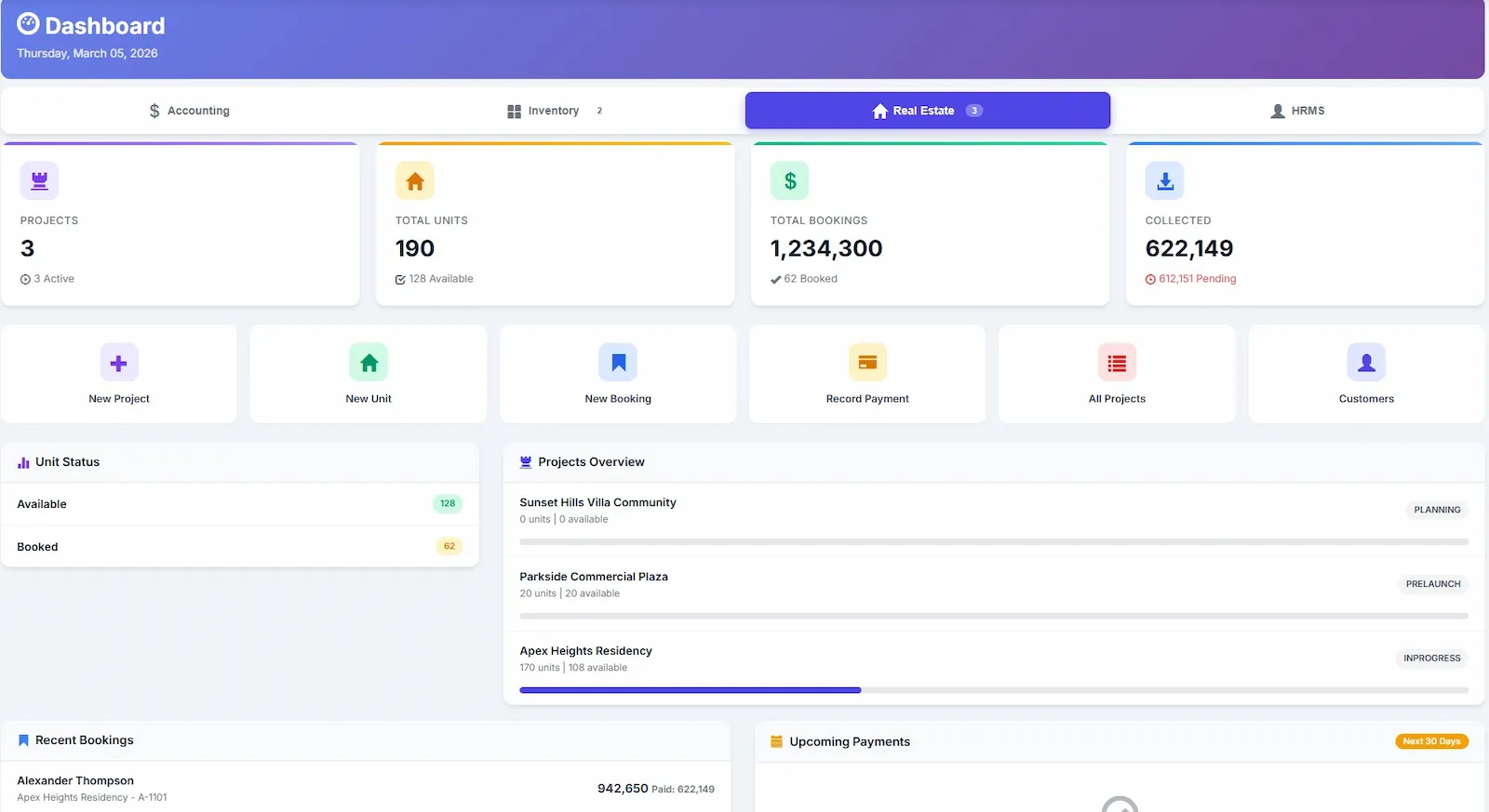
Real-Time Portfolio Dashboard

See available, booked, and sold units across every project and phase. Know collections, receivables, and pipeline value at a glance.

Auto Accounting Integration

Payments auto-post to your general ledger. Cancellations reverse entries. Revenue recognition, receivables, and financial reports are always accurate.

Everything You Need for Real Estate Management

From project setup to possession handover — all connected to your accounting and CRM.

Project & Phase Management

Create and manage multiple projects with phases and blocks. Track status, completion dates, and financial performance across your portfolio.

  • Multi-project support
  • Phase/block organisation
  • Status tracking
  • Project financials

Unit Management

Define unit types, areas, pricing, floor details, and availability. Bulk-create units for entire floors or blocks with consistent templates.

  • All unit types supported
  • Bulk unit creation
  • Availability tracking
  • Detailed specifications

Booking Management

Create bookings with agreement value, discounts, taxes, and broker info. Track status from draft to possession given.

  • Customer & co-applicant support
  • Broker commission tracking
  • Loan tracking
  • Cancellation handling

Payment Schedules

Generate flexible payment plans — construction-linked, time-linked, or custom. Track installments, record receipts, and send reminders.

  • Multiple plan types
  • Installment tracking
  • Due-date reminders
  • Overdue alerts

Lead CRM & Site Visits

Capture leads from multiple sources. Track follow-ups, schedule site visits, and convert qualified leads to customers and bookings.

  • Lead pipeline tracking
  • Site visit scheduling
  • Follow-up management
  • Lead-to-booking conversion

Real Estate Reports

Project summaries, unit availability, booking status, collection reports, overdue installments, and lead conversion analytics.

  • Collection reports
  • Overdue analysis
  • Lead conversion stats
  • Export to Excel & PDF

Ready to Manage Your Properties Professionally?

Join 2,000+ businesses already managing real estate with Biznsbook.

Real Estate Impact
Measurable results from day one
100%
Payment Visibility
Zero
Missed Installments
Real-Time
Unit Availability
1-Click
Payment Schedule

Why Developers Switch to Biznsbook Real Estate

Transform property management from spreadsheet chaos into a connected, automated workflow.

  • 100% Payment Visibility
    Every installment is tracked. Due dates, receipts, and overdue amounts are visible in real time across every booking.
  • Zero Missed Installments
    Automated reminders notify customers before due dates. Finance is alerted when payments are overdue.
  • Lead-to-Possession Tracking
    From the first inquiry through site visit, booking, payment, and handover — every step is tracked in one system.
  • Instant Accounting Sync
    Payments auto-post to your ledger. Cancellations reverse entries. Financial reports are always accurate.
  • Broker Commission Tracking
    Track referral sources, commission percentages, and payable amounts. Know exactly what's owed to each broker.

See the Difference Connected Real Estate Management Makes

100% payment visibility. Zero missed installments. Results from your very first project.

How Does Biznsbook Real Estate Work?

Get started in minutes. Our workflow follows a straightforward four-step process.

1

Set Up Projects

Create projects, phases, and units. Define types, pricing, and specifications for your entire portfolio.

2

Capture Leads

Capture leads, schedule site visits, track follow-ups, and convert qualified prospects into bookings.

3

Create Bookings

Book units for customers. Generate payment schedules. Track installments and send reminders.

4

Possession Handover

Complete all payments. Hand over possession. All transactions sync with accounting automatically.

Set Up in Minutes. Manage Your Entire Portfolio.

Projects, units, bookings, and payments — all connected to your accounting in one click.

Who Uses Real Estate Management Software?

Whether you manage a single project or a multi-city portfolio, Biznsbook scales with your business.

Property Developers

Perfect for developers managing residential and commercial projects with units, bookings, and payment schedules.

  • Project & phase setup
  • Bulk unit creation
  • Payment schedule generation
Popular

Real Estate Agents

Ideal for agents managing leads, site visits, and sales across multiple developer projects with commission tracking.

  • Lead CRM
  • Site visit tracking
  • Commission management

Property Managers

Enterprise-grade management for large portfolios with multi-project oversight, financial reporting, and compliance needs.

  • Multi-project portfolio
  • Full ERP integration
  • Financial reporting

Not Just Real Estate. Your Entire ERP, Connected.

Biznsbook Real Estate is built into your ERP — not bolted on. Every module shares the same data.

Accounting

Payments auto-post to your general ledger. Receivables, revenue recognition, and cancellation reversals — all in sync.

CRM

Lead data syncs with your CRM. Track inquiries, follow-ups, and conversions across real estate and other sales channels.

HRMS

Agent and sales team data connects to employee records. Track commissions, performance, and team allocation.

Security & Compliance

Your real estate data is protected with enterprise-grade security measures.

Data Security

Industry-standard encryption protects customer data, payment records, and property information. Role-based access controls who sees what.

Backup Systems

Automated backups ensure booking records, payment schedules, and customer data are never lost. Disaster recovery keeps everything safe.

Audit Trails

Every booking, payment receipt, cancellation, and status change is logged with user, timestamp, and action for full accountability.

Real Estate Is Included in Your Biznsbook ERP Subscription

No separate license. No per-unit fee. Just activate the module. Manage properties alongside Accounting, CRM, and HRMS — all in one plan.

Real Estate Management — Frequently Asked Questions

Quick answers to common questions about property management, bookings, payment schedules, and pricing.

Real estate management software helps property developers, agents, and managers track projects, manage units, handle bookings, and process payments in one centralised system. It automates property sales workflows and provides real-time visibility into project financials.

Select a project and available unit, create a booking for a customer with pricing details, and the system generates a payment schedule. Choose from construction-linked, time-linked, or custom plans. All payments sync with accounting automatically.

Yes. Create flexible payment plans with token amounts, down payments, EMIs, and possession payments. Track installment due dates, record receipts, and get automated alerts for overdue amounts. All payment data integrates with accounting.

Yes. Capture leads from multiple sources, track follow-ups, schedule site visits, and convert qualified leads to bookings. The CRM tracks the complete sales pipeline from inquiry to possession handover.

Yes. When you receive payments, all transactions are automatically recorded in your accounting ledgers. Revenue recognition, receivables, and cancellation reversals are handled automatically for accurate financial reporting.

Yes. Each project can have multiple phases, and each phase can contain multiple units. Track project status, expected completion dates, and financial performance across your entire portfolio from one dashboard.

Create and track individual units with types (apartments, villas, plots, shops), areas, pricing, floor details, and availability status. Bulk unit creation helps set up entire floors or blocks quickly with consistent templates.

Cancellations include proper documentation — reason, refund calculations, and deductions. The unit is automatically made available again, and all accounting entries are reversed or adjusted to maintain accurate financial records.

Absolutely. Small developers benefit the most from organised unit tracking, automated payment schedules, and lead management. No complex setup needed. The system scales as your portfolio grows.

Biznsbook includes real estate management in every ERP subscription at no extra cost. No separate licenses, no per-unit fees. Just activate the module alongside Accounting and CRM. View pricing →

Start TodayView Pricing