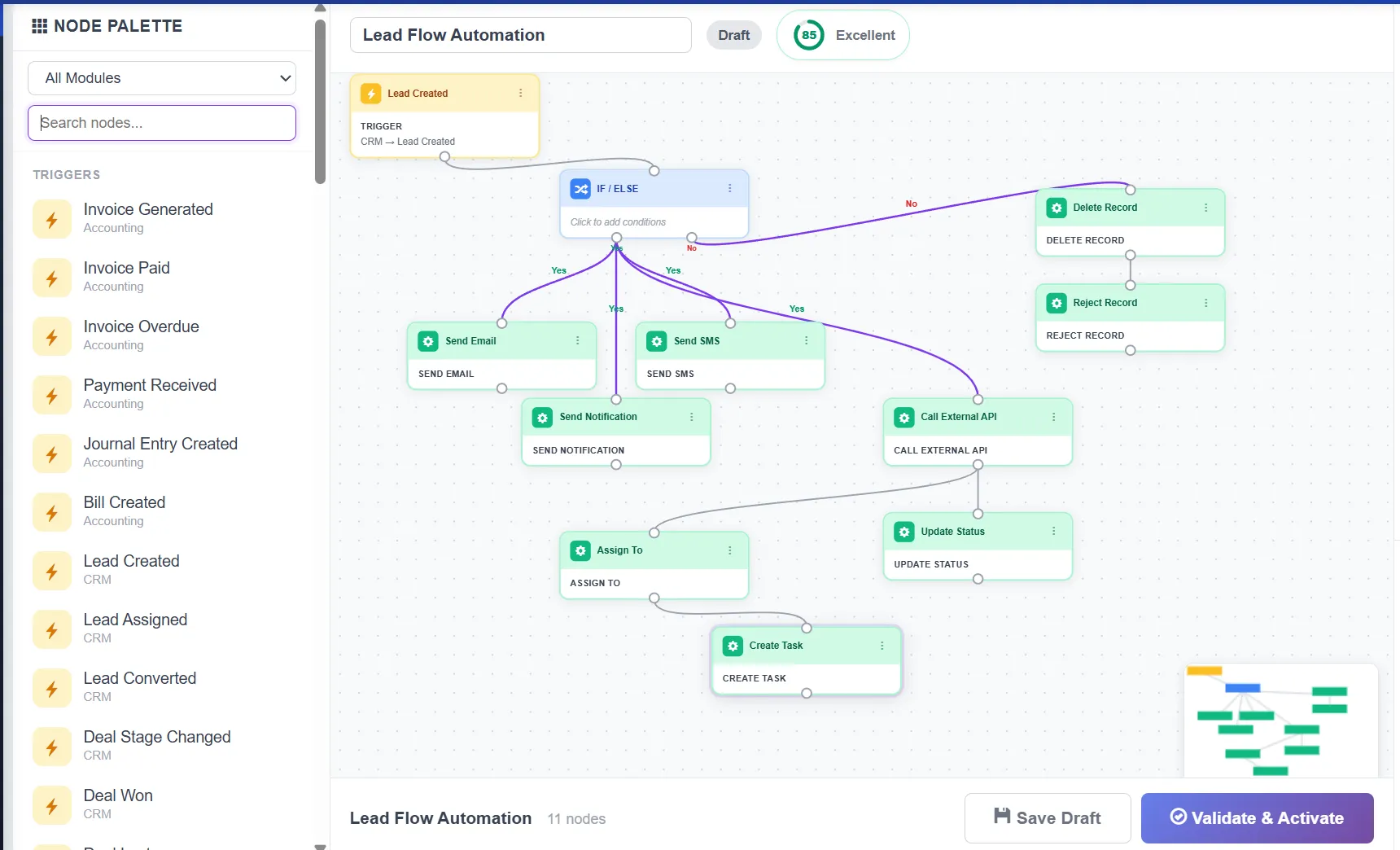
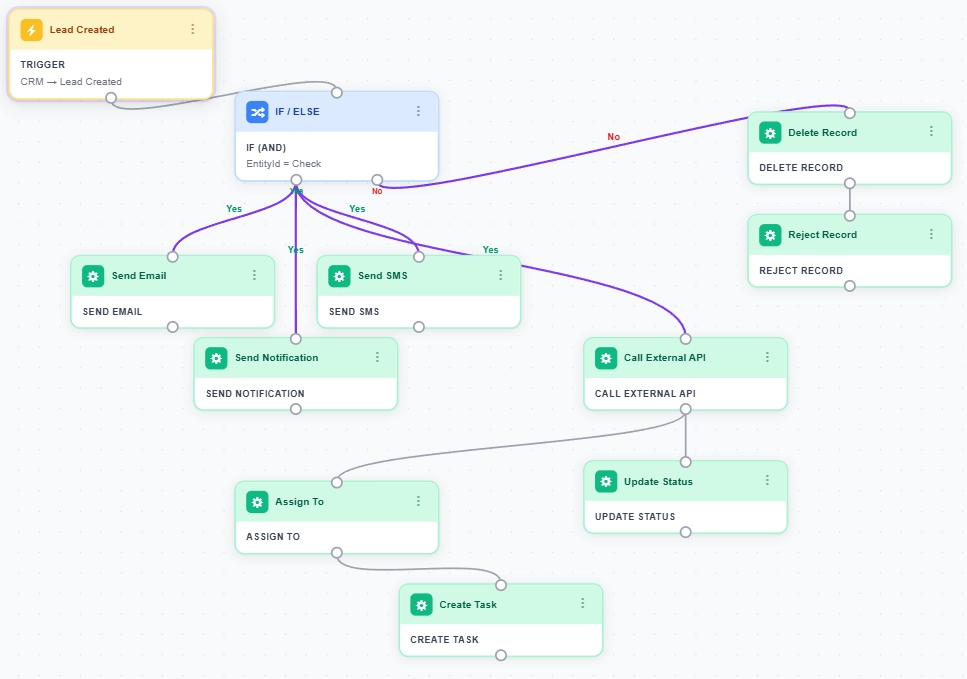
Automation Module

Turn Any ERP Event Into an Automated Action — No Code Needed

Build powerful "if this happens, then do that" workflows across HR, CRM, Accounting, Inventory, and more — all from a simple form-based builder. Zero code, zero developers.

No Credit Card Required Unlimited Workflows Zero Code
Workflow: New Lead Welcome ● Active
When
A new lead is created
Trigger: Lead Created (CRM Module)
If
Lead score is greater than 80
Condition: Score > 80
Then
Send welcome email
Action: Send Email to lead's address
Then
Create follow-up task
Action: "Contact within 48 hours" — due in 2 days
Then
Notify sales manager
Action: High-priority in-app notification

What Is Business Automation in ERP?

Business automation lets you create rules that trigger automatic actions when events happen in your business — like sending a welcome email when a new lead arrives, creating a follow-up task when an invoice goes overdue, or notifying a manager when stock runs low. No code, no developers, no waiting.

  • Trigger → Condition → Action — Pick an event, add optional filters, define what happens. That's it.
  • 25 triggers across 8 modules — HRMS, Accounting, CRM, Inventory, Expense, Payroll, Real Estate, and Manufacturing.
  • 10 powerful actions — Send emails, notifications, update fields, change statuses, create tasks, call APIs, send webhooks, and more.

Still Doing Manually What Software Can Do Automatically?

Repetitive Manual Tasks

Every new lead needs a welcome email. Every overdue invoice needs a reminder. Every new employee needs an onboarding checklist. Your team does these by hand, every single time.

Delayed Follow-Ups

Without automation, follow-up tasks are created hours or days late. Hot leads go cold. Overdue invoices pile up. Opportunities slip through the cracks.

Developer Dependency

Need a new workflow? Submit a ticket. Wait for IT. Explain requirements. Wait for deployment. Business users can't change workflows without developers.

Set Once, Run Forever

Build a workflow once and it runs automatically every time the trigger fires. Welcome emails, reminders, task creation — all happen instantly without human intervention.

Instant Actions

When a lead is created, the welcome email goes out in seconds — not hours. When an invoice goes overdue, the reminder fires immediately. Zero delay.

No-Code Builder

Business users build workflows from dropdown menus. Pick a trigger, add conditions, define actions. No programming. No IT tickets. Live in minutes.

Everything You Need for Business Automation

25 triggers, 19 condition operators, 10 action types — all without writing a single line of code.

25 Event Triggers

Listen for events across 8 modules — lead created, invoice overdue, stock low, expense submitted, employee onboarded, and more.

  • HRMS, Accounting, CRM
  • Inventory, Expense, Payroll
  • Real Estate, Manufacturing
  • Custom event mapping

19 Condition Operators

Filter triggers with precise conditions — equals, contains, greater than, in list, is empty, and more. Up to 10 conditions per workflow.

  • AND / OR logic
  • Numeric comparisons
  • String matching
  • Null / empty checks

10 Action Types

Send emails, notifications, update fields, change statuses, create tasks, insert records, call APIs, send webhooks, add delays, and log audit entries.

  • Email with dynamic tokens
  • External API calls
  • Multi-step sequences
  • Delay between actions

Execution Logs

Every workflow run is logged with timestamps, step-by-step detail, success/failure status, and error messages. Full audit trail.

  • Step-level detail
  • Error messages
  • Duration tracking
  • Searchable history

Reliability & Recovery

Automatic retry with exponential backoff. Circuit breaker deactivates failing workflows. Rate limiting prevents runaway execution.

  • 3x automatic retry
  • Circuit breaker protection
  • Rate limiting per workflow
  • Background queue processing

External Integrations

Connect to Slack, Zapier, custom APIs, and any HTTP endpoint. Send webhooks to external services. Call REST APIs with custom headers.

  • REST API calls
  • Webhook support
  • Custom headers & body
  • JSON response handling

Ready to Automate Your Business?

Stop doing manually what software can do for you. Build your first workflow in minutes.

Automation Impact
Measurable results from day one
25
Trigger Events
10
Action Types
8
ERP Modules
Workflows

Why Businesses Switch to Biznsbook Automation

Replace manual, repetitive work with automated workflows that run 24/7.

  • Zero-Code Workflow Builder
    Business users pick triggers, conditions, and actions from dropdown menus. No programming. No IT tickets. Live in minutes.
  • Instant Response to Business Events
    When a lead arrives, the email goes out in seconds. When an invoice goes overdue, the reminder fires instantly. Zero human delay.
  • Enterprise-Grade Reliability
    Automatic retry, circuit breaker protection, rate limiting, and execution logs. Your automations run 24/7 without silent failures.
  • External API & Webhook Support
    Connect to Slack, Zapier, custom APIs, and any HTTP endpoint. Your ERP workflows extend beyond Biznsbook.
  • Full Audit Trail
    Every execution is logged with timestamps, step-by-step detail, and error messages. Know exactly what ran, when, and what happened.

Build Automations That Run While You Sleep

25 triggers. 10 actions. 8 modules. Infinite possibilities. Zero code.

How Does Biznsbook Automation Work?

Every workflow follows the same simple pattern: something happens, you check conditions, then the system acts.

1

Pick a Trigger

Choose from 25 events across 8 modules — lead created, invoice overdue, stock low, and more.

2

Add Conditions

Optionally filter with conditions — "only if amount > 1000" or "only if status = New". Up to 10 conditions.

3

Define Actions

Add action steps — send email, create task, call API, update field. Chain multiple actions in sequence.

4

Activate & Monitor

Turn on the workflow. It runs automatically 24/7. Monitor execution logs for full visibility.

Set Up in Minutes. Automate Forever.

Pick a trigger. Add conditions. Define actions. Your first workflow goes live in under 5 minutes.

What Can You Automate?

Here are popular workflows our customers build in minutes — no coding required.

New Lead Welcome

When a lead is created → send welcome email → wait 1 hour → create follow-up task → notify sales manager.

  • CRM + Email + Task
  • Delay between steps
  • Manager notification
Popular

Overdue Invoice Reminder

When invoice goes overdue → send reminder email → notify accounts manager → log audit entry.

  • Accounting trigger
  • Automated email
  • Audit logging

Low Stock Alert

When stock falls below reorder level → notify inventory manager → send Slack webhook → log audit.

  • Inventory trigger
  • Webhook integration
  • Multi-channel alert

25 Triggers Across 8 ERP Modules

Your workflows start when something important happens anywhere in your ERP.

HRMS

User Created · Employee Onboarded · Employee Terminated · Leave Approved

Accounting

Invoice Generated · Invoice Paid · Invoice Overdue · Payment Received

CRM

Lead Created · Assigned · Converted · Deal Stage Changed · Won · Lost

Inventory

Stock Low Alert · Purchase Order Created · Stock Received

Expense & Payroll

Expense Submitted · Approved · Rejected · Payroll Run Completed

Real Estate & Manufacturing

Property Listed · Deal Closed · Work Order Created · Work Order Completed

Security & Reliability

Automation that runs 24/7 needs enterprise-grade protection. Here's what we've built.

Automatic Retry

Failed steps are retried up to 3 times with exponential backoff. Temporary failures resolve on their own without manual intervention.

Circuit Breaker

If a workflow fails 10+ times in an hour, it's auto-deactivated. No runaway failures. No email storms. No cascading errors.

Multi-Tenant Security

Complete data isolation between companies. Role-based access. Private IP blocking. Entity whitelists. Full audit logging.

Business Automation Is Included in Your Biznsbook ERP Subscription

No separate automation license. No per-workflow fee. Just activate the module. Automate across HRMS, Accounting, CRM, and more — all in one plan.

Business Automation — Frequently Asked Questions

Quick answers to common questions about workflow automation, triggers, actions, and pricing.

Business automation lets you create if-this-then-that rules that run automatically when events happen. For example, when a new lead is created, automatically send a welcome email, create a follow-up task, and notify the sales manager — no manual effort or coding needed.

No. Biznsbook uses a form-based workflow builder. Pick a trigger event, add optional conditions, and define actions from dropdown menus. No programming required. Business users build workflows themselves.

25 trigger events across 8 modules: HRMS (user created, employee onboarded, terminated, leave approved), Accounting (invoice generated, paid, overdue, payment received), CRM (lead created, assigned, converted, deal stage changed, won, lost), Inventory (stock low, PO created, stock received), Expense (submitted, approved, rejected), Payroll (run completed), Real Estate (property listed, deal closed), and Manufacturing (work order created, completed).

10 action types: Send emails, send in-app notifications, update record fields, change statuses, create tasks, insert new records, call external APIs, send webhooks, add delays between steps, and log audit entries.

No limit to the number of workflows. Each workflow can have up to 10 conditions and multiple action steps. You can also set rate limits per workflow to control execution frequency.

Failed steps are automatically retried up to 3 times with exponential backoff. If a workflow fails 10+ times in an hour, the circuit breaker deactivates it. All failures are logged with error details for debugging.

Yes. Use the Call API action to connect to any REST endpoint — Slack, Zapier, custom services. Use the Send Webhook action to push event data to external tools. Custom headers and JSON body are supported.

Biznsbook includes business automation in every ERP subscription at no extra cost. No per-workflow fees. Unlimited workflows. Just activate the module. View pricing →

Start TodayView Pricing