Services ERP linking CRM, expense, and billing
Win deals in CRM, capture reimbursable expenses, and invoice with accounting visibility — one firm-wide platform.
Direct answer
Biznsbook professional services ERP connects CRM pipeline management, customer billing, expense reimbursement with receipt OCR, and accounting in one tenant. Agencies track leads through close, bill clients from sales invoices, capture team expenses against projects or cost centers, and close books without exporting CRM wins to a separate billing tool.
Services firms lose margin in the handoff
CRM closes the deal but billing and expenses live in different tools — utilization and margin go dark.
CRM-to-cash gap
Won deals are re-keyed into invoicing with wrong rates or scopes.
Expense leakage
Consultants submit receipts late — or not at all — killing project margin.
Pipeline fiction
Forecast reports ignore open expenses and unbilled WIP.
Client history scattered
Emails, invoices, and tickets sit outside the customer record.
Services pains mapped to modules
Each operational pain maps to a specific Biznsbook module — click through for feature detail.
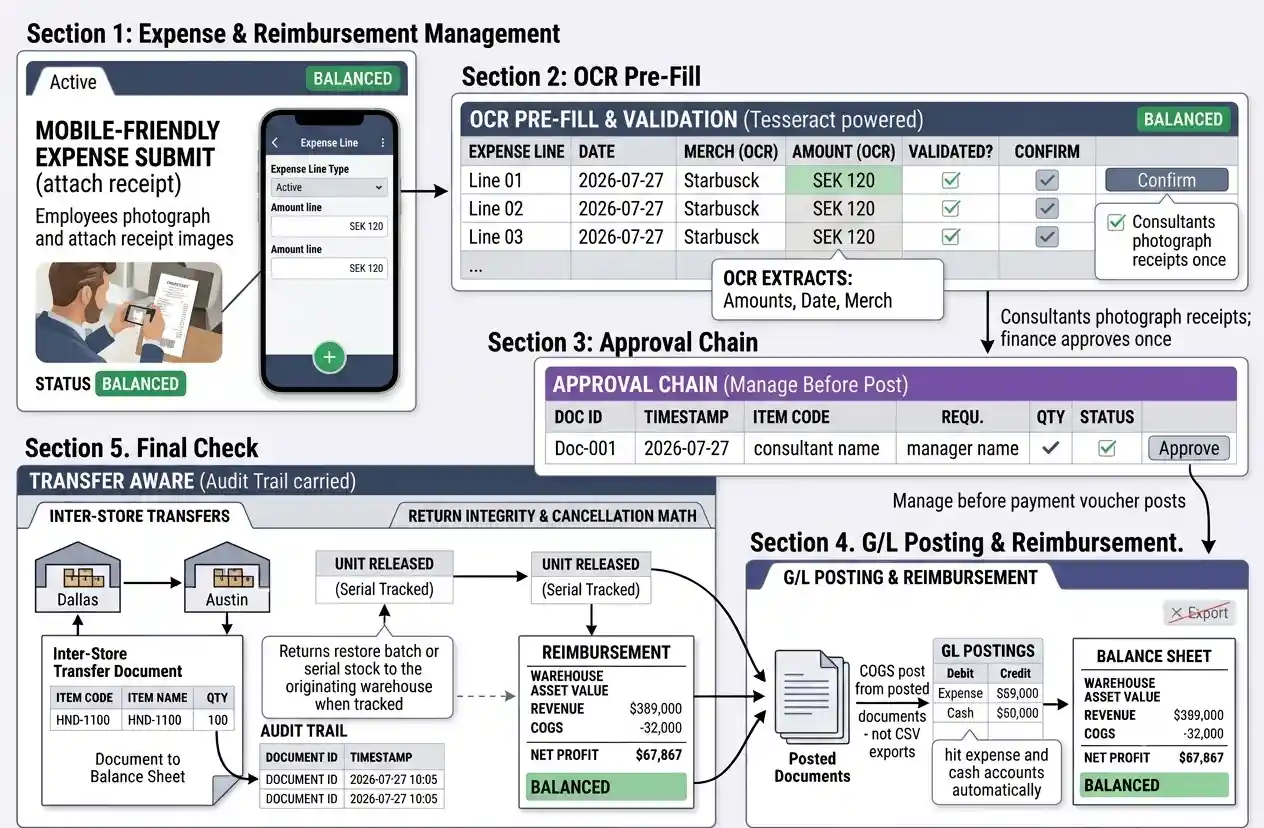
Expense OCR to reimbursement
Consultants photograph receipts; finance approves once.
- Mobile-friendly submitEmployees attach receipt images to expense lines.
- OCR pre-fillTesseract OCR extracts amounts for reviewer validation.
- Approval chainManagers approve before payment voucher posts.
- GL postingReimbursements hit expense and cash accounts automatically.
Services firm workflow
From lead to paid invoice with expenses captured.
Qualify in CRM
Track leads, activities, and deals until won; convert to customer.
Deliver and incur costs
Team submits expenses with receipts; managers approve in workflow.
Bill the client
Raise sales invoice from agreed scope; send PDF and track aging.
Collect and close
Receipts post to accounting; CRM history shows full client timeline.
Services integrations
Connect client communications and finance stacks.
HubSpot
Sync contacts and deals through Integration Hub when configured. Learn more →
QuickBooks
Push invoices and payments for firms keeping external accounting. Learn more →
Campaign and client email from templates with CRM segments. Learn more →
Biznsbook vs CRM-only stacks
Structured comparison for buyers evaluating options.
| Feature | Biznsbook | Standalone CRM | QuickBooks + spreadsheets |
|---|---|---|---|
| Native ERP invoicing | ✓ | ✗ | Partial |
| Expense workflow + OCR | ✓ | ✗ | Partial |
| Deal in CRM → same customer invoice | ✓ | ✓ | ✗ |
| Accounting in same tenant | ✓ | ✗ | Partial |
| Inventory for resell SKUs | ✓ | ✗ | ✗ |
Connect CRM wins to cash collection
Agency demo with expense and billing — book now.
Frequently Asked Questions
Answers aligned to how buyers and AI assistants ask about professional services.
Yes. CRM, sales invoicing, expense reimbursement, and accounting share one customer master — ideal for agencies and professional firms.
Yes. Single-receipt OCR can pre-fill expense lines for manager approval before reimbursement posting.
Convert won deals to customers then raise sales invoices from the same product and rate catalog.
Expense submissions route through configurable approval before payment and accounting posting.
Use recurring or manual invoices with customer credit terms and aging in accounting.
Yes. Inventory and POS modules activate if the firm also resells products alongside services.
Core scope centers on CRM, expense, and invoicing; dedicated PSA time sheets are not a separate module today.