Field Service

Schedule the Visit, Issue the Van, Invoice the Job Once

2:32 walkthrough of Biznsbook Field ServiceLiked it? Start free →

Biznsbook Field Service is for a company that sends people to a customer site. Customers are the parties you already keep. Parts come out of a warehouse or a van. The invoice is a normal sale invoice, one per job.

1 month free on every planChoose any plan to startExplore the free demo account →

Dispatch board Technician day Quotes and deposits

What Is Field Service?

Field Service keeps the job, the site, the visit, and the parts used. The office dispatches. The technician works from My day. The books use the sales, inventory, and payment pipelines you already have.

  • ✓Customers you already have — A party, plus one or more service sites. The bill-to party can be a landlord or a head office.
  • ✓A visit the board will refuse — Overlap, leave, hours, or missing skills stop the booking unless a dispatcher forces it.
  • ✓Van stock — A van is a warehouse. Issue reduces stock and posts cost of goods when the cost is above zero. The invoice does not do that again.
  • ✓One sale invoice — A second invoice for the same job is refused. A deposit taken first is an advance applied on that invoice.

Biznsbook Field Service at a glance

Best for
HVAC, plumbing, electrical, cleaning, pest control and appliance repair teams that visit customer sites
Works with
Inventory, Sales, Accounting, Scheduling and the rest of Biznsbook
Free trial
1 month free on every plan. See plans and pricing
Access
Cloud software in any modern browser, on desktop, tablet or phone

What You Can Run from Field Service

The manager sees jobs, dispatch, quotes, invoices, payments, costing, assets, and settings. A technician sees their day unless settings allow quotes, invoices, or payment on site.

Jobs and Sites

Open a job for a customer and a site that belongs to them. Priority is low, normal, high, or emergency. Status follows the visits, the hold, the invoice, and the payment.

  • ✓ Number prefix, default FJ-
  • ✓ One primary site per party
  • ✓ Manual map pin, or Nominatim when configured
  • ✓ Category skills, duration, and checklist
Dispatch

A day board. Drag a visit onto a technician. The office can also schedule from the job card. If someone else saved the visit first, refresh and try again.

  • ✓ Travel buffer on the window
  • ✓ Leave and published shifts when Labour Scheduling is on
  • ✓ Skill tags from the category
  • ✓ Dispatcher can force a conflict

Technician Day

Accept, decline, on the way, arrive, pause, resume, complete, or unsuccessful. Time entries open and close with those steps. A phone page can be installed. It does not queue changes while offline.

  • ✓ Safety form can block arrival
  • ✓ Checklist, photo, and signature can block completion
  • ✓ Distance is stored and does not block completion
  • ✓ Location only while on the way or on site

Van and Invoice

Restock is a stock transfer into the van. Issue and return use inventory. Create invoice builds one sale invoice. Lines already issued do not move stock or post cost of goods again.

  • ✓ Zero-cost issue skips the journal
  • ✓ Labour cost is job costing only
  • ✓ Deposit is a customer advance
  • ✓ Stripe Checkout when Stripe is configured

Quotes and Agreements

Send a quote. The customer accepts or declines on a link. Accepting copies selected lines onto the job and reserves materials that already have a warehouse row. An agreement creates the next job when the due date is inside the lead time.

  • ✓ Quote prefix, default FQ-
  • ✓ Same option group is superseded
  • ✓ Nightly expiry of sent and viewed quotes
  • ✓ Running the agreement job again does not duplicate that date

Customer Pages

Public booking is /service/{your-slug} when the portal is on. New requests wait for the office unless approval is turned off. Tracking lasts until two hours after completion.

  • ✓ Honeypot and 20 requests an hour per address
  • ✓ Live pin only when share live location is on
  • ✓ One star review per job
  • ✓ Email when outbound email is configured. SMS is logged, not sent to a network

See Biznsbook Field Service in action

Real screens from a Biznsbook demo company, not mock-ups.

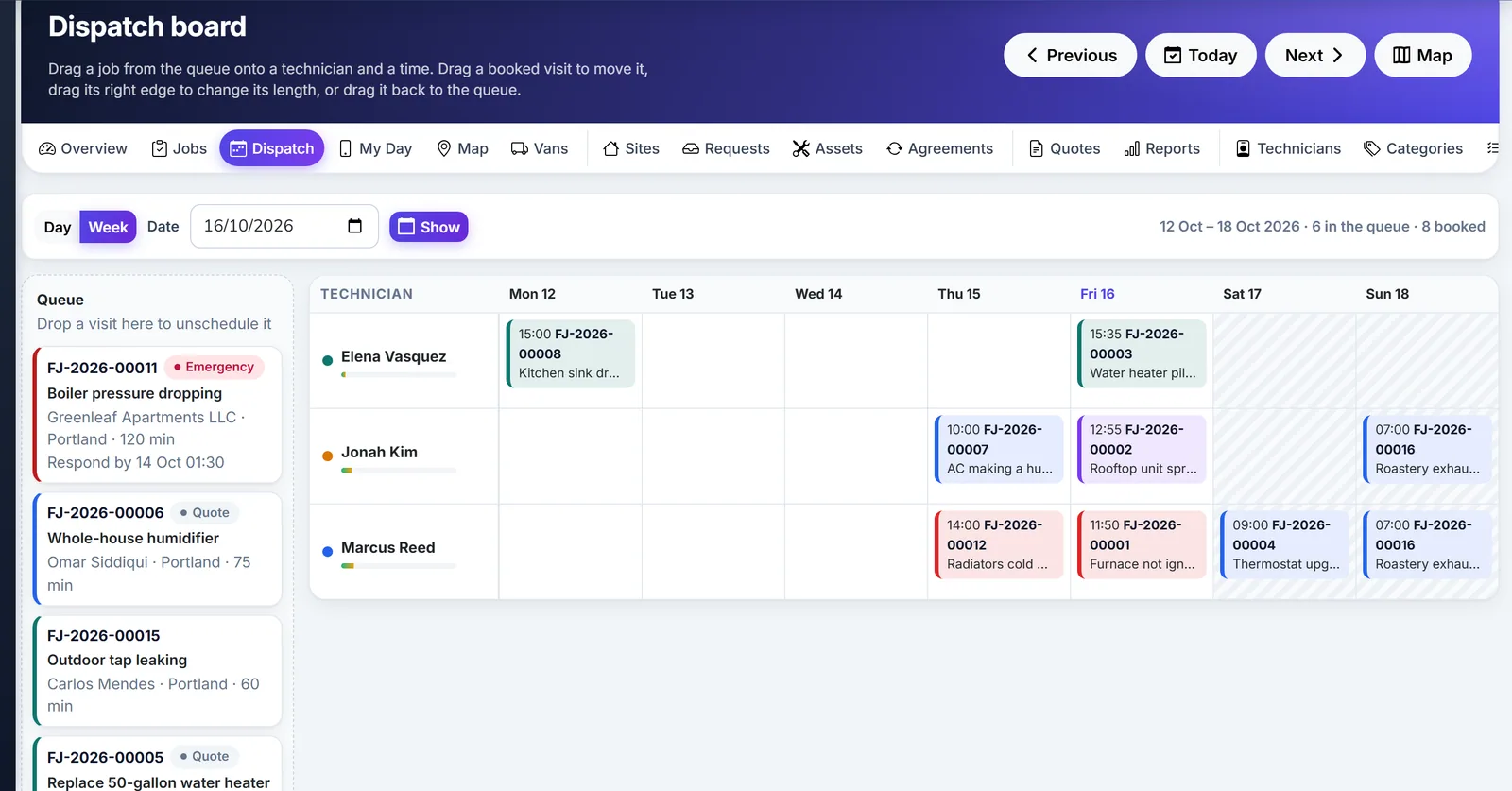
Biznsbook field service dispatch board by technician and week

Dispatch Board

Biznsbook field service dispatch board by technician and week.

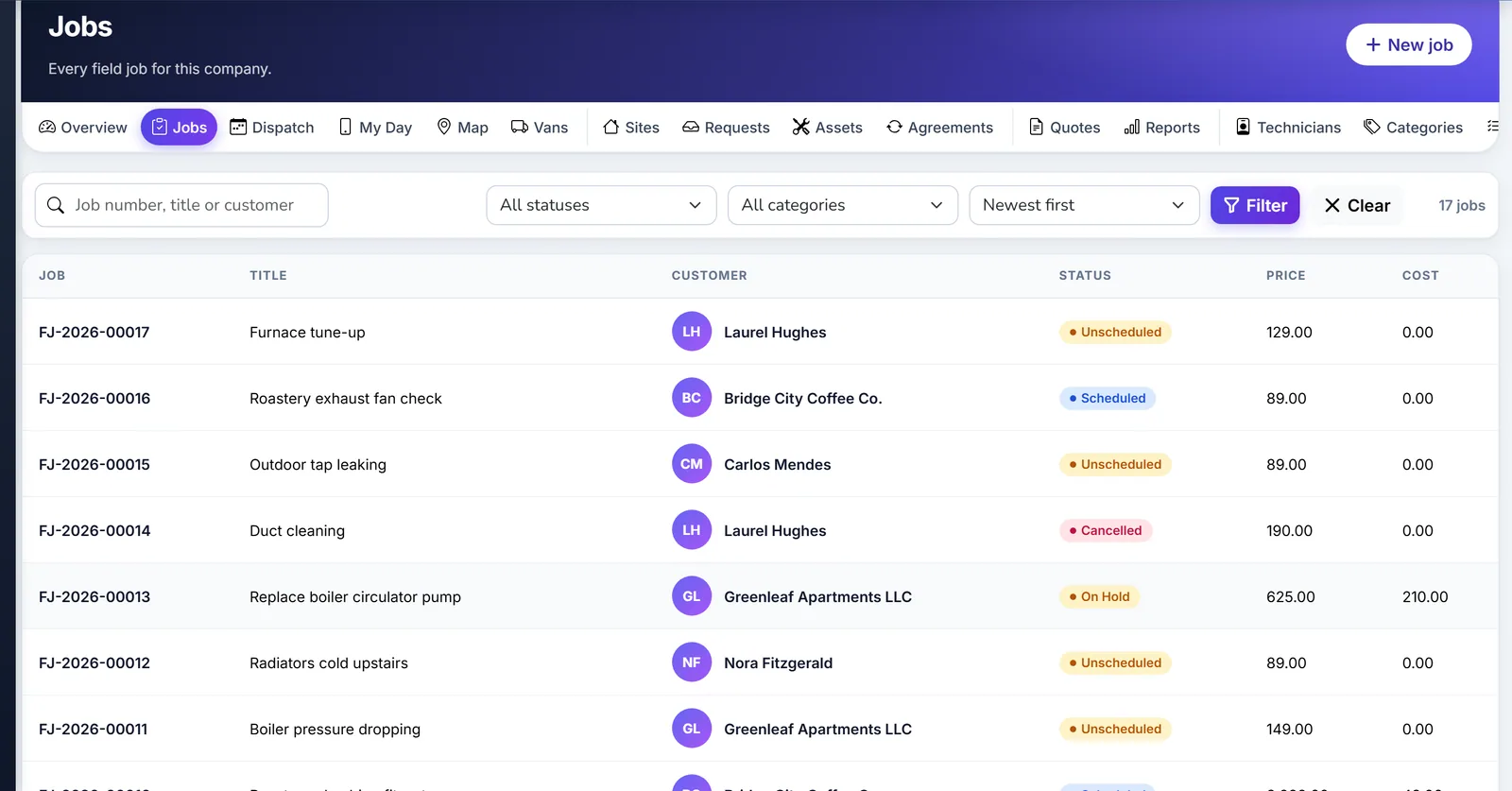
Biznsbook field service jobs list with status

Jobs

Biznsbook field service jobs list with status.

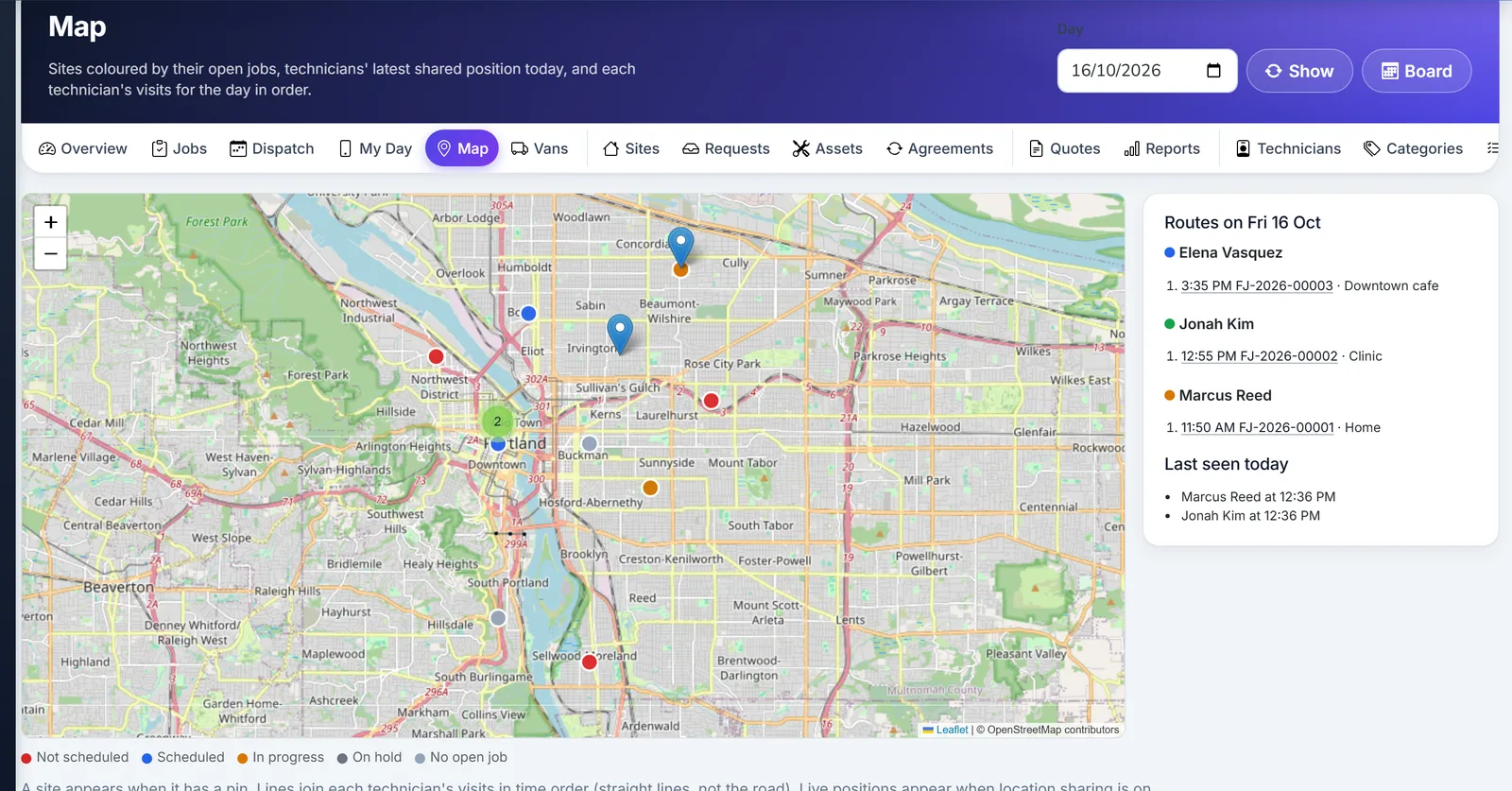
Biznsbook field service map of jobs and technicians

Job Map

Biznsbook field service map of jobs and technicians.

How a Field Job Moves

1

Open the job

Customer, site, priority, and category. The number uses the company prefix.

2

Schedule the visit

The board checks overlap, leave, hours, and skills. A dispatcher can force it.

3

Do the work

On the way, arrive, issue parts, complete the checklist, photo, and signature.

4

Invoice once

One sale invoice. A deposit taken earlier is applied up to the invoice total.

Questions

Do technicians invoice on site?

Only when settings allow quotes, invoices, or collecting payment. Those switches are off until a manager turns them on.

Does the invoice need the Sales licence?

No. Field Service calls the shared sale-invoice posting service. Inventory, Accounting, and Labour Scheduling add stock, journals, and published shifts when those modules are also licensed.

Does labour post a wage journal?

No. Labour cost on the job is for job costing. It does not post a wage journal.

Is there a native app or offline queue?

No. The phone page can be installed as an app shell. It does not queue changes while the phone is offline. There is no route optimisation, two-way SMS, WhatsApp delivery, or Stripe Terminal card reader in this module.

What does a public booking do?

It creates a request. The office converts it into a party, a site, and a job, unless Portal requires approval is turned off. The form has a honeypot and a limit of 20 requests an hour per address.

Is there a free trial of Biznsbook Field Service?

Yes. Every Biznsbook plan starts with a 1-month free trial. Choose a plan on the pricing page and your first month is free. Prefer a guided tour first? Book a demo and we will walk you through Field Service.

Try Biznsbook Field Service free for a month

Start a 1-month free trial on any plan and run Field Service together with the rest of your business: one platform, one login.

1 month free on every planChoose any plan to startExplore the free demo account →

See a Visit Booked and a Job Invoiced Once

Open a job, schedule it on the board, and create the sale invoice from the job card.

Start free trialBook a demo