Food Traceability List Setup
Flag which items are on the FTL and capture the data FDA expects per product, once.
- ✓ Is-FTL item flag
- ✓ FDA product code
- ✓ Food category & commodity
- ✓ Country of origin

8:25 walkthrough of Biznsbook FDA FSMA 204Start free trial
Biznsbook FDA FSMA 204 Food Traceability flags your Food Traceability List items, assigns traceability lot codes, and records Critical Tracking Events on every receipt, transfer, and shipment — then produces the FDA Electronic Sortable Spreadsheet in time for the 24-hour deadline. Built into your Inventory, Purchasing, and Sales.
30 days free on every planNo credit card neededTry the demo account
You flag your Food Traceability List items once. From then on, Biznsbook assigns a traceability lot code at receipt and records Critical Tracking Events automatically as goods move — receiving, transfers, and shipping — while you add farm-side events manually. When FDA asks, you generate the Electronic Sortable Spreadsheet for the requested date range.
FDA food traceability software is a system that helps food businesses meet the FSMA Section 204 Food Traceability Rule by identifying Food Traceability List items, assigning traceability lot codes, recording Critical Tracking Events with their Key Data Elements, tracing lots one-up and one-back, and producing the Electronic Sortable Spreadsheet FDA can request within 24 hours.
From Food Traceability List setup to the FDA Electronic Sortable Spreadsheet — connected to the inventory you already run.
Flag which items are on the FTL and capture the data FDA expects per product, once.
Use a supplier's TLC when provided, or auto-allocate an internal lot code — and carry it through every move.
Critical Tracking Events are recorded as you work — no parallel logbook to maintain.
Record the origination events the rule requires for growers, packers, and coolers.
Search a lot and see the full chain both directions — including Toast POS sales.
Produce the Electronic Sortable Spreadsheet on demand or queue it through the response portal.
Maintain the plan document the rule requires, with versioning and farm map upload.
Hold the trading-partner data CTEs depend on, right on the supplier record.
Keep records the required two years with proactive warnings — and never a silent delete.
Run a timed mock recall on any lot, save the drill and export it, and see which items and suppliers are missing key data elements before an inspector does.
Manual logs skip receipts, transfers, and shipments. When FDA asks for the chain, the gaps are obvious — and indefensible.
Reconstructing lot history across spreadsheets and emails can't be done in a day. The sortable spreadsheet FDA wants is hours of manual work.
Supplier lot codes, internal batches, and transfers live in different places, so you can't follow a lot one-up and one-back with confidence.
Every GRN, transfer, and shipment of an FTL item records a Critical Tracking Event with its Key Data Elements — no parallel logbook.
Generate the Electronic Sortable Spreadsheet for any date range instantly, or queue it from the 24-Hour Response Portal.
Traceability lot codes link suppliers, batches, transfers, and sales — so one search shows the full chain both directions.
Flag your FTL items once and let Biznsbook capture the rest.
Food compliance hub · SFCR Canada traceability · EPR packaging · FSMA 204 guide · Prepare FDA ESS · Help Center
Turn the Food Traceability Rule from a spreadsheet burden into an automatic, audit-ready record.
Real screens from a Biznsbook demo company, not mock-ups.
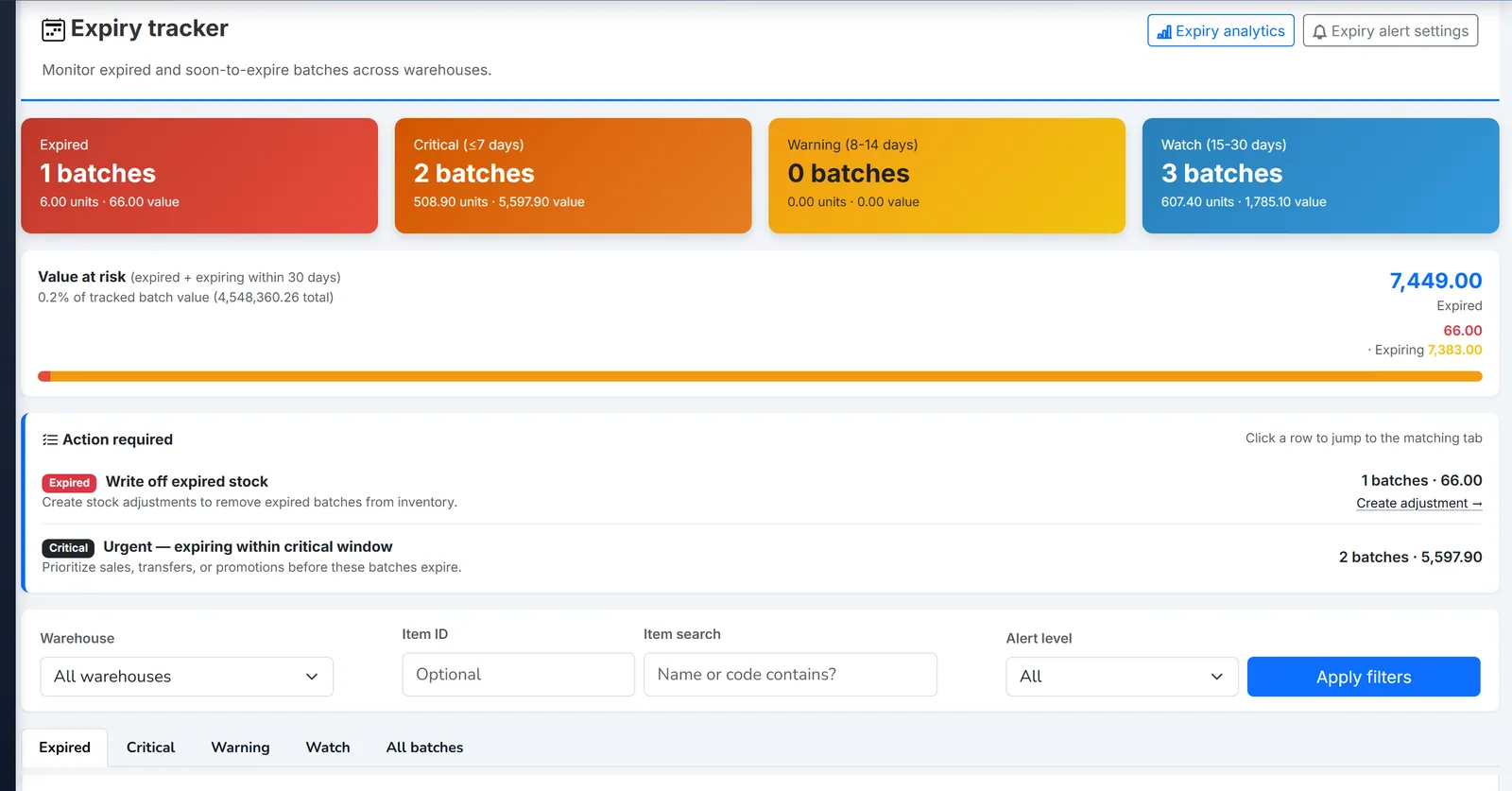
Biznsbook expiry tracker listing batches by days to expiry.
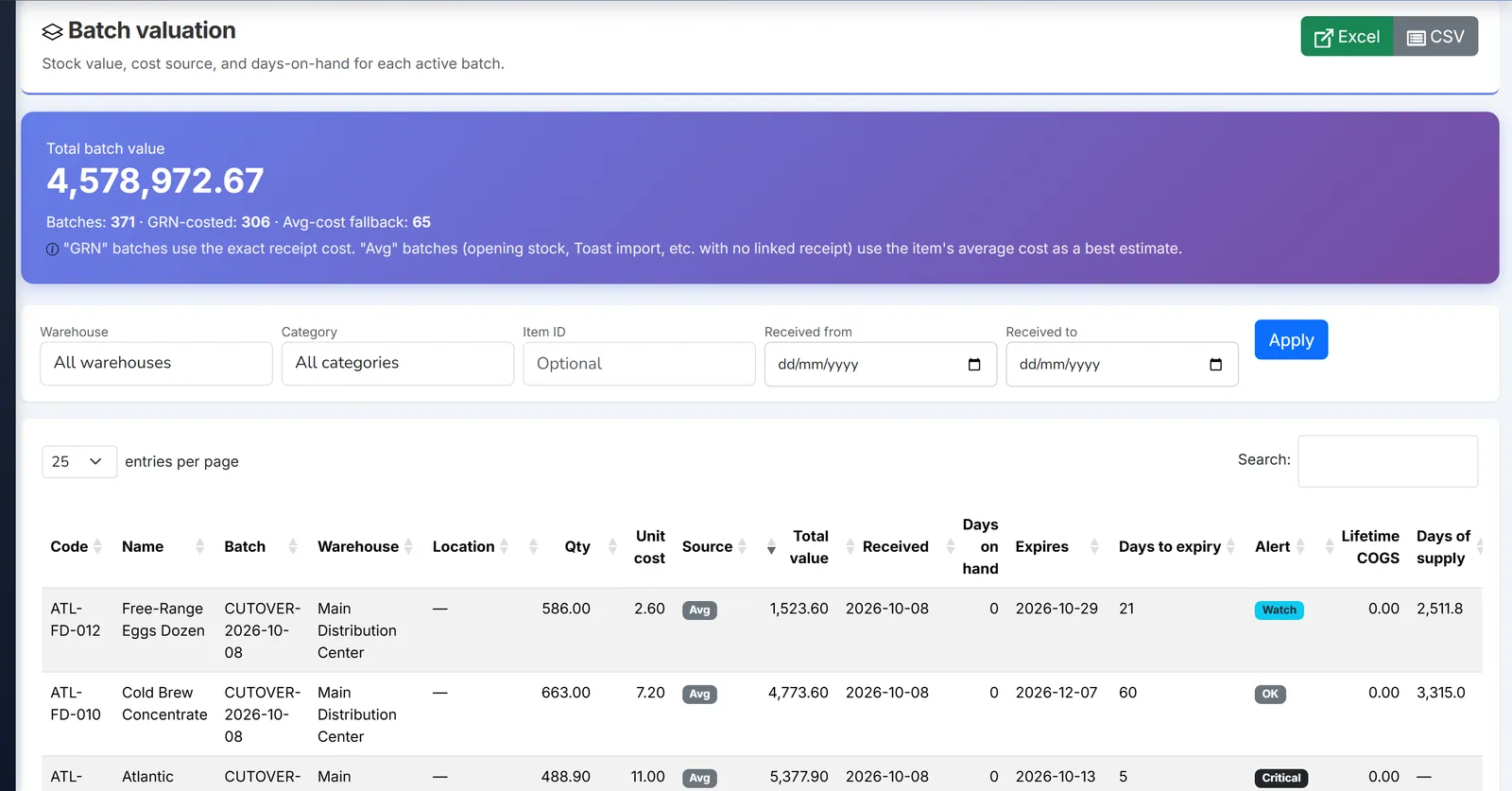
Biznsbook batch valuation report with cost and quantity per batch.
Get compliant in four steps — most of which run automatically.
Activate your Traceability Plan and flag Food Traceability List items with FDA codes.
Post GRNs — supplier TLCs are captured or internal lot codes assigned, and a Receiving CTE is recorded.
Transfers and sales record CTEs automatically; add harvesting, cooling, and packing manually.
Search any lot one-up/one-back and generate the FDA ESS within the 24-hour window.
Auto-captured CTEs. Linked lot codes. A 24-hour sortable spreadsheet on demand.
Anyone who manufactures, processes, packs, or holds foods on the FDA Food Traceability List.
Transformation and creation events linked through batch genealogy from source lots to finished goods.
Capture supplier TLCs at receipt and ship lots forward with full one-up/one-back visibility.
Outbound traces include Toast POS sales, so prepared-food lots are tracked end to end.
FDA Food Traceability shares the same items, batches, suppliers, and documents as the rest of Biznsbook.
FTL flags, batch tracking, lot genealogy, and warehouse transfers feed traceability automatically.
Receiving CTEs and supplier traceability lot codes are captured the moment goods are received.
Shipping CTEs are recorded on sales and Toast POS imports for complete forward tracing.
Your traceability data is protected and retained to the FSMA 204 standard.
Traceability viewing and plan management are governed by dedicated permissions, seeded to Company Admins on licensing.
Records are kept for the required two years, with a daily scan that warns you before anything ages out — never a silent delete.
Every trace, export, and plan is scoped to your company, with traceability data isolated per tenant.
Activate the FSMA 204 compliance module alongside Inventory, Purchasing, and Sales — no separate traceability system to run.
30 days free on every planNo credit card neededTry the demo account
Quick answers about FSMA 204, Critical Tracking Events, traceability lot codes, and the FDA ESS export.
FDA food traceability software helps food businesses comply with the FSMA Section 204 Food Traceability Rule by identifying Food Traceability List items, assigning traceability lot codes, recording Critical Tracking Events with their Key Data Elements, and producing the records FDA can request. Biznsbook captures most of these events automatically as goods are received, transferred, and shipped.
FSMA Section 204 is the FDA Food Traceability Final Rule (21 CFR Part 1, Subpart S). It requires anyone who manufactures, processes, packs, or holds foods on the Food Traceability List to keep additional records of Critical Tracking Events and Key Data Elements, and to provide them to FDA in a sortable electronic spreadsheet within 24 hours of a request.
Critical Tracking Events are the key supply-chain points where traceability data must be recorded — such as receiving, transformation, shipping, harvesting, cooling, and initial packing. Biznsbook records Receiving CTEs on GRNs, Shipping CTEs on sales, paired Shipping and Receiving CTEs on warehouse transfers, and lets you enter harvesting, cooling, and initial packing events manually.
A Traceability Lot Code uniquely identifies a lot of food for tracing. Biznsbook uses the supplier's TLC when it is provided at receipt, or automatically allocates an internal lot code, and propagates that code to destination batches when stock is transferred between warehouses.
Once you flag an item as being on the Food Traceability List, Biznsbook records Critical Tracking Events as part of your normal workflow — a Receiving CTE when you post a GRN, a Shipping CTE when you sell or ship, and paired Shipping/Receiving CTEs on transfers. Non-traceability items are never burdened with extra data entry.
Yes. Biznsbook generates the FDA Electronic Sortable Spreadsheet (ESS) on demand for a date range, or you can queue it from the 24-Hour Response Portal where it is produced in the background and downloaded when ready. The export includes the required fields such as TLC, product description, quantity, CTE type, event date and time, location, and trading-partner GLN.
Yes. Search by batch or lot number, supplier TLC, or GRN number and Biznsbook shows the full backward (inbound) chain from suppliers and GRNs and the forward (outbound) chain to customers and shipments, including a visual CTE event timeline that follows batch genealogy.
FSMA 204 requires a written Traceability Plan. Biznsbook stores a versioned plan with the effective date, point of contact, your data procedures, FTL identification process, and TLC management description, plus an optional farm map upload for originators. Activating a new version automatically archives the previous one.
Biznsbook retains traceability records for 24 months in line with the FSMA 204 record-keeping requirement. A daily scan raises an in-app warning as records approach the end of the retention window so you can export or archive them — records are never deleted automatically.
FDA FSMA 204 Food Traceability is a compliance module that activates inside your Biznsbook ERP and shares the same items, batches, suppliers, GRNs, and sales — so there is no separate traceability silo to maintain. Talk to sales to enable it for your account.
Yes. Pick a lot and run a mock recall: Biznsbook traces it, times the drill, saves it and exports a CSV, so you can show how fast you can respond.
Yes. Every Biznsbook plan starts with a 30-day free trial, no credit card needed. Start your free trial and pick a plan on the pricing page whenever you are ready. Prefer a guided tour first? Book a demo and we will walk you through FDA FSMA 204.
Start a 30-day free trial on any plan and run FDA FSMA 204 together with the rest of your business: one platform, one login.
30 days free on every planNo credit card neededTry the demo account