How to Manage Lease Security Deposits
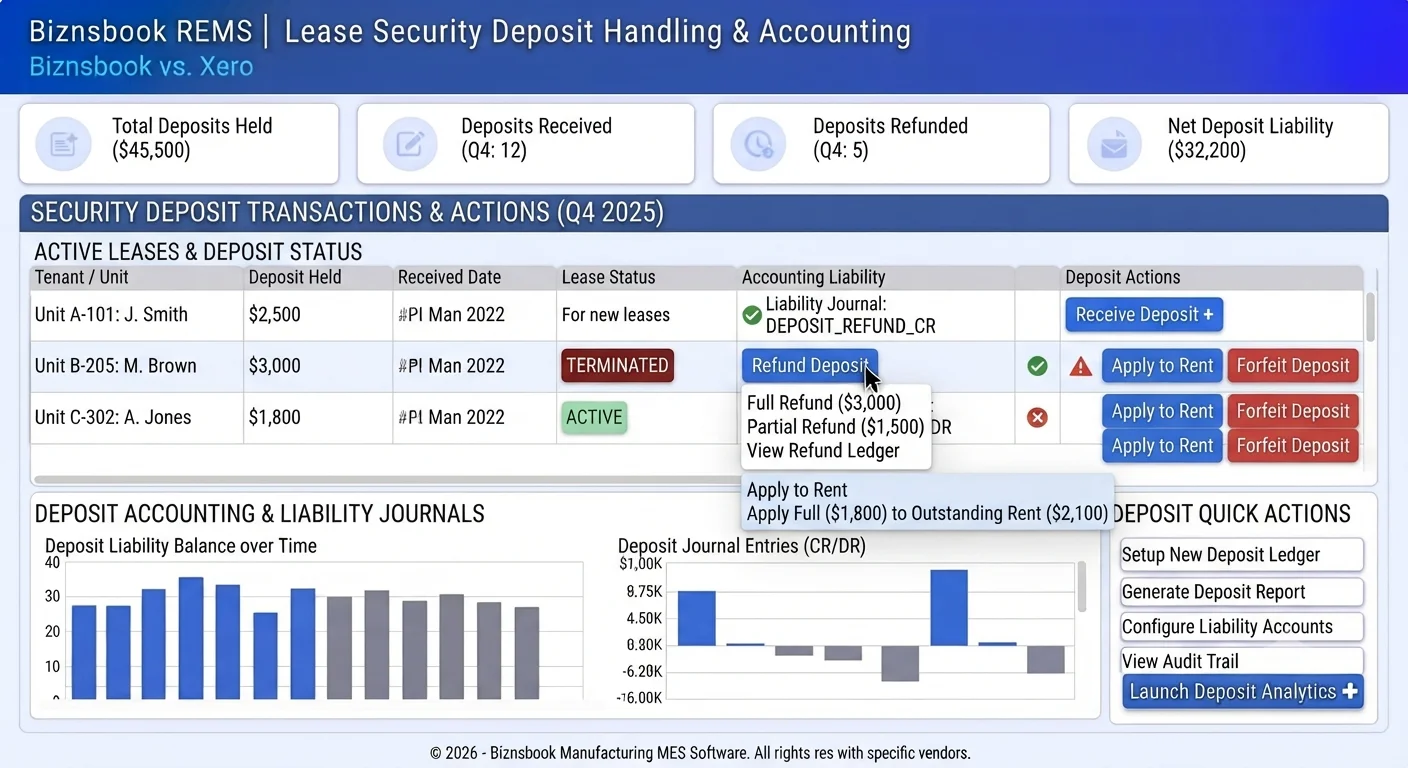
Why deposit handling creates disputes at move-out
Deposits recorded only as notes never hit a liability account, so finance cannot prove what is held.
Move-out teams refund cash without clearing aging rent, leaving receivables overstated.
Forfeits for damage are posted as miscellaneous income without linking back to the lease.
Without a documented weekly cadence, teams reopen spreadsheets within weeks of go-live and the board or dashboard becomes a second source of truth instead of the system of record.
Why this happens
- No structured receive posting when the lease is created.
- Refunds happen outside the lease record.
- Outstanding rent and deposit balances are reconciled in separate workbooks.
- Utility deposits are confused with lease security deposits.
Biznsbook addresses this through Security deposit receive, refund / apply / forfeit, RE security deposit liability when the Real Estate (REMS) module is enabled, with optional Accounting for deposit and rent journals.
Finance teams lose days each month reconciling versions that should never have diverged. Naming Biznsbook screens as the system of record — and closing periods when agreed — prevents silent edits that auditors flag immediately.
Step-by-step: Manage Lease Security Deposits
Built for property managers, leasing coordinators, and sales leaders running projects, units, leases, and agent pipelines in Biznsbook REMS.
- Enter deposit on lease create. Set Security Deposit on the draft lease. On save, REMS posts receive when Accounting system accounts are configured.
- Confirm held amount. On lease detail, check Deposit Held and flags for Refunded or Forfeited.
- Refund at move-out. Use Refund with amount, date, and reason. The liability reverses to cash/bank.
- Apply to arrears. Use Apply to Outstanding when the tenant owes rent; the earliest unpaid schedule is reduced.
- Forfeit when policy allows. Use Forfeit to move liability to rental income for documented breach or damage.
- Separate utility deposits. Utility connection deposits stay under Compliance → Utility connections — do not mix with lease deposit actions.
- Audit with rent roll. Include security deposit held columns on rent roll exports when reporting to owners.
- Document the SOP. Publish a one-page SOP naming screen owners, review cadence, and exception paths so new staff follow the same Biznsbook REMS flows described in this guide.
Review results after the first full weekly cycle. Adjust roles, mappings, or approvals where the same exception repeats.
Screen-level flows live in the Help Center. This guide focuses on the business process; help articles cover click-by-click navigation.
Common mistakes to avoid
- Mistake 1: No structured receive posting when the lease is created. Repeating this each month usually shows up first in occupancy, rent collections, or broker payout accuracy.
- Mistake 2: Refunds happen outside the lease record. Repeating this each month usually shows up first in occupancy, rent collections, or broker payout accuracy.
- Mistake 3: Outstanding rent and deposit balances are reconciled in separate workbooks. Repeating this each month usually shows up first in occupancy, rent collections, or broker payout accuracy.
- Mistake 4: Utility deposits are confused with lease security deposits. Repeating this each month usually shows up first in occupancy, rent collections, or broker payout accuracy.
Track recurring exceptions in month-end notes; each should map to a control above.
Best practices that hold up as you scale
- Enter deposit on lease create — Set Security Deposit on the draft lease.
- Confirm held amount — On lease detail, check Deposit Held and flags for Refunded or Forfeited.
- Refund at move-out — Use Refund with amount, date, and reason.
- Apply to arrears — Use Apply to Outstanding when the tenant owes rent; the earliest unpaid schedule is reduced.
- Forfeit when policy allows — Use Forfeit to move liability to rental income for documented breach or damage.
Teams that reconcile Unit Availability, Rent Dashboard, and commission boards weekly avoid vacant-unit drift and unpaid broker payouts.
How Biznsbook supports this workflow
Security deposit receive is documented in Biznsbook Real Estate (REMS) capabilities. Use it as part of a controlled finance process — posting, review, and period close — not as an isolated export. When Sales, Purchase, Inventory, Taxation, Expense, or Finance Management modules are enabled, related documents can post through the central accounting posting service with double-entry validation.
refund / apply / forfeit is documented in Biznsbook Real Estate (REMS) capabilities. Use it as part of a controlled finance process — posting, review, and period close — not as an isolated export. When Sales, Purchase, Inventory, Taxation, Expense, or Finance Management modules are enabled, related documents can post through the central accounting posting service with double-entry validation.
RE security deposit liability is documented in Biznsbook Real Estate (REMS) capabilities. Use it as part of a controlled finance process — posting, review, and period close — not as an isolated export. When Sales, Purchase, Inventory, Taxation, Expense, or Finance Management modules are enabled, related documents can post through the central accounting posting service with double-entry validation.
REMS permissions govern view and edit. Guest rent links work without tenant login; Agent Workspace Kanban uses the same pipeline API as integrations.
Suggested implementation timeline
- Week 1: Document current process gaps and configure Security deposit receive with finance owner sign-off.
- Weeks 2–3: Pilot on one month or one entity; post all test transactions through Biznsbook; freeze parallel spreadsheet journals.
- Week 4: Run first trial balance or report tie-out; fix mapping and permission issues.
- Month 2–3: Roll out to full team; add approvals and period close cadence from this guide.
- Ongoing: Monthly review using owner reporting and leadership dashboard.
Liability posting versus memo notes
When Accounting is configured, receiving a security deposit on lease create posts to the REMS security deposit liability account. That is what finance and owners expect when they ask what is held.
If Accounting is not licensed, you can still store deposit amounts on the lease, but journals will not post. Document that gap with finance before promising owner-ready liability reports.
Treat this screen as the daily system of record: if a status exists only in chat or email, update REMS before the next stand-up so leasing, collections, and brokers share one truth.
Refund, apply, and forfeit decision tree
At move-out, inspect first. If rent is owed, Apply to Outstanding before refunding the remainder. If policy allows forfeit for documented damage or breach, Forfeit moves liability to rental income with a reason.
Partial refunds leave remaining held on the lease. Never refund outside Deposit Actions if you need the lease flags Refunded or Forfeited to stay accurate for audits.
Utility deposits are a different workflow
Utility connection deposits under Compliance are not lease security deposits. Mixing them causes double-counting and wrong GL accounts.
Tenant portal home shows lease security deposit held. Train support to distinguish portal deposit from meter connection deposits when tenants ask “where is my deposit?”
Metrics to track monthly
- Occupancy rate from Unit Availability summary
- Expected vs collected rent on Rent Dashboard
- Pending Renewal leases in upcoming vacancies
- Security deposits held vs refunded
- Booking commissions Pending / Approved / Paid
Start with three metrics; trend direction matters more than a single point-in-time snapshot.
Spreadsheet / manual books vs integrated ERP
Compare typical manual finance work with Biznsbook Security deposit receive and related capabilities.
| Capability | Manual / Spreadsheet | Biznsbook |
|---|---|---|
| Receive | ❌ Cash book memo | ✅ Liability journal on lease create |
| Held balance | ❌ Spreadsheet cell | ✅ Deposit Held on lease detail |
| Arrears | ❌ Manual offset | ✅ Apply to outstanding rent |
| Refund | ❌ Cheque without lease link | ✅ Refund action + journal |
| Forfeit | ❌ Misc income dump | ✅ Documented forfeit on lease |
| Utility vs lease | ❌ One “deposit” bucket | ✅ Separate utility deposit workflow |
Owner reporting
When owners ask for deposits held, export rent roll with security deposit columns rather than rebuilding balances from bank statements. Include Deposit Held on rent roll exports for owner meetings so held balances are never reconstructed from bank statements alone.
Document this in your finance SOP and revisit each quarter as transaction volume or entity structure changes.
Frequently asked questions
Is the deposit income when received?
No. It posts to security deposit liability. Income only appears on forfeit or when applied rules recognize revenue.
Can I partially refund?
Yes. Enter a refund amount up to the held balance; remaining held stays on the lease.
What if Accounting is not licensed?
You can still track deposit fields, but journal posting requires Accounting and system accounts for REMS.
Where do tenants see the deposit?
Tenant portal home shows security deposit held when a portal account is invited.
Can I apply deposit to rent mid-lease?
Yes, when collections policy allows. Apply to Outstanding reduces the earliest unpaid schedule and reduces Deposit Held.
How this differs by industry
Retail
Residential managers standardize move-out checklists: inspect, apply to arrears if needed, then refund the remainder.
Wholesale & distribution
Commercial leases with large deposits use apply-to-rent before forfeit to keep AR aging clean.
Manufacturing
Workforce housing programs mirror utility deposit receive/refund patterns already used on meters.