How to Configure Lease Late Fees and Escalation
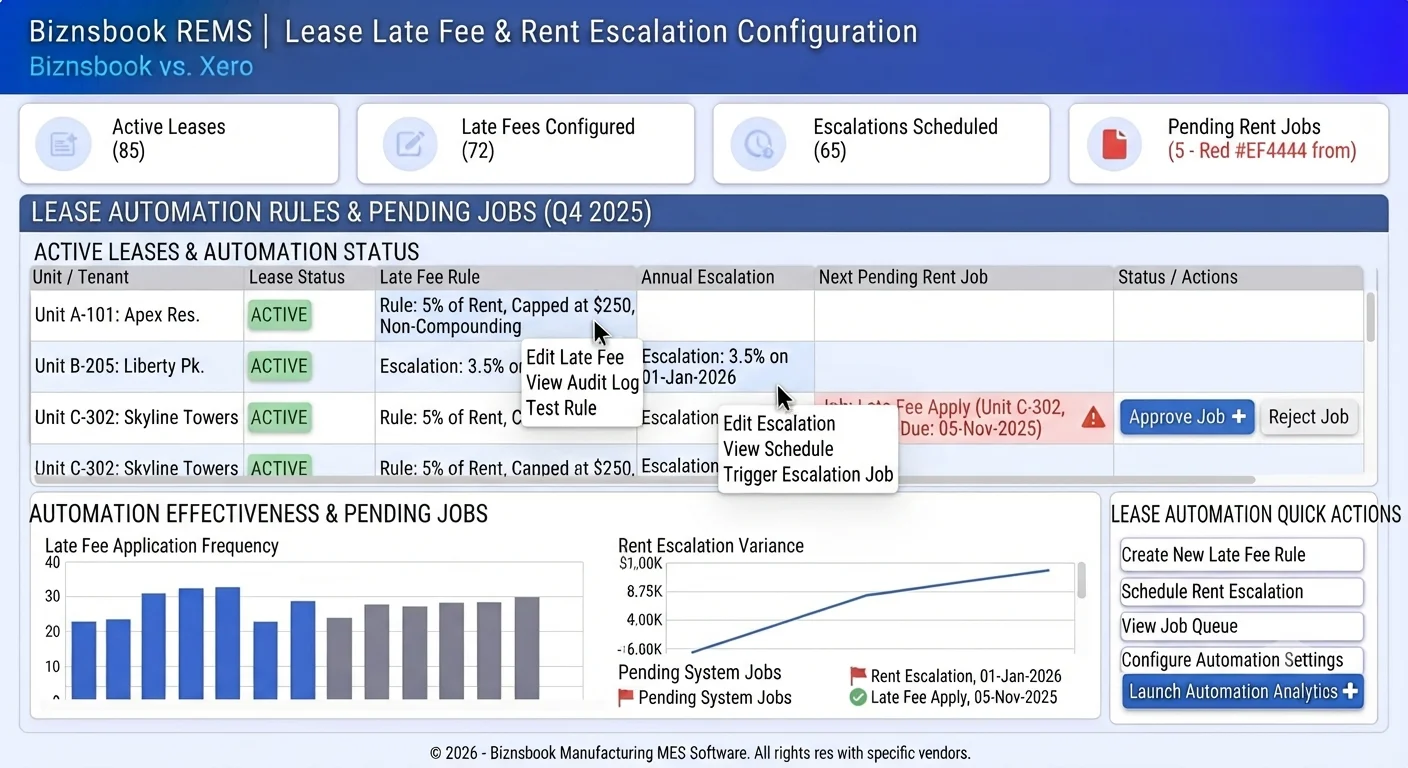
Why ad hoc late fees and annual increases fail audits
Staff invent different late fee amounts per tenant, creating disputes and write-offs.
Annual increases live in Word leases but never update the billing schedule.
Collections “escalation” emails are confused with contractual rent increases.
Without a documented weekly cadence, teams reopen spreadsheets within weeks of go-live and the board or dashboard becomes a second source of truth instead of the system of record.
Why this happens
- No lease-level late fee rule fields.
- Schedules not regenerated or updated after a rent increase.
- Mixing reminder escalation templates with rent escalation clauses.
- Weekly rent approximated as month/4 instead of exact week amounts.
Biznsbook addresses this through Late fee type / flat / cap, rent escalation %, AccrueRentDueJob when the Real Estate (REMS) module is enabled, with optional Accounting for deposit and rent journals.
Finance teams lose days each month reconciling versions that should never have diverged. Naming Biznsbook screens as the system of record — and closing periods when agreed — prevents silent edits that auditors flag immediately.
Step-by-step: Configure Lease Late Fees and Escalation
Built for property managers, leasing coordinators, and sales leaders running projects, units, leases, and agent pipelines in Biznsbook REMS.
- Set late fee type. Choose percentage of period rent or a flat amount on lease create or edit.
- Add grace and cap. Set Grace Period days and optional Late Fee Cap so fees stay within policy.
- Choose compounding. Once per overdue period, or monthly while still unpaid.
- Set rent escalation. Enter Rent Escalation % and every N years. Next escalation date is calculated from lease start when percent is set.
- Activate the lease. Generate the schedule; weekly frequency uses monthly × 12 / 52.
- Rely on jobs. Late-fee job and daily rent accrual/escalation job apply rules without spreadsheet edits.
- Preview renewals. When Pending Renewal appears, renew with the new rent reflecting any escalations already applied.
- Document the SOP. Publish a one-page SOP naming screen owners, review cadence, and exception paths so new staff follow the same Biznsbook REMS flows described in this guide.
Review results after the first full weekly cycle. Adjust roles, mappings, or approvals where the same exception repeats.
Screen-level flows live in the Help Center. This guide focuses on the business process; help articles cover click-by-click navigation.
Common mistakes to avoid
- Mistake 1: No lease-level late fee rule fields. Repeating this each month usually shows up first in occupancy, rent collections, or broker payout accuracy.
- Mistake 2: Schedules not regenerated or updated after a rent increase. Repeating this each month usually shows up first in occupancy, rent collections, or broker payout accuracy.
- Mistake 3: Mixing reminder escalation templates with rent escalation clauses. Repeating this each month usually shows up first in occupancy, rent collections, or broker payout accuracy.
- Mistake 4: Weekly rent approximated as month/4 instead of exact week amounts. Repeating this each month usually shows up first in occupancy, rent collections, or broker payout accuracy.
Track recurring exceptions in month-end notes; each should map to a control above.
Best practices that hold up as you scale
- Set late fee type — Choose percentage of period rent or a flat amount on lease create or edit.
- Add grace and cap — Set Grace Period days and optional Late Fee Cap so fees stay within policy.
- Choose compounding — Once per overdue period, or monthly while still unpaid.
- Set rent escalation — Enter Rent Escalation % and every N years.
- Activate the lease — Generate the schedule; weekly frequency uses monthly × 12 / 52.
Teams that reconcile Unit Availability, Rent Dashboard, and commission boards weekly avoid vacant-unit drift and unpaid broker payouts.
How Biznsbook supports this workflow
Late fee type / flat / cap is documented in Biznsbook Real Estate (REMS) capabilities. Use it as part of a controlled finance process — posting, review, and period close — not as an isolated export. When Sales, Purchase, Inventory, Taxation, Expense, or Finance Management modules are enabled, related documents can post through the central accounting posting service with double-entry validation.
rent escalation % is documented in Biznsbook Real Estate (REMS) capabilities. Use it as part of a controlled finance process — posting, review, and period close — not as an isolated export. When Sales, Purchase, Inventory, Taxation, Expense, or Finance Management modules are enabled, related documents can post through the central accounting posting service with double-entry validation.
AccrueRentDueJob is documented in Biznsbook Real Estate (REMS) capabilities. Use it as part of a controlled finance process — posting, review, and period close — not as an isolated export. When Sales, Purchase, Inventory, Taxation, Expense, or Finance Management modules are enabled, related documents can post through the central accounting posting service with double-entry validation.
REMS permissions govern view and edit. Guest rent links work without tenant login; Agent Workspace Kanban uses the same pipeline API as integrations.
Suggested implementation timeline
- Week 1: Document current process gaps and configure Late fee type / flat / cap with finance owner sign-off.
- Weeks 2–3: Pilot on one month or one entity; post all test transactions through Biznsbook; freeze parallel spreadsheet journals.
- Week 4: Run first trial balance or report tie-out; fix mapping and permission issues.
- Month 2–3: Roll out to full team; add approvals and period close cadence from this guide.
- Ongoing: Monthly review using naming tip for staff and leadership dashboard.
Late fee rules that survive disputes
Pick percentage of period rent or a flat amount once per lease type, not per conversation. Grace days give tenants a fair window; optional caps keep fees proportional on high-rent commercial units.
Compounding once per overdue period versus monthly while unpaid changes collections tone. Document the mode in your lease template so staff and tenants see the same rule the job will apply.
Treat this screen as the daily system of record: if a status exists only in chat or email, update REMS before the next stand-up so leasing, collections, and brokers share one truth.
Rent escalation as a schedule update
Rent Escalation % and every N years calculate the next escalation date from lease start. The daily accrual job (AccrueRentDueJob) applies increases to Monthly Rent and future Pending lines when due.
Paid history does not rewrite. That protects collected amounts while ensuring the next periods bill at the new rate. Preview renewals after escalations so renewal offers match the system rent.
Do not confuse reminder escalation
Rent Reminders under Leasing send multi-stage email, SMS, or portal messages for overdue rent. That is collections outreach, not the contractual annual increase.
Train agents: “escalation reminder” means outreach stage; “rent escalation” means the % field on the lease. Mixing the words in tickets creates wrong configuration changes.
Metrics to track monthly
- Occupancy rate from Unit Availability summary
- Expected vs collected rent on Rent Dashboard
- Pending Renewal leases in upcoming vacancies
- Security deposits held vs refunded
- Booking commissions Pending / Approved / Paid
Start with three metrics; trend direction matters more than a single point-in-time snapshot.
Spreadsheet / manual books vs integrated ERP
Compare typical manual finance work with Biznsbook Late fee type / flat / cap and related capabilities.
| Capability | Manual / Spreadsheet | Biznsbook |
|---|---|---|
| Late fee basis | ❌ Manager discretion | ✅ % or flat on the lease |
| Cap | ❌ None | ✅ Optional max fee |
| Compounding | ❌ Informal repeats | ✅ Once vs monthly modes |
| Annual increase | ❌ Word clause only | ✅ Escalation % + job |
| Weekly rent | ❌ Month ÷ 4 | ✅ ×12/52 exact |
| Reminder vs increase | ❌ Same “escalation” word | ✅ Distinct rent escalation fields |
Naming tip for staff
Train teams: “escalation reminder” means collections outreach; “rent escalation” means the annual increase clause on the lease form. Publish a one-page lease product standard (late fee type, grace, cap, escalation %) so every new lease inherits the same rules unless legal approves an exception.
Document this in your finance SOP and revisit each quarter as transaction volume or entity structure changes.
Frequently asked questions
Is rent escalation the same as overdue escalation emails?
No. Overdue escalation is a rent reminder stage. Rent escalation is a contractual annual increase on the lease.
When do late fees post?
A scheduled job applies fees after grace days on unpaid or partially paid periods, respecting your compounding mode.
Do past paid periods change after escalation?
No. Escalation updates Monthly Rent and future Pending schedule lines; paid history stays as collected.
Where do I configure reminders separately?
Real Estate → Leasing → Rent Reminders for multi-stage email/SMS/portal templates.
Where does AccrueRentDueJob run?
It is a Hangfire recurring job (`re-rent-accrual`) that accrues due rent and applies configured escalations. Late fees use the separate late-fee job.
How this differs by industry
Retail
Apartment portfolios use a standard 5% late fee with a five-day grace and 3% annual escalation for renewals.
Wholesale & distribution
Retail shop leases often use flat late fees with caps to match commercial lease norms.
Manufacturing
Campus housing may use weekly frequency with exact weekly amounts and yearly escalation for staff units.