How to Manage Inventory Transfers Between Warehouses
Why informal transfers create invisible shrinkage
Teams that "just move it" without system entries create phantom stock: the sending site shows quantity that left physically, the receiver shows nothing inbound, and finance trusts a total that matches neither building.
In-transit gaps matter for month-end close. Auditors ask where goods were on the balance sheet date — if your answer is a truck with no document, you fail basic control tests.
Capacity surprises at the receiving dock cause partial put-away in hallways, mis-picks, and damaged goods that become unexplained adjustments later.
Why this happens
- Urgent branch requests bypass the transfer workflow.
- Receivers forget to confirm arrival.
- In-transit is not tracked between dispatch and receipt.
- No capacity check before shipping full pallets.
These patterns show up across SMB inventory teams regardless of industry. The fix is usually process plus tooling — not hiring one more buyer. Biznsbook addresses this topic through stock transfers, in-transit accounting, warehouse capacity when the Inventory module (and related Warehouse, Purchase, or Integration modules where noted) is enabled for your tenant.
Leaders often underestimate how much informal workarounds cost: extra emails, duplicate counts, and end-of-month fire drills. Documenting who owns each step — and which screen in Biznsbook is the system of record — removes ambiguity that spreadsheets never solve.
Step-by-step: Manage Inventory Transfers Between Warehouses
The following workflow is designed for owners, warehouse leads, and finance reviewers who need a repeatable process. Adapt roles to your team size — separation of duties matters more than headcount.
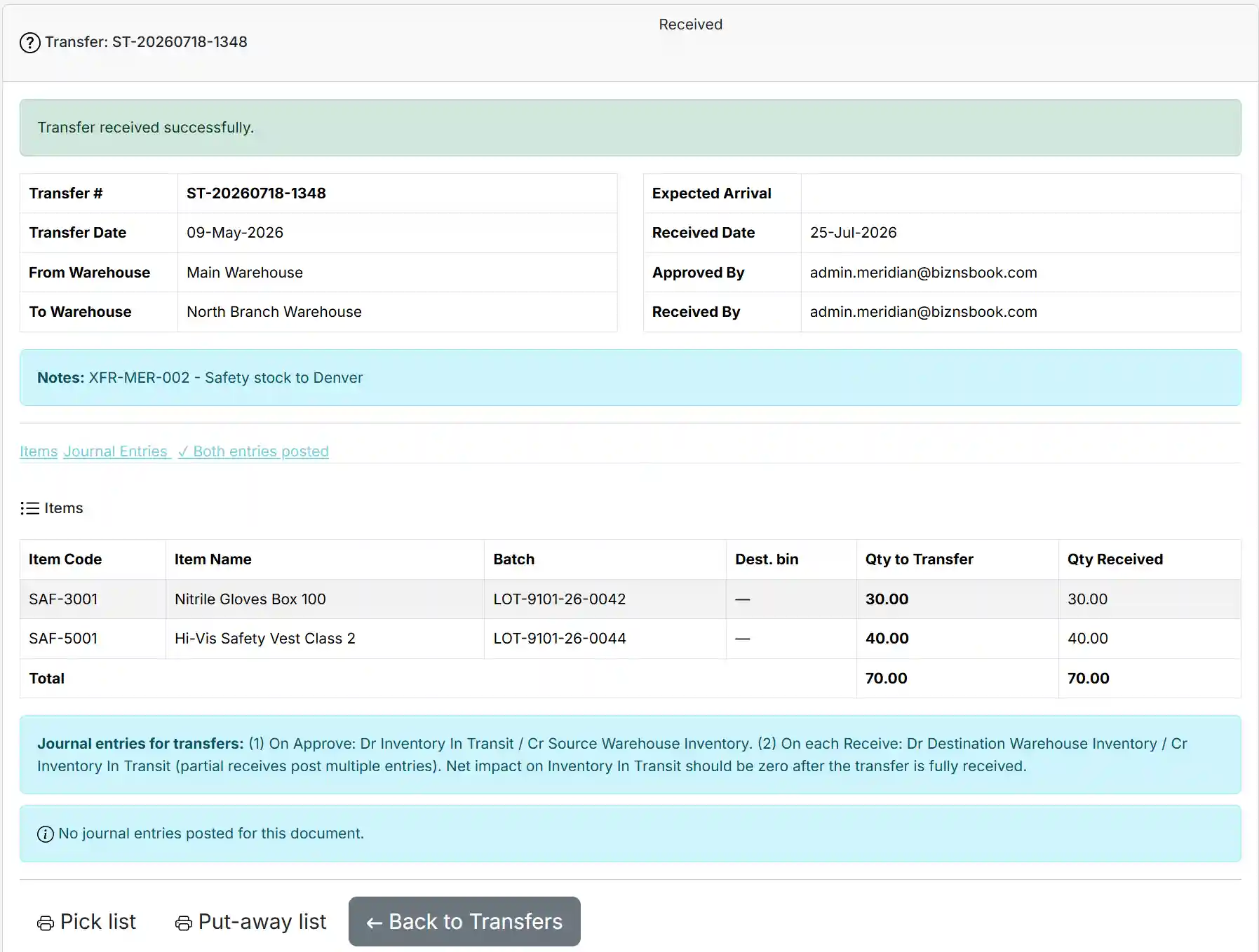
- Create a stock transfer request. Select from and to warehouses, lines, and quantities in the stock transfer screen.
- Verify sending warehouse on-hand. Confirm ItemWarehouse balance covers the transfer before dispatch to avoid negative stock.
- Dispatch and record in-transit. Post dispatch so quantity leaves sending on-hand and enters in-transit per Biznsbook transfer handling.
- Receive at destination. Complete receipt at the receiving warehouse to clear in-transit and increase destination on-hand.
- Check warehouse capacity first. Review warehouse capacity utilization before approving large transfers.
- Investigate variances immediately. Short receipts trigger same-day investigation — damage, mis-count, or theft — not month-end surprises.
- Reconcile transfer aging. Report on transfers in transit too long; stuck lines often mean receiving backlog or lost paperwork.
After implementing these steps, review results in the first full cycle (usually one month). Adjust thresholds, permissions, or training where the same exception repeats. Inventory improvement compounds when feedback loops are short.
For related screen-level flows, see the Biznsbook Help Center (for example GRN, transfers, batch tracking, or Shopify setup). This guide stays focused on the business problem; help articles cover click-by-click navigation.
Common mistakes to avoid
- Mistake 1: Ignoring that urgent branch requests bypass the transfer workflow. Teams that skip corrective process here usually see the same emergency twice in one quarter.
- Mistake 2: Ignoring that receivers forget to confirm arrival. Teams that skip corrective process here usually see the same emergency twice in one quarter.
- Mistake 3: Ignoring that in-transit is not tracked between dispatch and receipt. Teams that skip corrective process here usually see the same emergency twice in one quarter.
- Mistake 4: Ignoring that no capacity check before shipping full pallets. Teams that skip corrective process here usually see the same emergency twice in one quarter.
Most failures are repeat offenses, not one-off disasters. Track exceptions in your ops meeting notes and tie each back to a control in the step-by-step section.
Best practices that hold up as you scale
- Create a stock transfer request — Select from and to warehouses, lines, and quantities in the stock transfer screen.
- Verify sending warehouse on-hand — Confirm ItemWarehouse balance covers the transfer before dispatch to avoid negative stock.
- Dispatch and record in-transit — Post dispatch so quantity leaves sending on-hand and enters in-transit per Biznsbook transfer handling.
- Receive at destination — Complete receipt at the receiving warehouse to clear in-transit and increase destination on-hand.
- Check warehouse capacity first — Review warehouse capacity utilization before approving large transfers.
Consistency beats intensity. A medium-sized distributor that posts every GRN the same day will outperform a larger competitor that counts annually but posts sporadically.
How Biznsbook supports this workflow
stock transfers in Biznsbook is part of the verified Inventory module capability set (see product documentation). Use it in the workflow above rather than as a standalone report: connect stock transfers to daily receiving, shipping, and count routines so data stays current. When Warehouse, Purchase, Sales, POS, or Integration modules are licensed, the same stock ledger feeds stock transfers without duplicate entry — that integration is where SMB teams recover the hours lost to spreadsheet reconciliation.
in-transit accounting in Biznsbook is part of the verified Inventory module capability set (see product documentation). Use it in the workflow above rather than as a standalone report: connect in-transit accounting to daily receiving, shipping, and count routines so data stays current. When Warehouse, Purchase, Sales, POS, or Integration modules are licensed, the same stock ledger feeds in-transit accounting without duplicate entry — that integration is where SMB teams recover the hours lost to spreadsheet reconciliation.
warehouse capacity in Biznsbook is part of the verified Inventory module capability set (see product documentation). Use it in the workflow above rather than as a standalone report: connect warehouse capacity to daily receiving, shipping, and count routines so data stays current. When Warehouse, Purchase, Sales, POS, or Integration modules are licensed, the same stock ledger feeds warehouse capacity without duplicate entry — that integration is where SMB teams recover the hours lost to spreadsheet reconciliation.
Module licensing is flexible: Inventory is the foundation; enable Warehouse Management, Purchase, Sales, POS, Manufacturing, or Integration Hub connectors when your operating model requires them. Permissions are role-based per tenant — separate who can view, receive, adjust, and approve so controls scale with headcount.
Suggested implementation timeline
- Week 1: Baseline current performance, assign process owner, configure master data fields tied to stock transfers.
- Weeks 2–3: Pilot on one product group or warehouse; post every transaction through Biznsbook documents; no parallel spreadsheet edits.
- Week 4: First review against metrics; tune thresholds, permissions, and training gaps.
- Month 2–3: Expand to all warehouses and categories; add cycle count or replenishment cadence from this guide.
- Ongoing: Monthly ops review using health dashboard and transfer kpis checklist.
Metrics to track monthly
- Weeks on hand for top twenty SKUs by revenue
- Count accuracy percentage on A-class items
- Open document aging (GRNs, transfers, adjustments in draft)
- Value at risk from low-stock and overstock KPIs on replenishment views
- Exception rate: lines requiring manual override per hundred transactions
Pick three metrics to start — not all five. Review trend direction, not single points. Improving these metrics usually precedes revenue protection and working-capital releases finance can measure.
Manual / spreadsheet vs integrated ERP
Spreadsheets work for snapshots; they fail as a transaction system. Compare typical manual approaches with how Biznsbook supports stock transfers and related capabilities.
| Capability | Manual / Spreadsheet | Biznsbook |
|---|---|---|
| Transfer documentation | ❌ Phone call | ✅ Stock transfer documents |
| In-transit visibility | ❌ Unknown | ✅ In-transit accounting |
| Double-count risk | ❌ High | ✅ Controlled send/receive |
| Capacity planning | ❌ Ignored | ✅ Warehouse capacity view |
| Audit trail | ❌ None | ✅ Posted transfer history |
| Branch replenishment | ❌ Ad hoc vans | ✅ Scheduled transfer runs |
Transfer KPIs
Track average in-transit time, transfer accuracy rate, and lines received short per month. Improving these three metrics usually cuts unexplained adjustments more than stricter cycle counts alone.
Teams that document this section in their internal inventory SOP onboard new hires faster and pass audits with fewer emergency counts. Revisit quarterly as assortment and warehouse footprint change.
Pair this with the inventory valuation report and stock card when investigating exceptions — numbers in isolation rarely tell the full story without movement history behind them.
Frequently asked questions
Can partial transfers be received?
Yes. Receive actual quantity and investigate shorts against dispatch documentation.
How long should in-transit last?
Hours to a few days domestically. Aging in-transit reports highlight delays.
Do transfers affect valuation?
Total company value is unchanged; only location allocation shifts until receipt completes.
Are transfers the same as consignment moves?
No. Consignment may not change ownership. Transfers move your owned stock between your warehouses.
How this differs by industry
Retail
Store replenishment vans should run on fixed transfer schedules with receiving confirmed before the next POS day opens.
Wholesale & distribution
Full pallet moves between DCs need capacity and appointment scheduling at both ends.
Manufacturing
Transfer raw materials to production floor warehouses as formal moves, not floor stock assumptions.