How to Set Reorder Levels for Inventory
Wrong reorder levels cause both stockouts and overstock
Set the reorder point too low and you stock out every time lead time wobbles. Set it too high and cash sits in the warehouse while finance questions working capital.
Many SMBs copy a generic "two weeks of stock" rule to every SKU — ignoring that supplier A ships in three days while supplier B ships in six weeks.
Without max levels, buyers reorder up to arbitrary quantities and recreate overstock after you finally cleared dead stock.
Why this happens
- Lead time not recorded per supplier or item.
- Safety stock is zero for all SKUs.
- Max stock missing so POs overshoot.
- Thresholds never updated after demand shifts.
These patterns show up across SMB inventory teams regardless of industry. The fix is usually process plus tooling — not hiring one more buyer. Biznsbook addresses this topic through min/max stock, reorder level, replenishment settings when the Inventory module (and related Warehouse, Purchase, or Integration modules where noted) is enabled for your tenant.
Leaders often underestimate how much informal workarounds cost: extra emails, duplicate counts, and end-of-month fire drills. Documenting who owns each step — and which screen in Biznsbook is the system of record — removes ambiguity that spreadsheets never solve.
Step-by-step: Set Reorder Levels for Inventory
The following workflow is designed for owners, warehouse leads, and finance reviewers who need a repeatable process. Adapt roles to your team size — separation of duties matters more than headcount.
- Calculate lead-time demand. Multiply average daily usage by supplier lead time in days for each SKU or supplier group.
- Add safety stock buffer. Add buffer days based on demand variability — higher for volatile C-store items, lower for stable MRO parts.
- Enter reorder and min/max on products. Set reorder level, minimum stock, and maximum stock on the product master with lead-time hints.
- Align replenishment settings. Configure safety stock method and service level in replenishment settings to match your policy.
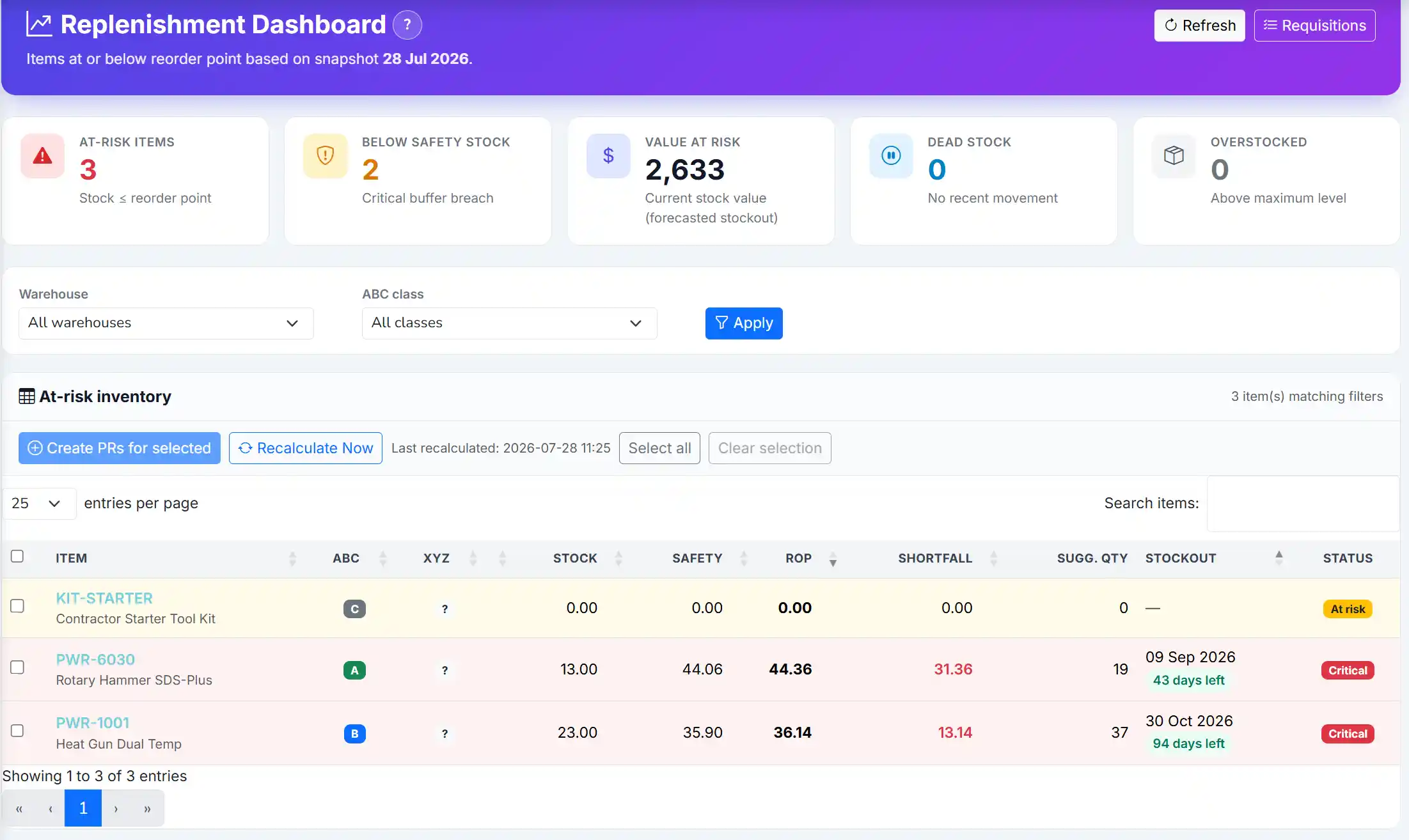
- Validate with health dashboard. Confirm low-stock alerts fire before zero for a sample of A SKUs.
- Review after stockouts or overstocks. Each exception is feedback — adjust thresholds and document why.
- Seasonal overrides. Temporarily raise min/max before peak season; revert after post-mortem.
After implementing these steps, review results in the first full cycle (usually one month). Adjust thresholds, permissions, or training where the same exception repeats. Inventory improvement compounds when feedback loops are short.
For related screen-level flows, see the Biznsbook Help Center (for example GRN, transfers, batch tracking, or Shopify setup). This guide stays focused on the business problem; help articles cover click-by-click navigation.
Common mistakes to avoid
- Mistake 1: Ignoring that lead time not recorded per supplier or item. Teams that skip corrective process here usually see the same emergency twice in one quarter.
- Mistake 2: Ignoring that safety stock is zero for all SKUs. Teams that skip corrective process here usually see the same emergency twice in one quarter.
- Mistake 3: Ignoring that max stock missing so POs overshoot. Teams that skip corrective process here usually see the same emergency twice in one quarter.
- Mistake 4: Ignoring that thresholds never updated after demand shifts. Teams that skip corrective process here usually see the same emergency twice in one quarter.
Most failures are repeat offenses, not one-off disasters. Track exceptions in your ops meeting notes and tie each back to a control in the step-by-step section.
Best practices that hold up as you scale
- Calculate lead-time demand — Multiply average daily usage by supplier lead time in days for each SKU or supplier group.
- Add safety stock buffer — Add buffer days based on demand variability — higher for volatile C-store items, lower for stable MRO parts.
- Enter reorder and min/max on products — Set reorder level, minimum stock, and maximum stock on the product master with lead-time hints.
- Align replenishment settings — Configure safety stock method and service level in replenishment settings to match your policy.
- Validate with health dashboard — Confirm low-stock alerts fire before zero for a sample of A SKUs.
Consistency beats intensity. A medium-sized distributor that posts every GRN the same day will outperform a larger competitor that counts annually but posts sporadically.
How Biznsbook supports this workflow
min/max stock in Biznsbook is part of the verified Inventory module capability set (see product documentation). Use it in the workflow above rather than as a standalone report: connect min/max stock to daily receiving, shipping, and count routines so data stays current. When Warehouse, Purchase, Sales, POS, or Integration modules are licensed, the same stock ledger feeds min/max stock without duplicate entry — that integration is where SMB teams recover the hours lost to spreadsheet reconciliation.
reorder level in Biznsbook is part of the verified Inventory module capability set (see product documentation). Use it in the workflow above rather than as a standalone report: connect reorder level to daily receiving, shipping, and count routines so data stays current. When Warehouse, Purchase, Sales, POS, or Integration modules are licensed, the same stock ledger feeds reorder level without duplicate entry — that integration is where SMB teams recover the hours lost to spreadsheet reconciliation.
replenishment settings in Biznsbook is part of the verified Inventory module capability set (see product documentation). Use it in the workflow above rather than as a standalone report: connect replenishment settings to daily receiving, shipping, and count routines so data stays current. When Warehouse, Purchase, Sales, POS, or Integration modules are licensed, the same stock ledger feeds replenishment settings without duplicate entry — that integration is where SMB teams recover the hours lost to spreadsheet reconciliation.
Module licensing is flexible: Inventory is the foundation; enable Warehouse Management, Purchase, Sales, POS, Manufacturing, or Integration Hub connectors when your operating model requires them. Permissions are role-based per tenant — separate who can view, receive, adjust, and approve so controls scale with headcount.
Suggested implementation timeline
- Week 1: Baseline current performance, assign process owner, configure master data fields tied to min/max stock.
- Weeks 2–3: Pilot on one product group or warehouse; post every transaction through Biznsbook documents; no parallel spreadsheet edits.
- Week 4: First review against metrics; tune thresholds, permissions, and training gaps.
- Month 2–3: Expand to all warehouses and categories; add cycle count or replenishment cadence from this guide.
- Ongoing: Monthly ops review using health dashboard and simple starting formula checklist.
Metrics to track monthly
- Weeks on hand for top twenty SKUs by revenue
- Count accuracy percentage on A-class items
- Open document aging (GRNs, transfers, adjustments in draft)
- Value at risk from low-stock and overstock KPIs on replenishment views
- Exception rate: lines requiring manual override per hundred transactions
Pick three metrics to start — not all five. Review trend direction, not single points. Improving these metrics usually precedes revenue protection and working-capital releases finance can measure.
Manual / spreadsheet vs integrated ERP
Spreadsheets work for snapshots; they fail as a transaction system. Compare typical manual approaches with how Biznsbook supports min/max stock and related capabilities.
| Capability | Manual / Spreadsheet | Biznsbook |
|---|---|---|
| Per-SKU thresholds | ❌ One rule for all | ✅ Item-level min/max/reorder |
| Lead time | ❌ Forgotten | ✅ Lead-time hints on items |
| Safety stock | ❌ Gut feel | ✅ Replenishment settings methods |
| Max control | ❌ None | ✅ Maximum stock caps PO size |
| Review cadence | ❌ Never | ✅ Quarterly classification refresh |
| Alert linkage | ❌ Manual scan | ✅ Health dashboard alerts |
Simple starting formula
Reorder point ≈ (average daily demand × lead time days) + safety stock days of demand. Refine with ABC class and forecast accuracy rather than pursuing false precision on C items.
Teams that document this section in their internal inventory SOP onboard new hires faster and pass audits with fewer emergency counts. Revisit quarterly as assortment and warehouse footprint change.
Pair this with the inventory valuation report and stock card when investigating exceptions — numbers in isolation rarely tell the full story without movement history behind them.
Frequently asked questions
What is minimum vs reorder level?
Reorder level triggers action; minimum is the floor you try not to breach. They may differ when buyers need early warning above absolute minimum.
Should max stock equal reorder plus EOQ?
Often max is set to cover order cycle plus safety. Use replenishment EOQ inputs where configured.
How do I estimate daily usage?
Use sales history from stock card or demand forecast weeks-on-hand projections for a starting average.
New items without history?
Use supplier MOQ and conservative safety until twelve weeks of movement exist.
How this differs by industry
Retail
Fashion items need shorter review cycles; basics can use stable min/max year-round.
Wholesale & distribution
Pallet quantities may force MOQ above formula — set max to multiples of pallet size.
Manufacturing
Components on critical BOM paths deserve higher safety than non-critical fasteners.