How to Comply with SFCR Canada
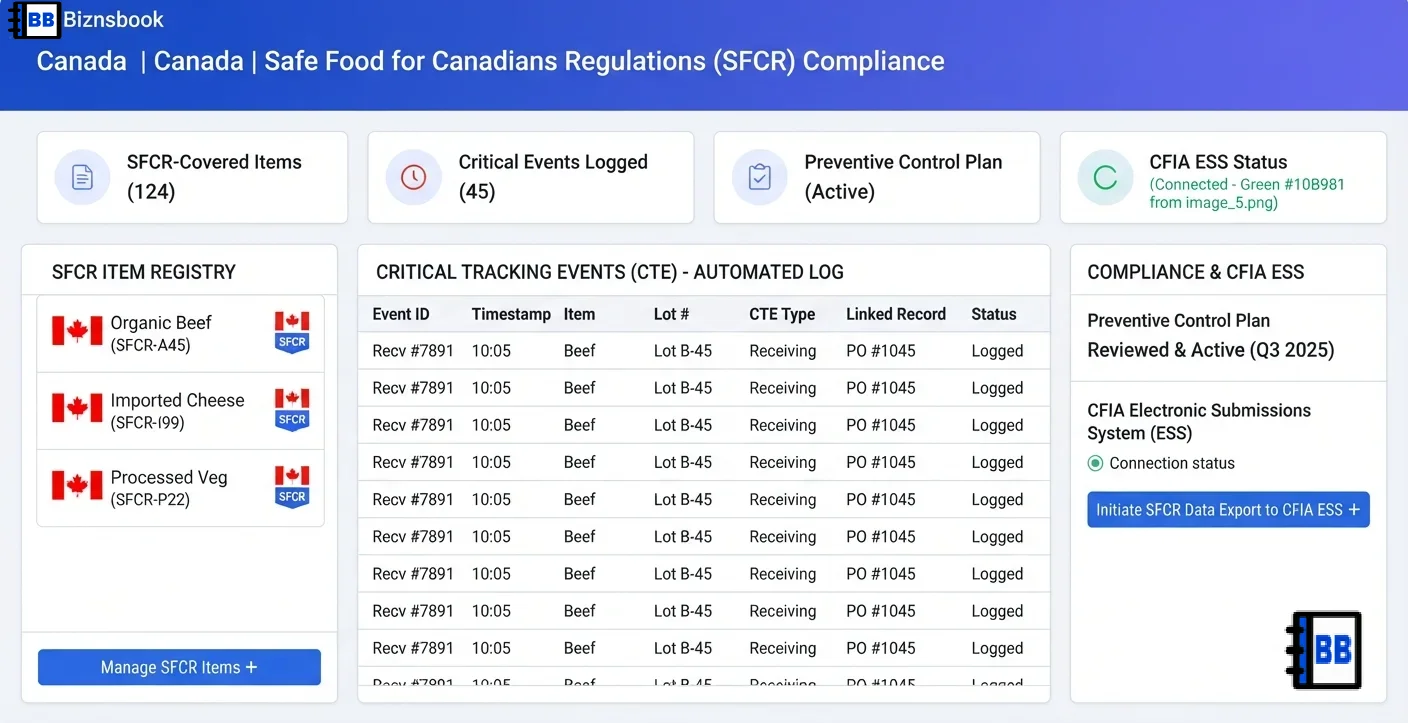
Manual lot logs make SFCR traceability fragile
Many food businesses track lots across spreadsheets, supplier emails, and paper receiving sheets, then try to assemble a one-up / one-down picture only when CFIA asks. Each channel uses a different format, so reconstructing which supplier lot became which shipment takes days the business does not have during a recall.
When receiving, transfer, and shipping records live in separate places — and the Preventive Control Plan sits unversioned in someone's drive — gaps appear exactly where the regulation expects evidence. A single system that records Critical Tracking Events as goods move removes that fragility.
A structured SFCR process improves recall readiness by combining automatic event capture, traceability lot codes, a living Preventive Control Plan, and a CFIA-ready export.
Why this happens
- Receiving, transfer, and shipping records are spread across sheets, inboxes, and paper.
- Supplier CFIA licences are buried in contracts instead of on the supplier record.
- The Preventive Control Plan is unversioned, so it drifts from actual practice.
- Lot history has to be rebuilt manually when CFIA requests traceability evidence.
Biznsbook addresses this through SFCR-covered item flags, automatic Critical Tracking Events, supplier CFIA licence capture, a versioned Preventive Control Plan, and a CFIA Electronic Sortable Spreadsheet when the SFCR Canada compliance module is enabled — reusing the same traceability engine as FDA FSMA 204.
Step-by-step: Comply with SFCR Canada
Built for food manufacturers, processors, importers, and distributors operating under Canada's Safe Food for Canadians Regulations.
- Activate a Preventive Control Plan. Open SFCR Canada → Preventive Control Plan → Create, enter your CFIA licence number, hazard analysis, and preventive control measures, and upload the PCP document. Activating a new version archives the previous one.
- Flag SFCR-covered items. Edit each in-scope item and turn on Covered by SFCR in the compliance accordion. An item can be both FDA FTL and SFCR-covered.
- Capture supplier CFIA data. On each supplier party, record the CFIA licence number and the establishment-registered flag so they appear on the export.
- Receive and lot-code goods. Post a GRN for an SFCR item with a batch number; a Receiving CTE is recorded and the supplier's traceability lot code is captured or an internal one is allocated.
- Record movement and shipping. Warehouse transfers record paired Shipping + Receiving CTEs, and sales record Shipping CTEs — automatically. Add harvesting, cooling, and initial packing through Manual CTE Entry.
- Trace a lot one-up / one-down. Open SFCR Canada → Trace Report and search by batch/lot number, supplier TLC, or GRN to see where a lot came from, where it went, and its full CTE timeline — then export just that trace as a CFIA CSV.
- Export the CFIA ESS. Use CFIA ESS Export for an instant date-range download, or the CFIA Export Portal to queue a larger export and download it when complete.
- Maintain retention and the plan. Records are kept for 24 months with proactive alerts; re-activate a new PCP version whenever your process changes.
Screen-level flows live in the Help Center. This guide focuses on the compliance process; help articles cover navigation.
Common mistakes to avoid
- Mistake 1: Forgetting to flag an item as SFCR-covered — no flag means no SFCR Critical Tracking Events are recorded.
- Mistake 2: Receiving SFCR items without a batch number, which prevents the Receiving CTE from being written.
- Mistake 3: Leaving supplier CFIA licences blank, so the trading-partner columns of the export are incomplete.
- Mistake 4: Treating the Preventive Control Plan as a one-time document instead of versioning it as your process changes.
Review recurring gaps in a monthly compliance check; each should map to a control above.
Best practices that hold up as you scale
- Flag SFCR coverage at item creation so traceability starts from the first receipt.
- Make batch numbers mandatory on SFCR receiving to guarantee every lot is traceable.
- Keep supplier CFIA licences current as part of supplier onboarding.
- Version the Preventive Control Plan whenever hazards, controls, or processes change.
- Run a periodic CFIA ESS export as a dry run so a real request is routine, not a scramble.
Teams that keep coverage flags and supplier data current can answer a CFIA request in minutes, not days.
How Biznsbook supports this workflow
Automatic Critical Tracking Events are documented in the Biznsbook SFCR Canada module. Receiving CTEs are written on GRNs, Shipping CTEs on sales, and paired Shipping/Receiving CTEs on warehouse transfers — each tagged with the SFCR regulatory source so it stays separate from FDA records.
Traceability lot codes reuse the proven engine: a supplier's lot code is captured at receipt or an internal code is allocated, then propagated to destination batches on transfers.
The Preventive Control Plan is a versioned record with the CFIA licence number, hazard analysis, preventive control measures, optional sanitation, pest control, allergen, and traceability procedures, and a PCP document upload.
The CFIA Electronic Sortable Spreadsheet produces a 16-column CFIA-aligned CSV inline or through a queued export portal, drawing supplier and customer CFIA licences directly from the party records.
SFCR permissions govern reporting and plan management. The module reuses the FSMA 204 traceability infrastructure while keeping records isolated per regulation.
Manual lot logs vs integrated SFCR traceability
Compare typical manual SFCR work with the Biznsbook SFCR Canada module and related capabilities.
| Capability | Manual / Spreadsheets | Biznsbook |
|---|---|---|
| Event capture | ❌ Manual logs | ✅ Automatic CTEs |
| Lot linkage | ❌ Disconnected | ✅ Traceability lot codes |
| Supplier CFIA data | ❌ In contracts/emails | ✅ On the supplier record |
| Preventive Control Plan | ❌ Unversioned file | ✅ Versioned with upload |
| CFIA request response | ❌ Days of rework | ✅ One-click CFIA ESS |
| FDA + CFIA records | ❌ Mixed or duplicated | ✅ Isolated per regulation |
Metrics to track monthly
- Share of SFCR-covered items with complete traceability data
- SFCR receipts with a batch number vs missing batch
- Suppliers with a recorded CFIA licence number
- Time to produce a CFIA Electronic Sortable Spreadsheet
- Preventive Control Plan version age vs last process change
Start with three metrics; trend direction matters more than any single snapshot.
Frequently asked questions
What records does SFCR require for traceability?
One-up, one-down records linking each lot to its supplier and customer, plus a written Preventive Control Plan. Biznsbook captures Receiving, Shipping, and Transfer CTEs with lot codes and stores a versioned PCP with CFIA licence, hazard analysis, and controls.
Do I need a CFIA licence number to use SFCR traceability in Biznsbook?
You record your own CFIA licence on the Preventive Control Plan and your suppliers' licences on each supplier party. These feed the trading-partner columns of the CFIA Electronic Sortable Spreadsheet.
How is SFCR traceability different from FDA FSMA 204 in Biznsbook?
Both modules share the traceability engine, but events are tagged with a regulatory source, so the FDA ESS only includes FSMA events and the CFIA export only includes SFCR events. An item can be flagged under both.
How do I respond to a CFIA traceability request?
Search the affected lot in the SFCR Trace Report by batch number, supplier TLC, or GRN to see its one-up / one-down chain and CTE timeline, and export that trace as a CFIA CSV. For a date range, generate the CFIA Electronic Sortable Spreadsheet from the SFCR menu or queue it from the CFIA Export Portal.
How this differs by business type
Manufacturers & processors
Record receiving and shipping CTEs and keep a versioned Preventive Control Plan that reflects current hazards and controls.
Importers & distributors
Capture supplier CFIA licences at receipt and ship lots forward with full one-up / one-down visibility across warehouses.
FDA + CFIA operators
Businesses selling into both the US and Canada keep FSMA 204 and SFCR records side by side, isolated per regulation.