How to Log Machine Downtime and Maintenance
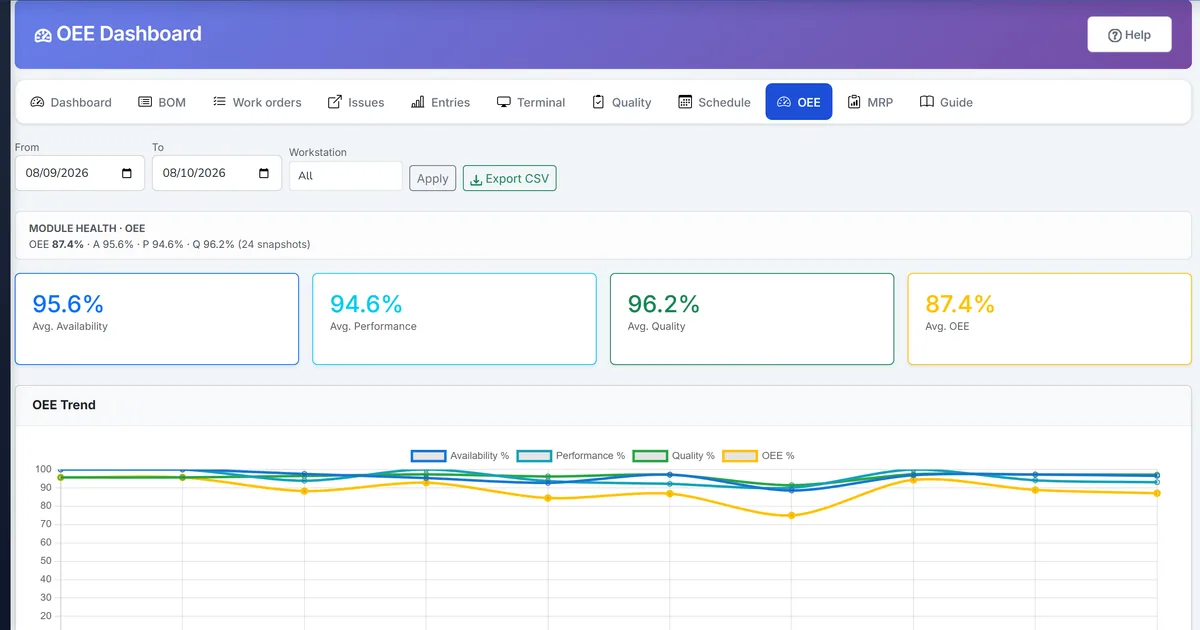
OEE Availability stays empty without a place to capture stops
Downtime entities and OEE math exist, but without a shop capture screen Availability never moves and nightly snapshots look artificially high.
Maintenance is tracked on paper or calendar apps that never update the machine last/next dates the plant already stores.
Supervisors cannot explain yesterday’s OEE dip because stop reasons were never recorded against the machine.
Why this happens
- Machine downtime had no dedicated UI path under Workstations.
- Maintenance schedules lived outside the ERP machine master.
- OEE Availability had no closed downtime windows to subtract.
- Operators lacked a simple End action when the line restarted.
Biznsbook addresses this through machine downtime, machine maintenance, OEE availability when Manufacturing and Inventory are enabled; Accounting adds WIP and cost postings when your chart and system accounts are configured.
Finance teams lose days each month reconciling versions that should never have diverged. Naming Biznsbook screens as the system of record — and closing periods when agreed — prevents silent edits that auditors flag immediately.
Step-by-step: Log Machine Downtime and Maintenance
Built for production planners, shop-floor supervisors, and operations managers running BOM-driven work orders with MES-lite capture, OEE, and inventory integration.
- Open Machines. Go to Manufacturing → Planning → Workstations → Machines and find the equipment row.
- Open Downtime. Click Downtime on the machine to open the log form and history list.
- Log the stop. Enter start time, reason (breakdown, setup, material shortage, power failure, and more), description, and optional cost or production-loss fields, then save.
- End when running again. Click End on the open row so duration minutes close and OEE Availability can subtract the window.
- Schedule maintenance. Open Maintenance on the same machine, pick type (preventive, corrective, etc.), scheduled date, and work description.
- Complete maintenance. Mark Complete when work finishes so last/next maintenance dates update on the machine.
- Recalculate OEE if needed. On OEE Dashboard, Recalculate the affected day so Availability reflects the corrected downtime.
Review results after the first full weekly cycle. Adjust roles, mappings, or approvals where the same exception repeats.
Screen-level flows live in the Help Center. This guide focuses on the business process; help articles cover click-by-click navigation.
Common mistakes to avoid
- Mistake 1: Machine downtime had no dedicated UI path under Workstations. Repeating this each month usually shows up first in OEE dashboard or stock card variance reports.
- Mistake 2: Maintenance schedules lived outside the ERP machine master. Repeating this each month usually shows up first in OEE dashboard or stock card variance reports.
- Mistake 3: OEE Availability had no closed downtime windows to subtract. Repeating this each month usually shows up first in OEE dashboard or stock card variance reports.
- Mistake 4: Operators lacked a simple End action when the line restarted. Repeating this each month usually shows up first in OEE dashboard or stock card variance reports.
Track recurring exceptions in month-end notes; each should map to a control above.
Best practices that hold up as you scale
- Open Machines — Go to Manufacturing → Planning → Workstations → Machines and find the equipment row.
- Open Downtime — Click Downtime on the machine to open the log form and history list.
- Log the stop — Enter start time, reason (breakdown, setup, material shortage, power failure, and more), description, and optional cost or production-loss fields, then save.
- End when running again — Click End on the open row so duration minutes close and OEE Availability can subtract the window.
- Schedule maintenance — Open Maintenance on the same machine, pick type (preventive, corrective, etc.
Teams that capture output on the shop-floor terminal, clock operations, and review OEE daily keep planned schedules and MRP-lite nets grounded in real production.
How Biznsbook supports this workflow
machine downtime is documented in Biznsbook Manufacturing capabilities. Use it as part of a controlled finance process — posting, review, and period close — not as an isolated export. When Sales, Purchase, Inventory, Taxation, Expense, or Finance Management modules are enabled, related documents can post through the central accounting posting service with double-entry validation.
machine maintenance is documented in Biznsbook Manufacturing capabilities. Use it as part of a controlled finance process — posting, review, and period close — not as an isolated export. When Sales, Purchase, Inventory, Taxation, Expense, or Finance Management modules are enabled, related documents can post through the central accounting posting service with double-entry validation.
OEE availability is documented in Biznsbook Manufacturing capabilities. Use it as part of a controlled finance process — posting, review, and period close — not as an isolated export. When Sales, Purchase, Inventory, Taxation, Expense, or Finance Management modules are enabled, related documents can post through the central accounting posting service with double-entry validation.
Manufacturing permissions separate BOM maintenance, work order release, production entry, quality inspection, reports, and scheduling. Inventory is required for items, warehouses, and stock mutations.
Suggested implementation timeline
- Week 1: Document current process gaps and configure machine downtime with finance owner sign-off.
- Weeks 2–3: Pilot on one month or one entity; post all test transactions through Biznsbook; freeze parallel spreadsheet journals.
- Week 4: Run first trial balance or report tie-out; fix mapping and permission issues.
- Month 2–3: Roll out to full team; add approvals and period close cadence from this guide.
- Ongoing: Monthly review using downtime hygiene and leadership dashboard.
Metrics to track monthly
- Shop-floor terminal sessions completed same shift
- Operation time logs vs BOM standard variance
- OEE by workstation (availability, performance, quality)
- Scheduling board load % over 100%
- MRP-lite shortages firmed to a work order, requisition, or transfer
- Genealogy where-used / where-from recall drills
Start with three metrics; trend direction matters more than a single point-in-time snapshot.
Spreadsheet / manual books vs integrated ERP
Compare typical manual finance work with Biznsbook machine downtime and related capabilities.
| Capability | Manual / Spreadsheet | Biznsbook |
|---|---|---|
| Downtime capture | ❌ Paper or chat messages | ✅ Machine Downtime screen |
| Reasons | ❌ Free text only | ✅ Standard reason codes |
| OEE link | ❌ Manual spreadsheet | ✅ Feeds Availability automatically |
| Maintenance | ❌ Separate calendar | ✅ On the machine master |
| Close-out | ❌ Forgotten open tickets | ✅ End / Complete actions |
| Audit | ❌ Lost history | ✅ Persisted per machine |
Downtime hygiene
Require an End within the shift for every open downtime, and review open rows in a morning stand-up before Recalculate so OEE never carries phantom Availability.
Document this in your finance SOP and revisit each quarter as transaction volume or entity structure changes.
Frequently asked questions
Does downtime require a separate MES license?
No. Machine Downtime and Maintenance ship with the Manufacturing module and feed the same OEE Dashboard as other MES-lite data.
When does Availability update?
Nightly Hangfire snapshots include closed downtime clipped to each day; use Recalculate on the OEE Dashboard after you correct historical stops.
Can I log downtime without a work order?
Yes. Downtime is recorded against the machine (and its workstation), independent of a specific work order session.
Who can create downtime and maintenance?
Users with Manufacturing BOM Edit permission (workstation/machine maintenance access) plus company portal access; CompanyAdmin bypasses fine-grained checks.
How this differs by industry
Retail
In-store assembly desks can log equipment stops so private-label lines still explain yield dips without a factory MES.
Wholesale & distribution
Distribution centers with light manufacture can record filler or sealer downtime that affects same-day pack rates.
Manufacturing
Discrete and food plants keep Availability honest by closing every stop against the machine that OEE already measures.