How to Monitor OEE for Workstations
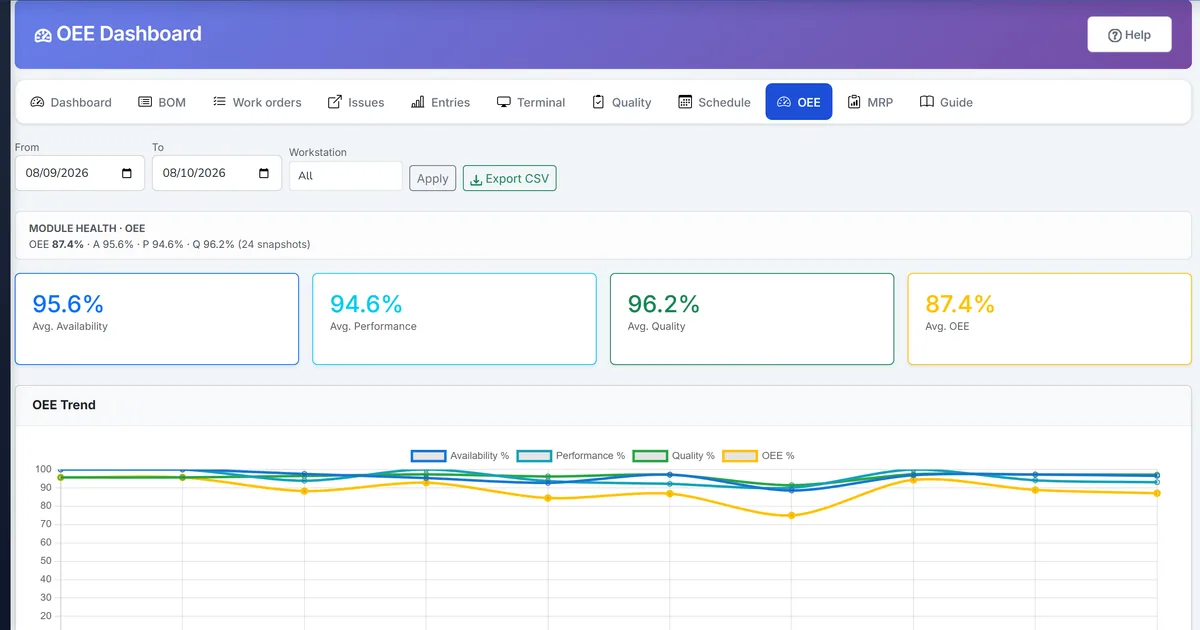
Downtime and scrap data sit unused without an OEE view
Machine downtime and production quality exist in the database but leaders cannot see Availability × Performance × Quality as a single KPI.
Without daily snapshots, trend conversations rely on one-off spreadsheet exports that never match next week.
Workstations look busy while scrap and stops quietly destroy effective capacity.
Why this happens
- Downtime records are not rolled into Availability.
- Performance lacks actual run time until operation clocks exist.
- Quality is not tied to production entry good versus total.
- No scheduled job stores comparable daily rows.
Biznsbook addresses this through OEE dashboard, availability performance quality, daily OEE snapshots when Manufacturing and Inventory are enabled; Accounting adds WIP and cost postings when your chart and system accounts are configured.
Finance teams lose days each month reconciling versions that should never have diverged. Naming Biznsbook screens as the system of record — and closing periods when agreed — prevents silent edits that auditors flag immediately.
Step-by-step: Monitor OEE for Workstations
Built for production planners, shop-floor supervisors, and operations managers running BOM-driven work orders with MES-lite capture, OEE, and inventory integration.
- Record downtime and production. From Workstations → Machines, open Downtime to log stoppages with reason and window, and post production entries (or terminal sessions) with good, reject, rework, and scrap.
- Clock operations when possible. Use operation time logs so Performance uses real run time; until then Biznsbook falls back to work order actual dates.
- Open OEE Dashboard. Go to Manufacturing → Reports → OEE Dashboard and set the date range (default last 30 days).
- Read the four cards. Review Availability, Performance, Quality, and OEE percent, then scan the per-workstation breakdown table.
- Recalculate a day if needed. Use recalculate to replace that day’s snapshots idempotently when source data was corrected.
- Export CSV for reviews. Export the range for plant meetings or BI tools without changing live snapshots.
- Rely on the nightly job. Hangfire OeeSnapshotJob at 03:00 UTC snapshots the previous day for companies with production activity.
Review results after the first full weekly cycle. Adjust roles, mappings, or approvals where the same exception repeats.
Screen-level flows live in the Help Center. This guide focuses on the business process; help articles cover click-by-click navigation.
Common mistakes to avoid
- Mistake 1: Downtime records are not rolled into Availability. Repeating this each month usually shows up first in OEE dashboard or stock card variance reports.
- Mistake 2: Performance lacks actual run time until operation clocks exist. Repeating this each month usually shows up first in OEE dashboard or stock card variance reports.
- Mistake 3: Quality is not tied to production entry good versus total. Repeating this each month usually shows up first in OEE dashboard or stock card variance reports.
- Mistake 4: No scheduled job stores comparable daily rows. Repeating this each month usually shows up first in OEE dashboard or stock card variance reports.
Track recurring exceptions in month-end notes; each should map to a control above.
Best practices that hold up as you scale
- Record downtime and production — From Workstations → Machines, open Downtime to log stoppages with reason and window, and post production entries (or terminal sessions) with good, reject, rework, and scrap.
- Clock operations when possible — Use operation time logs so Performance uses real run time; until then Biznsbook falls back to work order actual dates.
- Open OEE Dashboard — Go to Manufacturing → Reports → OEE Dashboard and set the date range (default last 30 days).
- Read the four cards — Review Availability, Performance, Quality, and OEE percent, then scan the per-workstation breakdown table.
- Recalculate a day if needed — Use recalculate to replace that day’s snapshots idempotently when source data was corrected.
Teams that capture output on the shop-floor terminal, clock operations, and review OEE daily keep planned schedules and MRP-lite nets grounded in real production.
How Biznsbook supports this workflow
OEE dashboard is documented in Biznsbook Manufacturing capabilities. Use it as part of a controlled finance process — posting, review, and period close — not as an isolated export. When Sales, Purchase, Inventory, Taxation, Expense, or Finance Management modules are enabled, related documents can post through the central accounting posting service with double-entry validation.
availability performance quality is documented in Biznsbook Manufacturing capabilities. Use it as part of a controlled finance process — posting, review, and period close — not as an isolated export. When Sales, Purchase, Inventory, Taxation, Expense, or Finance Management modules are enabled, related documents can post through the central accounting posting service with double-entry validation.
daily OEE snapshots is documented in Biznsbook Manufacturing capabilities. Use it as part of a controlled finance process — posting, review, and period close — not as an isolated export. When Sales, Purchase, Inventory, Taxation, Expense, or Finance Management modules are enabled, related documents can post through the central accounting posting service with double-entry validation.
Manufacturing permissions separate BOM maintenance, work order release, production entry, quality inspection, reports, and scheduling. Inventory is required for items, warehouses, and stock mutations.
Suggested implementation timeline
- Week 1: Document current process gaps and configure OEE dashboard with finance owner sign-off.
- Weeks 2–3: Pilot on one month or one entity; post all test transactions through Biznsbook; freeze parallel spreadsheet journals.
- Week 4: Run first trial balance or report tie-out; fix mapping and permission issues.
- Month 2–3: Roll out to full team; add approvals and period close cadence from this guide.
- Ongoing: Monthly review using daily oee huddle and leadership dashboard.
Metrics to track monthly
- Shop-floor terminal sessions completed same shift
- Operation time logs vs BOM standard variance
- OEE by workstation (availability, performance, quality)
- Scheduling board load % over 100%
- MRP-lite shortages firmed to a work order, requisition, or transfer
- Genealogy where-used / where-from recall drills
Start with three metrics; trend direction matters more than a single point-in-time snapshot.
Spreadsheet / manual books vs integrated ERP
Compare typical manual finance work with Biznsbook OEE dashboard and related capabilities.
| Capability | Manual / Spreadsheet | Biznsbook |
|---|---|---|
| KPI view | ❌ Ad hoc spreadsheet | ✅ OEE dashboard cards and trend |
| Availability | ❌ Ignored downtime | ✅ Planned time minus downtime |
| Performance | ❌ Gut feel | ✅ Output × standard / run time |
| Quality | ❌ Separate QC report | ✅ Good / total from entries |
| History | ❌ Overwritten files | ✅ Daily OeeSnapshot rows |
| Export | ❌ Manual copy | ✅ CSV from dashboard |
Daily OEE huddle
Review yesterday’s OEE card, pick the lowest workstation, and assign one downtime or scrap action before the next shift — then confirm the next snapshot moved.
Document this in your finance SOP and revisit each quarter as transaction volume or entity structure changes.
Frequently asked questions
What is the OEE formula in Biznsbook?
OEE equals Availability × Performance × Quality. Availability uses planned time minus downtime; Performance uses output and run time; Quality uses good units over total produced.
Can OEE run before operation time tracking?
Yes. Availability and Quality work from downtime and production entries; Performance uses work order date proxies until operation time logs exist.
Are snapshots deleted when recalculating?
Recalculate replaces that company and date’s rows idempotently — there is no public delete that erases history from the UI casually.
Who can open the OEE Dashboard?
Users with Manufacturing reports view access; the dashboard is a read-oriented analytics screen with optional recalculate for managers.
How this differs by industry
Retail
In-store production kitchens can watch OEE-style quality and downtime signals even when scale is smaller than a full plant.
Wholesale & distribution
Packaging and light assembly lines in DCs use OEE cards to justify overtime versus fixing scrap and stops.
Manufacturing
Plant managers get a Chart.js trend and workstation table grounded in the same downtime and production data already in ERP.