How to Trace Manufacturing Lot Genealogy
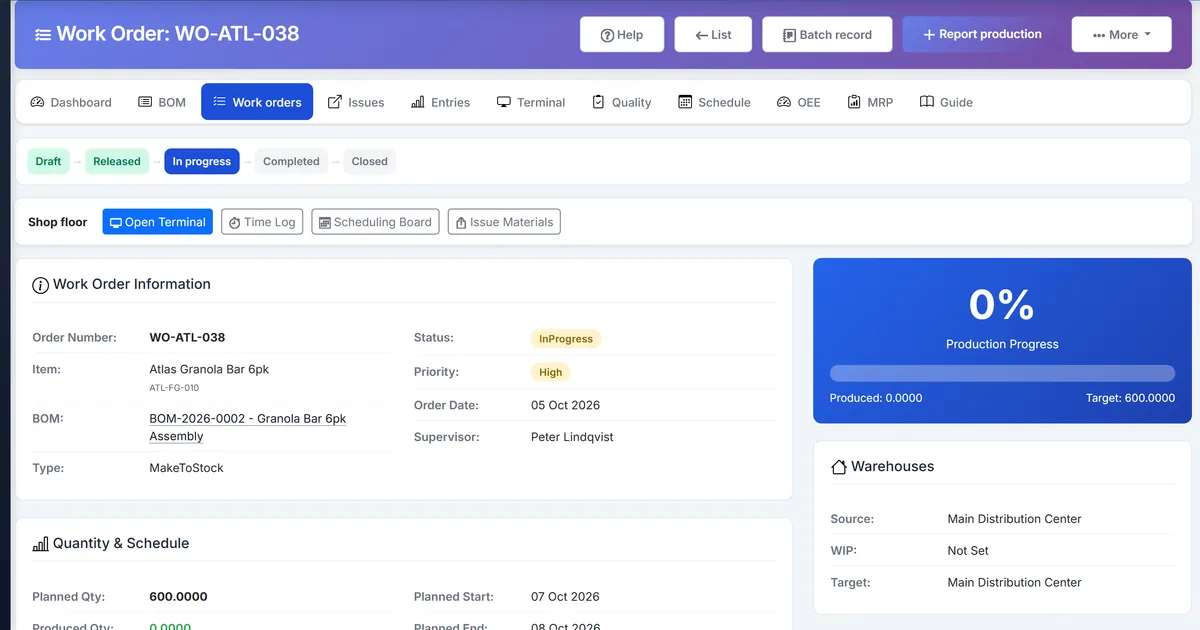
Purchase and sales traceability miss the manufacturing middle
Inventory already traces received and sold batches, but manufactured finished goods often lack a link showing which raw lots were consumed into which FG lot.
Recall drills stop at the production entry because consumption batches were never recorded as genealogy edges.
Teams invent spreadsheets linking batch numbers after the fact, which fail audits.
Why this happens
- No ProductionBatchConsumption link between raw and finished batches.
- Production completion does not record genealogy.
- Trace screens focus on purchase/sales flows only.
- Changing ItemBatch schema would break existing inventory.
Biznsbook addresses this through manufacturing lot genealogy, where used where from, production batch consumption when Manufacturing and Inventory are enabled; Accounting adds WIP and cost postings when your chart and system accounts are configured.
Finance teams lose days each month reconciling versions that should never have diverged. Naming Biznsbook screens as the system of record — and closing periods when agreed — prevents silent edits that auditors flag immediately.
Step-by-step: Trace Manufacturing Lot Genealogy
Built for production planners, shop-floor supervisors, and operations managers running BOM-driven work orders with MES-lite capture, OEE, and inventory integration.
- Issue materials with batch numbers. When issuing batch-tracked components, capture the raw batch so consumption sources are known.
- Complete production with FG batch. Post the production entry, or complete the terminal session, with a finished batch number. Genealogy records when that number is present. The finished item does not also have to be marked Track Expiry.
- Let genealogy record on complete. On production complete, Biznsbook writes ProductionBatchConsumption links in a non-fatal hook. If inventory already created the finished lot, genealogy uses that lot and does not add a second quantity. Issued lines with a batch number are linked even when the component is not expiry-tracked. Failures never block stock posting.
- Open genealogy on the entry. From Production Entry details, open the Genealogy section to see linked raw and finished batches.
- Run Where From. Ask which raw batches composed a finished lot when a customer or auditor questions FG quality.
- Run Where Used. Ask which finished lots consumed a suspect raw batch when a supplier issues a recall.
- Coordinate with Inventory Traceability. Use Inventory forward/backward trace for purchase and sales legs, and manufacturing genealogy for the production middle.
Review results after the first full weekly cycle. Adjust roles, mappings, or approvals where the same exception repeats.
Screen-level flows live in the Help Center. This guide focuses on the business process; help articles cover click-by-click navigation.
Common mistakes to avoid
- Mistake 1: No ProductionBatchConsumption link between raw and finished batches. Repeating this each month usually shows up first in OEE dashboard or stock card variance reports.
- Mistake 2: Production completion does not record genealogy. Repeating this each month usually shows up first in OEE dashboard or stock card variance reports.
- Mistake 3: Trace screens focus on purchase/sales flows only. Repeating this each month usually shows up first in OEE dashboard or stock card variance reports.
- Mistake 4: Changing ItemBatch schema would break existing inventory. Repeating this each month usually shows up first in OEE dashboard or stock card variance reports.
Track recurring exceptions in month-end notes; each should map to a control above.
Best practices that hold up as you scale
- Issue materials with batch numbers — When issuing batch-tracked components, capture the raw batch so consumption sources are known.
- Complete production with FG batch — Post the production entry, or complete the terminal session, with a finished batch number.
- Let genealogy record on complete — On production complete, Biznsbook writes ProductionBatchConsumption links in a non-fatal hook.
- Open genealogy on the entry — From Production Entry details, open the Genealogy section to see linked raw and finished batches.
- Run Where From — Ask which raw batches composed a finished lot when a customer or auditor questions FG quality.
Teams that capture output on the shop-floor terminal, clock operations, and review OEE daily keep planned schedules and MRP-lite nets grounded in real production.
How Biznsbook supports this workflow
manufacturing lot genealogy is documented in Biznsbook Manufacturing capabilities. Use it as part of a controlled finance process — posting, review, and period close — not as an isolated export. When Sales, Purchase, Inventory, Taxation, Expense, or Finance Management modules are enabled, related documents can post through the central accounting posting service with double-entry validation.
where used where from is documented in Biznsbook Manufacturing capabilities. Use it as part of a controlled finance process — posting, review, and period close — not as an isolated export. When Sales, Purchase, Inventory, Taxation, Expense, or Finance Management modules are enabled, related documents can post through the central accounting posting service with double-entry validation.
production batch consumption is documented in Biznsbook Manufacturing capabilities. Use it as part of a controlled finance process — posting, review, and period close — not as an isolated export. When Sales, Purchase, Inventory, Taxation, Expense, or Finance Management modules are enabled, related documents can post through the central accounting posting service with double-entry validation.
Manufacturing permissions separate BOM maintenance, work order release, production entry, quality inspection, reports, and scheduling. Inventory is required for items, warehouses, and stock mutations.
Suggested implementation timeline
- Week 1: Document current process gaps and configure manufacturing lot genealogy with finance owner sign-off.
- Weeks 2–3: Pilot on one month or one entity; post all test transactions through Biznsbook; freeze parallel spreadsheet journals.
- Week 4: Run first trial balance or report tie-out; fix mapping and permission issues.
- Month 2–3: Roll out to full team; add approvals and period close cadence from this guide.
- Ongoing: Monthly review using recall drill and leadership dashboard.
Metrics to track monthly
- Shop-floor terminal sessions completed same shift
- Operation time logs vs BOM standard variance
- OEE by workstation (availability, performance, quality)
- Scheduling board load % over 100%
- MRP-lite shortages firmed to a work order, requisition, or transfer
- Genealogy where-used / where-from recall drills
Start with three metrics; trend direction matters more than a single point-in-time snapshot.
Spreadsheet / manual books vs integrated ERP
Compare typical manual finance work with Biznsbook manufacturing lot genealogy and related capabilities.
| Capability | Manual / Spreadsheet | Biznsbook |
|---|---|---|
| FG origin | ❌ Unknown after make | ✅ Linked raw ItemBatch rows |
| Recall path | ❌ Spreadsheet chase | ✅ Where Used / Where From |
| Schema risk | ❌ Alter ItemBatch | ✅ Linking table only |
| Posting risk | ❌ Blocks complete | ✅ Non-fatal genealogy hook |
| Scope | ❌ Buy/sell only | ✅ Manufacturing middle added |
| Audit | ❌ Verbal history | ✅ Persisted consumption links |
Recall drill
Pick one finished lot monthly, run Where From to list raw batches, then Where Used on one raw batch to list other FG lots — confirm both paths match production records.
Document this in your finance SOP and revisit each quarter as transaction volume or entity structure changes.
Frequently asked questions
Does genealogy add a second finished quantity?
No. When inventory already created the finished lot, genealogy links that lot and does not add a second remaining quantity.
What if genealogy recording fails?
The hook is non-fatal — production entry completion and stock posting still succeed; the failure is logged for follow-up.
How is this different from Inventory Traceability?
Inventory Traceability covers purchase and sales batch movement; manufacturing genealogy links raw batches into finished batches created at production complete.
Do I need batch tracking on items?
The production entry needs a batch number. Issued lines appear when those lines have a batch number, even if the component is not marked Track Expiry. An entry with no batch number is skipped.
How this differs by industry
Retail
Private-label assemblers can prove which ingredient lots went into a finished retail SKU lot for customer complaints.
Wholesale & distribution
Repack operations can show which inbound lots fed each outbound finished lot after light manufacture.
Manufacturing
Food and regulated discrete makers close the FSMA-style gap between raw receipt and finished lot with production consumption links.