How to Track Warehouse Stock Movements
Scattered trails hide where stock actually went
Multi-site SMBs often chase the same question after a stockout: did the item leave on a sale, sit in transit between warehouses, or get moved to another bin on the map? When answers live in three screens, supervisors lose hours and still cannot brief auditors.
Wholesale hubs that ship daily transfers need a date-scoped trail of in-transit documents alongside ledger postings. Without it, “missing” cartons are debated on chat threads while the transfer is still Partially Received.
Retail chains rotating stock between stores invent spreadsheet movement logs that never match the ERP. Those files break the moment someone cancels a draft transfer or receives only half a load.
Manufacturing plants that relocate raw materials between layout nodes need map movement logs next to warehouse quantity changes, or production planners assume inventory that is no longer in the pick face.
Why this happens
- Ledger, transfers, and map moves are reviewed as separate lists with no shared warehouse filter.
- In-transit quantities are not visible next to on-hand stock on the same warehouse details page.
- Cancelled or partially received transfers leave operators unsure whether stock returned to source.
- Free-text bin notes drift from structured storage locations, so bin-level questions have no reliable join key.
Biznsbook Warehouse Management adds a warehouse-scoped movement view that reads Inventory ledger rows, stock transfer documents, and node movement logs while Inventory stays the system of record for costing.
Step-by-step: Track Warehouse Stock Movements
Built for warehouse supervisors and stock controllers who need one trail across sites without rebuilding a spreadsheet audit book.
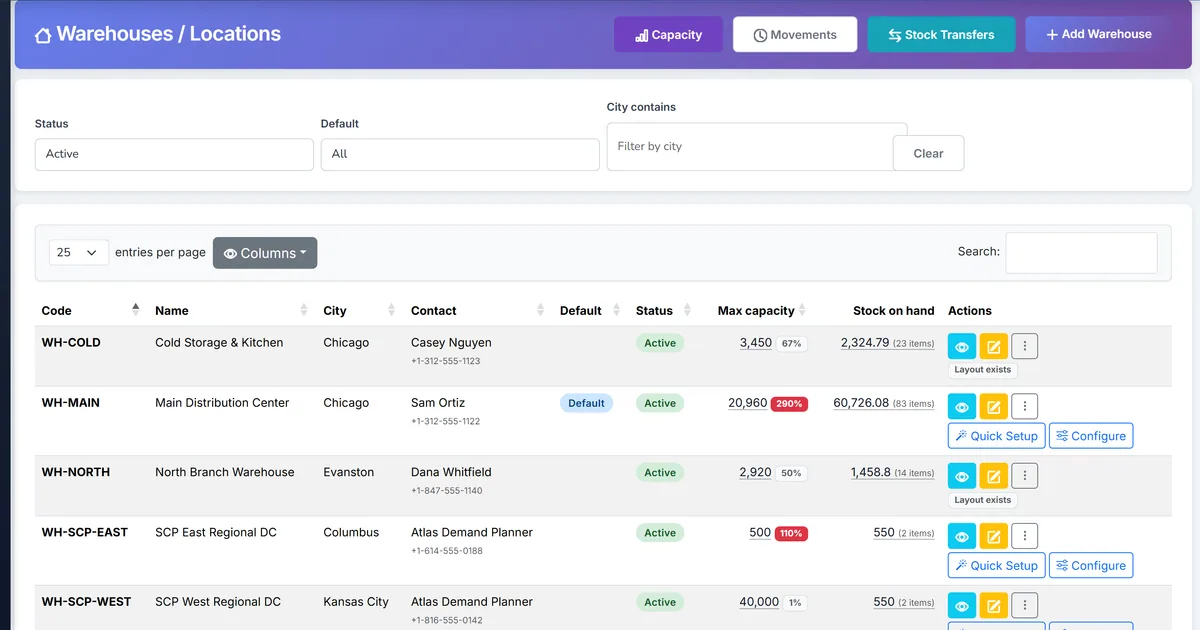
- Open movement history. From Inventory Operations, open Warehouse → Movement history (or use the Movements shortcut on the Warehouses page).
- Filter by warehouse and dates. Select a warehouse and a date range. Add a storage location id when you need bin-level focus.
- Review ledger lines. Confirm GRN, sale, adjustment, and transfer postings that moved quantity at that warehouse.
- Trace stock transfers. Use transfer rows to open Draft, In Transit, Partially Received, Received, or Cancelled documents.
- Check map node moves. Review map movement logs when stock was relocated between layout nodes inside the warehouse.
- Tie out to warehouse details. Compare in-transit cards on warehouse details with open transfer quantities still not fully received.
- Escalate mismatches. If physical counts disagree, open the related transfer or adjustment and correct with Inventory.Manage permissions.
Screen-level flows live in the Help Center. This guide focuses on the operational trail; help articles cover click-by-click navigation.
Common mistakes to avoid
- Relying only on free-text bin fields. Prefer structured storage locations so movement filters and map links resolve cleanly.
- Ignoring Partially Received transfers. Remaining quantity still sits in transit until the next receive.
- Cancelling in-transit without checking journals. Cancel returns remaining qty to source and clears in-transit GL when Accounting is set up.
- Searching company-wide ledgers for site questions. Start with warehouse movement history, then drill to item stock card if valuation detail is required.
How Biznsbook supports this workflow
Warehouse movement history combines inventory stock ledger entries, stock transfer documents, and map node movement logs with warehouse, location, and date filters.
Stock transfers support Draft → Approve & Ship (In Transit) → Received or Partially Received, plus Cancel for draft and safe in-transit reversal of remaining quantity.
Warehouse details surface outbound and inbound in-transit lines so supervisors see open quantity before they open the full movement screen.
Inventory remains the system of record for costing; Warehouse adds the multi-site trail. Enable Inventory and Warehouse Management, then grant Inventory.View to review history and Inventory.Manage to post transfer actions.
Spreadsheet movement log vs Biznsbook
| Capability | Manual / Spreadsheet | Biznsbook |
|---|---|---|
| Sources in one view | ❌ Separate files | ✅ Ledger + transfers + map |
| Warehouse filter | ⚠️ Tab per site | ✅ Built-in warehouse filter |
| In-transit status | ❌ Manual notes | ✅ Transfer status + details link |
| Partial receive | ❌ Hard to track | ✅ Per-line received qty |
| Cancel with return | ❌ Silent deletes | ✅ Cancel returns remaining stock |
| Audit readiness | ⚠️ Export chase | ✅ Date-scoped operational trail |
Frequently asked questions
What sources appear in warehouse movement history?
Biznsbook combines inventory stock ledger entries, stock transfer documents, and visual map node movement logs filtered by warehouse, storage location, and date.
Is movement history the same as the stock card?
No. The stock card remains the item-level inventory record. Warehouse movement history is an operational view scoped to a site, bin, and transfer trail.
Can I open a transfer from the movement list?
Yes. Transfer rows link to transfer details so you can review Approve & Ship, receive quantities, cancel status, and journal entries when Accounting is enabled.
Do I need the Warehouse module?
Yes. Movement history sits under Inventory Operations when Warehouse Management is licensed; Inventory remains required for products and the stock ledger.
How this differs by industry
Retail
Store managers filter one warehouse for the week, confirm transfer receipts from the DC, and spot cancelled drafts before cycle counts.
Wholesale & distribution
Hub supervisors reconcile in-transit loads overnight using overdue expected-arrival filters on the transfer list, then prove movement history to customers.
Manufacturing
Plants review map node moves for raw materials next to warehouse ledger issues so production never assumes stock still sitting in the pick face.