How to Manage Overtime Calculations
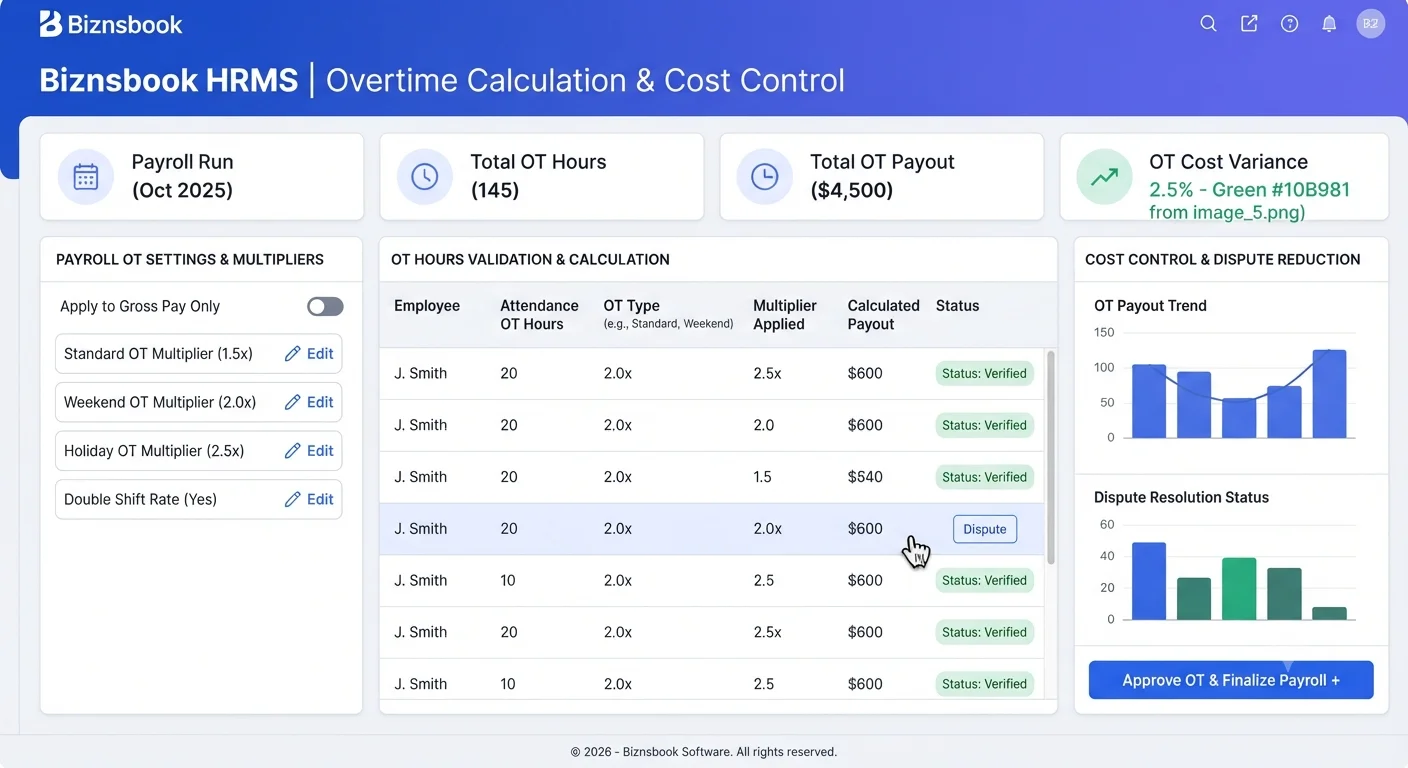
Overtime disputes grow when policy and data diverge
Overtime costs increase quickly when teams approve extra hours without consistent policy. Payroll receives mixed inputs and payout logic differs by manager.
Attendance OT hours also become unreliable if shift boundaries and correction approvals are weak. This creates disputes after payroll is calculated.
A controlled setup combines payroll multipliers, attendance validation, and approval checkpoints so overtime remains fair and predictable.
Why this happens
- Overtime multipliers in payroll settings are not aligned with policy.
- Attendance OT hours are approved without supporting shift validation.
- Managers bypass overtime approval or apply inconsistent thresholds.
- Payroll run reviews do not isolate overtime variance before approval.
Biznsbook addresses this through Overtime payroll settings, attendance OT hours, payroll multipliers when HR Management is enabled; add the Payroll module for salary structures, pay runs, and payslips, and Accounting for GL posting when configured.
Finance teams lose days each month reconciling versions that should never have diverged. Naming Biznsbook screens as the system of record — and closing periods when agreed — prevents silent edits that auditors flag immediately.
Step-by-step: Manage Overtime Calculations
Built for HR generalists, payroll administrators, and owners who need hire-to-pay discipline without spreadsheet chaos.
- Define overtime policy bands. Set eligibility, caps, and multiplier rules for normal and exceptional overtime cases.
- Configure payroll multipliers. Apply approved overtime multiplier settings in HRMS Payroll configuration.
- Validate shift boundaries. Ensure overtime hours are interpreted against accurate shift timing setup.
- Approve OT attendance entries. Use approval workflow for overtime corrections and disputed hour entries.
- Review overtime variance. Compare current run OT totals against expected trend before final approval.
- Communicate payout rules. Share clear overtime earning logic with managers and employees to reduce confusion.
- Optimize staffing plans. Use overtime trend reports to adjust shift coverage and reduce avoidable OT costs.
Review results after the first full monthly cycle. Adjust roles, mappings, or approvals where the same exception repeats.
Screen-level flows live in the Help Center (tax setup, expense claims, sale invoices). This guide focuses on finance process; help articles cover navigation.
Common mistakes to avoid
- Mistake 1: Overtime multipliers in payroll settings are not aligned with policy. Repeating this each month usually shows up first in payroll runs or attendance summary reports.
- Mistake 2: Attendance OT hours are approved without supporting shift validation. Repeating this each month usually shows up first in payroll runs or attendance summary reports.
- Mistake 3: Managers bypass overtime approval or apply inconsistent thresholds. Repeating this each month usually shows up first in payroll runs or attendance summary reports.
- Mistake 4: Payroll run reviews do not isolate overtime variance before approval. Repeating this each month usually shows up first in payroll runs or attendance summary reports.
Track recurring exceptions in month-end notes; each should map to a control above.
Best practices that hold up as you scale
- Define overtime policy bands — Set eligibility, caps, and multiplier rules for normal and exceptional overtime cases.
- Configure payroll multipliers — Apply approved overtime multiplier settings in HRMS Payroll configuration.
- Validate shift boundaries — Ensure overtime hours are interpreted against accurate shift timing setup.
- Approve OT attendance entries — Use approval workflow for overtime corrections and disputed hour entries.
- Review overtime variance — Compare current run OT totals against expected trend before final approval.
Teams that close attendance and leave before payroll cut-off day avoid the rework cycle that erodes trust in payslips.
How Biznsbook supports this workflow
Overtime payroll settings is documented in Biznsbook HRMS / Payroll capabilities. Use it as part of a controlled finance process — posting, review, and period close — not as an isolated export. When Sales, Purchase, Inventory, Taxation, Expense, or Finance Management modules are enabled, related documents can post through the central accounting posting service with double-entry validation.
attendance OT hours is documented in Biznsbook HRMS / Payroll capabilities. Use it as part of a controlled finance process — posting, review, and period close — not as an isolated export. When Sales, Purchase, Inventory, Taxation, Expense, or Finance Management modules are enabled, related documents can post through the central accounting posting service with double-entry validation.
payroll multipliers is documented in Biznsbook HRMS / Payroll capabilities. Use it as part of a controlled finance process — posting, review, and period close — not as an isolated export. When Sales, Purchase, Inventory, Taxation, Expense, or Finance Management modules are enabled, related documents can post through the central accounting posting service with double-entry validation.
HRMS and Payroll permissions separate employee edits, attendance, leave approval, and payroll approval. Payroll requires HRMS as the employee system of record.
Suggested implementation timeline
- Week 1: Document current process gaps and configure Overtime payroll settings with finance owner sign-off.
- Weeks 2–3: Pilot on one month or one entity; post all test transactions through Biznsbook; freeze parallel spreadsheet journals.
- Week 4: Run first trial balance or report tie-out; fix mapping and permission issues.
- Month 2–3: Roll out to full team; add approvals and period close cadence from this guide.
- Ongoing: Monthly review using overtime escalation rules and leadership dashboard.
Metrics to track monthly
- Attendance correction backlog and approval time
- Leave requests pending approval count
- Payroll run cycle time (draft to paid)
- Headcount and joiner/leaver trend monthly
- Payslip exceptions or manual adjustments per run
Start with three metrics; trend direction matters more than a single point-in-time snapshot.
Spreadsheet / manual books vs integrated ERP
Compare typical manual finance work with Biznsbook Overtime payroll settings and related capabilities.
| Capability | Manual / Spreadsheet | Biznsbook |
|---|---|---|
| Multiplier setup | ❌ Uncontrolled rates | ✅ Policy-aligned payroll multipliers |
| Hour validation | ❌ Trust-based entries | ✅ Shift-linked OT hour checks |
| Approval discipline | ❌ Manager discretion | ✅ Workflow-based OT approvals |
| Payroll review | ❌ Total-only review | ✅ Dedicated OT variance checks |
| Employee clarity | ❌ Unclear payout logic | ✅ Published OT calculation rules |
| Cost control | ❌ Reactive budgeting | ✅ Trend-based workforce planning |
Overtime escalation rules
Create thresholds for manager and finance escalation when overtime exceeds planned levels. Early escalation prevents recurring budget overruns.
Document this in your finance SOP and revisit each quarter as transaction volume or entity structure changes.
Frequently asked questions
Where are overtime multipliers configured?
Overtime multipliers are configured in payroll settings, then applied during payroll calculation against approved OT hours.
Should overtime use attendance data directly?
Use attendance OT hours, but only after shift validation and approval checks to maintain fairness and accuracy.
How can teams prevent overtime disputes?
Publish policy rules, enforce approvals, and review OT variance before payroll reaches approved state.
Is overtime review needed every payroll cycle?
Yes. Regular review helps catch abnormal spikes and prevents repeated payout errors.
How this differs by industry
Retail
Retail teams should monitor overtime by store and trading cycle to avoid unmanaged cost spikes during seasonal demand.
Wholesale & distribution
Office and services organizations can reduce overtime confusion by enforcing clear approvals and published payout multipliers for support teams.
Manufacturing
Factory payroll teams must validate OT hours against shift records carefully because overtime cost directly impacts production margins.