How to Send Invoices via WhatsApp
Invoice PDFs stall in email while customers live on WhatsApp
Many SMB buyers ask for the invoice on WhatsApp the moment a deal closes. When sales staff download a PDF, open a personal chat, and type the amount by hand, numbers drift, phones get mistyped, and finance cannot prove who shared what.
Email still matters for formal records, but response times drop when the only path is a mailbox the customer rarely checks. Teams that already message customers on WhatsApp need the ERP to open the right chat with the right body — from the sale invoice itself — without inventing a second billing channel.
Without intent logging, managers cannot tell whether a late payment started as a missed share, a wrong number, or a customer who never opened the chat. Spreadsheet “WhatsApp sent” columns go stale within a week and never tie back to the invoice ReferenceId.
Why this happens
- Invoice share stays email-only while customers expect WhatsApp for speed.
- Staff copy PDFs into personal chats with no company default country code or E.164 normalization.
- There is no WhatsAppLog row for Category and ReferenceId on each share attempt.
- Teams assume Meta Cloud API is required before any WhatsApp invoice share can exist.
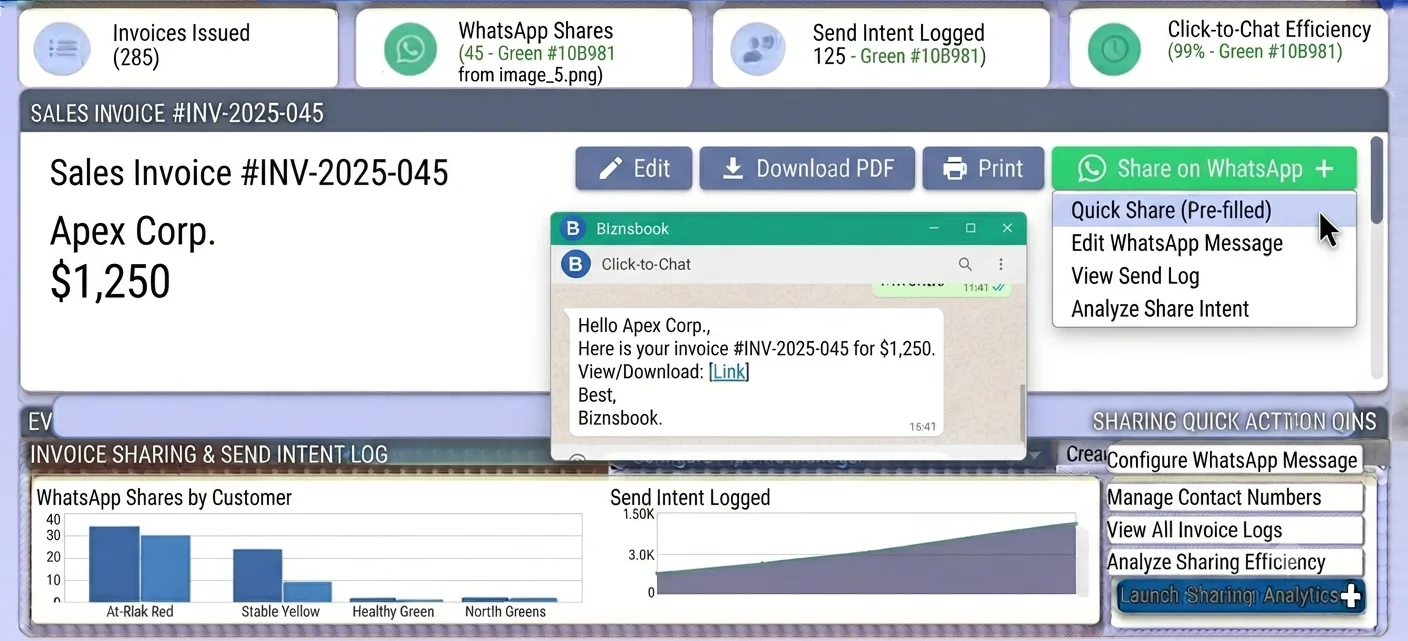
Biznsbook addresses this with Click-to-Chat on sale invoice details and print, a wa.me link builder, company ClickToChatOnly settings, and WhatsAppLog intent rows at Status=AwaitingManualSend. Staff send from their WhatsApp Business app — own-number delivery — while the ERP keeps the audit trail.
Pair this with governed email templates in customer communications so WhatsApp and email stay aligned on amounts, due dates, and payment instructions. When you later need event-driven reminders, use automated lead follow-up patterns and the Cloud API path in the automate WhatsApp updates guide.
Step-by-step: Send Invoices via WhatsApp
Built for sales, AR, and office staff who already close invoices in Biznsbook and need a logged Click-to-Chat share without standing up Meta Cloud API first.
- Confirm Click-to-Chat company settings. In company WhatsApp settings, use ClickToChatOnly mode with an active flag and a default country code so phone numbers normalize to digits for wa.me.
- Verify the customer WhatsApp phone. Ensure the CRM contact or party has a usable WhatsApp / phone field. Biznsbook applies the company default country code and keeps digits-only for the wa.me builder.
- Open the sale invoice. Go to sale invoice details or the print surface where the Send via WhatsApp share button is available next to existing email flows.
- Click Send via WhatsApp. Biznsbook builds https://wa.me/{digits}?text={encoded} from the E.164 digits and the resolved invoice message body, then opens Click-to-Chat.
- Confirm the chat and send. Review the pre-filled text in WhatsApp Business on the staff device, then send from your business number so the customer sees a familiar sender.
- Review WhatsAppLog intent. Confirm WhatsAppLog shows Channel=ClickToChat, Status=AwaitingManualSend, and Category plus ReferenceId tied to the invoice for audit.
- Standardize the share habit. Train the team to prefer the ERP share button over copying PDFs into personal chats so every attempt stays logged and phones stay normalized.
Review results after the first full weekly cycle. Spot-check WhatsAppLog for missing phones and AwaitingManualSend rows that never leave staff devices. Screen-level invoice steps live in the Help Center; this guide focuses on the WhatsApp share process.
Common mistakes to avoid
- Mistake 1: Pasting the invoice PDF into a personal WhatsApp chat with no wa.me builder and no WhatsAppLog row. You lose Category, ReferenceId, and any proof of the share attempt.
- Mistake 2: Leaving the company default country code blank so local numbers never become digits-only for Meta or wa.me. Failed opens look like “WhatsApp is broken” when the phone was never normalized.
- Mistake 3: Waiting for Cloud API Embedded Signup before using Click-to-Chat. Manual shares are available in ClickToChatOnly without API keys, webhooks, or monthly conversation fees.
- Mistake 4: Treating AwaitingManualSend as a delivery receipt. Click-to-Chat records intent; the teammate still must confirm send in the WhatsApp Business app.
Track recurring exceptions in AR notes; each should map to a setting or training fix above.
Best practices that hold up as you scale
- Keep ClickToChatOnly active with a correct default country code before the first invoice share.
- Maintain the CRM WhatsApp field as the recipient source of truth for phone resolution.
- Use sale invoice details or print Send via WhatsApp instead of ad-hoc message drafting.
- Audit WhatsAppLog weekly for Channel=ClickToChat rows missing ReferenceId or stuck without staff follow-through.
- Keep purchase invoice and supplier notify WhatsApp shares on the same habit when vendors expect chat updates.
Teams that review WhatsAppLog alongside open AR age reports recover faster than teams that only check email bounce logs.
How Biznsbook supports this workflow
Click-to-Chat (wa.me) builds https://wa.me/{digits}?text={encoded} from E.164 digits and the resolved message body so staff open a pre-filled chat on their WhatsApp Business app — own-number delivery without Meta tokens.
Sale invoice share button exposes Send via WhatsApp on sale invoice details and print, next to existing email flows, so order-to-cash stays in one system of record.
Phone normalization applies the company default country code and digits-only formatting required for wa.me and later Cloud API use.
WhatsAppLog intent logging stores Channel=ClickToChat, Status=AwaitingManualSend, Direction, Category, ReferenceId, body snapshot, and timestamps so every share attempt is auditable — mirroring EmailLog patterns.
Company ClickToChatOnly settings keep the channel active without Phone Number Id, WABA Id, or encrypted access tokens until you choose CloudApi provider mode.
CRM roles still govern who can open invoices; Communication Center remains home for email templates and, later, WhatsApp template libraries when you connect Cloud API.
Suggested implementation timeline
- Week 1: Enable ClickToChatOnly, set default country code, and clean CRM WhatsApp / phone fields for active customers.
- Weeks 2–3: Pilot Send via WhatsApp on a single sales desk; require WhatsAppLog review in daily huddle.
- Week 4: Roll out to all invoice owners; retire personal PDF-forward habits in the SOP.
- Month 2–3: Extend the same Click-to-Chat habit to purchase / supplier notify surfaces where useful.
- Ongoing: Monthly WhatsAppLog audit; plan Cloud API templates only when you need unattended sends.
Click-to-Chat versus Cloud API for invoices
Click-to-Chat is the right first step when humans already message customers and you need ERP-native share buttons with zero Meta account setup. The staff device confirms each send; WhatsAppLog marks AwaitingManualSend for intent.
Meta Cloud API is the path when you need approved Utility templates, delivery and read webhooks, and Automation Send WhatsApp actions without a person tapping send. That path requires Embedded Signup, WABA fields, opt-in ledger, and STOP handling — covered in automate WhatsApp customer updates.
Do not invent bulk click-to-chat dunning queues yet; that capability is planned, not available. Stay on single-document share buttons for sales and purchase documents today.
WhatsAppLog fields that matter for AR
For invoice shares, focus on Channel (ClickToChat vs CloudApi), Status (especially AwaitingManualSend), Category, ReferenceId, body snapshot, and timestamps. Direction is Outbound for share intents. Failure reason and ProviderMessageId become relevant once Cloud API sends are live.
Use ReferenceId to join WhatsAppLog to the sale invoice when a customer claims they never received the bill. Intent logging will not prove Meta delivery for Click-to-Chat, but it proves the ERP opened a correctly built wa.me chat for that invoice and phone.
Metrics to track monthly
- Sale invoices with at least one ClickToChat WhatsAppLog row
- Share attempts blocked by missing or invalid phones
- AwaitingManualSend volume versus staff confirmation habit
- Days from invoice post to first WhatsApp share attempt
- AR aging for customers who prefer WhatsApp versus email-only
Start with three metrics; trend direction matters more than a single point-in-time snapshot.
Manual chat vs Biznsbook Click-to-Chat
Compare ad-hoc WhatsApp invoice sharing with Biznsbook sale invoice Click-to-Chat.
| Capability | Manual / Spreadsheet | Biznsbook |
|---|---|---|
| Share entry point | ❌ Download PDF, open personal chat | ✅ Send via WhatsApp on invoice details / print |
| Link builder | ❌ Hand-typed numbers and text | ✅ wa.me digits + encoded body |
| Phone handling | ❌ Inconsistent country codes | ✅ Company default + digits-only |
| Audit trail | ❌ No ReferenceId | ✅ WhatsAppLog ClickToChat intent |
| Meta account | ⚠️ Often blocked waiting on API | ✅ ClickToChatOnly needs no tokens |
| Sender identity | ⚠️ Personal numbers | ✅ Staff WhatsApp Business / own number |
Design tip
Make the invoice share button the only approved WhatsApp path in your sales SOP. Personal chats without WhatsAppLog should be treated as control failures, not “just faster.” When Cloud API is ready, keep Click-to-Chat for high-touch accounts and automate routine payment reminders with approved templates.
Document this in your AR SOP and revisit each quarter as invoice volume or entity structure changes.
Frequently asked questions
Do I need a Meta Cloud API account to share invoices on WhatsApp?
No. Click-to-Chat uses wa.me links and your staff WhatsApp Business app. Company settings in ClickToChatOnly mode need a default country code and active flag — not Meta tokens, webhooks, or conversation fees.
What does intent logging record when I click Send via WhatsApp?
Biznsbook writes a WhatsAppLog row with Channel=ClickToChat, Status=AwaitingManualSend, plus Category and ReferenceId for the sale invoice so auditors can see every share attempt.
Where is the Send via WhatsApp control on sale invoices?
Use Send via WhatsApp on sale invoice details or print surfaces. Biznsbook builds a wa.me link from the customer phone (normalized with the company default country code) and a pre-filled message body.
Can purchase documents also open WhatsApp?
Yes. Purchase invoice and supplier notify surfaces also support Send via WhatsApp Click-to-Chat, with the same phone normalization and WhatsAppLog intent logging as sales.
Does Click-to-Chat send the message automatically?
No. Click-to-Chat opens a pre-filled chat on the staff device. The teammate confirms and sends from their WhatsApp Business app; the ERP records AwaitingManualSend until that manual send.
How do I move from manual shares to automated WhatsApp updates?
Connect Meta Cloud API, approve templates, and use the Automation Send WhatsApp action with opt-in and STOP handling. See the automate WhatsApp customer updates guide for that path.
How this differs by industry
Retail
Retail counters often close the sale face-to-face then share the invoice on WhatsApp before the shopper leaves. Click-to-Chat from sale invoice details keeps the receipt path logged without asking cashiers to type amounts.
Wholesale & distribution
Wholesale AR teams send many invoices daily. ERP-native share buttons plus WhatsAppLog ReferenceId make it practical to prove outreach on aged balances without a Meta project on day one.
Manufacturing
Manufacturers mix formal email packs with WhatsApp for plant buyers who want a quick due-date nudge. Keep Click-to-Chat for invoice share and reserve Cloud API templates for scheduled order-status updates later.