How to Follow Up With Leads Automatically
Manual follow-up fails at exactly the wrong time
Lead follow-up often depends on who is available when the inquiry arrives. During busy periods, first contact is delayed, and intent drops before a rep can respond. Even strong campaigns underperform when handoff to sales is slow.
Teams also send inconsistent messages. One lead receives product details quickly, while another gets a generic note days later. This uneven experience lowers trust and makes conversion difficult to diagnose.
As lead volume grows, manual reminders and calendar tasks cannot scale. Automation becomes necessary not for convenience, but for basic response reliability and measurable process control.
Why this happens
- No trigger-based workflow starts on new lead creation.
- Follow-up messaging lives in personal inboxes instead of reusable sequences.
- Teams confuse CRM configuration with automation ownership and delay setup.
- Lead qualification details are not passed into communication templates.
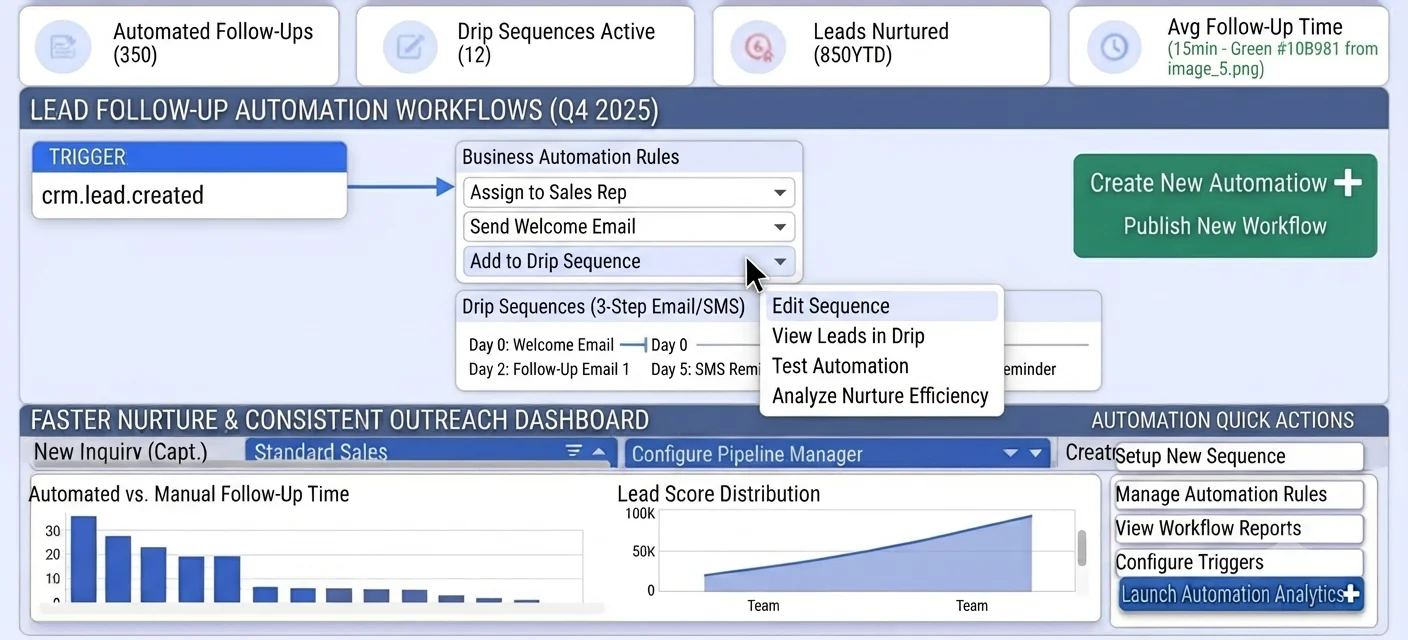
Biznsbook addresses this through Automation workflows, drip sequences, crm.lead.created when the CRM module is enabled. Add Business Automation and Communication Center for drip nurture on crm.lead.created; add Sales and Accounting for order-to-cash when deals close.
Finance teams lose days each month reconciling versions that should never have diverged. Naming Biznsbook screens as the system of record — and closing periods when agreed — prevents silent edits that auditors flag immediately.
Step-by-step: Follow Up With Leads Automatically
Built for sales reps, managers, and RevOps leads who need a repeatable funnel — not heroic inbox chasing. Adapt roles to your team size.
- Map your first seven days. Define follow-up timing and message goals from lead creation through initial qualification.
- Create trigger in Business Automation. In `/Automation`, start a workflow with the `crm.lead.created` event trigger.
- Build message templates. Prepare email templates for acknowledgment, value education, and next-step scheduling.
- Enroll leads into drips. Use the `Enroll in Drip Sequence` automation action to add leads to Communication Center Drip Sequences.
- Separate from CRM Sequences. Use `/CRM/Sequences` for rep-led sequence logic while communication drips handle automated nurture patterns.
- Add qualification branches. Route by source, score, or product interest so high-intent leads receive faster escalation.
- Monitor response and conversion. Track reply rate, meeting booking rate, and stage progression to optimize timing and content.
Review results after the first full weekly cycle. Adjust roles, mappings, or approvals where the same exception repeats.
Screen-level flows live in the Help Center (tax setup, expense claims, sale invoices). This guide focuses on finance process; help articles cover navigation.
Common mistakes to avoid
- Mistake 1: No trigger-based workflow starts on new lead creation. Repeating this each month usually shows up first in pipeline velocity or lead aging reports.
- Mistake 2: Follow-up messaging lives in personal inboxes instead of reusable sequences. Repeating this each month usually shows up first in pipeline velocity or lead aging reports.
- Mistake 3: Teams confuse CRM configuration with automation ownership and delay setup. Repeating this each month usually shows up first in pipeline velocity or lead aging reports.
- Mistake 4: Lead qualification details are not passed into communication templates. Repeating this each month usually shows up first in pipeline velocity or lead aging reports.
Track recurring exceptions in month-end notes; each should map to a control above.
Best practices that hold up as you scale
- Map your first seven days — Define follow-up timing and message goals from lead creation through initial qualification.
- Create trigger in Business Automation — In `/Automation`, start a workflow with the `crm.
- Build message templates — Prepare email templates for acknowledgment, value education, and next-step scheduling.
- Enroll leads into drips — Use the `Enroll in Drip Sequence` automation action to add leads to Communication Center Drip Sequences.
- Separate from CRM Sequences — Use `/CRM/Sequences` for rep-led sequence logic while communication drips handle automated nurture patterns.
Teams that review pipeline and lead aging weekly close more consistently than teams that only report at month-end.
How Biznsbook supports this workflow
Automation workflows is documented in Biznsbook CRM / Sales capabilities. Use it as part of a controlled finance process — posting, review, and period close — not as an isolated export. When Sales, Purchase, Inventory, Taxation, Expense, or Finance Management modules are enabled, related documents can post through the central accounting posting service with double-entry validation.
drip sequences is documented in Biznsbook CRM / Sales capabilities. Use it as part of a controlled finance process — posting, review, and period close — not as an isolated export. When Sales, Purchase, Inventory, Taxation, Expense, or Finance Management modules are enabled, related documents can post through the central accounting posting service with double-entry validation.
crm.lead.created is documented in Biznsbook CRM / Sales capabilities. Use it as part of a controlled finance process — posting, review, and period close — not as an isolated export. When Sales, Purchase, Inventory, Taxation, Expense, or Finance Management modules are enabled, related documents can post through the central accounting posting service with double-entry validation.
CRM roles (rep, manager, admin) govern export, settings, and reassignment. Workflow automations live in Business Automation — not buried in personal inboxes.
Suggested implementation timeline
- Week 1: Document current process gaps and configure Automation workflows with finance owner sign-off.
- Weeks 2–3: Pilot on one month or one entity; post all test transactions through Biznsbook; freeze parallel spreadsheet journals.
- Week 4: Run first trial balance or report tie-out; fix mapping and permission issues.
- Month 2–3: Roll out to full team; add approvals and period close cadence from this guide.
- Ongoing: Monthly review using automation quality controls and leadership dashboard.
Metrics to track monthly
- Lead response time (minutes from create to first activity)
- Lead-to-opportunity conversion rate by source
- Pipeline velocity and stage aging days
- Win rate and average deal size
- Forecast vs actual revenue (closed-won)
Start with three metrics; trend direction matters more than a single point-in-time snapshot.
Spreadsheet / manual books vs integrated ERP
Compare typical manual finance work with Biznsbook Automation workflows and related capabilities.
| Capability | Manual / Spreadsheet | Biznsbook |
|---|---|---|
| Follow-up start | ❌ Manual reminders | ✅ crm.lead.created trigger |
| Automation location | ❌ Assumed CRM Settings | ✅ Business Automation /Automation |
| Nurture delivery | ❌ One-off emails | ✅ Communication Center drips |
| Sequence model | ❌ Mixed use | ✅ /CRM/Sequences plus drips by purpose |
| Personalization | ❌ Generic outreach | ✅ Branch rules by lead context |
| Scale | ❌ Headcount limited | ✅ Workflow-driven consistency |
Automation quality controls
Test every workflow branch with sample leads before launch. Confirm trigger firing, template variables, and drip enrollment timing to avoid silent follow-up failures.
Document this in your finance SOP and revisit each quarter as transaction volume or entity structure changes.
Frequently asked questions
Where should I build lead-triggered automations?
Create them in the Business Automation module at `/Automation`, not in CRM Settings. That is where event triggers and workflow actions are managed.
How do drips connect to automation?
After trigger and conditions, use the `Enroll in Drip Sequence` action to place contacts into Communication Center Drip Sequences with controlled timing.
Is /CRM/Sequences the same as Communication Center drips?
No. `/CRM/Sequences` is a separate sequence capability. Communication Center Drip Sequences are used with automation-driven nurture campaigns.
What should I optimize first?
Prioritize first-response latency and meeting-booked rate. Those two metrics usually reveal whether timing and messaging sequence are aligned to buyer intent.
How this differs by industry
Retail
Retail B2B teams can automate inquiry acknowledgments and product-category drips to keep prospects engaged between first contact and rep callback.
Wholesale & distribution
Wholesale distributors benefit from triggered follow-up that gathers expected order size early so reps prioritize accounts with near-term revenue potential.
Manufacturing
Manufacturing sellers can use automation branches for technical inquiry types, then route urgent opportunities to specialist reps quickly.