How to Reduce Lead Response Time
Slow first contact kills high-intent opportunities
Most prospects compare multiple vendors quickly. If your team responds hours later, even a strong offer may arrive too late. Response speed is often the first competitive advantage customers experience.
Manual routing introduces avoidable delays. Leads wait in shared inboxes or are forwarded between teams without clear ownership, so qualified prospects become cold before discovery starts.
Teams often underestimate response-time impact because it is not measured rigorously. Without clear metrics, delays remain invisible and conversion losses are misattributed to pricing or market conditions.
Why this happens
- Lead capture channels do not feed CRM in real time.
- No automated assignment starts when a lead is created.
- Acknowledgment messages depend on manual sending.
- Response-time SLAs are not monitored by source.
Biznsbook addresses this through Form builder, automation on crm.lead.created when the CRM module is enabled. Add Business Automation and Communication Center for drip nurture on crm.lead.created; add Sales and Accounting for order-to-cash when deals close.
Finance teams lose days each month reconciling versions that should never have diverged. Naming Biznsbook screens as the system of record — and closing periods when agreed — prevents silent edits that auditors flag immediately.
Step-by-step: Reduce Lead Response Time
Built for sales reps, managers, and RevOps leads who need a repeatable funnel — not heroic inbox chasing. Adapt roles to your team size.
- Standardize intake with Form Builder. Use one lead form schema so required routing and qualification fields are captured consistently.
- Publish all capture channels. Deploy embed codes and public API submissions to ensure every inbound source reaches CRM instantly.
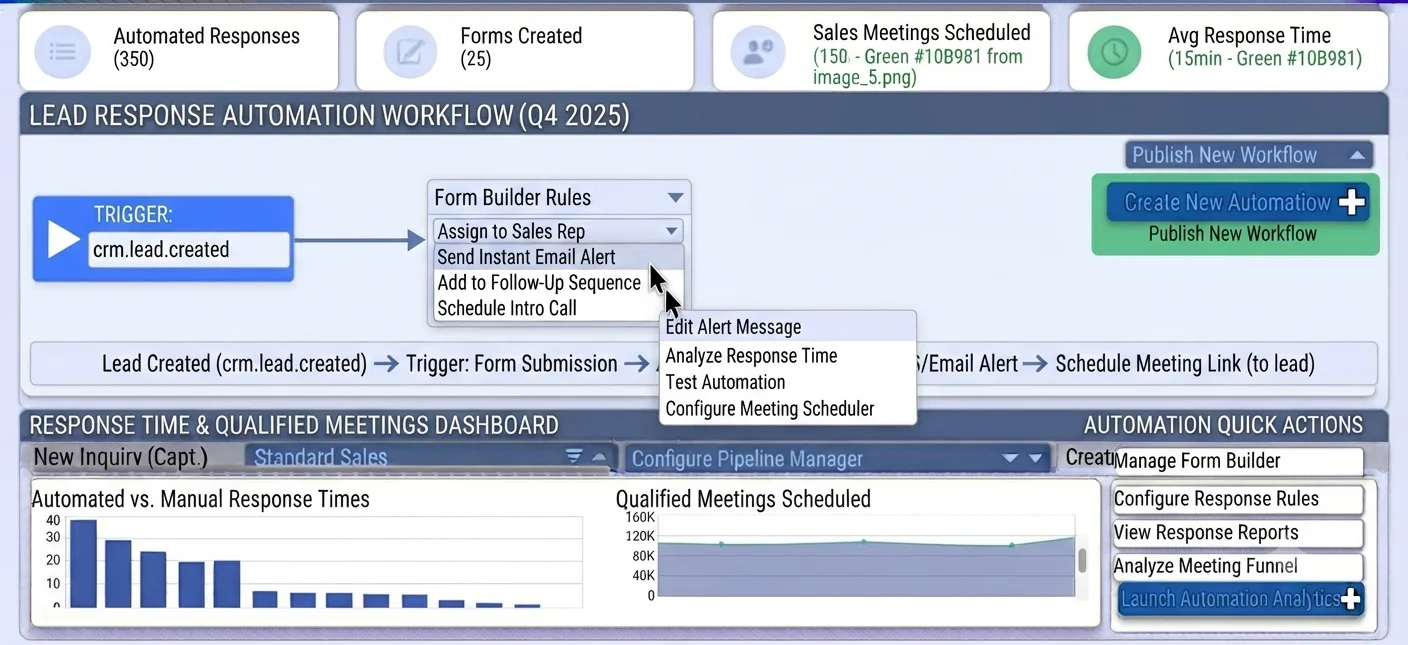
- Trigger routing workflow. In Business Automation `/Automation`, use `crm.lead.created` to assign owner and create first-contact task.
- Send instant acknowledgment. Auto-send a confirmation message so prospects know when to expect a human follow-up.
- Set source-based SLAs. Define stricter first-response targets for high-intent channels such as demo requests.
- Monitor response dashboards. Track median and percentile response time by team, source, and time window.
- Improve exception handling. Escalate unassigned or overdue leads automatically to prevent queue stagnation.
Review results after the first full weekly cycle. Adjust roles, mappings, or approvals where the same exception repeats.
Screen-level flows live in the Help Center (tax setup, expense claims, sale invoices). This guide focuses on finance process; help articles cover navigation.
Common mistakes to avoid
- Mistake 1: Lead capture channels do not feed CRM in real time. Repeating this each month usually shows up first in pipeline velocity or lead aging reports.
- Mistake 2: No automated assignment starts when a lead is created. Repeating this each month usually shows up first in pipeline velocity or lead aging reports.
- Mistake 3: Acknowledgment messages depend on manual sending. Repeating this each month usually shows up first in pipeline velocity or lead aging reports.
- Mistake 4: Response-time SLAs are not monitored by source. Repeating this each month usually shows up first in pipeline velocity or lead aging reports.
Track recurring exceptions in month-end notes; each should map to a control above.
Best practices that hold up as you scale
- Standardize intake with Form Builder — Use one lead form schema so required routing and qualification fields are captured consistently.
- Publish all capture channels — Deploy embed codes and public API submissions to ensure every inbound source reaches CRM instantly.
- Trigger routing workflow — In Business Automation `/Automation`, use `crm.
- Send instant acknowledgment — Auto-send a confirmation message so prospects know when to expect a human follow-up.
- Set source-based SLAs — Define stricter first-response targets for high-intent channels such as demo requests.
Teams that review pipeline and lead aging weekly close more consistently than teams that only report at month-end.
How Biznsbook supports this workflow
Form builder is documented in Biznsbook CRM / Sales capabilities. Use it as part of a controlled finance process — posting, review, and period close — not as an isolated export. When Sales, Purchase, Inventory, Taxation, Expense, or Finance Management modules are enabled, related documents can post through the central accounting posting service with double-entry validation.
automation on crm.lead.created is documented in Biznsbook CRM / Sales capabilities. Use it as part of a controlled finance process — posting, review, and period close — not as an isolated export. When Sales, Purchase, Inventory, Taxation, Expense, or Finance Management modules are enabled, related documents can post through the central accounting posting service with double-entry validation.
CRM roles (rep, manager, admin) govern export, settings, and reassignment. Workflow automations live in Business Automation — not buried in personal inboxes.
Suggested implementation timeline
- Week 1: Document current process gaps and configure Form builder with finance owner sign-off.
- Weeks 2–3: Pilot on one month or one entity; post all test transactions through Biznsbook; freeze parallel spreadsheet journals.
- Week 4: Run first trial balance or report tie-out; fix mapping and permission issues.
- Month 2–3: Roll out to full team; add approvals and period close cadence from this guide.
- Ongoing: Monthly review using response-time operating target and leadership dashboard.
Metrics to track monthly
- Lead response time (minutes from create to first activity)
- Lead-to-opportunity conversion rate by source
- Pipeline velocity and stage aging days
- Win rate and average deal size
- Forecast vs actual revenue (closed-won)
Start with three metrics; trend direction matters more than a single point-in-time snapshot.
Spreadsheet / manual books vs integrated ERP
Compare typical manual finance work with Biznsbook Form builder and related capabilities.
| Capability | Manual / Spreadsheet | Biznsbook |
|---|---|---|
| Lead intake | ❌ Email forwarding | ✅ Form Builder + API capture |
| Trigger timing | ❌ Periodic checks | ✅ Instant crm.lead.created event |
| Automation location | ❌ Wrong module assumptions | ✅ Business Automation /Automation |
| First contact | ❌ Manual reply | ✅ Immediate acknowledgment action |
| Assignment | ❌ Shared queue | ✅ Owner auto-routing |
| SLA control | ❌ No baseline | ✅ Measured response metrics |
Response-time operating target
Set a practical target such as under 15 minutes in business hours for high-intent channels. Targets create urgency and support staffing decisions.
Document this in your finance SOP and revisit each quarter as transaction volume or entity structure changes.
Frequently asked questions
Where should lead response automations be configured?
Configure them in the Business Automation module at `/Automation`, using event triggers such as `crm.lead.created` for real-time routing and actions.
How does Form Builder help response speed?
Form Builder captures structured lead data at source, reducing manual triage and enabling immediate assignment logic.
What response-time metric should I track first?
Track median first-response time and percentage of leads answered within SLA. These two metrics quickly expose routing and staffing gaps.
Can fast response compensate for weak qualification?
It helps but does not replace qualification quality. Pair speed with scoring and stage discipline to convert efficiently.
How this differs by industry
Retail
Retail B2B teams can capture seasonal campaign inquiries through forms and route them instantly to available reps during peak demand windows.
Wholesale & distribution
Wholesale businesses can prioritize fast response for high-volume account inquiries where speed strongly influences shortlist selection.
Manufacturing
Manufacturing sellers can shorten initial response on technical inquiries by auto-routing lead categories to the right specialist team.