How to Organize Sales Pipelines
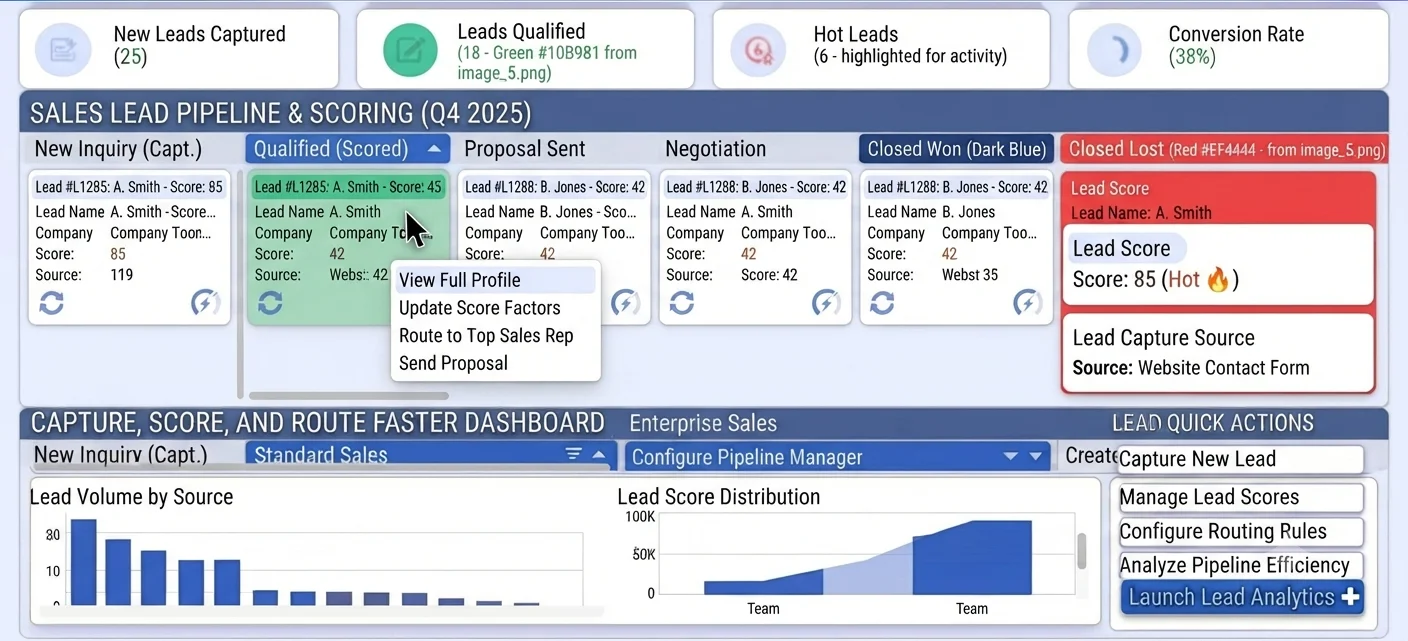
When a pipeline is visible but not truly usable
Many teams have a board, but stage names are vague and interpreted differently by each rep. Deals jump forward without evidence, then slip late in the month because qualification never actually happened.
Without governance, old stages remain while new ones are added reactively. The pipeline becomes cluttered, and managers cannot compare conversion rates across periods because definitions changed mid-cycle.
Pipeline disorder also hurts coaching. If managers cannot trust stage meaning, they cannot identify where reps need help or where process friction is blocking revenue.
Why this happens
- Deal stages lack explicit entry and exit criteria.
- Pipeline updates are inconsistent across reps and teams.
- Pipeline structure is changed ad hoc without review discipline.
- Aging deals stay open indefinitely with no reset rules.
Biznsbook addresses this through Pipeline board, deal stages, pipeline manager when the CRM module is enabled. Add Business Automation and Communication Center for drip nurture on crm.lead.created; add Sales and Accounting for order-to-cash when deals close.
Finance teams lose days each month reconciling versions that should never have diverged. Naming Biznsbook screens as the system of record — and closing periods when agreed — prevents silent edits that auditors flag immediately.
Step-by-step: Organize Sales Pipelines
Built for sales reps, managers, and RevOps leads who need a repeatable funnel — not heroic inbox chasing. Adapt roles to your team size.
- Design stage architecture. Define stage names that reflect real milestones, not internal opinions about deal quality.
- Configure Pipeline Manager. Set and maintain stage structure in Pipeline Manager inside CRM Settings for controlled updates.
- Document stage criteria. Publish required evidence for moving from one stage to the next.
- Apply board aging rules. Flag deals that exceed expected stage duration and review them in standups.
- Assign owner accountability. Ensure each opportunity has one clear owner and escalation path for blocked progress.
- Track stage conversion rates. Measure conversion and cycle time by stage to detect bottlenecks early.
- Review structure quarterly. Adjust stages only after trend analysis, then retrain reps on any revised definitions.
Review results after the first full weekly cycle. Adjust roles, mappings, or approvals where the same exception repeats.
Screen-level flows live in the Help Center (tax setup, expense claims, sale invoices). This guide focuses on finance process; help articles cover navigation.
Common mistakes to avoid
- Mistake 1: Deal stages lack explicit entry and exit criteria. Repeating this each month usually shows up first in pipeline velocity or lead aging reports.
- Mistake 2: Pipeline updates are inconsistent across reps and teams. Repeating this each month usually shows up first in pipeline velocity or lead aging reports.
- Mistake 3: Pipeline structure is changed ad hoc without review discipline. Repeating this each month usually shows up first in pipeline velocity or lead aging reports.
- Mistake 4: Aging deals stay open indefinitely with no reset rules. Repeating this each month usually shows up first in pipeline velocity or lead aging reports.
Track recurring exceptions in month-end notes; each should map to a control above.
Best practices that hold up as you scale
- Design stage architecture — Define stage names that reflect real milestones, not internal opinions about deal quality.
- Configure Pipeline Manager — Set and maintain stage structure in Pipeline Manager inside CRM Settings for controlled updates.
- Document stage criteria — Publish required evidence for moving from one stage to the next.
- Apply board aging rules — Flag deals that exceed expected stage duration and review them in standups.
- Assign owner accountability — Ensure each opportunity has one clear owner and escalation path for blocked progress.
Teams that review pipeline and lead aging weekly close more consistently than teams that only report at month-end.
How Biznsbook supports this workflow
Pipeline board is documented in Biznsbook CRM / Sales capabilities. Use it as part of a controlled finance process — posting, review, and period close — not as an isolated export. When Sales, Purchase, Inventory, Taxation, Expense, or Finance Management modules are enabled, related documents can post through the central accounting posting service with double-entry validation.
deal stages is documented in Biznsbook CRM / Sales capabilities. Use it as part of a controlled finance process — posting, review, and period close — not as an isolated export. When Sales, Purchase, Inventory, Taxation, Expense, or Finance Management modules are enabled, related documents can post through the central accounting posting service with double-entry validation.
pipeline manager is documented in Biznsbook CRM / Sales capabilities. Use it as part of a controlled finance process — posting, review, and period close — not as an isolated export. When Sales, Purchase, Inventory, Taxation, Expense, or Finance Management modules are enabled, related documents can post through the central accounting posting service with double-entry validation.
CRM roles (rep, manager, admin) govern export, settings, and reassignment. Workflow automations live in Business Automation — not buried in personal inboxes.
Suggested implementation timeline
- Week 1: Document current process gaps and configure Pipeline board with finance owner sign-off.
- Weeks 2–3: Pilot on one month or one entity; post all test transactions through Biznsbook; freeze parallel spreadsheet journals.
- Week 4: Run first trial balance or report tie-out; fix mapping and permission issues.
- Month 2–3: Roll out to full team; add approvals and period close cadence from this guide.
- Ongoing: Monthly review using stage governance cadence and leadership dashboard.
Metrics to track monthly
- Lead response time (minutes from create to first activity)
- Lead-to-opportunity conversion rate by source
- Pipeline velocity and stage aging days
- Win rate and average deal size
- Forecast vs actual revenue (closed-won)
Start with three metrics; trend direction matters more than a single point-in-time snapshot.
Spreadsheet / manual books vs integrated ERP
Compare typical manual finance work with Biznsbook Pipeline board and related capabilities.
| Capability | Manual / Spreadsheet | Biznsbook |
|---|---|---|
| Stage design | ❌ Loose naming | ✅ Criteria-based deal stages |
| Configuration control | ❌ Ad hoc edits | ✅ Pipeline Manager in CRM Settings |
| Board usage | ❌ Occasional updates | ✅ Daily operating rhythm |
| Aging management | ❌ Deals linger | ✅ Stage-duration alerts |
| Coaching inputs | ❌ Anecdotal | ✅ Conversion and cycle metrics |
| Forecast confidence | ❌ Subjective | ✅ Structured stage progression |
Stage governance cadence
Hold weekly pipeline hygiene checks and quarterly stage-design reviews. Governance keeps board data trustworthy for coaching, forecasting, and resource planning.
Document this in your finance SOP and revisit each quarter as transaction volume or entity structure changes.
Frequently asked questions
How many stages should a small sales team use?
Most SMB teams perform best with five to seven stages. Fewer stages reduce reporting value, while too many stages increase update overhead and inconsistency.
Where is Pipeline Manager located?
Pipeline Manager is configured in CRM Settings, where admins maintain deal stage definitions and update governance.
Should pipelines differ by segment?
Yes, if sales motions differ materially. Keep shared stage logic where possible so reporting still supports cross-team comparison.
What is a strong indicator of pipeline disorder?
A high number of stale opportunities in middle stages usually indicates unclear criteria, weak ownership, or inconsistent board discipline.
How this differs by industry
Retail
Retail B2B pipelines benefit from simple stages tied to quote, sample, and reorder milestones so reps move accounts with clear evidence.
Wholesale & distribution
Wholesale teams can split pipelines by territory while keeping common qualification standards and aging rules.
Manufacturing
Manufacturing sales often need technical validation stages; define these clearly so engineering support does not become a hidden bottleneck.