How to Calculate Scheduling Labour Cost
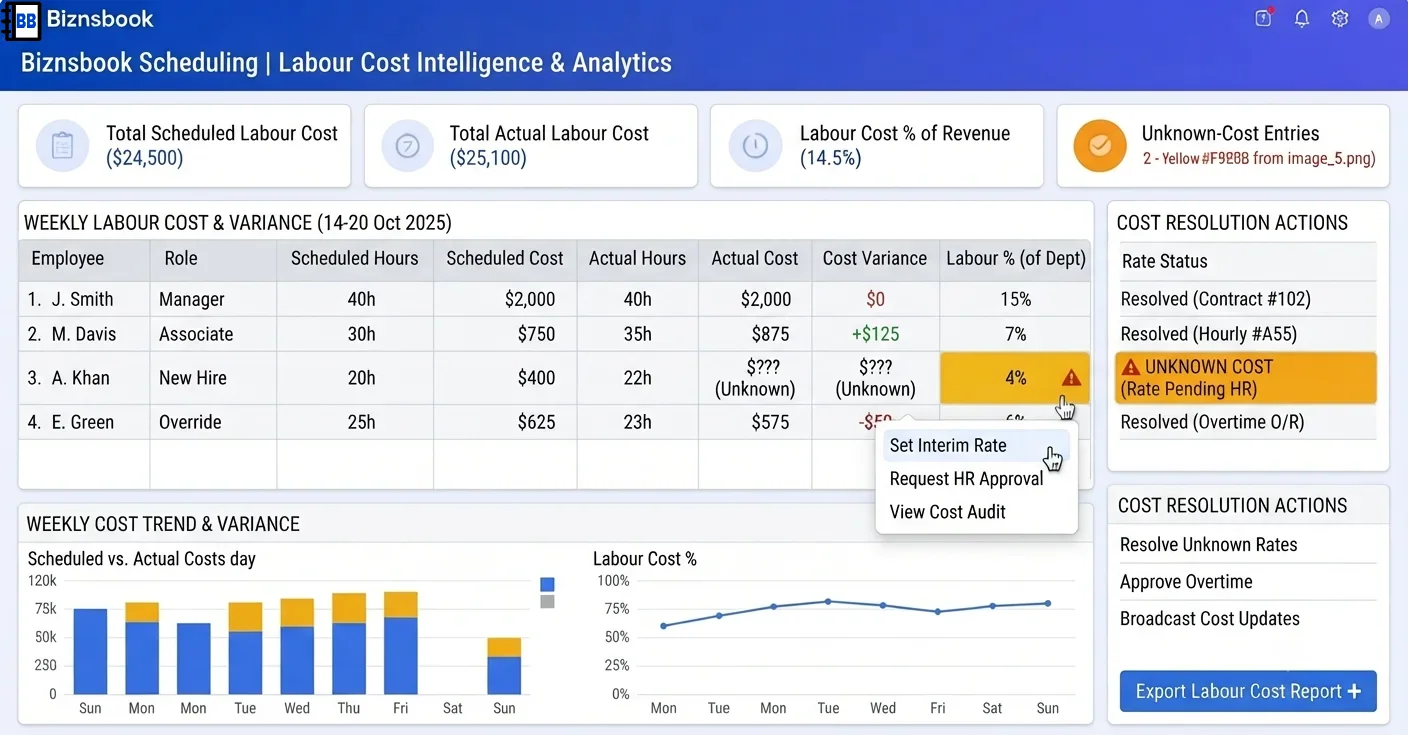
Labour cost looks wrong when rates and revenue are disconnected
Spreadsheet labour models use flat rates that ignore role defaults and manual overrides. Scheduled cost totals diverge from what managers see on the Builder row summaries.
Comparing payroll dollars to revenue monthly hides daily drift. Without labour cost percentage trends, owners react after margin is already compressed.
Systems that show zero when rate data is missing pretend labour is free. That distorts dashboards and posting previews alike.
Why this happens
- Hourly rates are not set on positions or employee extensions.
- HRMS hourly rates are expected but HRMS stores monthly salary without hourly conversion.
- Scheduled versus actual variance is not reviewed weekly.
- Revenue integration for labour cost % is not understood per module.
Biznsbook addresses this through Labour cost %, scheduled vs actual, rate resolution when Scheduling is licensed — positions, templates, and the drag-and-drop builder connect to attendance verification, analytics, GL posting, and optional Restaurant, Manufacturing, and POS integrations on one database.
Finance teams lose days each month reconciling versions that should never have diverged. Naming Biznsbook screens as the system of record — and closing periods when agreed — prevents silent edits that auditors flag immediately.
Step-by-step: Calculate Scheduling Labour Cost
Built for schedulers, operations managers, and finance leads running shift rosters, attendance, swaps, and labour cost controls in Biznsbook Scheduling.
- Configure rate fallback chain. Use manual shift override first, then employee provider rate, then position DefaultHourlyRate — each assignment records HourlyRateSource.
- Set position defaults. Enter default hourly rates and minimum staffing on each position so uncovered employees still get estimates where possible.
- Review Builder row totals. Watch per-employee scheduled hours and estimated cost while building; dashes mark genuinely unknown rates.
- Open Analytics dashboard. Use Labour Scheduling → Analytics for scheduled vs actual hours, cost, labour cost % of revenue, open shifts, and pending swaps.
- Run variance and overtime reports. Export scheduled-vs-actual variance and overtime-by-employee reports to Excel for weekly ops reviews.
- Interpret labour cost % carefully. GetLabourCostPct returns null when no revenue source exists — not zero — so leaders know data is unavailable.
- Connect restaurant or POS context when licensed. Restaurant integration adds labour cost per cover and optional performance dashboard lines; POS Z-reports can include labour summary sections.
Review results after the first full weekly cycle. Adjust roles, mappings, or approvals where the same exception repeats.
Screen-level flows live in the Help Center (tax setup, expense claims, sale invoices). This guide focuses on finance process; help articles cover navigation.
Common mistakes to avoid
- Mistake 1: Hourly rates are not set on positions or employee extensions. Repeating this each month usually shows up first in attendance verification queues or labour cost posting previews.
- Mistake 2: HRMS hourly rates are expected but HRMS stores monthly salary without hourly conversion. Repeating this each month usually shows up first in attendance verification queues or labour cost posting previews.
- Mistake 3: Scheduled versus actual variance is not reviewed weekly. Repeating this each month usually shows up first in attendance verification queues or labour cost posting previews.
- Mistake 4: Revenue integration for labour cost % is not understood per module. Repeating this each month usually shows up first in attendance verification queues or labour cost posting previews.
Track recurring exceptions in month-end notes; each should map to a control above.
Best practices that hold up as you scale
- Configure rate fallback chain — Use manual shift override first, then employee provider rate, then position DefaultHourlyRate — each assignment records HourlyRateSource.
- Set position defaults — Enter default hourly rates and minimum staffing on each position so uncovered employees still get estimates where possible.
- Review Builder row totals — Watch per-employee scheduled hours and estimated cost while building; dashes mark genuinely unknown rates.
- Open Analytics dashboard — Use Labour Scheduling → Analytics for scheduled vs actual hours, cost, labour cost % of revenue, open shifts, and pending swaps.
- Run variance and overtime reports — Export scheduled-vs-actual variance and overtime-by-employee reports to Excel for weekly ops reviews.
Teams that complete setup before the first publish, verify attendance before cost posting, and review overtime reports mid-week avoid the surprise labour variances that show up only at month-end.
How Biznsbook supports this workflow
Labour cost % is documented in Biznsbook Scheduling capabilities. Use it as part of a controlled finance process — posting, review, and period close — not as an isolated export. When Sales, Purchase, Inventory, Taxation, Expense, or Finance Management modules are enabled, related documents can post through the central accounting posting service with double-entry validation.
scheduled vs actual is documented in Biznsbook Scheduling capabilities. Use it as part of a controlled finance process — posting, review, and period close — not as an isolated export. When Sales, Purchase, Inventory, Taxation, Expense, or Finance Management modules are enabled, related documents can post through the central accounting posting service with double-entry validation.
rate resolution is documented in Biznsbook Scheduling capabilities. Use it as part of a controlled finance process — posting, review, and period close — not as an isolated export. When Sales, Purchase, Inventory, Taxation, Expense, or Finance Management modules are enabled, related documents can post through the central accounting posting service with double-entry validation.
Scheduling permissions separate view, positions, settings, schedule management, attendance, swap approval, reporting, and cost posting. HR Management enhances employee and leave data but is not required to start.
Suggested implementation timeline
- Week 1: Document current process gaps and configure Labour cost % with finance owner sign-off.
- Weeks 2–3: Pilot on one month or one entity; post all test transactions through Biznsbook; freeze parallel spreadsheet journals.
- Week 4: Run first trial balance or report tie-out; fix mapping and permission issues.
- Month 2–3: Roll out to full team; add approvals and period close cadence from this guide.
- Ongoing: Monthly review using weekly labour review and leadership dashboard.
Metrics to track monthly
- Scheduled vs actual hours variance
- Labour cost % of revenue (when revenue data exists)
- Shifts missing cost estimate at publish
- Open shifts and pending swap count
- Unverified attendance rows before posting
Start with three metrics; trend direction matters more than a single point-in-time snapshot.
Spreadsheet / manual books vs integrated ERP
Compare typical manual finance work with Biznsbook Labour cost % and related capabilities.
| Capability | Manual / Spreadsheet | Biznsbook |
|---|---|---|
| Rate source | ❌ Single flat rate | ✅ Override → employee → position |
| Unknown cost | ❌ Shows $0 | ✅ Excluded or dashed, never fake zero |
| Variance | ❌ Month-end guess | ✅ Scheduled vs actual report |
| Revenue tie-in | ❌ Manual export | ✅ Native labour cost % when revenue exists |
| Trend | ❌ Static spreadsheet | ✅ Labour cost % over time chart |
| Export | ❌ Copy-paste | ✅ Excel on every analytics view |
Weekly labour review
Review labour cost % trend, top overtime employees, and shifts with missing rates every week before publishing the next roster — fix rates at source instead of adjusting in spreadsheets.
Document this in your finance SOP and revisit each quarter as transaction volume or entity structure changes.
Frequently asked questions
Why is HRMS hourly rate often empty?
HRMS stores monthly salary figures without an hourly field — Scheduling does not invent a conversion. Use position defaults or manual overrides for estimates.
What does HourlyRateSource mean?
It records whether Manual, Provider, or PositionDefault resolved the rate for auditability on each shift.
Does walk-in attendance affect cost?
Walk-ins without linked shifts contribute to unknown or excluded counts in analytics rather than silent zero cost.
Where is restaurant labour per cover?
When Restaurant is licensed, GetLabourCostPerCoverAsync feeds performance dashboards from the same database as food cost.
How this differs by industry
Retail
Restaurants can compare recommended covers-based staffing to scheduled headcount in the Builder sidebar when floor-plan locations are linked.
Wholesale & distribution
Multi-site operators should filter analytics by mapped warehouse or generic locations to compare labour cost % across sites honestly.
Manufacturing
Plants can read labour cost per unit output alongside operator coverage gaps when workstations are linked to scheduling locations.