How to Reduce Scheduling Overtime
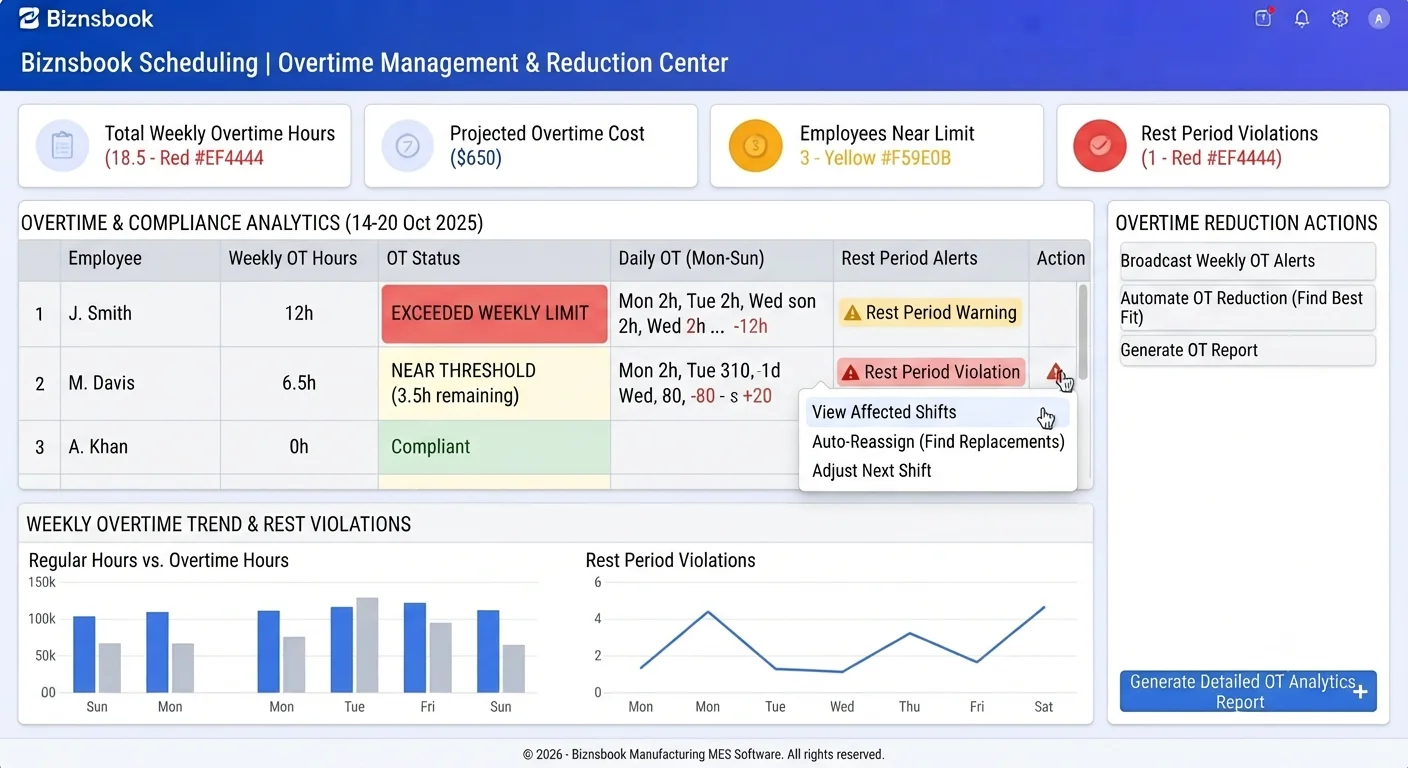
Overtime surprises come from roster and attendance gaps
Managers stack shifts without seeing cumulative weekly paid hours because contract data is missing for HR-backed staff. OvertimeWarning is often the only signal that fires broadly.
Insufficient rest between closes and opens creates fatigue and premium pay. Without configurable minimum rest, schedulers approve rosters that guarantee overtime at clock-out.
Finance learns overtime dollars late when analytics exports are skipped. Estimated premium cost on the overtime report should drive mid-week staffing changes.
Why this happens
- Weekly and daily overtime thresholds left at defaults without ops review.
- Yellow overtime warnings ignored because they do not block publish.
- Clock-out overtime calculated against wrong baseline when shift paid hours missing.
- Hourly recurring overtime warning job alerts not monitored.
Biznsbook addresses this through Overtime warnings, overtime report, rest thresholds when Scheduling is licensed — positions, templates, and the drag-and-drop builder connect to attendance verification, analytics, GL posting, and optional Restaurant, Manufacturing, and POS integrations on one database.
Finance teams lose days each month reconciling versions that should never have diverged. Naming Biznsbook screens as the system of record — and closing periods when agreed — prevents silent edits that auditors flag immediately.
Step-by-step: Reduce Scheduling Overtime
Built for schedulers, operations managers, and finance leads running shift rosters, attendance, swaps, and labour cost controls in Biznsbook Scheduling.
- Set overtime thresholds in settings. Configure OvertimeThresholdHoursPerDay, OvertimeThresholdHoursPerWeek, multiplier, and minimum rest hours between shifts.
- Heed Builder warnings. Review OvertimeWarning and InsufficientRest yellow dots before publish even though they are non-blocking.
- Use ISO Monday week boundaries. Weekly totals use ISO Monday week start consistently for paid hours comparisons in conflict detection.
- Monitor clock-out overtime. On clock-out, ActualHours and OvertimeHours compute against linked shift PaidHours or daily threshold fallback.
- Run overtime analytics report. Export overtime by employee with estimated cost from Labour Scheduling → Analytics for weekly leadership review.
- Respond to automation warnings. Review hourly overtime threshold warning job output and Business Automation templates tied to labour events.
- Adjust next roster from data. Reduce stacked shifts for top overtime employees and fill gaps with open shifts before adding extra hours.
Review results after the first full weekly cycle. Adjust roles, mappings, or approvals where the same exception repeats.
Screen-level flows live in the Help Center (tax setup, expense claims, sale invoices). This guide focuses on finance process; help articles cover navigation.
Common mistakes to avoid
- Mistake 1: Weekly and daily overtime thresholds left at defaults without ops review. Repeating this each month usually shows up first in attendance verification queues or labour cost posting previews.
- Mistake 2: Yellow overtime warnings ignored because they do not block publish. Repeating this each month usually shows up first in attendance verification queues or labour cost posting previews.
- Mistake 3: Clock-out overtime calculated against wrong baseline when shift paid hours missing. Repeating this each month usually shows up first in attendance verification queues or labour cost posting previews.
- Mistake 4: Hourly recurring overtime warning job alerts not monitored. Repeating this each month usually shows up first in attendance verification queues or labour cost posting previews.
Track recurring exceptions in month-end notes; each should map to a control above.
Best practices that hold up as you scale
- Set overtime thresholds in settings — Configure OvertimeThresholdHoursPerDay, OvertimeThresholdHoursPerWeek, multiplier, and minimum rest hours between shifts.
- Heed Builder warnings — Review OvertimeWarning and InsufficientRest yellow dots before publish even though they are non-blocking.
- Use ISO Monday week boundaries — Weekly totals use ISO Monday week start consistently for paid hours comparisons in conflict detection.
- Monitor clock-out overtime — On clock-out, ActualHours and OvertimeHours compute against linked shift PaidHours or daily threshold fallback.
- Run overtime analytics report — Export overtime by employee with estimated cost from Labour Scheduling → Analytics for weekly leadership review.
Teams that complete setup before the first publish, verify attendance before cost posting, and review overtime reports mid-week avoid the surprise labour variances that show up only at month-end.
How Biznsbook supports this workflow
Overtime warnings is documented in Biznsbook Scheduling capabilities. Use it as part of a controlled finance process — posting, review, and period close — not as an isolated export. When Sales, Purchase, Inventory, Taxation, Expense, or Finance Management modules are enabled, related documents can post through the central accounting posting service with double-entry validation.
overtime report is documented in Biznsbook Scheduling capabilities. Use it as part of a controlled finance process — posting, review, and period close — not as an isolated export. When Sales, Purchase, Inventory, Taxation, Expense, or Finance Management modules are enabled, related documents can post through the central accounting posting service with double-entry validation.
rest thresholds is documented in Biznsbook Scheduling capabilities. Use it as part of a controlled finance process — posting, review, and period close — not as an isolated export. When Sales, Purchase, Inventory, Taxation, Expense, or Finance Management modules are enabled, related documents can post through the central accounting posting service with double-entry validation.
Scheduling permissions separate view, positions, settings, schedule management, attendance, swap approval, reporting, and cost posting. HR Management enhances employee and leave data but is not required to start.
Suggested implementation timeline
- Week 1: Document current process gaps and configure Overtime warnings with finance owner sign-off.
- Weeks 2–3: Pilot on one month or one entity; post all test transactions through Biznsbook; freeze parallel spreadsheet journals.
- Week 4: Run first trial balance or report tie-out; fix mapping and permission issues.
- Month 2–3: Roll out to full team; add approvals and period close cadence from this guide.
- Ongoing: Monthly review using overtime control cadence and leadership dashboard.
Metrics to track monthly
- Scheduled vs actual hours variance
- Labour cost % of revenue (when revenue data exists)
- Shifts missing cost estimate at publish
- Open shifts and pending swap count
- Unverified attendance rows before posting
Start with three metrics; trend direction matters more than a single point-in-time snapshot.
Spreadsheet / manual books vs integrated ERP
Compare typical manual finance work with Biznsbook Overtime warnings and related capabilities.
| Capability | Manual / Spreadsheet | Biznsbook |
|---|---|---|
| Weekly OT signal | ❌ Payroll after fact | ✅ OvertimeWarning while scheduling |
| Rest policy | ❌ Informal | ✅ MinimumRestHoursBetweenShifts setting |
| OT calculation | ❌ Manual spreadsheet | ✅ Clock-out with shift or daily baseline |
| Contract hours | ❌ Required for warnings | ✅ Weekly OT warning works without contract data |
| Cost estimate | ❌ Unknown premium | ✅ Overtime report estimated cost |
| Corrective action | ❌ Next month hiring | ✅ Mid-week roster edits from report |
Overtime control cadence
Review overtime report every Monday and Thursday, cap weekly hours for repeat offenders in Builder, and document rest exceptions only when managers approve explicit overrides.
Document this in your finance SOP and revisit each quarter as transaction volume or entity structure changes.
Frequently asked questions
Why does ExceedsWeeklyHours rarely fire for HR staff?
HRMS does not supply ContractHoursPerWeek on the provider path — that warning skips rather than guessing. OvertimeWarning still compares weekly paid hours to threshold.
What baseline is used on clock-out?
Linked shift PaidHours first, then LabourSettings daily threshold, then skip overtime calc if neither exists.
Does overtime post to a separate GL account?
Yes when configured — regular hours debit Labour Cost and overtime premium debits Overtime GL account on verified full-time and part-time posting.
How often are threshold warnings checked?
An hourly job wraps CheckOvertimeThresholdWarningsAsync in addition to build-time conflict detection.
How this differs by industry
Retail
Retailers should watch part-time staff approaching weekly thresholds during holiday weeks when extra shifts are offered informally.
Wholesale & distribution
DC managers can split long shifts across two part-time employees when rest warnings flag insufficient turnaround on consecutive days.
Manufacturing
Factories should align overtime reports with production schedule changes before premium hours accrue on bottleneck workstations.