How to Detect Scheduling Conflicts
Conflict surprises erode trust and inflate labour cost
When conflicts are caught only on the shop floor, employees arrive to overlapping shifts or illegal turnarounds. Managers scramble to swap coverage while customers or production wait.
Leave approved in HR but missing from the roster creates no-shows that look like attendance failures. The real failure is scheduling against approved absence.
Under-staffed positions hide until service or output slips. Without per-position minimums tied to the grid, one missing cashier or operator becomes a revenue or quality incident.
Why this happens
- Publish is attempted without clearing red double-booking conflicts.
- Minimum rest hours between shifts are not configured in settings.
- Schedulers do not review yellow warning dots before publish.
- Multi-seat needs are represented as notes instead of separate shift rows.
Biznsbook addresses this through Conflict detection, double-booking block, minimum staffing when Scheduling is licensed — positions, templates, and the drag-and-drop builder connect to attendance verification, analytics, GL posting, and optional Restaurant, Manufacturing, and POS integrations on one database.
Finance teams lose days each month reconciling versions that should never have diverged. Naming Biznsbook screens as the system of record — and closing periods when agreed — prevents silent edits that auditors flag immediately.
Step-by-step: Detect Scheduling Conflicts
Built for schedulers, operations managers, and finance leads running shift rosters, attendance, swaps, and labour cost controls in Biznsbook Scheduling.
- Set rest and overtime thresholds. In Scheduling → Settings, configure minimum rest between shifts, daily and weekly overtime thresholds, and break rules used by warning logic.
- Define position minimums. On each position, set minimum staffing level and optional covers-per-staff ratio for restaurant recommendations.
- Build shifts as one row per seat. Create multiple shift rows when you need more than one person in the same role — the grid does not use a headcount counter on a single row.
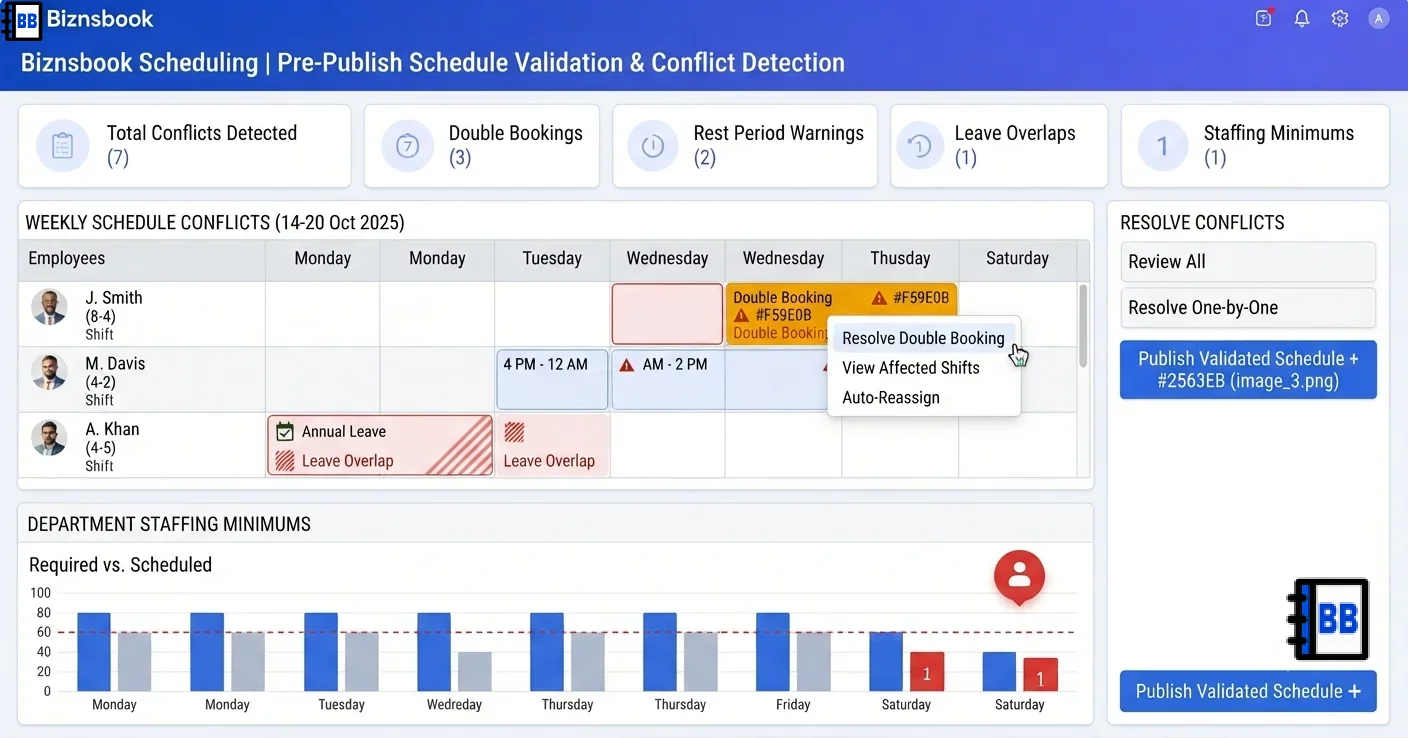
- Read badges while dragging. Red borders block publish for double-bookings; yellow dots flag rest, overtime, leave, or staffing warnings worth reviewing.
- Fix blocking conflicts first. Move or unassign overlapping shifts, including overnight shifts that cross midnight, until no red borders remain.
- Review warnings before publish. Address leave overlaps and below-minimum staffing even when publish is allowed — warnings do not block but predict operational pain.
- Re-check after copy-forward. When copying shifts to the next period, scan conflict badges again because leave and bookings change week to week.
Review results after the first full weekly cycle. Adjust roles, mappings, or approvals where the same exception repeats.
Screen-level flows live in the Help Center (tax setup, expense claims, sale invoices). This guide focuses on finance process; help articles cover navigation.
Common mistakes to avoid
- Mistake 1: Publish is attempted without clearing red double-booking conflicts. Repeating this each month usually shows up first in attendance verification queues or labour cost posting previews.
- Mistake 2: Minimum rest hours between shifts are not configured in settings. Repeating this each month usually shows up first in attendance verification queues or labour cost posting previews.
- Mistake 3: Schedulers do not review yellow warning dots before publish. Repeating this each month usually shows up first in attendance verification queues or labour cost posting previews.
- Mistake 4: Multi-seat needs are represented as notes instead of separate shift rows. Repeating this each month usually shows up first in attendance verification queues or labour cost posting previews.
Track recurring exceptions in month-end notes; each should map to a control above.
Best practices that hold up as you scale
- Set rest and overtime thresholds — In Scheduling → Settings, configure minimum rest between shifts, daily and weekly overtime thresholds, and break rules used by warning logic.
- Define position minimums — On each position, set minimum staffing level and optional covers-per-staff ratio for restaurant recommendations.
- Build shifts as one row per seat — Create multiple shift rows when you need more than one person in the same role — the grid does not use a headcount counter on a single row.
- Read badges while dragging — Red borders block publish for double-bookings; yellow dots flag rest, overtime, leave, or staffing warnings worth reviewing.
- Fix blocking conflicts first — Move or unassign overlapping shifts, including overnight shifts that cross midnight, until no red borders remain.
Teams that complete setup before the first publish, verify attendance before cost posting, and review overtime reports mid-week avoid the surprise labour variances that show up only at month-end.
How Biznsbook supports this workflow
Conflict detection is documented in Biznsbook Scheduling capabilities. Use it as part of a controlled finance process — posting, review, and period close — not as an isolated export. When Sales, Purchase, Inventory, Taxation, Expense, or Finance Management modules are enabled, related documents can post through the central accounting posting service with double-entry validation.
double-booking block is documented in Biznsbook Scheduling capabilities. Use it as part of a controlled finance process — posting, review, and period close — not as an isolated export. When Sales, Purchase, Inventory, Taxation, Expense, or Finance Management modules are enabled, related documents can post through the central accounting posting service with double-entry validation.
minimum staffing is documented in Biznsbook Scheduling capabilities. Use it as part of a controlled finance process — posting, review, and period close — not as an isolated export. When Sales, Purchase, Inventory, Taxation, Expense, or Finance Management modules are enabled, related documents can post through the central accounting posting service with double-entry validation.
Scheduling permissions separate view, positions, settings, schedule management, attendance, swap approval, reporting, and cost posting. HR Management enhances employee and leave data but is not required to start.
Suggested implementation timeline
- Week 1: Document current process gaps and configure Conflict detection with finance owner sign-off.
- Weeks 2–3: Pilot on one month or one entity; post all test transactions through Biznsbook; freeze parallel spreadsheet journals.
- Week 4: Run first trial balance or report tie-out; fix mapping and permission issues.
- Month 2–3: Roll out to full team; add approvals and period close cadence from this guide.
- Ongoing: Monthly review using conflict triage order and leadership dashboard.
Metrics to track monthly
- Scheduled vs actual hours variance
- Labour cost % of revenue (when revenue data exists)
- Shifts missing cost estimate at publish
- Open shifts and pending swap count
- Unverified attendance rows before posting
Start with three metrics; trend direction matters more than a single point-in-time snapshot.
Spreadsheet / manual books vs integrated ERP
Compare typical manual finance work with Biznsbook Conflict detection and related capabilities.
| Capability | Manual / Spreadsheet | Biznsbook |
|---|---|---|
| Double booking | ❌ Discovered on floor | ✅ Red block before publish |
| Overnight shifts | ❌ Manual date math | ✅ Overnight-aware end datetime |
| Leave alignment | ❌ Separate calendar | ✅ Live approved leave warnings |
| Staffing minimums | ❌ Manager memory | ✅ Position-level warnings by day |
| Rest between shifts | ❌ Informal policy | ✅ Configurable minimum hours |
| Publish gate | ❌ Hope for the best | ✅ Throws if blocking conflicts exist |
Conflict triage order
Clear all red double-bookings first, then leave overlaps, then below-minimum staffing, then overtime warnings. That sequence prevents publish failures and reduces last-minute floor chaos.
Document this in your finance SOP and revisit each quarter as transaction volume or entity structure changes.
Frequently asked questions
What conflicts block publish?
Double-booked employees block publish. Warnings such as insufficient rest, overtime risk, leave overlap, or below-minimum staffing do not block but should be reviewed.
How are overnight shifts handled?
End datetime adds a day when a shift is marked overnight or end time is before start time, so rest calculations stay accurate.
Does qualification checking work?
Qualification-missing warnings are not active today because operational credentials are not tracked in HRMS — the conflict type is reserved for future use.
Where do leave conflicts come from?
Approved HR leave records are read live when HR Management is licensed, so schedulers see overlap warnings on the same database.
How this differs by industry
Retail
Stores with split shifts should watch insufficient-rest warnings when students or part-time staff work closes and opens on consecutive days.
Wholesale & distribution
DC supervisors can group warnings by position and location to see whether pick or load lanes fall below minimum staffing on peak dispatch days.
Manufacturing
Planners linking locations to workstations should treat operator-gap warnings at work order release as a signal to adjust the roster, not ignore them.