How to Post Scheduling Costs to Accounting
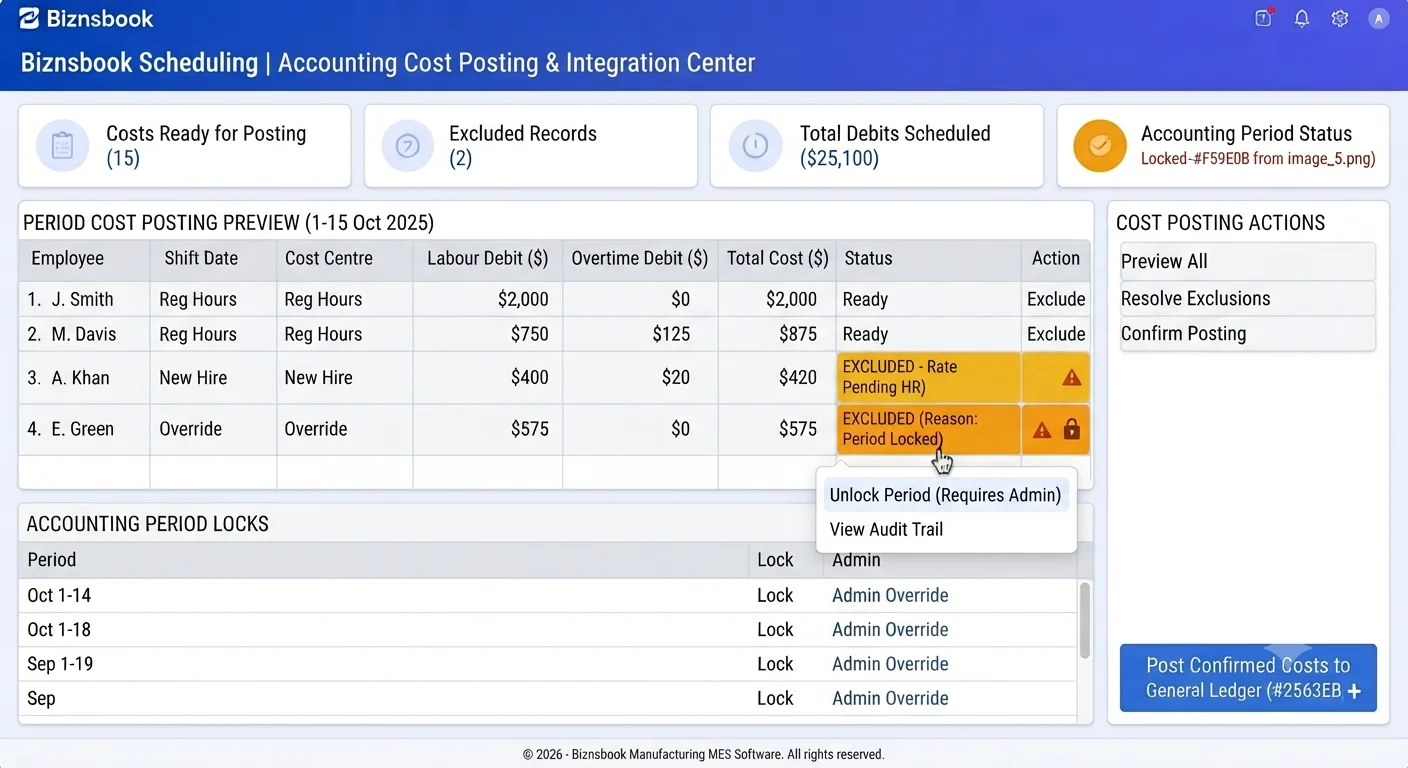
Labour journals fail when attendance and GL setup are out of step
Manual wage journals each pay period re-key hours finance already captured elsewhere. Errors duplicate overtime or miss verified rows entirely.
Posting without preview surprises accountants with excluded records they cannot explain to operations.
Closed accounting periods and missing GL account configuration cause failed posts mid-close when settings were never validated upfront.
Why this happens
- LabourCostGLAccountID or WagesPayableGLAccountID not set in Scheduling settings.
- Attendance verified in meetings but not in the Timesheet queue.
- Casual overtime expected on GL when it should route to expense claims.
- Posting attempted into a locked accounting period.
Biznsbook addresses this through Cost posting, GL accounts, wages payable when Scheduling is licensed — positions, templates, and the drag-and-drop builder connect to attendance verification, analytics, GL posting, and optional Restaurant, Manufacturing, and POS integrations on one database.
Finance teams lose days each month reconciling versions that should never have diverged. Naming Biznsbook screens as the system of record — and closing periods when agreed — prevents silent edits that auditors flag immediately.
Step-by-step: Post Scheduling Costs to Accounting
Built for schedulers, operations managers, and finance leads running shift rosters, attendance, swaps, and labour cost controls in Biznsbook Scheduling.
- Configure GL accounts in settings. Set Labour Cost, Overtime, and Wages Payable accounts from your chart of accounts before first posting.
- Verify attendance for the range. Complete timesheet verification for all clocked-out rows in the posting date range.
- Open Cost Posting preview. Select dates and preview regular cost, overtime premium, total, and excluded records with reasons such as no rate or not verified.
- Validate employment types. Confirm full-time and part-time rows post to GL; casual and contractor overtime belongs in the expense claim section instead.
- Check accounting period is open. Posting validates the date against open periods via ValidateBackdatingAsync before creating journals.
- Post the journal. PostAsync and attendance PostedAt updates run in one transaction — zero eligible rows means no empty journal is created.
- Generate casual overtime claims if needed. Use Generate Claims for casual and contractor overtime into draft Expense records requiring an configured Overtime category.
Review results after the first full weekly cycle. Adjust roles, mappings, or approvals where the same exception repeats.
Screen-level flows live in the Help Center (tax setup, expense claims, sale invoices). This guide focuses on finance process; help articles cover navigation.
Common mistakes to avoid
- Mistake 1: LabourCostGLAccountID or WagesPayableGLAccountID not set in Scheduling settings. Repeating this each month usually shows up first in attendance verification queues or labour cost posting previews.
- Mistake 2: Attendance verified in meetings but not in the Timesheet queue. Repeating this each month usually shows up first in attendance verification queues or labour cost posting previews.
- Mistake 3: Casual overtime expected on GL when it should route to expense claims. Repeating this each month usually shows up first in attendance verification queues or labour cost posting previews.
- Mistake 4: Posting attempted into a locked accounting period. Repeating this each month usually shows up first in attendance verification queues or labour cost posting previews.
Track recurring exceptions in month-end notes; each should map to a control above.
Best practices that hold up as you scale
- Configure GL accounts in settings — Set Labour Cost, Overtime, and Wages Payable accounts from your chart of accounts before first posting.
- Verify attendance for the range — Complete timesheet verification for all clocked-out rows in the posting date range.
- Open Cost Posting preview — Select dates and preview regular cost, overtime premium, total, and excluded records with reasons such as no rate or not verified.
- Validate employment types — Confirm full-time and part-time rows post to GL; casual and contractor overtime belongs in the expense claim section instead.
- Check accounting period is open — Posting validates the date against open periods via ValidateBackdatingAsync before creating journals.
Teams that complete setup before the first publish, verify attendance before cost posting, and review overtime reports mid-week avoid the surprise labour variances that show up only at month-end.
How Biznsbook supports this workflow
Cost posting is documented in Biznsbook Scheduling capabilities. Use it as part of a controlled finance process — posting, review, and period close — not as an isolated export. When Sales, Purchase, Inventory, Taxation, Expense, or Finance Management modules are enabled, related documents can post through the central accounting posting service with double-entry validation.
GL accounts is documented in Biznsbook Scheduling capabilities. Use it as part of a controlled finance process — posting, review, and period close — not as an isolated export. When Sales, Purchase, Inventory, Taxation, Expense, or Finance Management modules are enabled, related documents can post through the central accounting posting service with double-entry validation.
wages payable is documented in Biznsbook Scheduling capabilities. Use it as part of a controlled finance process — posting, review, and period close — not as an isolated export. When Sales, Purchase, Inventory, Taxation, Expense, or Finance Management modules are enabled, related documents can post through the central accounting posting service with double-entry validation.
Scheduling permissions separate view, positions, settings, schedule management, attendance, swap approval, reporting, and cost posting. HR Management enhances employee and leave data but is not required to start.
Suggested implementation timeline
- Week 1: Document current process gaps and configure Cost posting with finance owner sign-off.
- Weeks 2–3: Pilot on one month or one entity; post all test transactions through Biznsbook; freeze parallel spreadsheet journals.
- Week 4: Run first trial balance or report tie-out; fix mapping and permission issues.
- Month 2–3: Roll out to full team; add approvals and period close cadence from this guide.
- Ongoing: Monthly review using posting readiness gate and leadership dashboard.
Metrics to track monthly
- Scheduled vs actual hours variance
- Labour cost % of revenue (when revenue data exists)
- Shifts missing cost estimate at publish
- Open shifts and pending swap count
- Unverified attendance rows before posting
Start with three metrics; trend direction matters more than a single point-in-time snapshot.
Spreadsheet / manual books vs integrated ERP
Compare typical manual finance work with Biznsbook Cost posting and related capabilities.
| Capability | Manual / Spreadsheet | Biznsbook |
|---|---|---|
| Data source | ❌ Spreadsheet hours | ✅ Verified attendance rows |
| Preview | ❌ Blind journal | ✅ Included vs excluded breakdown |
| Double entry | ❌ Manual DR/CR | ✅ Labour + OT debit, Wages Payable credit |
| Period control | ❌ Risk backdating | ✅ Open period validation |
| Duplicate post | ❌ Possible | ✅ PostedAt excludes re-inclusion |
| Casual pay | ❌ Same GL path | ✅ Overtime to draft expense claims |
Posting readiness gate
Do not post until settings GL accounts, verification queue zero, preview excluded list reviewed, and period open — run this gate every cycle to keep wage accruals audit-clean.
Document this in your finance SOP and revisit each quarter as transaction volume or entity structure changes.
Frequently asked questions
What GL accounts are required?
Labour Cost and Wages Payable are required; Overtime account is required when overtime premium is greater than zero.
Can I post twice for the same attendance?
No. PostedAt and PostedTransactionId on ShiftAttendance prevent duplicate inclusion in later runs.
Why are casual regular hours not on GL?
Casual and contractor regular hours are intentionally excluded — they are expected to be paid outside this module's financial output.
What expense category do overtime claims need?
An active Expense category named Overtime or code OT/OVT with a GL account must exist per company — it is not seeded automatically.
How this differs by industry
Retail
Restaurant groups can align posted labour with optional restaurant P&L labour lines when finance reviews margin weekly.
Wholesale & distribution
Operators posting weekly can tie wages payable to location-mapped cost centres if accounting uses cost centre dimensions on journal lines.
Manufacturing
Plants should post verified operator hours before comparing labour cost per unit output on manufacturing analytics.