How to Improve Employee Onboarding
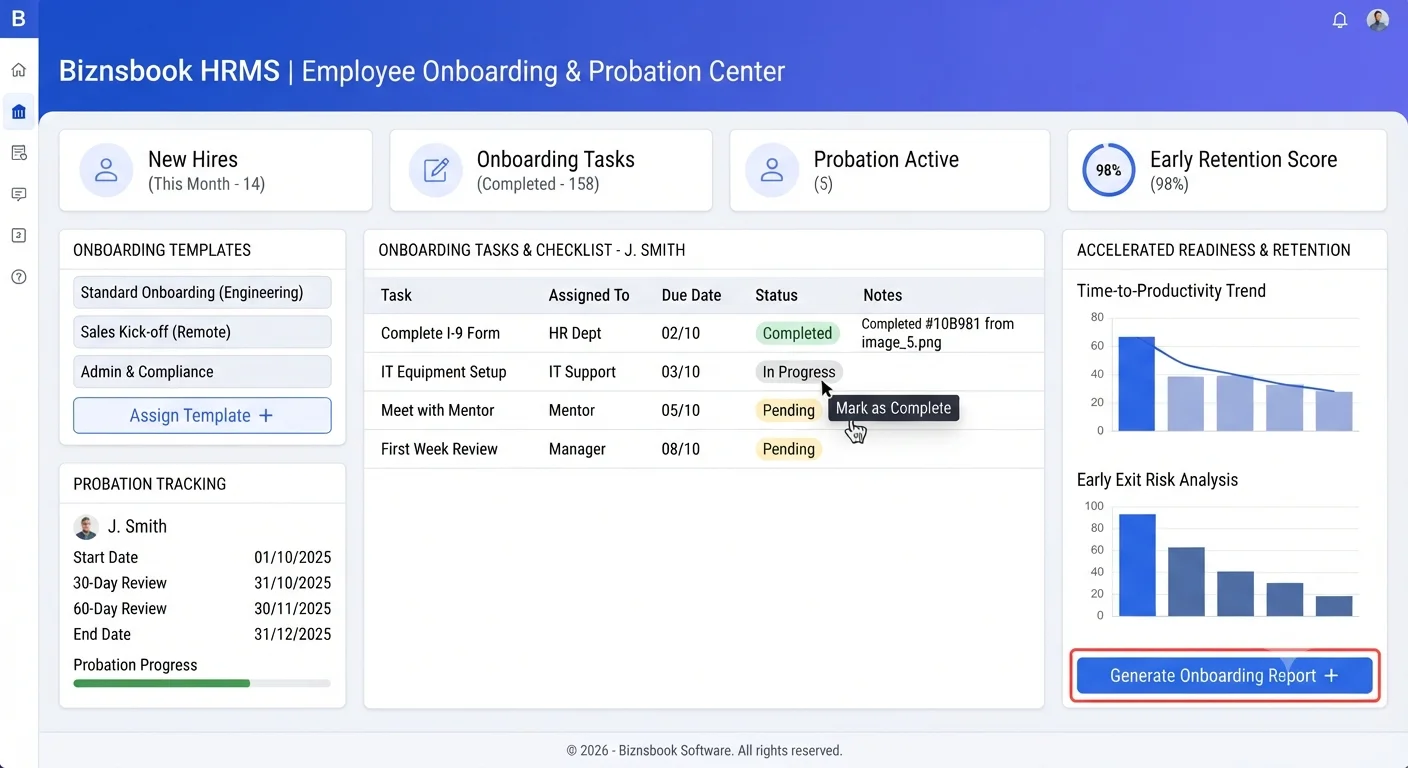
Onboarding quality drops without a repeatable plan
Many teams rely on memory and manual checklists for onboarding. Important steps such as policy signoff, equipment setup, or role orientation get delayed or missed.
New hires then begin work without full access or clear expectations. Managers spend extra time fixing setup gaps instead of coaching performance.
A template-driven HRMS workflow keeps onboarding consistent and tracks probation progress so early issues are addressed quickly.
Why this happens
- Onboarding tasks are not standardized by role or department.
- Ownership of checklist items is unclear across HR and managers.
- Probation milestones are not tracked with scheduled reviews.
- Document collection and acknowledgments are handled manually.
Biznsbook addresses this through Onboarding templates, onboarding tasks, probation tracking when HR Management is enabled; add the Payroll module for salary structures, pay runs, and payslips, and Accounting for GL posting when configured.
Finance teams lose days each month reconciling versions that should never have diverged. Naming Biznsbook screens as the system of record — and closing periods when agreed — prevents silent edits that auditors flag immediately.
Step-by-step: Improve Employee Onboarding
Built for HR generalists, payroll administrators, and owners who need hire-to-pay discipline without spreadsheet chaos.
- Create onboarding templates. Build role-based onboarding templates with required tasks and document checkpoints.
- Assign task owners. Map each onboarding task to HR, manager, IT, or admin owner with due dates.
- Collect required documents. Upload offer, identity, and policy documents to the employee record during onboarding.
- Track progress weekly. Review completion status of onboarding tasks and escalate overdue items.
- Set probation milestones. Define 30, 60, and 90-day checkpoints with manager feedback criteria.
- Record probation outcomes. Capture extension, confirmation, or action plans based on review evidence.
- Refine template quality. Analyze recurring delays and improve template steps each hiring cycle.
Review results after the first full monthly cycle. Adjust roles, mappings, or approvals where the same exception repeats.
Screen-level flows live in the Help Center (tax setup, expense claims, sale invoices). This guide focuses on finance process; help articles cover navigation.
Common mistakes to avoid
- Mistake 1: Onboarding tasks are not standardized by role or department. Repeating this each month usually shows up first in payroll runs or attendance summary reports.
- Mistake 2: Ownership of checklist items is unclear across HR and managers. Repeating this each month usually shows up first in payroll runs or attendance summary reports.
- Mistake 3: Probation milestones are not tracked with scheduled reviews. Repeating this each month usually shows up first in payroll runs or attendance summary reports.
- Mistake 4: Document collection and acknowledgments are handled manually. Repeating this each month usually shows up first in payroll runs or attendance summary reports.
Track recurring exceptions in month-end notes; each should map to a control above.
Best practices that hold up as you scale
- Create onboarding templates — Build role-based onboarding templates with required tasks and document checkpoints.
- Assign task owners — Map each onboarding task to HR, manager, IT, or admin owner with due dates.
- Collect required documents — Upload offer, identity, and policy documents to the employee record during onboarding.
- Track progress weekly — Review completion status of onboarding tasks and escalate overdue items.
- Set probation milestones — Define 30, 60, and 90-day checkpoints with manager feedback criteria.
Teams that close attendance and leave before payroll cut-off day avoid the rework cycle that erodes trust in payslips.
How Biznsbook supports this workflow
Onboarding templates is documented in Biznsbook HRMS / Payroll capabilities. Use it as part of a controlled finance process — posting, review, and period close — not as an isolated export. When Sales, Purchase, Inventory, Taxation, Expense, or Finance Management modules are enabled, related documents can post through the central accounting posting service with double-entry validation.
onboarding tasks is documented in Biznsbook HRMS / Payroll capabilities. Use it as part of a controlled finance process — posting, review, and period close — not as an isolated export. When Sales, Purchase, Inventory, Taxation, Expense, or Finance Management modules are enabled, related documents can post through the central accounting posting service with double-entry validation.
probation tracking is documented in Biznsbook HRMS / Payroll capabilities. Use it as part of a controlled finance process — posting, review, and period close — not as an isolated export. When Sales, Purchase, Inventory, Taxation, Expense, or Finance Management modules are enabled, related documents can post through the central accounting posting service with double-entry validation.
HRMS and Payroll permissions separate employee edits, attendance, leave approval, and payroll approval. Payroll requires HRMS as the employee system of record.
Suggested implementation timeline
- Week 1: Document current process gaps and configure Onboarding templates with finance owner sign-off.
- Weeks 2–3: Pilot on one month or one entity; post all test transactions through Biznsbook; freeze parallel spreadsheet journals.
- Week 4: Run first trial balance or report tie-out; fix mapping and permission issues.
- Month 2–3: Roll out to full team; add approvals and period close cadence from this guide.
- Ongoing: Monthly review using first-30-day success plan and leadership dashboard.
Metrics to track monthly
- Attendance correction backlog and approval time
- Leave requests pending approval count
- Payroll run cycle time (draft to paid)
- Headcount and joiner/leaver trend monthly
- Payslip exceptions or manual adjustments per run
Start with three metrics; trend direction matters more than a single point-in-time snapshot.
Spreadsheet / manual books vs integrated ERP
Compare typical manual finance work with Biznsbook Onboarding templates and related capabilities.
| Capability | Manual / Spreadsheet | Biznsbook |
|---|---|---|
| Process design | ❌ Informal checklist | ✅ Template-driven onboarding workflow |
| Task ownership | ❌ Shared assumptions | ✅ Assigned owner per onboarding step |
| Document handling | ❌ Email attachments | ✅ Employee-profile document storage |
| Probation control | ❌ Ad hoc feedback | ✅ Structured milestone tracking |
| Visibility | ❌ Manual follow-up | ✅ HRMS progress dashboard |
| Outcome quality | ❌ Uneven readiness | ✅ Consistent ramp-up experience |
First-30-day success plan
Define three role-critical outcomes for each new hire in the first month. Focused goals improve manager coaching and onboarding effectiveness.
Document this in your finance SOP and revisit each quarter as transaction volume or entity structure changes.
Frequently asked questions
Why are onboarding templates useful?
Templates remove guesswork and ensure each new hire receives the same essential setup, training, and compliance steps.
How often should onboarding tasks be reviewed?
Weekly review works well, with faster checks during heavy hiring periods to prevent bottlenecks.
What is the value of probation tracking?
Probation tracking turns early feedback into structured decisions, helping teams address performance and fit concerns promptly.
Can onboarding affect retention?
Yes. Clear early support and role clarity significantly improve confidence and reduce short-tenure exits.
How this differs by industry
Retail
Retail teams can use standardized onboarding templates to prepare frontline staff quickly and maintain consistent customer service readiness.
Wholesale & distribution
Office and services companies benefit when onboarding tasks and probation reviews are scheduled and visible across managers and HR.
Manufacturing
Factory onboarding should combine safety documentation, shift orientation, and probation checkpoints to improve early productivity.