How to Manage Shift Swaps
Informal shift trades create coverage gaps and disputes
When employees swap shifts in chat without manager sign-off, the official roster still shows the wrong person. Attendance, cost, and notifications all reference outdated assignments.
Drop requests handled verbally leave open seats invisible until shift start. Without a queue, managers cannot prioritize which gaps need filling versus open-shift claims.
Targeted swaps that skip colleague acceptance create resentment when someone discovers a shift moved to them without consent.
Why this happens
- Swap policy lives outside the system while the published roster stays unchanged.
- Managers approve in messaging apps without using the Swaps queue.
- Open swaps and targeted swaps are not distinguished in workflow.
- Escalation for stale requests is not monitored.
Biznsbook addresses this through Shift swaps, drop requests, manager approval when Scheduling is licensed — positions, templates, and the drag-and-drop builder connect to attendance verification, analytics, GL posting, and optional Restaurant, Manufacturing, and POS integrations on one database.
Finance teams lose days each month reconciling versions that should never have diverged. Naming Biznsbook screens as the system of record — and closing periods when agreed — prevents silent edits that auditors flag immediately.
Step-by-step: Manage Shift Swaps
Built for schedulers, operations managers, and finance leads running shift rosters, attendance, swaps, and labour cost controls in Biznsbook Scheduling.
- Enable swap features in settings. Turn on employee swap requests and open shift claiming so self-service paths are available alongside manager tools.
- Train employees on My Swaps. Show staff how to request swap (optionally name a colleague or leave open), request drop, or accept when named as target.
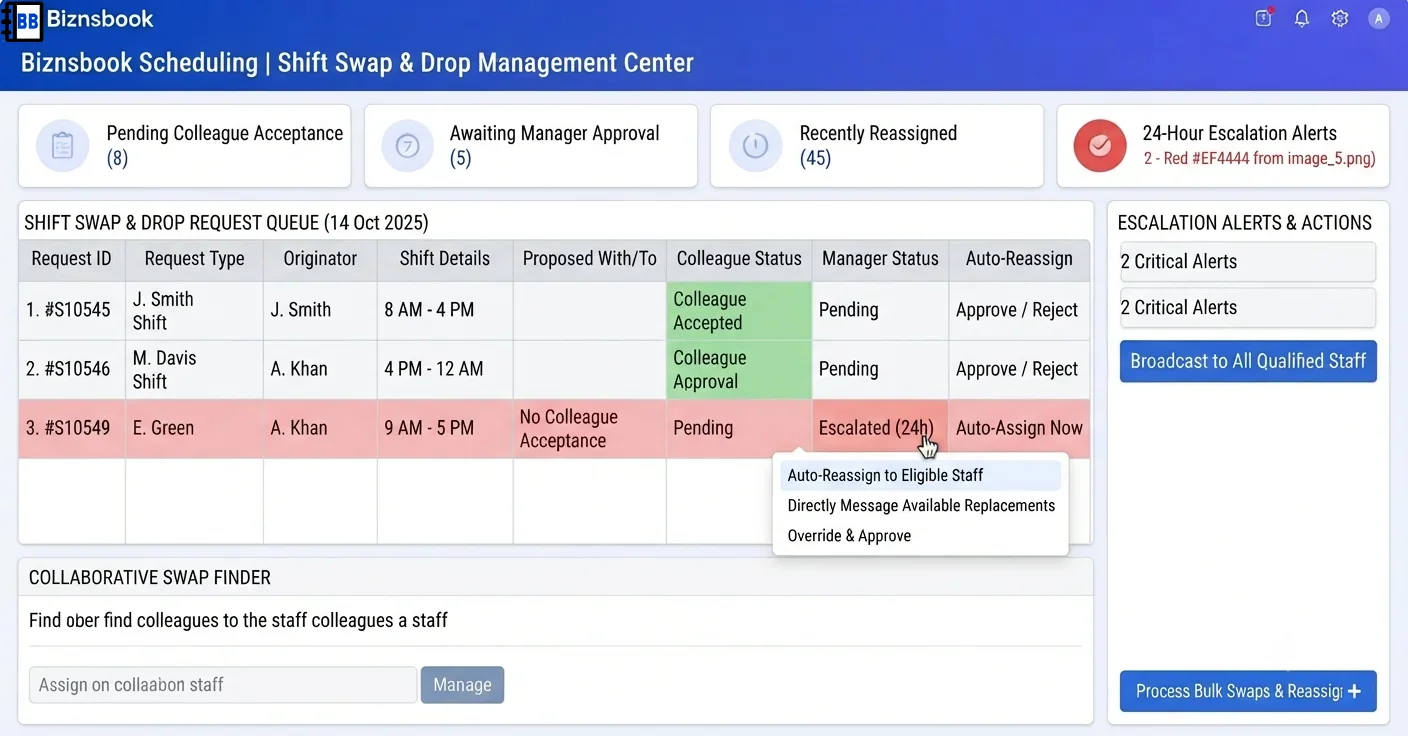
- Require target acceptance for swaps. Let colleagues approve via ApproveByTarget before the request enters the manager queue — drops skip this step.
- Review the manager queue. Open Labour Scheduling → Swaps; approve or reject pending and target-approved requests with full audit context.
- Confirm automatic reassignment. On manager approval, the system reassigns via scheduling service and marks Completed only on success — failures stay visible with notes.
- Watch escalation alerts. Respond to swaps pending manager response 24+ hours flagged by the daily escalation job and automation event.
- Prevent deleting in-flight shifts. Do not delete shifts referenced by active swap requests — deletion is blocked while swaps are in progress.
Review results after the first full weekly cycle. Adjust roles, mappings, or approvals where the same exception repeats.
Screen-level flows live in the Help Center (tax setup, expense claims, sale invoices). This guide focuses on finance process; help articles cover navigation.
Common mistakes to avoid
- Mistake 1: Swap policy lives outside the system while the published roster stays unchanged. Repeating this each month usually shows up first in attendance verification queues or labour cost posting previews.
- Mistake 2: Managers approve in messaging apps without using the Swaps queue. Repeating this each month usually shows up first in attendance verification queues or labour cost posting previews.
- Mistake 3: Open swaps and targeted swaps are not distinguished in workflow. Repeating this each month usually shows up first in attendance verification queues or labour cost posting previews.
- Mistake 4: Escalation for stale requests is not monitored. Repeating this each month usually shows up first in attendance verification queues or labour cost posting previews.
Track recurring exceptions in month-end notes; each should map to a control above.
Best practices that hold up as you scale
- Enable swap features in settings — Turn on employee swap requests and open shift claiming so self-service paths are available alongside manager tools.
- Train employees on My Swaps — Show staff how to request swap (optionally name a colleague or leave open), request drop, or accept when named as target.
- Require target acceptance for swaps — Let colleagues approve via ApproveByTarget before the request enters the manager queue — drops skip this step.
- Review the manager queue — Open Labour Scheduling → Swaps; approve or reject pending and target-approved requests with full audit context.
- Confirm automatic reassignment — On manager approval, the system reassigns via scheduling service and marks Completed only on success — failures stay visible with notes.
Teams that complete setup before the first publish, verify attendance before cost posting, and review overtime reports mid-week avoid the surprise labour variances that show up only at month-end.
How Biznsbook supports this workflow
Shift swaps is documented in Biznsbook Scheduling capabilities. Use it as part of a controlled finance process — posting, review, and period close — not as an isolated export. When Sales, Purchase, Inventory, Taxation, Expense, or Finance Management modules are enabled, related documents can post through the central accounting posting service with double-entry validation.
drop requests is documented in Biznsbook Scheduling capabilities. Use it as part of a controlled finance process — posting, review, and period close — not as an isolated export. When Sales, Purchase, Inventory, Taxation, Expense, or Finance Management modules are enabled, related documents can post through the central accounting posting service with double-entry validation.
manager approval is documented in Biznsbook Scheduling capabilities. Use it as part of a controlled finance process — posting, review, and period close — not as an isolated export. When Sales, Purchase, Inventory, Taxation, Expense, or Finance Management modules are enabled, related documents can post through the central accounting posting service with double-entry validation.
Scheduling permissions separate view, positions, settings, schedule management, attendance, swap approval, reporting, and cost posting. HR Management enhances employee and leave data but is not required to start.
Suggested implementation timeline
- Week 1: Document current process gaps and configure Shift swaps with finance owner sign-off.
- Weeks 2–3: Pilot on one month or one entity; post all test transactions through Biznsbook; freeze parallel spreadsheet journals.
- Week 4: Run first trial balance or report tie-out; fix mapping and permission issues.
- Month 2–3: Roll out to full team; add approvals and period close cadence from this guide.
- Ongoing: Monthly review using swap policy clarity and leadership dashboard.
Metrics to track monthly
- Scheduled vs actual hours variance
- Labour cost % of revenue (when revenue data exists)
- Shifts missing cost estimate at publish
- Open shifts and pending swap count
- Unverified attendance rows before posting
Start with three metrics; trend direction matters more than a single point-in-time snapshot.
Spreadsheet / manual books vs integrated ERP
Compare typical manual finance work with Biznsbook Shift swaps and related capabilities.
| Capability | Manual / Spreadsheet | Biznsbook |
|---|---|---|
| Swap request | ❌ Text message | ✅ My Swaps with audit trail |
| Colleague consent | ❌ Assumed | ✅ Target acceptance step for swaps |
| Manager gate | ❌ Verbal OK | ✅ Approve or reject in queue |
| Roster update | ❌ Manual edit | ✅ Automatic reassignment on approval |
| Escalation | ❌ Forgotten requests | ✅ 24-hour manager alert |
| Failure handling | ❌ Silent mismatch | ✅ Stays at approved-with-note if reassignment fails |
Swap policy clarity
Document which shifts allow drops, how far before start swaps must be submitted, and who gets escalation alerts — then enforce through the Swaps queue instead of side channels.
Document this in your finance SOP and revisit each quarter as transaction volume or entity structure changes.
Frequently asked questions
What is the difference between swap and drop?
Swap trades a shift with another employee; drop gives up a shift without offering one in return. Drops go straight to manager approval after submission.
Can anyone accept an open swap?
When no target is named, eligible colleagues can accept before manager review depending on your workflow configuration.
What if the shift is deleted before approval?
Reassignment fails and the request remains at manager-approved state with a note — it is never silently marked complete.
How is employee identity resolved?
Self-service actions resolve the employee server-side from the logged-in user — client-supplied employee keys are not trusted.
How this differs by industry
Retail
High-turnover retail teams benefit from open swaps for evening coverage when named colleagues are unavailable.
Wholesale & distribution
DC teams can require manager approval for all drops on critical inbound shifts while allowing peer swaps on standard pick shifts.
Manufacturing
Factories should tie swap approval to workstation-linked locations so operator coverage checks stay meaningful after reassignment.