How to Publish Employee Schedules
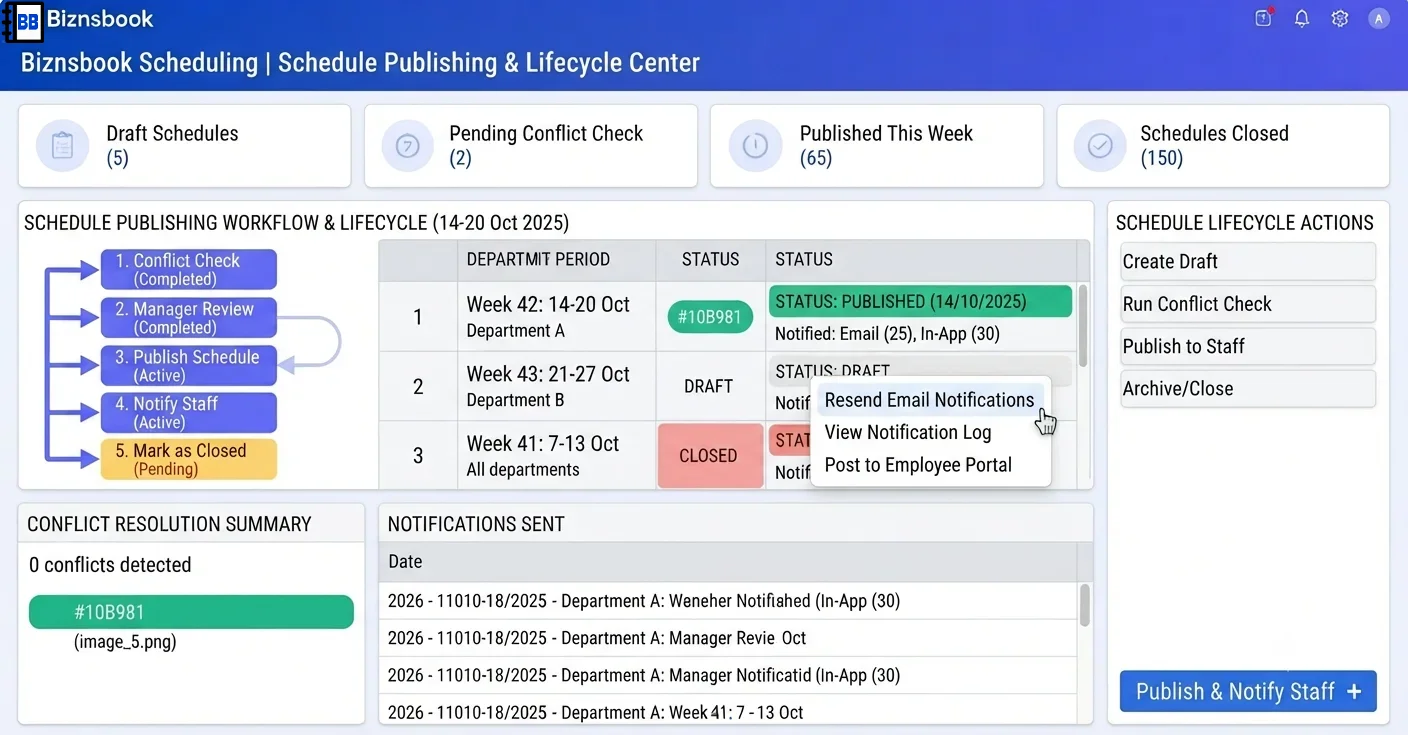
Unpublished rosters leave staff and systems out of sync
Draft schedules shared as screenshots never update when managers edit the grid. Employees show up on wrong days while attendance auto-match looks for published shifts.
Publishing without checking missing cost estimates produces understated labour budgets. Finance sees low totals while many shifts lack resolvable rates.
Leaving periods open indefinitely allows retroactive edits that break attendance and swap audit trails after payroll has already interpreted hours.
Why this happens
- Managers share Builder exports instead of clicking Publish.
- Red double-booking conflicts are ignored until publish fails.
- Shifts missing rate data are not reviewed via ShiftsMissingCostEstimate count.
- Closed periods are delayed so edits continue after the work week ends.
Biznsbook addresses this through Publish schedule, schedule notifications, schedule lifecycle when Scheduling is licensed — positions, templates, and the drag-and-drop builder connect to attendance verification, analytics, GL posting, and optional Restaurant, Manufacturing, and POS integrations on one database.
Finance teams lose days each month reconciling versions that should never have diverged. Naming Biznsbook screens as the system of record — and closing periods when agreed — prevents silent edits that auditors flag immediately.
Step-by-step: Publish Employee Schedules
Built for schedulers, operations managers, and finance leads running shift rosters, attendance, swaps, and labour cost controls in Biznsbook Scheduling.
- Finish building in Draft. Complete assignments, open shifts, and template copies while the schedule remains editable in Draft status.
- Clear blocking conflicts. Resolve all red double-booking badges — publish throws if any blocking-severity conflict remains.
- Review cost estimate gaps. Check running totals and shifts showing dashes; add manual rate overrides where needed before trusting published cost totals.
- Click Publish. Publish recomputes TotalScheduledHours and TotalEstimatedCost from shifts with non-null estimated cost and locks the published state.
- Confirm notifications sent. Assigned employees receive email when an address exists plus in-app notifications; missing email does not block publish.
- Direct staff to My Schedule. Employees with View Own Schedule see upcoming shifts and claimable open shifts after publish.
- Close the period after it ends. Close the schedule when the period passes to prevent further shift edits and protect swap and attendance integrity.
Review results after the first full weekly cycle. Adjust roles, mappings, or approvals where the same exception repeats.
Screen-level flows live in the Help Center (tax setup, expense claims, sale invoices). This guide focuses on finance process; help articles cover navigation.
Common mistakes to avoid
- Mistake 1: Managers share Builder exports instead of clicking Publish. Repeating this each month usually shows up first in attendance verification queues or labour cost posting previews.
- Mistake 2: Red double-booking conflicts are ignored until publish fails. Repeating this each month usually shows up first in attendance verification queues or labour cost posting previews.
- Mistake 3: Shifts missing rate data are not reviewed via ShiftsMissingCostEstimate count. Repeating this each month usually shows up first in attendance verification queues or labour cost posting previews.
- Mistake 4: Closed periods are delayed so edits continue after the work week ends. Repeating this each month usually shows up first in attendance verification queues or labour cost posting previews.
Track recurring exceptions in month-end notes; each should map to a control above.
Best practices that hold up as you scale
- Finish building in Draft — Complete assignments, open shifts, and template copies while the schedule remains editable in Draft status.
- Clear blocking conflicts — Resolve all red double-booking badges — publish throws if any blocking-severity conflict remains.
- Review cost estimate gaps — Check running totals and shifts showing dashes; add manual rate overrides where needed before trusting published cost totals.
- Click Publish — Publish recomputes TotalScheduledHours and TotalEstimatedCost from shifts with non-null estimated cost and locks the published state.
- Confirm notifications sent — Assigned employees receive email when an address exists plus in-app notifications; missing email does not block publish.
Teams that complete setup before the first publish, verify attendance before cost posting, and review overtime reports mid-week avoid the surprise labour variances that show up only at month-end.
How Biznsbook supports this workflow
Publish schedule is documented in Biznsbook Scheduling capabilities. Use it as part of a controlled finance process — posting, review, and period close — not as an isolated export. When Sales, Purchase, Inventory, Taxation, Expense, or Finance Management modules are enabled, related documents can post through the central accounting posting service with double-entry validation.
schedule notifications is documented in Biznsbook Scheduling capabilities. Use it as part of a controlled finance process — posting, review, and period close — not as an isolated export. When Sales, Purchase, Inventory, Taxation, Expense, or Finance Management modules are enabled, related documents can post through the central accounting posting service with double-entry validation.
schedule lifecycle is documented in Biznsbook Scheduling capabilities. Use it as part of a controlled finance process — posting, review, and period close — not as an isolated export. When Sales, Purchase, Inventory, Taxation, Expense, or Finance Management modules are enabled, related documents can post through the central accounting posting service with double-entry validation.
Scheduling permissions separate view, positions, settings, schedule management, attendance, swap approval, reporting, and cost posting. HR Management enhances employee and leave data but is not required to start.
Suggested implementation timeline
- Week 1: Document current process gaps and configure Publish schedule with finance owner sign-off.
- Weeks 2–3: Pilot on one month or one entity; post all test transactions through Biznsbook; freeze parallel spreadsheet journals.
- Week 4: Run first trial balance or report tie-out; fix mapping and permission issues.
- Month 2–3: Roll out to full team; add approvals and period close cadence from this guide.
- Ongoing: Monthly review using publish checklist and leadership dashboard.
Metrics to track monthly
- Scheduled vs actual hours variance
- Labour cost % of revenue (when revenue data exists)
- Shifts missing cost estimate at publish
- Open shifts and pending swap count
- Unverified attendance rows before posting
Start with three metrics; trend direction matters more than a single point-in-time snapshot.
Spreadsheet / manual books vs integrated ERP
Compare typical manual finance work with Biznsbook Publish schedule and related capabilities.
| Capability | Manual / Spreadsheet | Biznsbook |
|---|---|---|
| Staff visibility | ❌ Screenshot or PDF | ✅ My Schedule live data |
| Notification | ❌ Manual message | ✅ Email plus in-app on publish |
| Cost totals | ❌ Rough guess | ✅ Summed estimated shift cost with gap count |
| Conflict gate | ❌ Informal | ✅ Blocks on double-booking |
| Lifecycle | ❌ Endless draft | ✅ Draft → Published → Closed → Archived |
| Reminder jobs | ❌ Manual call | ✅ Automatic shift reminders before start |
Publish checklist
No red conflicts, cost dashes explained, open shifts intentional, notifications spot-checked on two employees, then publish and archive PDF for the break room if needed.
Document this in your finance SOP and revisit each quarter as transaction volume or entity structure changes.
Frequently asked questions
What happens if some shifts have no rate?
Publish succeeds but reports ShiftsMissingCostEstimate so managers see how many shifts lack cost data instead of a misleadingly low total.
Can I edit after publish?
Published schedules allow controlled changes until Closed; deleting shifts with active swap requests is blocked.
When are shift reminders sent?
A recurring job sends reminders in a window about two hours before shift start, deduped per shift via ReminderSentAt.
Do HRMS employees get email?
Email uses Work Email or Personal Email from HRMS when licensed; standalone employees use portal login email.
How this differs by industry
Retail
Publish mid-week for the following week so reminder emails and open-shift claims populate before weekend peak trading.
Wholesale & distribution
Publish location-specific schedules when each warehouse runs different shift templates tied to mapped locations.
Manufacturing
Publish operator rosters before work order release so manufacturing coverage checks reflect staffed workstations.