How to Monitor Business Financial Health
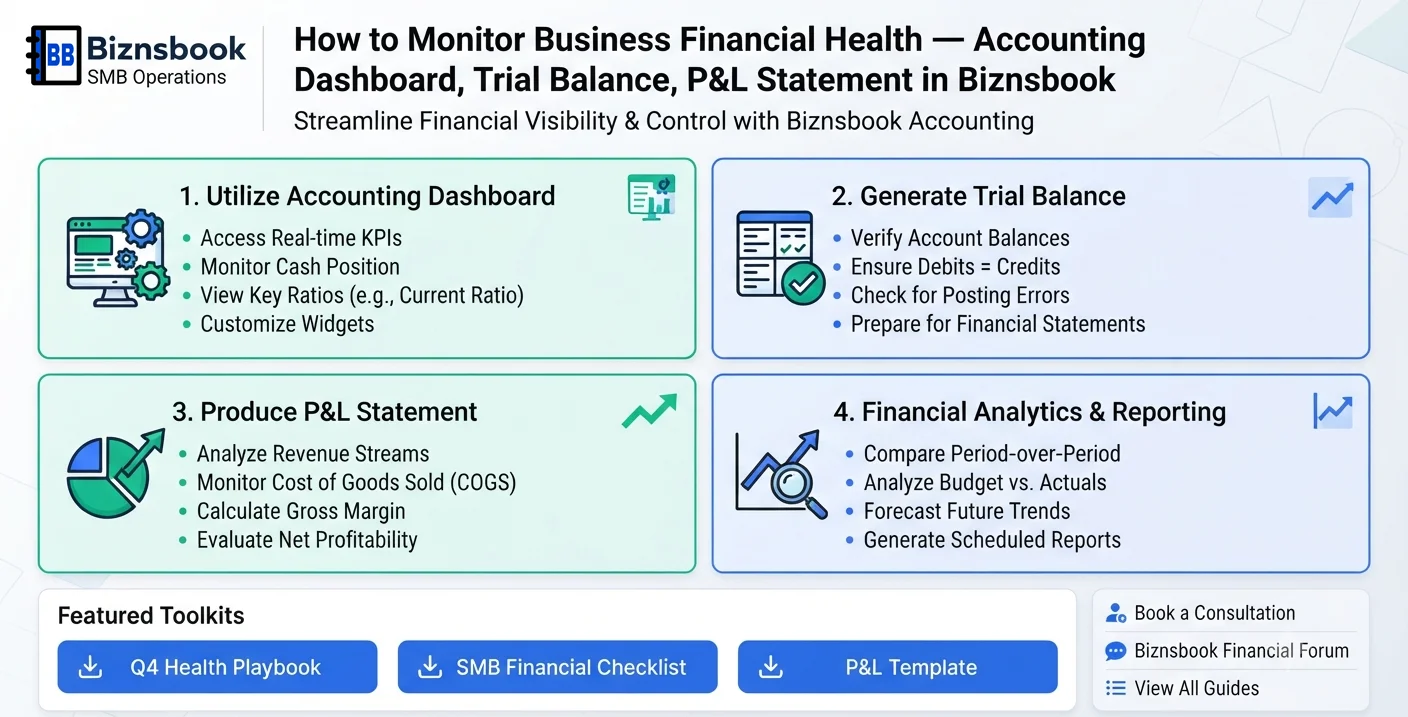
Leaders lack one reliable finance pulse
Teams often wait for month-end packs, so early warning signals on liquidity or profitability are missed.
When indicators are spread across files, leaders struggle to connect summary KPIs with accounting reality.
Operational managers may react to revenue movement without understanding cost and margin impact.
Why this happens
- No shared finance dashboard.
- Trial balance is reviewed late.
- P&L checks are infrequent.
- POS or Payments is not configured for dashboard view.
Biznsbook addresses this through accounting dashboard, trial balance, P&L statement when Accounting is enabled; add Finance Management, Taxation, Expense, Sales, or Purchase modules as your operating model requires.
Finance teams lose days each month reconciling versions that should never have diverged. Naming Biznsbook screens as the system of record — and closing periods when agreed — prevents silent edits that auditors flag immediately.
Step-by-step: Monitor Business Financial Health
Designed for owners, bookkeepers, and controllers who need repeatable month-end discipline. Adapt roles to team size — separation of duties matters more than headcount.
- Confirm dashboard availability. Ensure POS or Payments modules are configured so accounting dashboard components are visible.
- Review dashboard indicators. Check cash trends, payable pressure, and top-line movement at the start of each week.
- Run trial balance check. Validate ledger integrity and investigate unusual account swings promptly.
- Analyze current P&L. Compare gross margin and operating expense trends against prior period.
- Flag control exceptions. Identify abnormal balances or posting spikes and assign owners.
- Align finance and operations. Share findings with non-finance managers in a short weekly meeting.
- Track corrective actions. Review previous action items and confirm closure before next cycle.
Review results after the first full monthly cycle. Adjust roles, mappings, or approvals where the same exception repeats.
Screen-level flows live in the Help Center. This guide focuses on the business process; help articles cover click-by-click navigation.
Common mistakes to avoid
- Mistake 1: No shared finance dashboard. Repeating this each month usually shows up first in trial balance or AR/AP aging.
- Mistake 2: Trial balance is reviewed late. Repeating this each month usually shows up first in trial balance or AR/AP aging.
- Mistake 3: P&L checks are infrequent. Repeating this each month usually shows up first in trial balance or AR/AP aging.
- Mistake 4: POS or Payments is not configured for dashboard view. Repeating this each month usually shows up first in trial balance or AR/AP aging.
Track recurring exceptions in month-end notes; each should map to a control above.
Best practices that hold up as you scale
- Confirm dashboard availability — Ensure POS or Payments modules are configured so accounting dashboard components are visible.
- Review dashboard indicators — Check cash trends, payable pressure, and top-line movement at the start of each week.
- Run trial balance check — Validate ledger integrity and investigate unusual account swings promptly.
- Analyze current P&L — Compare gross margin and operating expense trends against prior period.
- Flag control exceptions — Identify abnormal balances or posting spikes and assign owners.
Consistency beats heroics at month-end. A smaller team that closes the same calendar every month outperforms a larger team that posts sporadically.
How Biznsbook supports this workflow
accounting dashboard is documented in Biznsbook Accounting / Finance capabilities. Use it as part of a controlled finance process — posting, review, and period close — not as an isolated export. When Sales, Purchase, Inventory, Taxation, Expense, or Finance Management modules are enabled, related documents can post through the central accounting posting service with double-entry validation.
trial balance is documented in Biznsbook Accounting / Finance capabilities. Use it as part of a controlled finance process — posting, review, and period close — not as an isolated export. When Sales, Purchase, Inventory, Taxation, Expense, or Finance Management modules are enabled, related documents can post through the central accounting posting service with double-entry validation.
P&L statement is documented in Biznsbook Accounting / Finance capabilities. Use it as part of a controlled finance process — posting, review, and period close — not as an isolated export. When Sales, Purchase, Inventory, Taxation, Expense, or Finance Management modules are enabled, related documents can post through the central accounting posting service with double-entry validation.
Permissions are role-based: separate chart maintenance, journal creation, report viewing, period close, and bank reconciliation per tenant policy.
Suggested implementation timeline
- Week 1: Document current process gaps and configure accounting dashboard with finance owner sign-off.
- Weeks 2–3: Pilot on one month or one entity; post all test transactions through Biznsbook; freeze parallel spreadsheet journals.
- Week 4: Run first trial balance or report tie-out; fix mapping and permission issues.
- Month 2–3: Roll out to full team; add approvals and period close cadence from this guide.
- Ongoing: Monthly review using weekly health dashboard habit and leadership dashboard.
Metrics to track monthly
- Days to complete month-end close
- Unreconciled bank lines outstanding
- AR and AP aging buckets over 30/60/90 days
- Trial balance out-of-balance exceptions
- Manual journal count vs automated postings ratio
Start with three metrics; trend direction matters more than a single point-in-time snapshot.
Spreadsheet / manual books vs integrated ERP
Compare typical manual finance work with Biznsbook accounting dashboard and related capabilities.
| Capability | Manual / Spreadsheet | Biznsbook |
|---|---|---|
| Financial pulse | ❌ End-month only | ✅ Dashboard plus ledgers |
| Ledger confidence | ❌ Spot checks | ✅ Trial balance routine |
| Profit visibility | ❌ Late reports | ✅ Frequent P&L checks |
| Issue detection | ❌ Reactive | ✅ Weekly exception scanning |
| Team alignment | ❌ Finance-only | ✅ Cross-functional review |
| Control maturity | ❌ Unstructured | ✅ Action-tracked cadence |
Weekly health dashboard habit
A 30-minute recurring review creates faster decisions than a long month-end postmortem.
Document this in your finance SOP and revisit each quarter as transaction volume or entity structure changes.
Frequently asked questions
What should I review first each week?
Start with dashboard signals, then verify with trial balance and current P&L details.
When does accounting dashboard appear?
In Biznsbook it appears when POS or Payments capabilities are active and configured.
Is trial balance enough on its own?
No, trial balance validates ledger balance while P&L explains operating performance.
Who should attend finance health reviews?
Finance plus key operations leaders to convert findings into actions quickly.
How this differs by industry
Retail
Retail operators should track margin shifts alongside payment settlement timing to catch cash pressure early.
Wholesale & distribution
Wholesale businesses should combine AP and AR signals with P&L trend checks for stable working capital decisions.
Manufacturing
Manufacturers should include cost movement and overhead trends in weekly health reviews to protect profitability.