How to Track Construction Project Progress
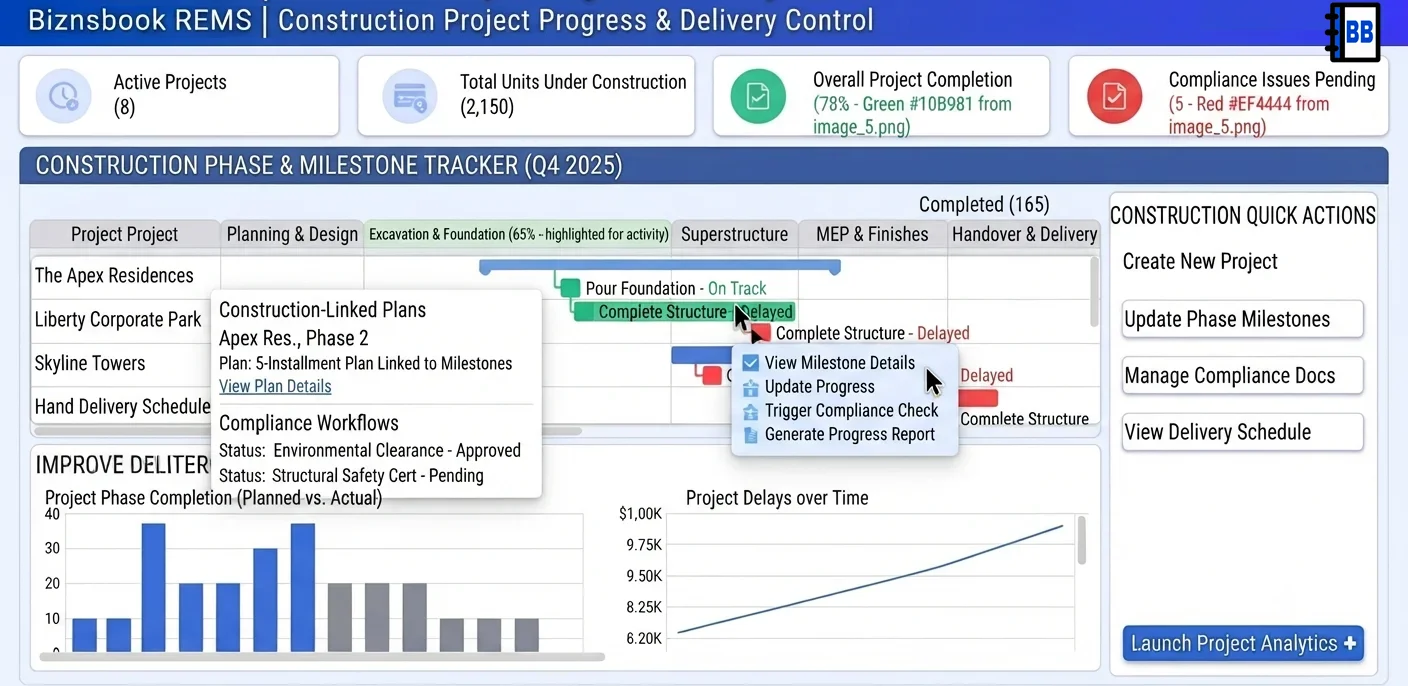
Progress reporting often misses financial and compliance context
Construction progress is frequently reported as percentage completion without linking milestone achievement to collection triggers or compliance readiness. This produces optimistic updates that do not translate into operational certainty.
Customer payment schedules tied to milestones become difficult to manage when phase updates are delayed or unverified. Collections and customer communication then become reactive and dispute-prone.
A unified progress model improves reliability by connecting physical delivery signals with financial and regulatory dependencies before key commitments are made.
Why this happens
- Phase updates are not recorded with consistent milestone criteria.
- Construction-linked payment triggers are not synchronized with verified progress.
- Compliance tasks are tracked separately from project execution reviews.
- Teams report status without evidence-backed validation routines.
Biznsbook addresses this through Construction-linked payment plan, Phases, Compliance dashboard when the Real Estate (REMS) module is enabled, with optional Accounting, Communication Center, and Business Automation for collections and workflows.
Finance teams lose days each month reconciling versions that should never have diverged. Naming Biznsbook screens as the system of record — and closing periods when agreed — prevents silent edits that auditors flag immediately.
Step-by-step: Track Construction Project Progress
Built for developers, sales coordinators, and property ops teams managing units from booking through possession and leasing.
- Define milestone framework. Set phase-level milestones with clear completion criteria and responsible owners.
- Link milestones to plan triggers. Align construction-linked payment schedules to validated milestone events, not assumptions.
- Maintain phase update cadence. Update phase records regularly so sales, collections, and customer teams receive current information.
- Run compliance checks in parallel. Track permits, renewals, and regulatory requirements alongside construction progress.
- Validate evidence before release. Require documented evidence before marking milestones complete and communicating updates.
- Coordinate collections messaging. Trigger customer communication only after milestone validation to reduce dispute risk.
- Review variance trends. Analyze milestone slippage and payment impact to improve planning and execution quality.
Review results after the first full weekly cycle. Adjust roles, mappings, or approvals where the same exception repeats.
Screen-level flows live in the Help Center (tax setup, expense claims, sale invoices). This guide focuses on finance process; help articles cover navigation.
Common mistakes to avoid
- Mistake 1: Phase updates are not recorded with consistent milestone criteria. Repeating this each month usually shows up first in aged receivables or installment status reports.
- Mistake 2: Construction-linked payment triggers are not synchronized with verified progress. Repeating this each month usually shows up first in aged receivables or installment status reports.
- Mistake 3: Compliance tasks are tracked separately from project execution reviews. Repeating this each month usually shows up first in aged receivables or installment status reports.
- Mistake 4: Teams report status without evidence-backed validation routines. Repeating this each month usually shows up first in aged receivables or installment status reports.
Track recurring exceptions in month-end notes; each should map to a control above.
Best practices that hold up as you scale
- Define milestone framework — Set phase-level milestones with clear completion criteria and responsible owners.
- Link milestones to plan triggers — Align construction-linked payment schedules to validated milestone events, not assumptions.
- Maintain phase update cadence — Update phase records regularly so sales, collections, and customer teams receive current information.
- Run compliance checks in parallel — Track permits, renewals, and regulatory requirements alongside construction progress.
- Validate evidence before release — Require documented evidence before marking milestones complete and communicating updates.
Teams that reconcile unit status and schedules weekly avoid the month-end scramble that delays disbursements and handovers.
How Biznsbook supports this workflow
Construction-linked payment plan is documented in Biznsbook Real Estate (REMS) capabilities. Use it as part of a controlled finance process — posting, review, and period close — not as an isolated export. When Sales, Purchase, Inventory, Taxation, Expense, or Finance Management modules are enabled, related documents can post through the central accounting posting service with double-entry validation.
Phases is documented in Biznsbook Real Estate (REMS) capabilities. Use it as part of a controlled finance process — posting, review, and period close — not as an isolated export. When Sales, Purchase, Inventory, Taxation, Expense, or Finance Management modules are enabled, related documents can post through the central accounting posting service with double-entry validation.
Compliance dashboard is documented in Biznsbook Real Estate (REMS) capabilities. Use it as part of a controlled finance process — posting, review, and period close — not as an isolated export. When Sales, Purchase, Inventory, Taxation, Expense, or Finance Management modules are enabled, related documents can post through the central accounting posting service with double-entry validation.
REMS permissions govern view, create, edit, and payment link actions. Guest collection pages work without buyer or tenant login.
Suggested implementation timeline
- Week 1: Document current process gaps and configure Construction-linked payment plan with finance owner sign-off.
- Weeks 2–3: Pilot on one month or one entity; post all test transactions through Biznsbook; freeze parallel spreadsheet journals.
- Week 4: Run first trial balance or report tie-out; fix mapping and permission issues.
- Month 2–3: Roll out to full team; add approvals and period close cadence from this guide.
- Ongoing: Monthly review using milestone governance board and leadership dashboard.
Metrics to track monthly
- Available vs booked vs sold unit counts by project
- Installment schedule overdue value and count
- Collection rate on due installments and rent
- Days from booking to possession/handover
- Aged receivables buckets (30/60/90+ days)
Start with three metrics; trend direction matters more than a single point-in-time snapshot.
Spreadsheet / manual books vs integrated ERP
Compare typical manual finance work with Biznsbook Construction-linked payment plan and related capabilities.
| Capability | Manual / Spreadsheet | Biznsbook |
|---|---|---|
| Progress model | ❌ Percent-only updates | ✅ Milestone evidence tracking |
| Payment linkage | ❌ Manual interpretation | ✅ Construction-linked triggers |
| Compliance visibility | ❌ Separate spreadsheets | ✅ Integrated compliance workflow |
| Update quality | ❌ Irregular cadence | ✅ Structured phase updates |
| Customer communication | ❌ Premature notices | ✅ Validation-based messaging |
| Risk control | ❌ Late variance detection | ✅ Trend-driven review cadence |
Milestone governance board
Use a governance board that reviews milestone evidence, compliance blockers, and payment-trigger readiness together. This reduces rework and improves delivery-to-collection alignment.
Document this in your finance SOP and revisit each quarter as transaction volume or entity structure changes.
Frequently asked questions
Why use construction-linked payment plans?
They align customer dues with verified project progress, improving fairness and reducing uncertainty in collection communication.
How often should phase progress be updated?
Use a regular operational cadence, typically weekly, with immediate updates after critical milestone completions.
Should compliance be reviewed separately?
Compliance can have separate owners, but it should be reviewed in the same progress cycle to avoid last-minute delivery blockers.
What causes most progress-reporting disputes?
Disputes often come from unverified milestone communication and inconsistent criteria for marking phase completion.
How this differs by industry
Retail
Residential developers can improve buyer confidence by linking construction milestones to transparent payment triggers and evidence-backed progress communication.
Wholesale & distribution
Commercial and mixed-use teams can coordinate tenant commitments better when milestone completion and compliance readiness are tracked in one control cycle.
Manufacturing
Property management firms onboarding newly delivered assets can plan transition activities more accurately when construction and compliance updates are dependable.