How to Hold Received Goods for Quality Inspection
Why uninspected goods get sold before anyone checks them
Once goods are received, they look like any other stock. If inspection is a separate step done later, a picker can ship them, a cashier can sell them, or production can issue them before anyone has checked the delivery.
Keeping them out of stock until inspection is not a fix either. Stock and valuation are then wrong, the supplier's delivery is not on record, and the goods sit on the dock with no system telling anyone they are waiting.
A QC hold receives the goods into stock and values them, but keeps them out of every place that checks availability until the quality check releases them. Rejected quantity is written off at that check.
Why this happens
- Inspection happens after the goods are already available to sell.
- Goods wait on the dock off the books until someone checks them.
- Nobody has a list of deliveries still waiting for inspection.
- Rejects are put aside but stock is never corrected.
Biznsbook addresses this through inspect on receipt per product, hold all receipts, receipts on QC hold list, release at the quality check in the Purchase module, on the same orders, receipts, bills and stock records.
Purchasing problems rarely start with one big mistake. They start with a price nobody checked, a bill keyed twice, or goods used before anyone looked at them. Recording each step where it happens removes those gaps.
Step-by-step: Hold Received Goods for Quality Inspection
Written for buyers, store keepers and accounts payable teams in small and mid-sized businesses. The steps follow Purchase in Biznsbook.
- Choose what is held. For specific products, open the product and tick Inspect on receipt in the Stock section. To hold every delivery, turn on Hold all receipts for quality check in Inventory setup.
- Receive with a GRN. Go to Purchasing → Good Receive Note and create the GRN with the supplier, warehouse and lines, including batch and expiry for expiry-tracked products and one serial per unit for serial products. If your administrator turned on Enable receipt batch photos, you can attach images of the lot on each line. You need the Manage GRN permission.
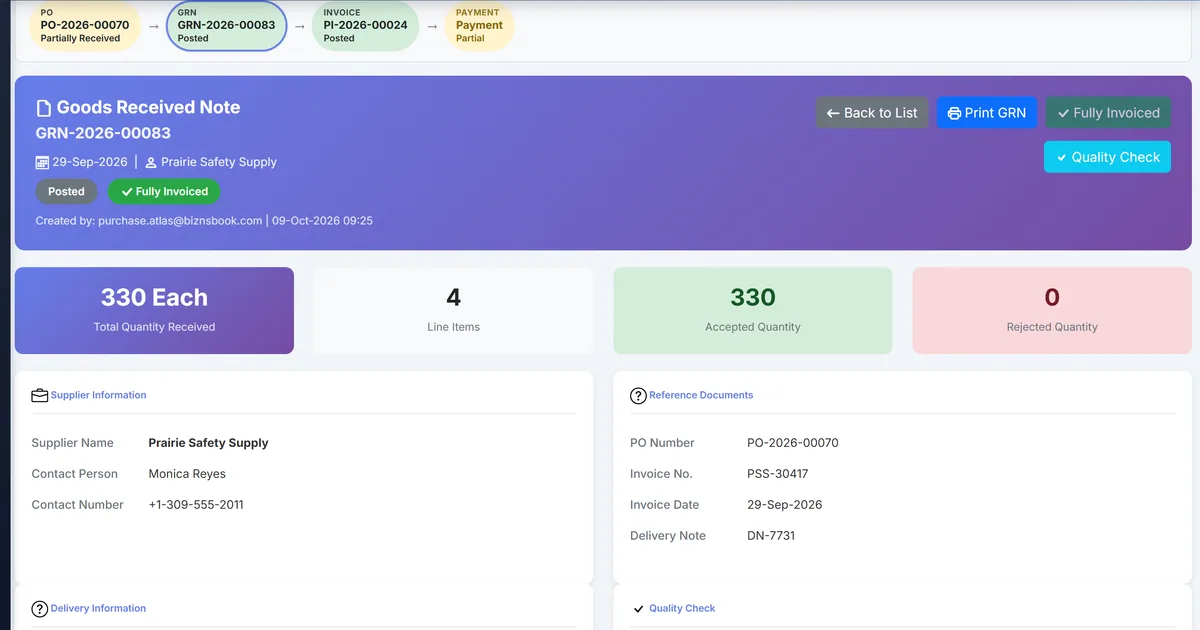
- Post the GRN. Posting increases stock and keeps the held quantities on hold. They are on hand and valued, but cannot be sold, issued, reserved or transferred.
- Work the waiting list. Open Purchasing → Receipts on QC hold. It lists what is waiting, oldest first.
- Run the quality check. Choose Quality check on the receipt and enter the accepted and rejected quantities. This releases the hold, and rejected quantity is written off. Goods rejected here also count in the supplier scorecard's quality score, next to goods returned to the supplier.
- Cancel when the delivery was wrong. Cancelling or reversing the GRN ends the hold and reverses the stock.
Review results after the first full monthly cycle. Adjust roles, mappings, or approvals where the same exception repeats.
Inside Biznsbook, each Purchasing screen explains its own steps. This article explains the business process behind those screens.
Common mistakes to avoid
- Mistake 1: Inspection happens after the goods are already available to sell. Repeating this each month usually shows up first in a supplier paid the wrong amount, late, or for goods that never arrived.
- Mistake 2: Goods wait on the dock off the books until someone checks them. Repeating this each month usually shows up first in a supplier paid the wrong amount, late, or for goods that never arrived.
- Mistake 3: Nobody has a list of deliveries still waiting for inspection. Repeating this each month usually shows up first in a supplier paid the wrong amount, late, or for goods that never arrived.
- Mistake 4: Rejects are put aside but stock is never corrected. Repeating this each month usually shows up first in a supplier paid the wrong amount, late, or for goods that never arrived.
Each of these shows up later as a supplier balance nobody can explain. Fix it on the order, receipt or bill rather than in a side spreadsheet.
Best practices that hold up as you scale
- Choose what is held — For specific products, open the product and tick Inspect on receipt in the Stock section.
- Receive with a GRN — Go to Purchasing → Good Receive Note and create the GRN with the supplier, warehouse and lines, including batch and expiry for expiry-tracked products and one serial per unit for serial products.
- Post the GRN — Posting increases stock and keeps the held quantities on hold.
- Work the waiting list — Open Purchasing → Receipts on QC hold.
- Run the quality check — Choose Quality check on the receipt and enter the accepted and rejected quantities.
Keep the order, the receipt and the bill linked, so every payment can be traced back to what was ordered and what arrived.
How Biznsbook supports this workflow
inspect on receipt per product is part of Biznsbook Purchase. It works on the same purchase orders, goods receipts and supplier bills, so stock, payables and the ledger stay in step.
hold all receipts is part of Biznsbook Purchase. It works on the same purchase orders, goods receipts and supplier bills, so stock, payables and the ledger stay in step.
receipts on QC hold list is part of Biznsbook Purchase. It works on the same purchase orders, goods receipts and supplier bills, so stock, payables and the ledger stay in step.
release at the quality check is part of Biznsbook Purchase. It works on the same purchase orders, goods receipts and supplier bills, so stock, payables and the ledger stay in step.
Access is permission-based: viewing, creating, editing and approving purchases are separate permissions. Purchase orders and goods receipts need the Inventory module; postings to accounts payable need Accounting.
Suggested implementation timeline
- Week 1: Set up inspect on receipt per product and give buyers and accounts payable the permissions they need.
- Week 2: Run one supplier end to end in Biznsbook only: order, receipt, bill and payment, with no side spreadsheet.
- Week 3: Review the exceptions with the people involved and adjust the rules where they disagreed.
- Month 2: Roll out to every supplier and retire the old tracking sheet.
- Ongoing: Monthly review using per product or every receipt.
Metrics to track monthly
- Open purchase order lines past their delivery date
- Bills waiting in bill matching
- Overdue supplier bills and bills due in the next 7 days
- Purchase price variance by supplier this month
Start with three metrics; trend direction matters more than a single point-in-time snapshot.
Spreadsheets and email vs Biznsbook Purchase
Compare a typical spreadsheet-and-email buying process with Biznsbook inspect on receipt per product and the related Purchase capabilities.
| Capability | Manual / Spreadsheet | Biznsbook |
|---|---|---|
| Uninspected goods | ❌ Available to sell as soon as received | ✅ On hand and valued, but held |
| Where held stock is blocked | ❌ Depends on people remembering | ✅ Sales order reservation, POS, transfers and manufacturing issue |
| What is waiting | ❌ A note on the dock or a whiteboard | ✅ Purchasing → Receipts on QC hold, oldest first |
| Rejected goods | ❌ Put aside, stock not corrected | ✅ Written off at the quality check |
| Wrong delivery | ❌ Stock corrected by hand | ✅ Cancel or reverse the GRN to end the hold |
| Supplier quality record | ❌ Kept separately, if at all | ✅ Goods rejected at receipt QC count in the supplier scorecard's quality score |
Per product or every receipt
Inspect on receipt suits a business that checks only some products, such as food, chemicals or parts with tight tolerances. Hold all receipts for quality check suits a business where every delivery is inspected. Either way, the release happens at the GRN quality check, and Purchasing → Receipts on QC hold shows what is still waiting. The hold does not delay the rest of the receipt: posting the GRN still updates stock, the stock card and, with Accounting, the receipt journal, so the goods are on the books from the day they arrive. What the hold changes is what that stock can be used for. Because batch-level availability does not see the hold, treat the waiting list, not the lot screens, as the record of what has not yet been inspected.
Write the rule into your purchasing procedure so buyers, store keepers and accounts payable follow the same steps, and revisit it each quarter.
Frequently asked questions
Is held stock counted in stock and valuation?
Yes. It is on hand and valued from the moment the GRN is posted. It just cannot be sold, issued, reserved or transferred.
Where is held stock excluded?
Wherever availability is checked, for example sales-order reservation, POS, transfers, manufacturing issue and field jobs.
Does the hold apply at batch level?
No. Batch-level availability does not see the hold, so check the Receipts on QC hold list before relying on a specific lot.
How do I release the goods?
Run Quality check on the GRN and enter accepted and rejected quantities. The accepted quantity is released and the rejected quantity is written off.
What happens if I cancel the GRN?
Cancelling or reversing the GRN ends the hold and reverses the stock.
Does a reject affect the supplier's score?
Yes. The supplier scorecard's quality score counts goods returned to the supplier plus goods rejected at receipt QC.
Which statuses does a GRN go through?
Draft (editable), Posted, Quality Check, Approved and Cancelled. Stock increases when the GRN is posted, and cancelling a GRN reverses the stock.
Who can work the Receipts on QC hold list?
The list sits under the Purchasing menu and needs the same Manage GRN permission as receiving goods with a GRN.
How this differs by industry
Retail
A grocer holds chilled and fresh deliveries until they are checked, so the POS cannot sell them while they wait on the dock.
Wholesale & distribution
A distributor ticks Inspect on receipt for products with a history of damage in transit, and works the Receipts on QC hold list each morning.
Manufacturing
A manufacturer holds every raw material receipt until QC passes it, so production cannot issue an uninspected lot to a work order.