How to Use a Cross-Module Attention Center
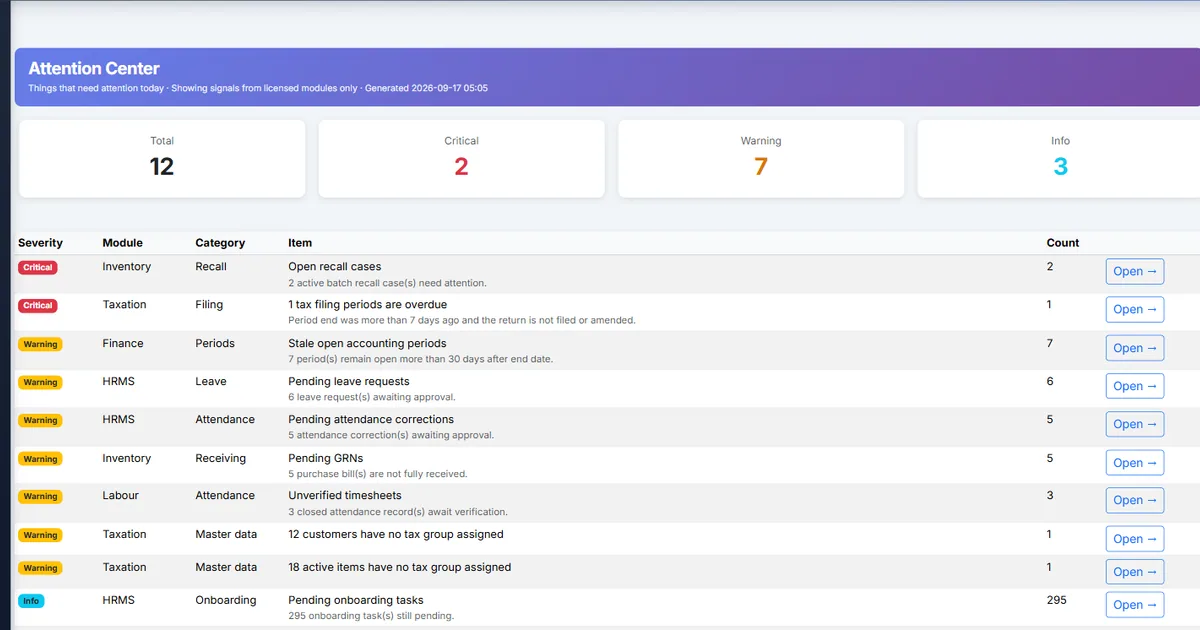
Leaders juggle five module dashboards before morning standup
Inventory health, tax compliance, unverified timesheets, trial balance drift, and pending leave live on separate screens. By the time finance finishes a TB check, warehouse recalls and labour exceptions have already aged another day.
Company Home shows revenue widgets but not a single ordered list of what needs action today across licensed modules.
Without a module gate, half-licensed tenants open an empty “attention” page and lose trust in the hub.
Why this happens
- Each module owns its own alert UI with no company rollup.
- Operators skip View Reports permission and never see the feed.
- Tenants with no source modules licensed expect Attention Center to appear.
- Teams ignore cache timing and assume the list is real-time every second.
Biznsbook addresses this through Attention Center, severity providers, severity-gated sidebar, company home summary card when Company Administration is used with the licensed source modules — one triage feed and one party profile instead of five dashboards.
Finance teams lose days each month reconciling versions that should never have diverged. Naming Biznsbook screens as the system of record — and closing periods when agreed — prevents silent edits that auditors flag immediately.
Step-by-step: Use a Cross-Module Attention Center
Built for controllers and ops leads running Biznsbook Company Administration — Attention Center and Party 360 — alongside Finance, Taxation, Inventory, Labour, and HRMS.
- Confirm licensed source modules. License at least one of Inventory, Labour Scheduling, HRMS, Finance or Accounting, or Taxation. If none are licensed, the sidebar link and home widget stay hidden and /Company/Attention returns not found. The feed shows signals from licensed modules only.
- Confirm permission. Grant View reports (Finance.ViewReports) or Company Admin so operators can open the feed.
- Open Attention Center. Go to Management → Attention Center, or Company Dashboard → Attention Center card → View all.
- Triage by severity. Work Critical first (active recalls, ledger drift, unbalanced trial balance, overdue tax filings), then Warning, then Info.
- Deep-link and resolve. Use Open → to jump to the owning screen. Fix the underlying document or approval in that module.
- Refresh after cache. Wait a few minutes and reload — providers aggregate with a short cache (~3 minutes) so immediate refresh may still show the old item.
- Make it a daily ritual. Assign one ops owner to clear Critical before standup; finance owns TB and tax Warnings; HR owns leave and exit Info items.
Review results after the first full daily cycle. Adjust roles, mappings, or approvals where the same exception repeats.
Screen-level flows live in the Help Center. This guide focuses on the business process; help articles cover click-by-click navigation.
Common mistakes to avoid
- Mistake 1: Each module owns its own alert UI with no company rollup. Repeating this each month usually shows up first in missed Critical ops items or incomplete auditor packs.
- Mistake 2: Operators skip View Reports permission and never see the feed. Repeating this each month usually shows up first in missed Critical ops items or incomplete auditor packs.
- Mistake 3: Tenants with no source modules licensed expect Attention Center to appear. Repeating this each month usually shows up first in missed Critical ops items or incomplete auditor packs.
- Mistake 4: Teams ignore cache timing and assume the list is real-time every second. Repeating this each month usually shows up first in missed Critical ops items or incomplete auditor packs.
Track recurring exceptions in month-end notes; each should map to a control above.
Best practices that hold up as you scale
- Confirm licensed source modules — License at least one of Inventory, Labour Scheduling, HRMS, Finance or Accounting, or Taxation.
- Confirm permission — Grant View reports (Finance.
- Open Attention Center — Go to Management → Attention Center, or Company Dashboard → Attention Center card → View all.
- Triage by severity — Work Critical first (active recalls, ledger drift, unbalanced trial balance, overdue tax filings), then Warning, then Info.
- Deep-link and resolve — Use Open → to jump to the owning screen.
Teams that clear Critical Attention items before standup and open Party 360 before vendor or customer calls keep AP, inventory, and tax aligned.
How Biznsbook supports this workflow
Attention Center is documented in Biznsbook Company Administration capabilities. Use it as part of a controlled finance process — posting, review, and period close — not as an isolated export. When Sales, Purchase, Inventory, Taxation, Expense, or Finance Management modules are enabled, related documents can post through the central accounting posting service with double-entry validation.
severity providers is documented in Biznsbook Company Administration capabilities. Use it as part of a controlled finance process — posting, review, and period close — not as an isolated export. When Sales, Purchase, Inventory, Taxation, Expense, or Finance Management modules are enabled, related documents can post through the central accounting posting service with double-entry validation.
severity-gated sidebar is documented in Biznsbook Company Administration capabilities. Use it as part of a controlled finance process — posting, review, and period close — not as an isolated export. When Sales, Purchase, Inventory, Taxation, Expense, or Finance Management modules are enabled, related documents can post through the central accounting posting service with double-entry validation.
company home summary card is documented in Biznsbook Company Administration capabilities. Use it as part of a controlled finance process — posting, review, and period close — not as an isolated export. When Sales, Purchase, Inventory, Taxation, Expense, or Finance Management modules are enabled, related documents can post through the central accounting posting service with double-entry validation.
View reports and Manage parties permissions gate Attention and Party 360 separately from day-to-day clerks.
Suggested implementation timeline
- Week 1: Document current process gaps and configure Attention Center with finance owner sign-off.
- Weeks 2–3: Pilot on one month or one entity; post all test transactions through Biznsbook; freeze parallel spreadsheet journals.
- Week 4: Run first trial balance or report tie-out; fix mapping and permission issues.
- Month 2–3: Roll out to full team; add approvals and period close cadence from this guide.
- Ongoing: Monthly review using ownership tip and leadership dashboard.
What each provider contributes
Inventory providers surface health signals such as active recalls, stockout risk, pending GRNs, and suppliers below the scorecard floor. Taxation contributes compliance checklist pressure including overdue filings. Labour Scheduling contributes unverified attendance and related timesheet risk.
Finance or Accounting contributes trial balance and period health — unbalanced TB and ledger drift land as Critical. HRMS contributes pending leave, corrections, onboarding, and exit clearances, often as Warning or Info depending on urgency.
Providers are pluggable. The Attention aggregator merges them into one severity-ordered list with counts and deep links so operators never need five browser tabs for the morning triage.
Morning standup ritual
Assign Critical clears to an ops lead before standup. Finance owns TB and tax Warnings; HR owns leave and exit Info items; warehouse owns recall and GRN Warnings. Record who owns each Critical item in your standup notes.
Do not treat Attention Center as a permanent ticket system. Resolve in the source module, then confirm the item drops after the short cache window. If it remains, verify the underlying document status rather than refreshing endlessly.
Licensing and trust
The sidebar and home widget appear when at least one of Inventory, Labour Scheduling, HRMS, Finance or Accounting, or Taxation is licensed. Providers soft-skip modules you do not have, so partial suites still get a useful feed from what is licensed.
View reports or Company Admin permission is required. Clerks without reports access continue to use their module screens; the company feed is for cross-module operators and controllers.
Metrics to track monthly
- Critical Attention items cleared before daily standup
- Attention Center visible when any source module is licensed
- Party 360 opens used before vendor renegotiation calls
- Aging buckets reviewed on Overview before credit release
- Soft-fail tabs understood when Inventory or Finance is off
Start with three metrics; trend direction matters more than a single point-in-time snapshot.
Spreadsheet / manual books vs integrated ERP
Compare typical manual finance work with Biznsbook Attention Center and related capabilities.
| Capability | Manual / Spreadsheet | Biznsbook |
|---|---|---|
| Alert location | ❌ Five module dashboards | ✅ One Attention Center feed |
| Severity order | ❌ Ad hoc email noise | ✅ Critical / Warning / Info |
| Deep links | ❌ Manual URL hunting | ✅ Open → to owning screen |
| Module gate | ❌ Empty pages when half-licensed | ✅ Shown for any source module; feed is partial |
| Home visibility | ❌ No ops card | ✅ Company Home summary card |
| Refresh model | ❌ Always live or never live | ✅ Cached aggregation ~3 minutes |
Ownership tip
Name a primary owner for Critical clears and a backup. Attention Center is a triage board, not a substitute for Inventory Health, tax checklist, or HRMS approvals. Review Attention Center Critical count as a weekly KPI — rising Critical volume usually means process backlog, not a software defect.
Document this in your finance SOP and revisit each quarter as transaction volume or entity structure changes.
Frequently asked questions
Why is Attention Center missing from the sidebar?
At least one of Inventory, Labour Scheduling, HRMS, Finance or Accounting, or Taxation must be licensed, and you need View reports or Company Admin. The feed only includes signals from modules you have licensed.
What Critical examples should I expect?
Active recall cases, ledger drift, unbalanced trial balance, and overdue tax filings are typical Critical items.
Do Warning items block posting?
No. They highlight risk such as unverified timesheets, pending GRNs, low supplier scores, stale open periods, or pending leave — you still resolve them in the source module.
Is the list real-time?
Aggregation is cached briefly (~3 minutes). Resolve in the module, then refresh after a short wait.
Does Attention Center replace Inventory Health?
No. Inventory Health and module checklists remain. Attention Center rolls up signals from whichever source modules you have licensed.
How this differs by industry
Retail
Multi-store retailers clear Critical recalls and TB Warnings each morning before store managers open POS.
Wholesale & distribution
Distributors triage pending GRNs and low scorecard suppliers from Attention Center before releasing large POs.
Manufacturing
Plants pair Attention Center labour Warnings with scheduling attendance so unverified timesheets do not delay payroll.