How to Log Restaurant Food Waste
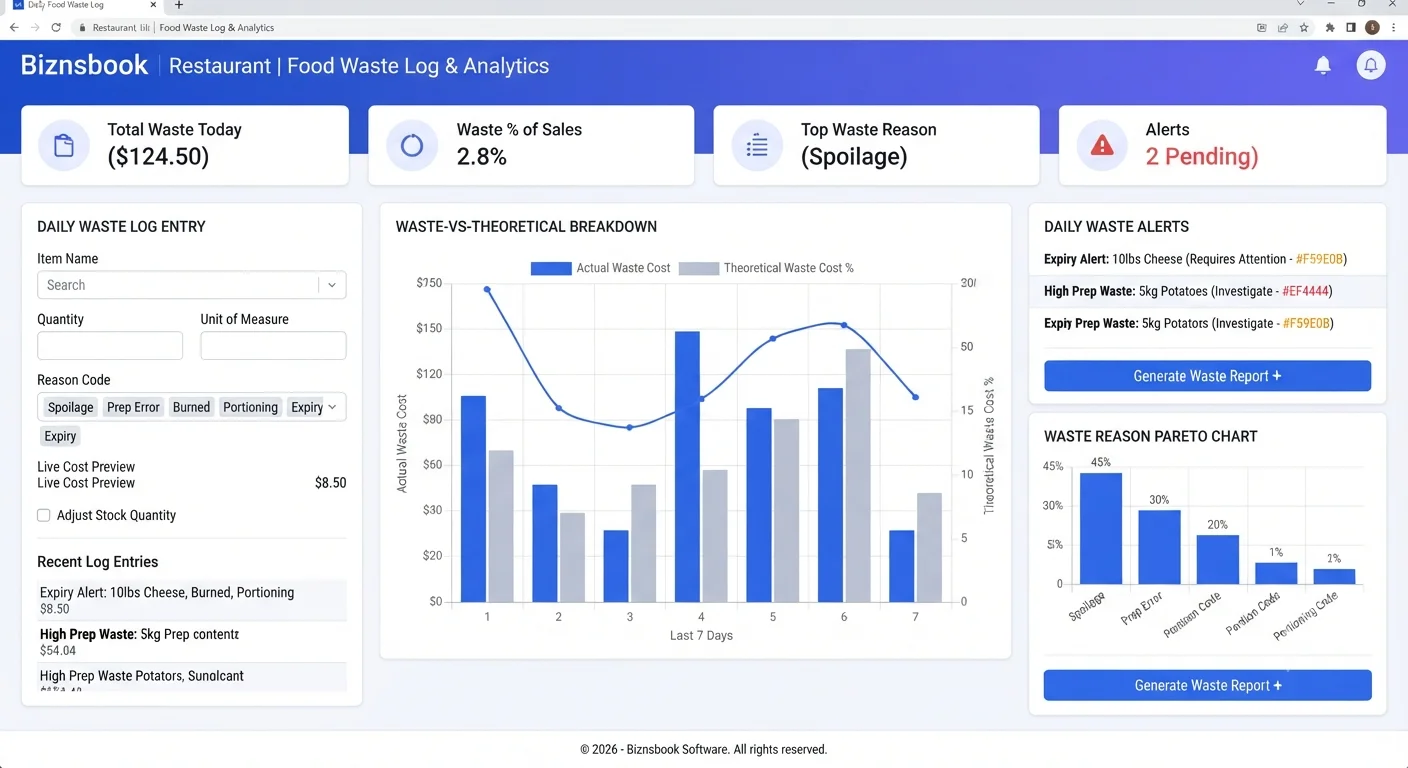
Unlogged waste inflates unexplained COGS variance
Kitchens throw away product daily, but if waste is not captured with cost and reason, variance reports show large unexplained gaps. Managers then debate theft or portioning without separating known spoilage and prep loss.
Generic waste notes also block action. Without configurable reason codes — spoilage, over-production, dropped dish, employee meal — teams cannot see which failure mode to fix first.
When waste does not reduce stock, on-hand quantities stay wrong and par-level ordering overstates need. The result is double loss: wasted product plus unnecessary purchasing.
Why this happens
- Waste is discussed verbally but not entered in the system same shift.
- Reason codes are unused or not configured for categories that need notes.
- Auto-adjust stock on waste is off while teams expect inventory to match reality.
- Daily waste-cost threshold alerts are not set, so spikes go unnoticed.
Biznsbook addresses this through Waste log, reason codes, waste vs theoretical when Restaurant, Inventory, and POS are licensed — recipes pull live ingredient costs, POS sales drive theoretical COGS and optional auto-depletion, and purchasing workflows stay in the same ERP.
Finance teams lose days each month reconciling versions that should never have diverged. Naming Biznsbook screens as the system of record — and closing periods when agreed — prevents silent edits that auditors flag immediately.
Step-by-step: Log Restaurant Food Waste
Built for restaurant owners, kitchen managers, and operations leads running recipe-based food costing, POS-linked depletion, and back-of-house controls in Biznsbook.
- Configure reason codes. Review seeded defaults — spoilage, over-production, dropped dish, employee meal, QC rejection, theft/loss — rename, reorder, activate, and flag codes that require a note.
- Set waste controls in settings. Enable auto-adjust stock on waste when you want logging to post outbound adjustments, and set a daily waste-cost alert threshold.
- Log waste with live cost preview. Record item, date, quantity, unit, reason, and notes; the form shows cost as you type using live average cost.
- Enforce notes on sensitive codes. Block save when a requires-note reason is selected without explanation, improving audit quality for theft/loss and similar events.
- Review Waste Summary report. Use KPI cards, by-category doughnut, 14-day cost chart, and top ten wasted items to spot patterns by period.
- Read waste vs theoretical view. Compare logged waste, unexplained remainder, and explained percentage to quantify how much COGS variance waste logging already covers.
- Export and coach by reason. Filter by date, reason, and category, export to Excel, then coach prep and service teams on the top two recurring reason categories.
Review results after the first full weekly cycle. Adjust roles, mappings, or approvals where the same exception repeats.
Screen-level flows live in the Help Center. This guide focuses on the business process; help articles cover click-by-click navigation.
Common mistakes to avoid
- Mistake 1: Waste is discussed verbally but not entered in the system same shift. Repeating this each month usually shows up first in COGS variance reports or depletion failure logs.
- Mistake 2: Reason codes are unused or not configured for categories that need notes. Repeating this each month usually shows up first in COGS variance reports or depletion failure logs.
- Mistake 3: Auto-adjust stock on waste is off while teams expect inventory to match reality. Repeating this each month usually shows up first in COGS variance reports or depletion failure logs.
- Mistake 4: Daily waste-cost threshold alerts are not set, so spikes go unnoticed. Repeating this each month usually shows up first in COGS variance reports or depletion failure logs.
Track recurring exceptions in month-end notes; each should map to a control above.
Best practices that hold up as you scale
- Configure reason codes — Review seeded defaults — spoilage, over-production, dropped dish, employee meal, QC rejection, theft/loss — rename, reorder, activate, and flag codes that require a note.
- Set waste controls in settings — Enable auto-adjust stock on waste when you want logging to post outbound adjustments, and set a daily waste-cost alert threshold.
- Log waste with live cost preview — Record item, date, quantity, unit, reason, and notes; the form shows cost as you type using live average cost.
- Enforce notes on sensitive codes — Block save when a requires-note reason is selected without explanation, improving audit quality for theft/loss and similar events.
- Review Waste Summary report — Use KPI cards, by-category doughnut, 14-day cost chart, and top ten wasted items to spot patterns by period.
Teams that activate recipes before enabling auto-deplete, review COGS variance weekly, and log waste at the point of discard avoid the month-end surprises that inflate food cost.
How Biznsbook supports this workflow
Waste log is documented in Biznsbook Restaurant capabilities. Use it as part of a controlled finance process — posting, review, and period close — not as an isolated export. When Sales, Purchase, Inventory, Taxation, Expense, or Finance Management modules are enabled, related documents can post through the central accounting posting service with double-entry validation.
reason codes is documented in Biznsbook Restaurant capabilities. Use it as part of a controlled finance process — posting, review, and period close — not as an isolated export. When Sales, Purchase, Inventory, Taxation, Expense, or Finance Management modules are enabled, related documents can post through the central accounting posting service with double-entry validation.
waste vs theoretical is documented in Biznsbook Restaurant capabilities. Use it as part of a controlled finance process — posting, review, and period close — not as an isolated export. When Sales, Purchase, Inventory, Taxation, Expense, or Finance Management modules are enabled, related documents can post through the central accounting posting service with double-entry validation.
Restaurant permissions separate recipe management, waste logging, par levels, floor plans, KDS, reservations, and settings. Inventory and POS are prerequisites for depletion and costing.
Suggested implementation timeline
- Week 1: Document current process gaps and configure Waste log with finance owner sign-off.
- Weeks 2–3: Pilot on one month or one entity; post all test transactions through Biznsbook; freeze parallel spreadsheet journals.
- Week 4: Run first trial balance or report tie-out; fix mapping and permission issues.
- Month 2–3: Roll out to full team; add approvals and period close cadence from this guide.
- Ongoing: Monthly review using waste logging habit and leadership dashboard.
Metrics to track monthly
- Food cost % vs target (theoretical ÷ POS sales)
- COGS variance % by ingredient (red / amber / green)
- Failed or stuck sale depletions
- Today waste cost vs daily threshold
- Par level shortages and unread supplier price alerts
Start with three metrics; trend direction matters more than a single point-in-time snapshot.
Spreadsheet / manual books vs integrated ERP
Compare typical manual finance work with Biznsbook Waste log and related capabilities.
| Capability | Manual / Spreadsheet | Biznsbook |
|---|---|---|
| Capture timing | ❌ End-of-day estimates | ✅ Log at point of waste |
| Cost visibility | ❌ Unknown until count | ✅ Live average-cost preview |
| Reason detail | ❌ Free-text only | ✅ Configurable reason codes |
| Stock impact | ❌ Separate adjustment | ✅ Optional auto-adjust on log |
| Variance context | ❌ Total gap only | ✅ Waste vs theoretical split |
| Alerting | ❌ None | ✅ Daily waste-cost threshold |
Waste logging habit
Place Log Waste on the shift opener checklist and review today's waste cost on the dashboard at handover. Same-shift logging is the biggest lever for explained variance and accurate stock.
Document this in your finance SOP and revisit each quarter as transaction volume or entity structure changes.
Frequently asked questions
Does logging waste reduce stock?
Only when auto-adjust stock on waste is enabled in settings; then an outbound adjustment tagged RestaurantWaste posts automatically.
What are default reason codes?
Six defaults are seeded on licensing: spoilage, over-production, dropped dish, employee meal, QC rejection, and theft/loss.
How does waste relate to COGS variance?
The Waste vs Theoretical view splits variance into logged waste and unexplained remainder so you know how much variance is explained.
Who can log waste?
Logging requires Manage Waste permission; summary and export need View Reports; reason-code editing needs Manage Settings.
How this differs by industry
Retail
Fast-casual locations can require notes on dropped-dish and over-production codes to reduce repeat errors during peak service.
Wholesale & distribution
Commissary kitchens logging batch spoilage keep central stock honest before product ships to satellite stores.
Manufacturing
Franchise groups can compare waste-by-reason donuts across units and coach locations with high unexplained variance remainder.