How to Manage Restaurant Par Levels
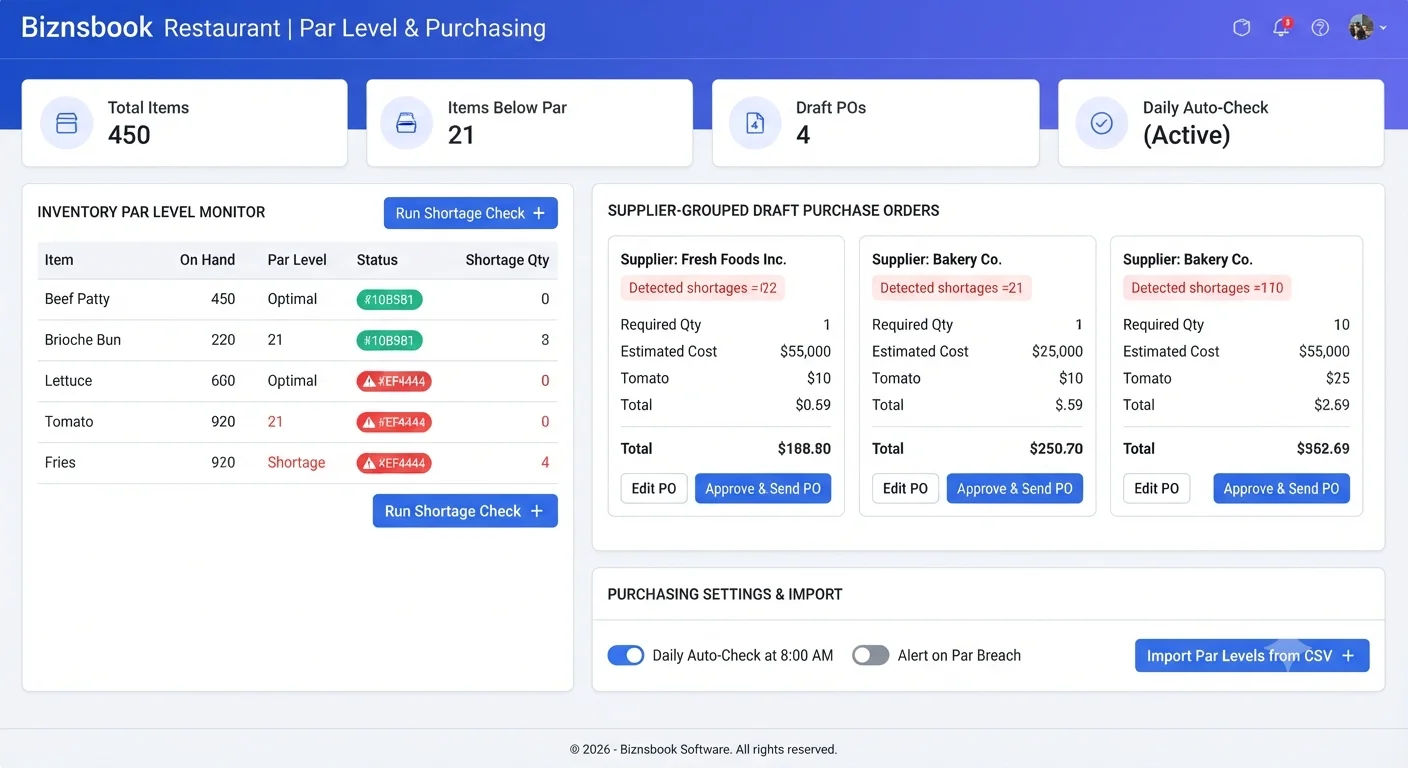
Stockouts and over-ordering both start without par discipline
Kitchens run out of key ingredients during service when no one watches reorder points consistently. Emergency purchases raise cost and disrupt prep plans already in motion.
The opposite failure is blanket ordering from habit. Without par targets tied to live stock, walk-in coolers fill with excess that spoils before use, especially on volatile produce lines.
When purchase orders are built manually from memory, unit prices drift from last paid rates and preferred suppliers are skipped, weakening negotiated savings.
Why this happens
- Par levels are not defined per item and warehouse for critical ingredients.
- Preferred supplier is missing, so auto-generation skips lines silently.
- Daily par-check job or on-demand Generate Orders is unused.
- Draft POs from par runs are not reviewed in Order History.
Biznsbook addresses this through Par levels, draft purchase orders, order history when Restaurant, Inventory, and POS are licensed — recipes pull live ingredient costs, POS sales drive theoretical COGS and optional auto-depletion, and purchasing workflows stay in the same ERP.
Finance teams lose days each month reconciling versions that should never have diverged. Naming Biznsbook screens as the system of record — and closing periods when agreed — prevents silent edits that auditors flag immediately.
Step-by-step: Manage Restaurant Par Levels
Built for restaurant owners, kitchen managers, and operations leads running recipe-based food costing, POS-linked depletion, and back-of-house controls in Biznsbook.
- Define par per item and warehouse. Set target on-hand quantity, minimum order quantity, preferred supplier, unit, and lead time for each ingredient you must never run out of.
- Review Par Levels screen status. Use green, amber, and red indicators with current stock vs par and the exact suggested order quantity respecting minimum order qty.
- Enable daily auto-generate if desired. Turn on auto-generate purchase orders in settings so a morning job creates draft POs and raises a deduplicated in-app alert.
- Run Generate Orders on demand. Create the same supplier-grouped draft POs anytime stock drops before the next scheduled check.
- Review and approve draft POs. Open each draft purchase order, verify quantities and pre-filled unit prices from supplier price history, then submit through normal purchasing workflow.
- Track runs in Order History. Audit every generation with date, trigger, lines, status, and links to created POs; note skipped groups with no preferred supplier.
- Bulk-import large par lists. Load par levels from CSV using item code, par qty, min order qty, and optional supplier when onboarding many SKUs at once.
Review results after the first full weekly cycle. Adjust roles, mappings, or approvals where the same exception repeats.
Screen-level flows live in the Help Center. This guide focuses on the business process; help articles cover click-by-click navigation.
Common mistakes to avoid
- Mistake 1: Par levels are not defined per item and warehouse for critical ingredients. Repeating this each month usually shows up first in COGS variance reports or depletion failure logs.
- Mistake 2: Preferred supplier is missing, so auto-generation skips lines silently. Repeating this each month usually shows up first in COGS variance reports or depletion failure logs.
- Mistake 3: Daily par-check job or on-demand Generate Orders is unused. Repeating this each month usually shows up first in COGS variance reports or depletion failure logs.
- Mistake 4: Draft POs from par runs are not reviewed in Order History. Repeating this each month usually shows up first in COGS variance reports or depletion failure logs.
Track recurring exceptions in month-end notes; each should map to a control above.
Best practices that hold up as you scale
- Define par per item and warehouse — Set target on-hand quantity, minimum order quantity, preferred supplier, unit, and lead time for each ingredient you must never run out of.
- Review Par Levels screen status — Use green, amber, and red indicators with current stock vs par and the exact suggested order quantity respecting minimum order qty.
- Enable daily auto-generate if desired — Turn on auto-generate purchase orders in settings so a morning job creates draft POs and raises a deduplicated in-app alert.
- Run Generate Orders on demand — Create the same supplier-grouped draft POs anytime stock drops before the next scheduled check.
- Review and approve draft POs — Open each draft purchase order, verify quantities and pre-filled unit prices from supplier price history, then submit through normal purchasing workflow.
Teams that activate recipes before enabling auto-deplete, review COGS variance weekly, and log waste at the point of discard avoid the month-end surprises that inflate food cost.
How Biznsbook supports this workflow
Par levels is documented in Biznsbook Restaurant capabilities. Use it as part of a controlled finance process — posting, review, and period close — not as an isolated export. When Sales, Purchase, Inventory, Taxation, Expense, or Finance Management modules are enabled, related documents can post through the central accounting posting service with double-entry validation.
draft purchase orders is documented in Biznsbook Restaurant capabilities. Use it as part of a controlled finance process — posting, review, and period close — not as an isolated export. When Sales, Purchase, Inventory, Taxation, Expense, or Finance Management modules are enabled, related documents can post through the central accounting posting service with double-entry validation.
order history is documented in Biznsbook Restaurant capabilities. Use it as part of a controlled finance process — posting, review, and period close — not as an isolated export. When Sales, Purchase, Inventory, Taxation, Expense, or Finance Management modules are enabled, related documents can post through the central accounting posting service with double-entry validation.
Restaurant permissions separate recipe management, waste logging, par levels, floor plans, KDS, reservations, and settings. Inventory and POS are prerequisites for depletion and costing.
Suggested implementation timeline
- Week 1: Document current process gaps and configure Par levels with finance owner sign-off.
- Weeks 2–3: Pilot on one month or one entity; post all test transactions through Biznsbook; freeze parallel spreadsheet journals.
- Week 4: Run first trial balance or report tie-out; fix mapping and permission issues.
- Month 2–3: Roll out to full team; add approvals and period close cadence from this guide.
- Ongoing: Monthly review using par level ownership and leadership dashboard.
Metrics to track monthly
- Food cost % vs target (theoretical ÷ POS sales)
- COGS variance % by ingredient (red / amber / green)
- Failed or stuck sale depletions
- Today waste cost vs daily threshold
- Par level shortages and unread supplier price alerts
Start with three metrics; trend direction matters more than a single point-in-time snapshot.
Spreadsheet / manual books vs integrated ERP
Compare typical manual finance work with Biznsbook Par levels and related capabilities.
| Capability | Manual / Spreadsheet | Biznsbook |
|---|---|---|
| Shortage detection | ❌ Visual walk-in check | ✅ Live stock vs par with colors |
| Order quantity | ❌ Rounded guess | ✅ Suggested qty with min order rules |
| PO creation | ❌ Manual per supplier | ✅ Grouped draft POs by supplier |
| Unit pricing | ❌ Last invoice memory | ✅ Pre-filled from price history |
| Automation | ❌ Ad hoc reminders | ✅ Daily job or on-demand generate |
| Spend control | ❌ Direct submit risk | ✅ Always Draft until human review |
Par level ownership
Assign one purchasing owner to review Par Level Shortages on the dashboard daily and clear draft POs from auto-runs before lunch service. Skipped supplier groups should be fixed same day.
Document this in your finance SOP and revisit each quarter as transaction volume or entity structure changes.
Frequently asked questions
Are generated purchase orders submitted automatically?
No. Generated orders are always Draft and require manual review and approval before commitment.
When does the daily par check run?
The optional background job runs every morning at 06:00 UTC and raises at most one in-app alert per day.
What if an item has no preferred supplier?
That group is recorded as skipped in Order History so you can assign a supplier and regenerate.
Can I import many par levels at once?
Yes. Use CSV bulk import with item code, par quantity, minimum order quantity, and optional supplier.
How this differs by industry
Retail
Fast-casual stores with limited storage set tighter par levels on high-velocity proteins and produce to balance service risk and spoilage.
Wholesale & distribution
Commissary hubs par raw ingredients separately from each satellite warehouse so central production does not starve downstream units.
Manufacturing
Franchise purchasing teams import par levels by item code across new openings, then rely on Order History to audit each generation run.