How to Run a Kitchen Display System
Paper tickets and verbal calls break under volume
During rush periods, shouted orders and handwritten chits get lost or sequence wrong. Grill, fry, and cold stations work from different interpretations of the same check, delaying fire times and increasing remakes.
Without age visibility, oldest tickets blend with new ones. Guests wait disproportionately long while newer tables receive food first, hurting reviews and table turns.
When every course prints at once, desserts age on the board during starters. Managers lack ticket-time data when kitchens rely on memory, so station thresholds stay unchanged.
Why this happens
- KDS is not enabled in Restaurant settings though POS sales are active.
- Recipes lack Default KDS Station assignment for routing.
- Course 2+ is never fired from the POS table chip after starters clear.
- Ticket lifecycle steps are skipped, breaking Ready notifications for front of house.
Biznsbook addresses this through KDS station boards, ticket routing, KDS analytics when Restaurant, Inventory, and POS are licensed — recipes pull live ingredient costs, POS sales drive theoretical COGS and optional auto-depletion, and purchasing workflows stay in the same ERP.
Finance teams lose days each month reconciling versions that should never have diverged. Naming Biznsbook screens as the system of record — and closing periods when agreed — prevents silent edits that auditors flag immediately.
Step-by-step: Run a Kitchen Display System
Built for restaurant owners, kitchen managers, and operations leads running recipe-based food costing, POS-linked depletion, and back-of-house controls in Biznsbook.
- Enable KDS in Restaurant settings. Switch KDS on when stations are configured; until then POS sales complete as before with no tickets created.
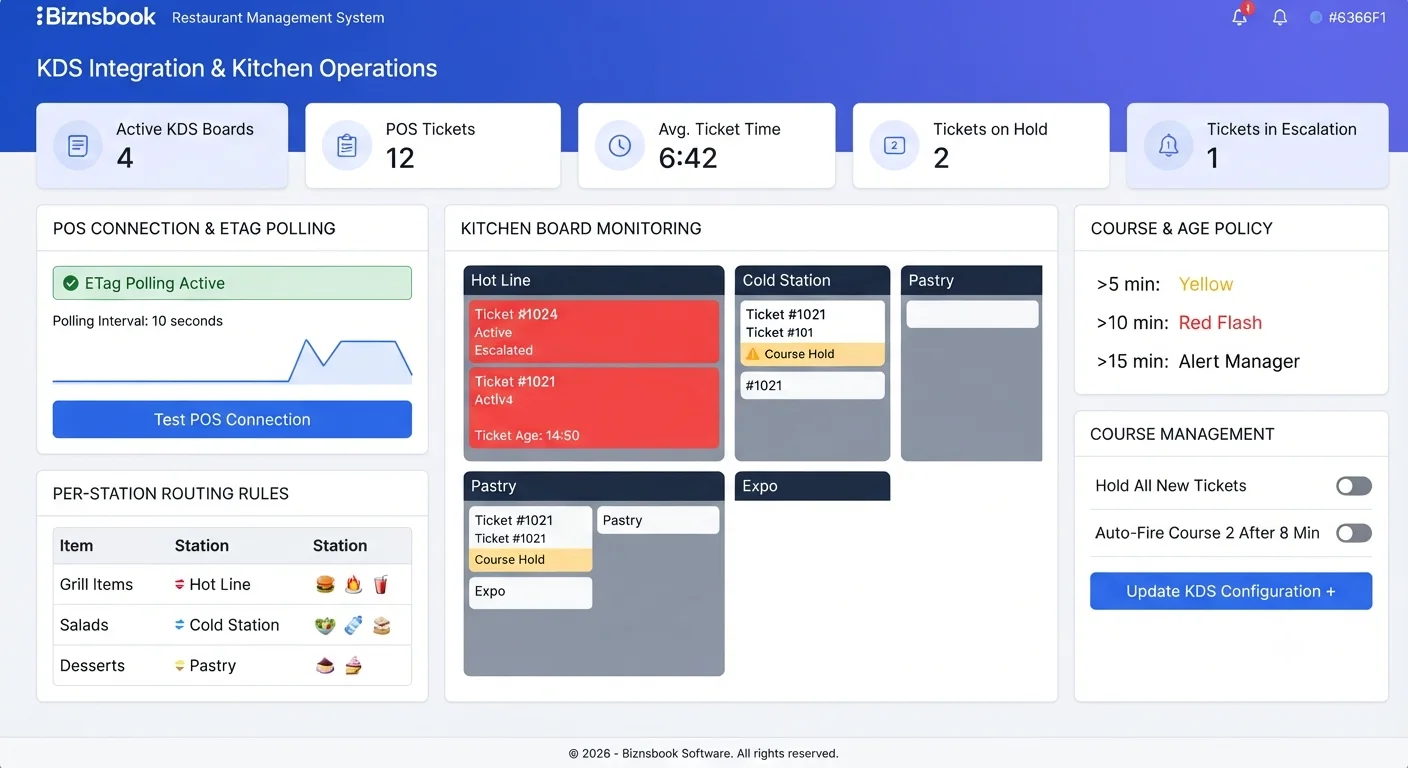
- Configure stations and thresholds. Name each station, set display color, warn and urgent seconds, sort order, and ticket font size for kitchen screens.
- Assign Default KDS Station on recipes. Route Grill, Fryer, Cold, Bar, Expeditor, or All-Kitchen per dish so mixed orders split into one ticket per station automatically.
- Open station boards on kitchen screens. Use the full-screen dark layout with 10-second polling and ETag / 304 for unchanged payloads — no special hardware or SignalR required.
- Pace courses from POS. Course 1 fires on sale post; set Course 2+ on the table banner or modifier modal, then tap Fire when expo is ready so held lines appear on the next poll.
- Drive ticket lifecycle with one tap. Move tickets Acknowledge → Start → Ready → Bump, use Void when needed, and optionally bump individual lines until the ticket auto-completes.
- Review KDS Analytics weekly. Track average ticket time per station, volume by hour, average covers per ticket, and dashboard tiles for active tickets and oldest age.
Review results after the first full weekly cycle. Adjust roles, mappings, or approvals where the same exception repeats.
Screen-level flows live in the Help Center. This guide focuses on the business process; help articles cover click-by-click navigation.
Common mistakes to avoid
- Mistake 1: KDS is not enabled in Restaurant settings though POS sales are active. Repeating this each month usually shows up first in COGS variance reports or depletion failure logs.
- Mistake 2: Recipes lack Default KDS Station assignment for routing. Repeating this each month usually shows up first in COGS variance reports or depletion failure logs.
- Mistake 3: Course 2+ is never fired from the POS table chip after starters clear. Repeating this each month usually shows up first in COGS variance reports or depletion failure logs.
- Mistake 4: Ticket lifecycle steps are skipped, breaking Ready notifications for front of house. Repeating this each month usually shows up first in COGS variance reports or depletion failure logs.
Track recurring exceptions in month-end notes; each should map to a control above.
Best practices that hold up as you scale
- Enable KDS in Restaurant settings — Switch KDS on when stations are configured; until then POS sales complete as before with no tickets created.
- Configure stations and thresholds — Name each station, set display color, warn and urgent seconds, sort order, and ticket font size for kitchen screens.
- Assign Default KDS Station on recipes — Route Grill, Fryer, Cold, Bar, Expeditor, or All-Kitchen per dish so mixed orders split into one ticket per station automatically.
- Open station boards on kitchen screens — Use the full-screen dark layout with 10-second polling and ETag / 304 for unchanged payloads — no special hardware or SignalR required.
- Pace courses from POS — Course 1 fires on sale post; set Course 2+ on the table banner or modifier modal, then tap Fire when expo is ready so held lines appear on the next poll.
Teams that activate recipes before enabling auto-deplete, review COGS variance weekly, and log waste at the point of discard avoid the month-end surprises that inflate food cost.
How Biznsbook supports this workflow
KDS station boards is documented in Biznsbook Restaurant capabilities. Use it as part of a controlled finance process — posting, review, and period close — not as an isolated export. When Sales, Purchase, Inventory, Taxation, Expense, or Finance Management modules are enabled, related documents can post through the central accounting posting service with double-entry validation.
ticket routing is documented in Biznsbook Restaurant capabilities. Use it as part of a controlled finance process — posting, review, and period close — not as an isolated export. When Sales, Purchase, Inventory, Taxation, Expense, or Finance Management modules are enabled, related documents can post through the central accounting posting service with double-entry validation.
KDS analytics is documented in Biznsbook Restaurant capabilities. Use it as part of a controlled finance process — posting, review, and period close — not as an isolated export. When Sales, Purchase, Inventory, Taxation, Expense, or Finance Management modules are enabled, related documents can post through the central accounting posting service with double-entry validation.
Restaurant permissions separate recipe management, waste logging, par levels, floor plans, KDS, reservations, and settings. Inventory and POS are prerequisites for depletion and costing.
Suggested implementation timeline
- Week 1: Document current process gaps and configure KDS station boards with finance owner sign-off.
- Weeks 2–3: Pilot on one month or one entity; post all test transactions through Biznsbook; freeze parallel spreadsheet journals.
- Week 4: Run first trial balance or report tie-out; fix mapping and permission issues.
- Month 2–3: Roll out to full team; add approvals and period close cadence from this guide.
- Ongoing: Monthly review using kds rollout tip and leadership dashboard.
Metrics to track monthly
- Food cost % vs target (theoretical ÷ POS sales)
- COGS variance % by ingredient (red / amber / green)
- Failed or stuck sale depletions
- Today waste cost vs daily threshold
- Par level shortages and unread supplier price alerts
Start with three metrics; trend direction matters more than a single point-in-time snapshot.
Spreadsheet / manual books vs integrated ERP
Compare typical manual finance work with Biznsbook KDS station boards and related capabilities.
| Capability | Manual / Spreadsheet | Biznsbook |
|---|---|---|
| Ticket source | ❌ Handwritten chits | ✅ Auto from completed POS sale |
| Station clarity | ❌ Verbal filtering | ✅ Per-station split tickets |
| Course pacing | ❌ All courses at once | ✅ Hold Course 2+ until Fire |
| Priority signal | ❌ Shouting loudest | ✅ Age color green → red |
| Lifecycle | ❌ Informal done marks | ✅ Acknowledge through Bump |
| Performance data | ❌ Anecdotal | ✅ KDS Analytics by station and hour |
KDS rollout tip
Pilot one busy dinner service with Expeditor view, course fire, and analytics logging enabled. Tune warn and urgent seconds from real ticket-time data before rolling boards to every station.
Document this in your finance SOP and revisit each quarter as transaction volume or entity structure changes.
Frequently asked questions
Does KDS need special hardware?
No. Station boards run in a browser with 10-second ETag polling; no SignalR, printers, or dedicated KDS devices are required.
How are mixed orders handled?
Each sold item routes via its recipe station, creating separate tickets per station for the same order.
Why is Course 2 missing on the board?
Course 2+ stays held until FOH taps Fire on the table chip. Course 1 always appears when the sale posts.
Do online orders appear on KDS?
Yes. Online and QR-table orders create KDS tickets automatically (course 1) with appropriate ticket numbering when ordering is enabled.
How this differs by industry
Retail
Fast-casual kitchens during lunch rush use age escalation so fry and grill stations always fire oldest tickets first without expo shouting.
Wholesale & distribution
Commissary production lines can route prep batches to Cold or All-Kitchen stations while retail-facing units run Grill and Bar separately.
Manufacturing
Franchise trainers standardize station names and warn/urgent thresholds so every location's ticket behavior matches brand service standards.