How to Manage Customer Relationships Efficiently
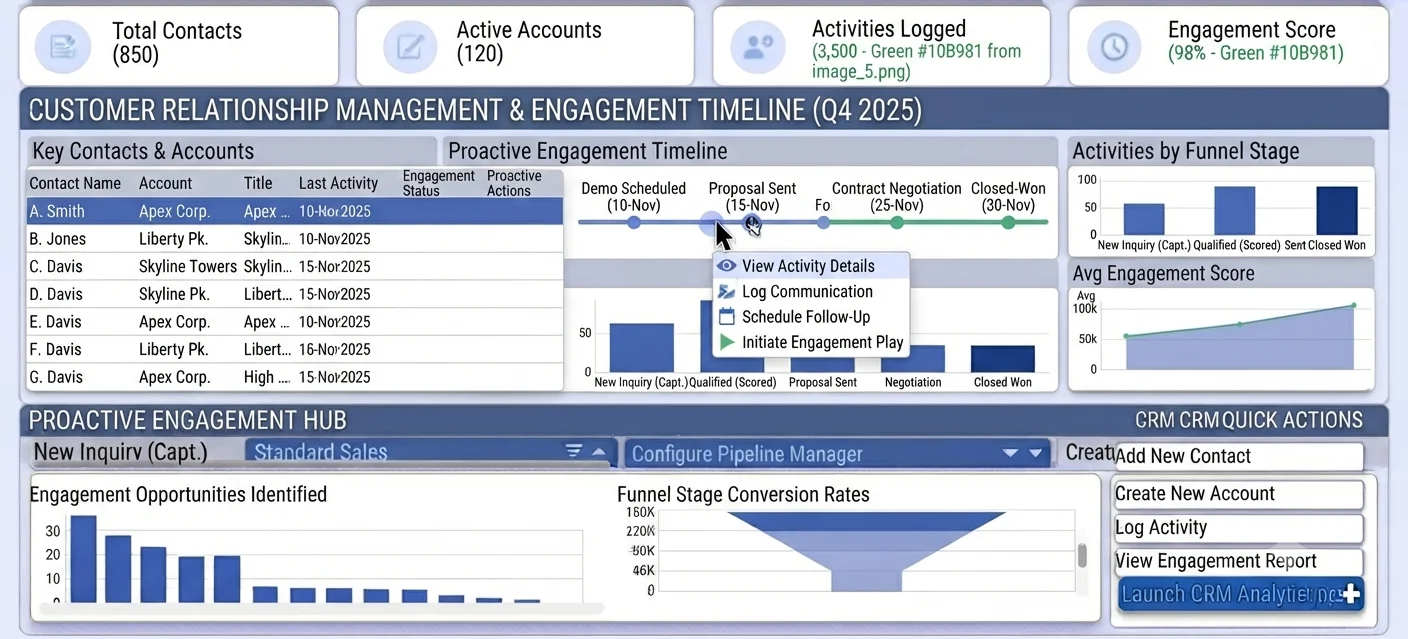
Customer context disappears when systems are fragmented
Customers experience your company as one brand, but internal teams often operate in silos. Sales, support, and finance keep separate notes, so key context is missing during calls and follow-ups.
When a relationship owner leaves or changes territory, history is lost. New reps restart discovery, which frustrates customers and weakens trust built over previous interactions.
Inefficient relationship management also drives reactive behavior. Teams respond only when a problem appears instead of proactively guiding accounts toward success and expansion.
Why this happens
- Contact and account records are incomplete or duplicated.
- Activities are tracked outside CRM and not linked to accounts.
- Timeline history is not reviewed before major customer touchpoints.
- Ownership changes occur without documented handoff context.
Biznsbook addresses this through CRM contacts, accounts, activities, timeline when the CRM module is enabled. Add Business Automation and Communication Center for drip nurture on crm.lead.created; add Sales and Accounting for order-to-cash when deals close.
Finance teams lose days each month reconciling versions that should never have diverged. Naming Biznsbook screens as the system of record — and closing periods when agreed — prevents silent edits that auditors flag immediately.
Step-by-step: Manage Customer Relationships Efficiently
Built for sales reps, managers, and RevOps leads who need a repeatable funnel — not heroic inbox chasing. Adapt roles to your team size.
- Clean contact and account masters. Merge duplicates and standardize key fields such as role, segment, and decision authority.
- Log every critical interaction. Capture calls, meetings, and follow-ups as CRM activities tied to account records.
- Use timeline before outreach. Review account timeline to understand recent issues, promises, and open tasks before contacting customers.
- Define account ownership rules. Set clear primary and backup owners for continuity during leave or territory changes.
- Create routine account reviews. Run monthly account health check-ins across pipeline, support events, and renewal risk signals.
- Align cross-team notes. Ensure sales and support updates are visible on the same account context where possible.
- Audit relationship hygiene. Review stale contacts, missing activities, and unresolved tasks to maintain usable CRM context.
Review results after the first full weekly cycle. Adjust roles, mappings, or approvals where the same exception repeats.
Screen-level flows live in the Help Center (tax setup, expense claims, sale invoices). This guide focuses on finance process; help articles cover navigation.
Common mistakes to avoid
- Mistake 1: Contact and account records are incomplete or duplicated. Repeating this each month usually shows up first in pipeline velocity or lead aging reports.
- Mistake 2: Activities are tracked outside CRM and not linked to accounts. Repeating this each month usually shows up first in pipeline velocity or lead aging reports.
- Mistake 3: Timeline history is not reviewed before major customer touchpoints. Repeating this each month usually shows up first in pipeline velocity or lead aging reports.
- Mistake 4: Ownership changes occur without documented handoff context. Repeating this each month usually shows up first in pipeline velocity or lead aging reports.
Track recurring exceptions in month-end notes; each should map to a control above.
Best practices that hold up as you scale
- Clean contact and account masters — Merge duplicates and standardize key fields such as role, segment, and decision authority.
- Log every critical interaction — Capture calls, meetings, and follow-ups as CRM activities tied to account records.
- Use timeline before outreach — Review account timeline to understand recent issues, promises, and open tasks before contacting customers.
- Define account ownership rules — Set clear primary and backup owners for continuity during leave or territory changes.
- Create routine account reviews — Run monthly account health check-ins across pipeline, support events, and renewal risk signals.
Teams that review pipeline and lead aging weekly close more consistently than teams that only report at month-end.
How Biznsbook supports this workflow
CRM contacts is documented in Biznsbook CRM / Sales capabilities. Use it as part of a controlled finance process — posting, review, and period close — not as an isolated export. When Sales, Purchase, Inventory, Taxation, Expense, or Finance Management modules are enabled, related documents can post through the central accounting posting service with double-entry validation.
accounts is documented in Biznsbook CRM / Sales capabilities. Use it as part of a controlled finance process — posting, review, and period close — not as an isolated export. When Sales, Purchase, Inventory, Taxation, Expense, or Finance Management modules are enabled, related documents can post through the central accounting posting service with double-entry validation.
activities is documented in Biznsbook CRM / Sales capabilities. Use it as part of a controlled finance process — posting, review, and period close — not as an isolated export. When Sales, Purchase, Inventory, Taxation, Expense, or Finance Management modules are enabled, related documents can post through the central accounting posting service with double-entry validation.
timeline is documented in Biznsbook CRM / Sales capabilities. Use it as part of a controlled finance process — posting, review, and period close — not as an isolated export. When Sales, Purchase, Inventory, Taxation, Expense, or Finance Management modules are enabled, related documents can post through the central accounting posting service with double-entry validation.
CRM roles (rep, manager, admin) govern export, settings, and reassignment. Workflow automations live in Business Automation — not buried in personal inboxes.
Suggested implementation timeline
- Week 1: Document current process gaps and configure CRM contacts with finance owner sign-off.
- Weeks 2–3: Pilot on one month or one entity; post all test transactions through Biznsbook; freeze parallel spreadsheet journals.
- Week 4: Run first trial balance or report tie-out; fix mapping and permission issues.
- Month 2–3: Roll out to full team; add approvals and period close cadence from this guide.
- Ongoing: Monthly review using relationship ownership playbook and leadership dashboard.
Metrics to track monthly
- Lead response time (minutes from create to first activity)
- Lead-to-opportunity conversion rate by source
- Pipeline velocity and stage aging days
- Win rate and average deal size
- Forecast vs actual revenue (closed-won)
Start with three metrics; trend direction matters more than a single point-in-time snapshot.
Spreadsheet / manual books vs integrated ERP
Compare typical manual finance work with Biznsbook CRM contacts and related capabilities.
| Capability | Manual / Spreadsheet | Biznsbook |
|---|---|---|
| Account context | ❌ Scattered notes | ✅ Unified CRM timeline |
| Contact quality | ❌ Duplicates and gaps | ✅ Governed contact master |
| Interaction logging | ❌ Personal trackers | ✅ Linked activities |
| Handoffs | ❌ Tribal knowledge | ✅ Documented ownership transitions |
| Proactive management | ❌ Issue driven | ✅ Scheduled account reviews |
| Team alignment | ❌ Siloed updates | ✅ Shared account history |
Relationship ownership playbook
Create a handoff checklist covering contacts, open commitments, risk signals, and next milestones. A repeatable playbook prevents account disruption during staffing changes.
Document this in your finance SOP and revisit each quarter as transaction volume or entity structure changes.
Frequently asked questions
What should always exist on an account record?
At minimum: key contacts, owner, segment, recent activities, and open actions. Missing these basics makes follow-up inconsistent and slows customer response.
How do timelines help relationship quality?
Timelines preserve context across teams and ownership changes, so customers do not need to repeat history in every interaction.
How often should accounts be reviewed?
Monthly for most SMBs, with weekly checks for strategic accounts or accounts showing churn risk signals.
Can this approach improve upsell outcomes?
Yes. Better account context helps reps identify expansion opportunities aligned with customer goals and recent engagement patterns.
How this differs by industry
Retail
Retail account teams can maintain stronger distributor relationships by logging all buying-cycle activities and reviewing timeline context before trade discussions.
Wholesale & distribution
Wholesale businesses should track procurement contacts, payment stakeholders, and service history in one account view to reduce communication friction.
Manufacturing
Manufacturers can improve continuity by storing technical, purchasing, and operations interactions on shared account timelines.