How to Track Sales Activities
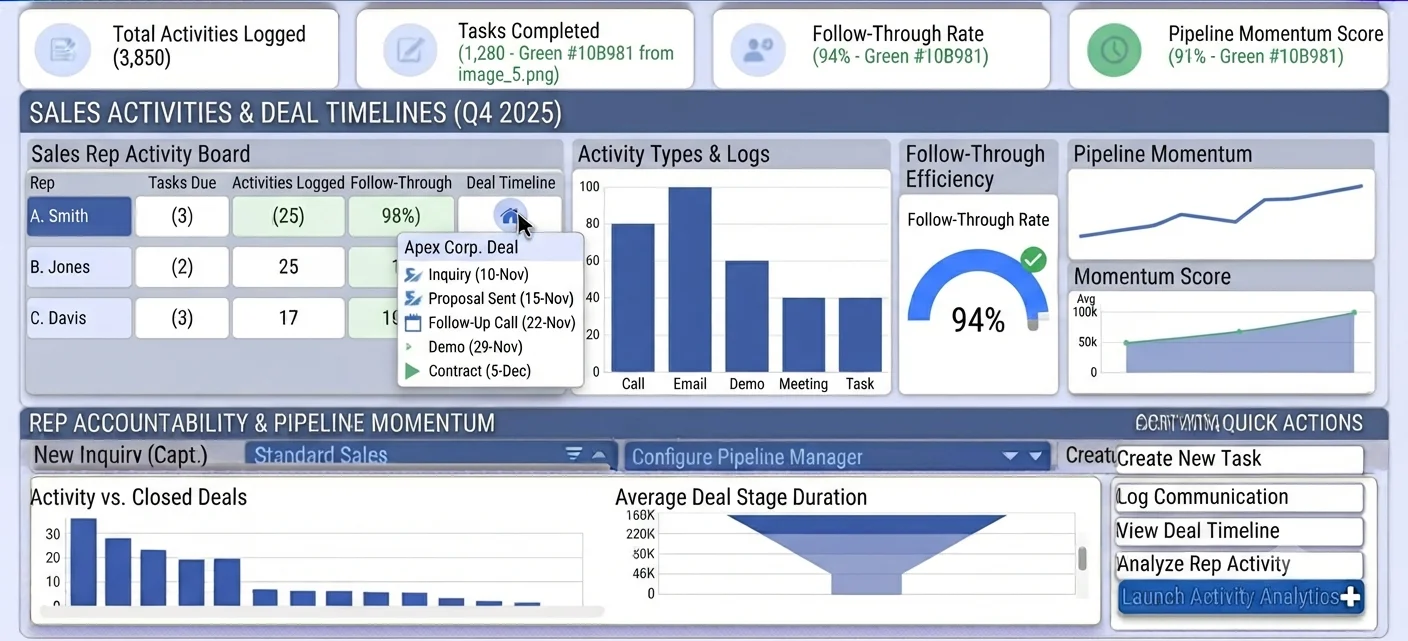
Activity blind spots create pipeline surprises
Pipelines can look healthy while execution is weak underneath. Without activity visibility, managers see stage labels but not whether meaningful customer interactions are actually happening.
Reps often keep personal reminders outside CRM, so overdue follow-ups are hidden until opportunities stall. This creates avoidable slippage and inconsistent customer experience.
When activity data is incomplete, performance reviews become subjective. Teams argue about effort rather than learning from objective patterns in follow-up behavior.
Why this happens
- Tasks are not consistently created after meetings or calls.
- Activities are logged outside CRM and not linked to records.
- Deal timeline is reviewed only when problems escalate.
- No SLA exists for overdue tasks and next actions.
Biznsbook addresses this through Activities, tasks, deal detail timeline when the CRM module is enabled. Add Business Automation and Communication Center for drip nurture on crm.lead.created; add Sales and Accounting for order-to-cash when deals close.
Finance teams lose days each month reconciling versions that should never have diverged. Naming Biznsbook screens as the system of record — and closing periods when agreed — prevents silent edits that auditors flag immediately.
Step-by-step: Track Sales Activities
Built for sales reps, managers, and RevOps leads who need a repeatable funnel — not heroic inbox chasing. Adapt roles to your team size.
- Define activity standards. Specify which interactions must be logged and what minimum detail each entry requires.
- Create tasks with every next step. Immediately assign tasks with due dates after meetings, demos, and stakeholder calls.
- Use deal detail timeline. Review deal timeline entries to verify activity sequence supports stage progression.
- Set overdue task alerts. Track overdue actions daily and escalate high-value opportunities with delayed follow-up.
- Link activity to outcomes. Correlate activity volume and quality with conversion and cycle-time performance.
- Coach from evidence. Use timeline history in one-on-ones to identify execution habits that need improvement.
- Run weekly hygiene checks. Audit deals with no recent activity and enforce cleanup before forecasting reviews.
Review results after the first full weekly cycle. Adjust roles, mappings, or approvals where the same exception repeats.
Screen-level flows live in the Help Center (tax setup, expense claims, sale invoices). This guide focuses on finance process; help articles cover navigation.
Common mistakes to avoid
- Mistake 1: Tasks are not consistently created after meetings or calls. Repeating this each month usually shows up first in pipeline velocity or lead aging reports.
- Mistake 2: Activities are logged outside CRM and not linked to records. Repeating this each month usually shows up first in pipeline velocity or lead aging reports.
- Mistake 3: Deal timeline is reviewed only when problems escalate. Repeating this each month usually shows up first in pipeline velocity or lead aging reports.
- Mistake 4: No SLA exists for overdue tasks and next actions. Repeating this each month usually shows up first in pipeline velocity or lead aging reports.
Track recurring exceptions in month-end notes; each should map to a control above.
Best practices that hold up as you scale
- Define activity standards — Specify which interactions must be logged and what minimum detail each entry requires.
- Create tasks with every next step — Immediately assign tasks with due dates after meetings, demos, and stakeholder calls.
- Use deal detail timeline — Review deal timeline entries to verify activity sequence supports stage progression.
- Set overdue task alerts — Track overdue actions daily and escalate high-value opportunities with delayed follow-up.
- Link activity to outcomes — Correlate activity volume and quality with conversion and cycle-time performance.
Teams that review pipeline and lead aging weekly close more consistently than teams that only report at month-end.
How Biznsbook supports this workflow
Activities is documented in Biznsbook CRM / Sales capabilities. Use it as part of a controlled finance process — posting, review, and period close — not as an isolated export. When Sales, Purchase, Inventory, Taxation, Expense, or Finance Management modules are enabled, related documents can post through the central accounting posting service with double-entry validation.
tasks is documented in Biznsbook CRM / Sales capabilities. Use it as part of a controlled finance process — posting, review, and period close — not as an isolated export. When Sales, Purchase, Inventory, Taxation, Expense, or Finance Management modules are enabled, related documents can post through the central accounting posting service with double-entry validation.
deal detail timeline is documented in Biznsbook CRM / Sales capabilities. Use it as part of a controlled finance process — posting, review, and period close — not as an isolated export. When Sales, Purchase, Inventory, Taxation, Expense, or Finance Management modules are enabled, related documents can post through the central accounting posting service with double-entry validation.
CRM roles (rep, manager, admin) govern export, settings, and reassignment. Workflow automations live in Business Automation — not buried in personal inboxes.
Suggested implementation timeline
- Week 1: Document current process gaps and configure Activities with finance owner sign-off.
- Weeks 2–3: Pilot on one month or one entity; post all test transactions through Biznsbook; freeze parallel spreadsheet journals.
- Week 4: Run first trial balance or report tie-out; fix mapping and permission issues.
- Month 2–3: Roll out to full team; add approvals and period close cadence from this guide.
- Ongoing: Monthly review using activity quality score and leadership dashboard.
Metrics to track monthly
- Lead response time (minutes from create to first activity)
- Lead-to-opportunity conversion rate by source
- Pipeline velocity and stage aging days
- Win rate and average deal size
- Forecast vs actual revenue (closed-won)
Start with three metrics; trend direction matters more than a single point-in-time snapshot.
Spreadsheet / manual books vs integrated ERP
Compare typical manual finance work with Biznsbook Activities and related capabilities.
| Capability | Manual / Spreadsheet | Biznsbook |
|---|---|---|
| Task ownership | ❌ Shared to-do memory | ✅ Assigned tasks with due dates |
| Activity logging | ❌ Personal notes | ✅ CRM-linked activity records |
| Deal context | ❌ Fragmented communication | ✅ Unified deal timeline |
| Overdue follow-up | ❌ Late discovery | ✅ Daily overdue monitoring |
| Coaching basis | ❌ Anecdotal | ✅ Timeline-backed evidence |
| Pipeline confidence | ❌ Status-based | ✅ Execution-based |
Activity quality score
Score activity logs by completeness, next-step clarity, and stakeholder coverage. Quality metrics encourage meaningful updates rather than checkbox logging.
Document this in your finance SOP and revisit each quarter as transaction volume or entity structure changes.
Frequently asked questions
How much activity detail is enough?
Capture objective next-step context: who was contacted, what was discussed, and what action is due next. Keep entries concise but actionable.
Should all reps follow the same activity rules?
Yes for core interactions. Consistent logging standards make coaching, forecasting, and cross-rep comparisons meaningful.
How often should managers review overdue tasks?
Daily for active pipelines. Quick intervention prevents small delays from turning into stage slippage.
Can activity volume replace conversion metrics?
No. Activity indicates effort, but conversion and cycle quality reveal whether that effort is effective.
How this differs by industry
Retail
Retail B2B reps can improve sell-through planning by logging store visits and replenishment discussions as traceable account activities.
Wholesale & distribution
Wholesale teams should tie key account calls and quote follow-ups to tasks so high-value opportunities never miss deadlines.
Manufacturing
Manufacturing deals often involve long cycles; timeline discipline helps teams track technical and commercial milestones in sequence.