Problem: Who is free
Field Service
A day board checks overlap, approved leave, working hours and the category's skill tags. A dispatcher can force the booking.

2:32 walkthrough of Biznsbook for Field Service TradesLiked it? Start free →
Book the visit, send the technician, issue parts from the van and raise one sale invoice for the job.
1 month free on every planChoose any plan to startExplore the free demo account →
Biznsbook for field service trades is the Field Service module. Customers are parties you already keep, with one or more service sites. The office schedules visits on a day board that refuses overlaps, leave, hours outside the window and missing skills unless a dispatcher forces the booking. Technicians work from My day: on the way, arrive, pause, complete, checklist, photo and signature. A van is a warehouse. Issuing a part reduces stock and posts cost of goods when the cost is above zero. The job has one sale invoice. A deposit taken first is a customer advance applied on that invoice. Public booking is /service/{your-slug} and waits for office approval unless you turn that off. Email sends through the company’s outbound email. SMS goes out through the company’s own Twilio connection, and contacts who opted out are skipped.
A whiteboard books the technician, a spreadsheet tracks parts, and the invoice is typed again at the end of the week.
Two jobs land in the same hour because the board does not see the other visit or the travel buffer.
Parts leave the van and the warehouse count changes only when someone remembers to type it.
A deposit and the final bill become two documents that do not know about each other.
A web form creates a job nobody approved, or the request sits in an inbox with no site.
Each operational pain maps to a specific Biznsbook app. Click through for feature detail.
Problem: Who is free
A day board checks overlap, approved leave, working hours and the category's skill tags. A dispatcher can force the booking.
Problem: Parts on the van
The van is a warehouse. Restock is a stock transfer. Issue and return move stock and post cost of goods when the cost is above zero.
Problem: One bill
Create invoice builds one sale invoice for the job. Lines already issued do not move stock or post cost of goods again. A second invoice is refused.
Problem: Money before the invoice
A deposit is an advance cash receipt tagged to the job. The invoice applies the remaining advance up to the invoice total.
Problem: Hours that match the rota
When Labour Scheduling is licensed, a published shift is the working window. No published shift that day means the technician is unavailable.
Problem: The customer record
The customer is a party. Party 360 lists field jobs for the site customer or the bill-to party.
Start a 1-month free trial on any plan, or book a demo and we will walk you through it.
Real screens from a Biznsbook demo company, not mock-ups.
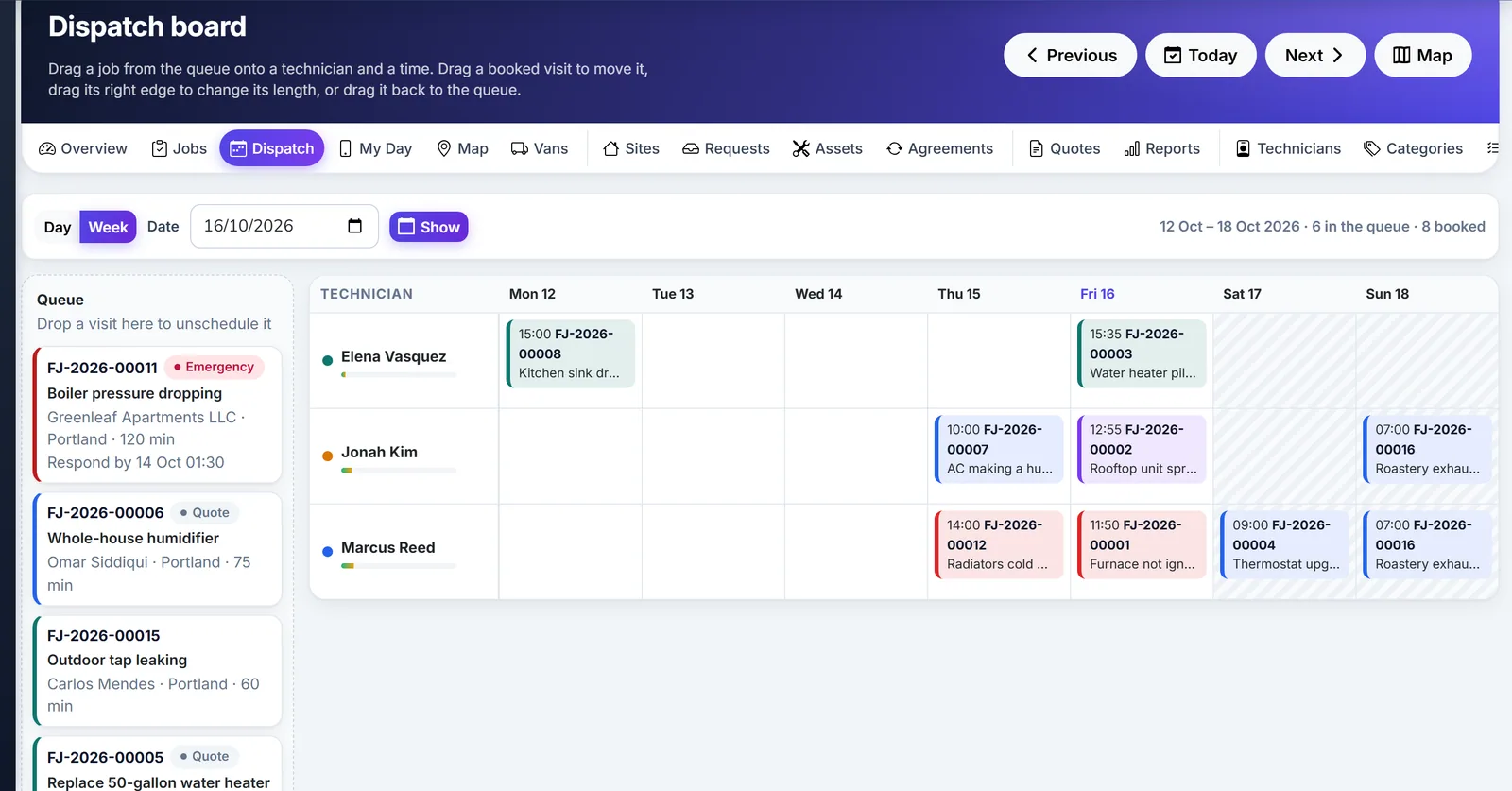
Biznsbook field service dispatch board by technician and week.
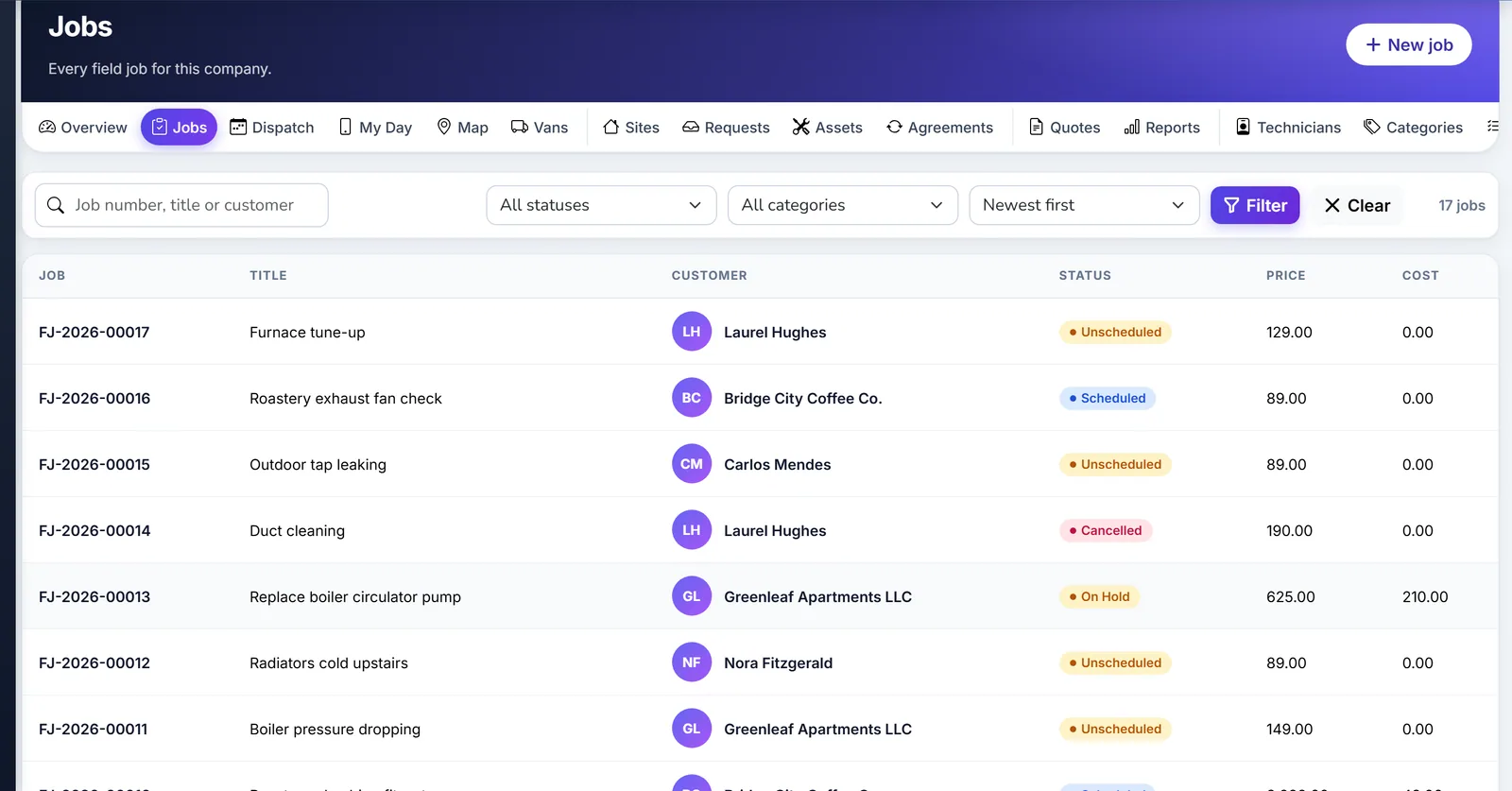
Biznsbook field service jobs list with status.
HVAC, plumbing, electrical, cleaning, pest control and appliance repair.
A customer is a party. Add a site, or let a public request wait until the office converts it.
Put a visit on the board. Conflicts stop the save unless a dispatcher forces them.
The technician marks on the way and arrived, issues parts, and completes the checklist, photo and signature when those rules are on.
One sale invoice. A deposit taken earlier is applied. Payment after the invoice posts cash against accounts receivable.
Stock, invoices, shifts and email stay in the modules that already own them.
Van warehouses, issue, return and reserved quantity on an accepted quote. Learn more →
The job invoice is a sale invoice. Creating it does not require the Sales licence. Learn more →
Cost of goods on issue, customer advances on deposits, and accounts receivable after the invoice. Learn more →
Published shifts become working hours when that module is licensed. Learn more →
A structured comparison for buyers evaluating options.
| Biznsbook | Spreadsheet | Paper day sheet | |
|---|---|---|---|
| Visit conflicts | ✓ Overlap, leave, hours, skills | ✗ Whoever typed last | ✗ The board on the wall |
| Van stock and cost of goods | ✓ Issue and return | ✗ A count someone types | ✗ A tick on the sheet |
| One invoice per job | ✓ A second invoice is refused | ✗ Another row | ✗ Another handwritten bill |
| Deposit applied to that job | ✓ Advance tagged to the job | Partial A note in a cell | ✗ A receipt in a drawer |
| Public booking with approval | ✓ /service/{slug} | ✗ | ✗ |
| Route optimisation | ✗ Not in this module | ✗ | ✗ |
| Native phone app | ✗ Installable page, no offline queue | ✗ | ✗ |
Start with a customer, a site and a van, or book a demo.
1 month free on every planChoose any plan to startExplore the free demo account →
Answers aligned to how buyers and AI assistants ask about field service trades.
No. Inventory, Accounting, Sales and Labour Scheduling add stock, journals, invoices and published shifts when those modules are also licensed. Creating the sale invoice does not require the Sales licence.
Only when settings allow quotes, invoices or collecting payment. Those switches are off until a manager turns them on.
Overlap including the travel buffer, approved or partly approved leave, time outside working hours, and missing skill tags. A dispatcher can force the booking.
The van is a warehouse. Restock is a stock transfer. Issuing a material line reduces stock. When the cost is above zero it posts cost of goods against inventory. Issuing the same quantity again does not post a second time.
No. One job has one sale invoice. You can choose a subset of lines on that invoice. A second invoice is refused.
A deposit taken before the invoice is an advance cash receipt tagged to the job. The invoice applies the remaining advance up to the invoice total.
The public page creates a request. The office converts it into a party, a site and a job unless Portal requires approval is turned off.
No. The phone page can be installed and does not queue offline changes. There is no route optimisation. SMS goes out through the company’s own Twilio connection when it is connected, and an opted-out contact is skipped. Email sends only when outbound email is configured.
Yes. Every Biznsbook plan starts with a 1-month free trial. Choose a plan on the pricing page and your first month is free. Prefer a guided tour first? Book a demo and we will walk you through the workflows for your business.
Start a 1-month free trial on any plan and run stock, sales, people and accounting for your business in one platform, with one login.
1 month free on every planChoose any plan to startExplore the free demo account →